スプリット PDF 使用 n8n アクション
PDF4me スプリット PDF 分ける PDF ドキュメントをより小さなファイルに n8n 自動化ワークフロー。プロセス PDFs 経由 n8n トリガー、バイナリデータ、base64文字列、または公開 URLs ページ分割(特定のページで分割)、繰り返し分割(Nページごと)、シーケンス分割(複数の特定のページ)、範囲分割(特定のページ範囲を抽出)などの方法で分割でき、ファイル命名オプションも柔軟です。このソリューションは、文書アーカイブ、コンテンツ配信、章分け、バッチ処理、文書セグメンテーション、自動化に最適です。 PDF 品質を維持し、シームレスな統合を実現しながら、柔軟な分割方法を必要とするワークフローの分割。
関連ブログ記事
この機能に関するブログ記事はまだありません。近日公開予定です。
その間、PDF4me ブログを閲覧して、あらゆるプラットフォームのチュートリアルやワークフローをご覧ください。
ブログをご覧ください →
設定
追加する PDF4me "スプリット PDF「ノードをあなたの n8n ワークフローを実行し、必要なパラメータを設定します。初期設定手順については、こちらをご覧ください。 n8n 統合ガイド。
前提条件:
- PDF4me API 資格
- n8n ワークフローへのアクセス
構成:
- 追加 PDF4me ノードからワークフローへ
- 「分割」を選択 PDF" アクション
- 入力パラメータを設定します(下記参照)。
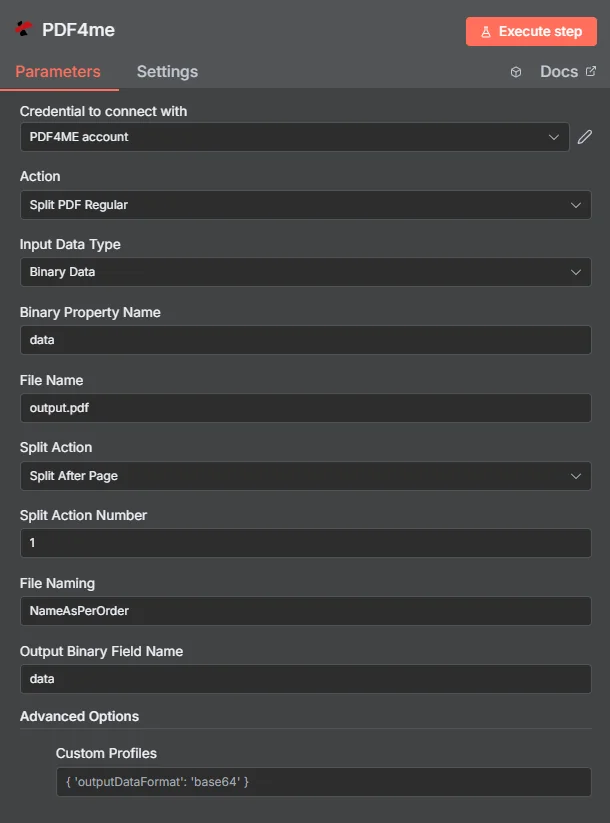
パラメータ
Splitのパラメータ一覧 PDF アクション。これらのパラメーターを設定して制御します。 PDF 分割。
重要: アスタリスク(***)が付いているパラメータは必須であり、アクションが正しく機能するためには必ず指定する必要があります。
| パラメータ | 必須 | その機能 | 例 |
|---|---|---|---|
| Input Data Type | Required | Choose how to provide the PDF data. Options: Base64 String, Binary Data, URL. Default is `Binary Data`. | Binary Data |
| Base64 Content | Conditional | Base64 encoded PDF content. Shown when Input Data Type is Base64 String. | UEsDBBQABgAI... |
| Binary Property Name | Conditional | Name of the binary property containing the PDF file. Shown when Input Data Type is Binary Data. Default is `data`. | data |
| PDF URL | Conditional | URL to the PDF file. Shown when Input Data Type is URL. | |
| File Name | Required | Name of the document sent to PDF4me; also used for sourcePdf and folderName in the output. Default is `output.pdf`. | output.pdf |
| Split Action | Required | Choose how to split the PDF. Options: Split After Page, Recurring Split After Page, Split Sequence, Split Ranges. Default is `Split After Page`. | Split After Page |
| Split Action Number | Conditional | Page number for split action (e.g., split after page 1, or every N pages). Shown when Split Action is Split After Page. Default is `1`. | 1 |
| Split Action Number | Conditional | Page number for split action (e.g., split after page 1, or every N pages). Shown when Split Action is Recurring Split After Page. Default is `1`. | 1 |
| Split Sequence | Conditional | Comma-separated list of page numbers to split at (e.g., 1,3,8). Shown when Split Action is Split Sequence. | |
| Split Ranges | Conditional | Page ranges to extract (e.g., 1-4,10-21). Shown when Split Action is Split Ranges. | |
| File Naming | Required | File naming convention for split files. Default is `NameAsPerOrder`. | NameAsPerOrder |
| Output Binary Field Name | Optional | Name of the binary property to store the output PDF file. Default is `data`. | data |
| Advanced Options | Optional | Optional settings, collapsed behind Add Option. | Add Option |
| Custom Profiles | Optional | Use "JSON" to adjust custom properties. Review Profiles at https://dev.pdf4me.com/apiv2/documentation/ to set extra options for API calls. | { "outputDataFormat": "base64", "preserveMetadata": true, "optimizeForStorage": true } |
出力
出力パラメータ
| 分野 | タイプ | 内容物 |
|---|---|---|
success | Boolean | True when the operation succeeded. |
message | String | Status message, `PDF split into <n> file(s) successfully`. |
folderName | String | Document name without `.pdf`, followed by `_split_outputs`. Informational only. |
outputDirectory | String | `/tmp/` followed by folderName. Informational only: the node does not write any files there. |
totalFiles | Number | Number of split files returned. |
sourcePdf | String | File Name that was sent to PDF4me. |
splitAction | String | Split Action that was used. |
fileNaming | String | File Naming value that was sent. |
responseType | String | Which PDF4me response format the node read, for example `Multiple PDFs (splitedDocuments)`. |
files | String | One entry per split file: fileName, pageIndex (position of the part, from 1), binaryProperty (name of the binary property that holds it), mimeType, fileType (`PDF file`) and fileSize (bytes). |
data | Binary | One PDF per split part, all on the single output item, in binary properties named after Output Binary Field Name with a counter (`data_1`, `data_2`, ...). No ZIP file is returned; if PDF4me answers with a ZIP the node stops with an error. |
N8N 行動対応
の PDF4me スプリット PDF API 複数の形式で表示可能なレスポンスを返します。ニーズに最適な表示形式を選択してください。
- JSON
- Table
- Schema
- Binary
JSON 回答形式
生 JSON からの応答 API:
{
  "fileName": "output_1.pdf",
  "mimeType": "application/pdf",
  "fileSize": 245760,
  "success": true,
  "message": "PDF split successfully into 3 files",
  "splitCount": 3,
  "originalFileName": "document.pdf"
}
テーブルビュー
構造化された表形式の応答データ:
| パラメータ | 価値 |
|---|---|
| fileName | output_1.pdf |
| mimeType | application/pdf |
| fileSize | 245760 |
| success | true |
| message | PDF split successfully into 3 files |
| splitCount | 3 |
| originalFileName | document.pdf |
スキーマビュー
レスポンスのデータ構造と型:
1 item
fileName: AB output_1.pdf
mimeType: AB application/pdf
fileSize: # 245760
success: ☑ true
message: AB PDF split successfully into 3 files
splitCount: # 3
originalFileName: AB document.pdf
タイプ指標:
AB= String#= 番号☑= Boolean
バイナリデータビュー
実際の分割 PDF ファイルデータとメタデータ:
data
─────────────────────────────
File Name: output_1.pdf
File Extension: pdf
Mime Type: application/pdf
File Size: 240.0 KB
ユースケース
文書管理とアーカイブ
- 膨大な歴史文書、研究論文、法律文書などを、整理しやすく、検索が速く、文書アーカイブ内を容易に移動できるように、管理しやすいセクションに分割します。
- 組織構造とユーザーアクセスパターンに合わせて論理的なセクションに分割することで、複数章からなるレポート、トレーニングマニュアル、技術文書を処理する。
- スキャンされた文書コレクションとデジタル化されたアーカイブのセグメンテーションを自動化し、検索可能で分類された文書ライブラリを作成して、情報管理を強化します。
コンテンツの配信と共有
- 包括的なレポートや出版物から特定の章、セクション、またはページを抽出して、さまざまな読者、利害関係者、部門向けに的を絞ったコンテンツを作成します。
- 製品カタログ、サービスガイド、マーケティング資料を、受信者を圧倒することなく、メール、ソーシャルメディア、顧客ポータルなどを通じて簡単に共有できる、焦点を絞った文書に分割する。
- 大規模なプレゼンテーション資料や研修資料を処理するために、モジュール式のコンテンツを作成し、必要に応じて個別に配布したり、さまざまな研修セッションやワークショップに合わせて組み合わせたりできるようにします。
自動化されたワークフロー統合
- マスター文書を個々の顧客固有のファイルに分割することで、複数テナントの請求書、明細書、レポートの処理を自動化し、パーソナライズされた配布と自動請求ワークフローを実現します。
- 統合する PDF ドキュメント処理パイプラインとの分割により、大規模なバッチ処理を処理し、下流システムに最適なファイルサイズ、電子メール配信制限、およびストレージ最適化を確保します。
- 規制文書、コンプライアンス報告書、監査資料を処理するために、特定の報告要件、提出期限、利害関係者のニーズに合わせてセグメント化されたバージョンを作成する。