スプリット PDF テキストを使用して n8n アクション
PDF4me スプリット PDF テキストによる 分ける PDF 検出されたテキストパターンとコンテンツに基づく文書 n8n 自動化ワークフロー。プロセス PDFs 経由 n8n トリガー、バイナリデータ、base64文字列、または公開 URLs 特定のテキスト文字列を自動的に検出し、テキスト位置で文書を分割し、検出されたコンテンツに基づいてファイルを整理して、インテリジェントなファイル名付けを実現します。このソリューションは、請求書の分離、契約書の分割、文書の一括処理、コンテンツベースの整理、自動ファイリング、およびテキストベースの文書分類ワークフローなど、正確なテキスト検出とインテリジェントな文書分割、シームレスな統合が求められる用途に最適です。
設定
追加する PDF4me "スプリット PDF 「テキスト」ノードをあなたの n8n ワークフローを実行し、必要なパラメータを設定します。初期設定手順については、こちらをご覧ください。 n8n 統合ガイド。
前提条件:
- PDF4me API 資格
- n8n ワークフローへのアクセス
構成:
- 追加 PDF4me ノードからワークフローへ
- 「分割」を選択 PDF 「テキストによる」アクション
- 入力パラメータを設定します(下記参照)。
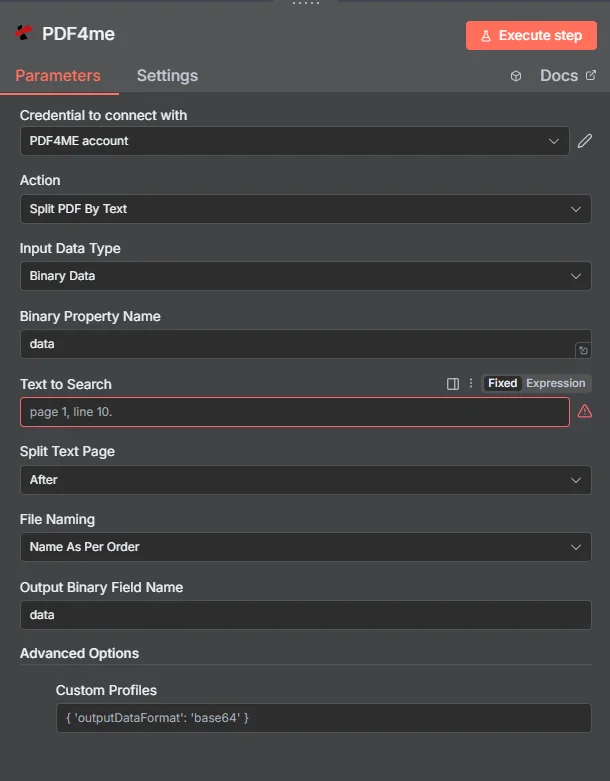
パラメータ
Splitのパラメータ一覧 PDF テキストアクションによる。これらのパラメーターを設定して、テキストベースのアクションを制御します。 PDF 分割。
重要: アスタリスク(***)が付いているパラメータは必須であり、アクションが正しく機能するためには必ず指定する必要があります。
| パラメータ | 必須 | その機能 | 例 |
|---|---|---|---|
| Input Data Type | Required | Choose how to provide the PDF data. Options: Base64 String, Binary Data, URL. Default is `Binary Data`. | Binary Data |
| Base64 Content | Conditional | Base64 encoded PDF content. Shown when Input Data Type is Base64 String. | UEsDBBQABgAI... |
| Binary Property Name | Conditional | Name of the binary property containing the PDF file. Shown when Input Data Type is Binary Data. Default is `data`. | data |
| PDF URL | Conditional | URL to the PDF file. Shown when Input Data Type is URL. | |
| Text to Search | Required | Text to search for splitting. | page 1, line 10. |
| Split Text Page | Required | Where to split relative to the text page. Options: After, Before. Default is `After`. | After |
| File Naming | Required | File naming convention for split files. Options: Name As Per Order, Name As Per Page. Default is `Name As Per Order`. | Name As Per Order |
| Output Binary Field Name | Optional | Name of the binary property to store the output PDF file. Default is `data`. | data |
| Advanced Options | Optional | Optional settings, collapsed behind Add Option. | Add Option |
| Custom Profiles | Optional | Use "JSON" to adjust custom properties. Review Profiles at https://dev.pdf4me.com/apiv2/documentation/ to set extra options for API calls. | { "outputDataFormat": "base64", "preserveMetadata": true, "optimizeForPrinting": false, "compressionLevel": "medium" } |
出力
出力パラメータ
| 分野 | タイプ | 内容物 |
|---|---|---|
success | Boolean | True when the operation succeeded. |
message | String | Status message, `PDF split into <n> file(s) successfully`. |
folderName | String | Always `sample_split_text_outputs`. Informational only. |
outputDirectory | String | `/tmp/` followed by folderName. Informational only: the node does not write any files there. |
totalFiles | Number | Number of split files returned. |
sourcePdf | String | Always `sample.pdf`, whatever the input file is called. |
responseType | String | Which PDF4me response format the node read, for example `Multiple PDFs (splitedDocuments)`. |
files | String | One entry per split file: fileName, pageIndex (position of the part, from 1), binaryProperty (name of the binary property that holds it), mimeType, fileType (`PDF file`) and fileSize (bytes). |
data | Binary | One PDF per split part, all on the single output item, in binary properties named after Output Binary Field Name with a counter (`data_1`, `data_2`, ...). No ZIP file is returned; if PDF4me answers with a ZIP the node stops with an error. |
N8N 行動対応
の PDF4me スプリット PDF テキストによる API 複数の形式で表示可能なレスポンスを返します。ニーズに最適な表示形式を選択してください。
- JSON
- Table
- Schema
- Binary
JSON 回答形式
生 JSON からの応答 API:
[
  {
    "success": true,
    "message": "PDF split by text successfully",
    "fileName": "text_split_output.pdf",
    "mimeType": "application/pdf",
    "fileSize": 125430,
    "docName": "text_split_output.pdf",
    "textSplitCompleted": true,
    "textMatchesFound": 3,
    "filesGenerated": 4
  }
]
テーブルビュー
構造化された表形式の応答データ:
| パラメータ | 価値 |
|---|---|
| success | true |
| message | PDF split by text successfully |
| fileName | text_split_output.pdf |
| mimeType | application/pdf |
| fileSize | 125430 |
| docName | text_split_output.pdf |
| textSplitCompleted | true |
| textMatchesFound | 3 |
| filesGenerated | 4 |
スキーマビュー
レスポンスのデータ構造と型:
1 item
success: ☑ true
message: AB PDF split by text successfully
fileName: AB text_split_output.pdf
mimeType: AB application/pdf
fileSize: # 125430
docName: AB text_split_output.pdf
textSplitCompleted: ☑ true
textMatchesFound: # 3
filesGenerated: # 4
タイプ指標:
AB= String#= 番号☑= Boolean
バイナリデータビュー
実際に分割されたPDFファイルのデータとメタデータ:
data
─────────────────────────────
File Name: text_split_output.pdf
File Extension: pdf
Mime Type: application/pdf
File Size: 122.5 KB
バイナリデータアクセス:
- n8n バイナリオブジェクト:
$binary.data.data - Base64 コンテンツ直接使用可能
- ファイル操作ダウンロード、メール送信、または保存の準備ができました
ユースケース
文書処理とコンテンツ管理
- 大きな文書を特定のテキストマーカーまたはセクションヘッダーで分割し、部門やプロセスごとに整理された管理しやすいファイルを作成します。
- 法的文書を処理する際は、特定の条項マーカーまたはセクション区切り線で分割し、各法的セクションごとに個別のファイルを作成します。
- 章タイトルやセクション見出しに基づいてレポートやマニュアルを自動的に分類し、コンテンツの整理を改善する。
ビジネスプロセス自動化
- 請求書バッチを「請求書番号」や「支払期日」などの特定のテキストパターンで検索して分割し、各取引ごとに個別の請求書ファイルを作成します。
- 契約書や合意書を処理する際は、「セクション」や「条項」などの特定のテキストマーカーで分割し、各セクションごとに個別のファイルを作成します。
- 財務文書の整理を自動化するために、「四半期報告書」や「年次概要」などのテキストパターンで、報告期間ごとに分割します。
コンテンツ配信とワークフロー管理
- 機密文書を特定のテキストマーカーで分割し、アクセス要件に基づいて異なる関係者向けに個別のファイルを作成する。
- トレーニング教材を「モジュール」や「レッスン」などのテキストパターンで分割し、異なる対象者向けに個別の学習モジュールを作成する。
- さまざまなユーザータイプ向けに、「APIリファレンス」や「ユーザーガイド」などのテキストマーカーで分割することで、技術文書の整理を自動化します。