スプリット PDF バーコードを使用して n8n アクション
PDF4me スプリット PDF バーコードによる 分ける PDF 検出されたバーコードの内容に基づく文書 n8n 自動化ワークフロー。プロセス PDFs 経由 n8n トリガー、バイナリデータ、base64文字列、または公開 URLs バーコードを自動的に検出する(QR Code、 Code 128、 Data Matrixこのソリューションは、文書をバーコードの位置で分割し、バーコードの内容に基づいてファイルを整理して、インテリジェントなファイル名付けを実現します。郵便室の自動化、文書の一括処理、請求書の分離、自動ファイリング、文書の仕分け、そして正確なバーコード検出とインテリジェントな文書分割、シームレスな統合が求められるバーコードベースの整理ワークフローに最適です。
設定
追加する PDF4me "スプリット PDF 「バーコード」ノードを n8n ワークフローを実行し、必要なパラメータを設定します。初期設定手順については、こちらをご覧ください。 n8n 統合ガイド。
前提条件:
- PDF4me API 資格
- n8n ワークフローへのアクセス
構成:
- 追加 PDF4me ノードからワークフローへ
- 「分割」を選択 PDF 「バーコードによる」アクション
- 入力パラメータを設定します(下記参照)。
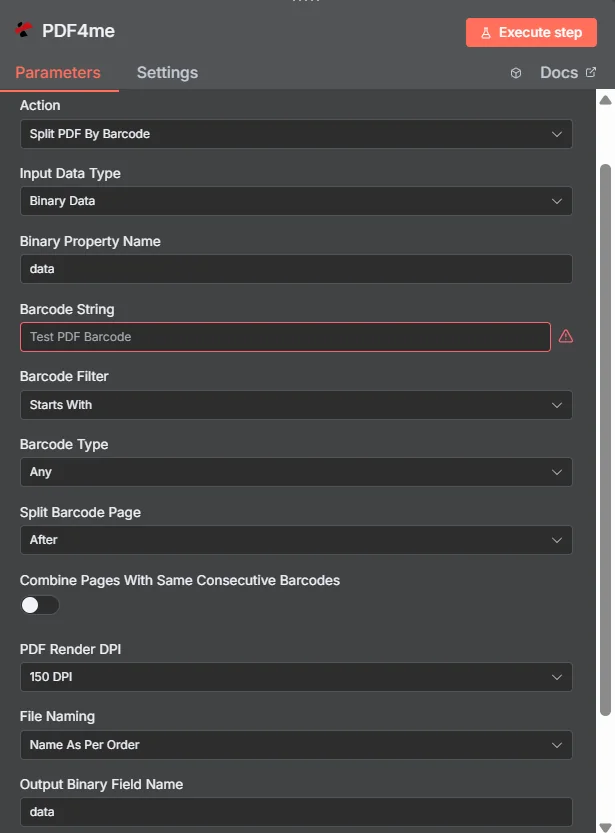
パラメータ
Splitのパラメータ一覧 PDF バーコードアクションによる。これらのパラメータを設定して、バーコードベースの PDF 分割。
重要: アスタリスク(***)が付いているパラメータは必須であり、アクションが正しく機能するためには必ず指定する必要があります。
| パラメータ | 必須 | その機能 | 例 |
|---|---|---|---|
| Input Data Type | Required | Choose how to provide the PDF data. Options: Base64 String, Binary Data, URL. Default is `Binary Data`. | Binary Data |
| Base64 Content | Conditional | Base64 encoded content of the PDF file. Shown when Input Data Type is Base64 String. | UEsDBBQABgAI... |
| Input File Name | Conditional | Name of the input file (including extension). Shown when Input Data Type is Base64 String. | |
| Binary Property | Conditional | Name of the binary property containing the PDF file. Shown when Input Data Type is Binary Data. Default is `data`. | data |
| Input File Name | Conditional | Name of the input file (including extension). If not provided, will use the filename from binary data. Shown when Input Data Type is Binary Data. | |
| File URL | Conditional | URL of the PDF file. Shown when Input Data Type is URL. | https://abc.com/sample.pdf |
| Input File Name | Conditional | Name of the input file (including extension). Shown when Input Data Type is URL. | |
| Barcode String | Required | Barcode string to search for. | Test PDF Barcode |
| Barcode Filter | Required | Filter type for barcode matching. Options: Starts With, Ends With, Contains, Exact Match. Default is `Starts With`. | Starts With |
| Barcode Type | Required | Type of barcode to detect. Options: Any, Data Matrix, QR Code, PDF417. Default is `Any`. | Any |
| Split Barcode Page | Required | Where to split relative to the barcode page. Options: After, Before, Remove. Default is `After`. | After |
| Combine Pages With Same Consecutive Barcodes | Required | Whether to combine consecutive pages with the same barcode. Default is `No`. | No |
| PDF Render DPI | Required | PDF render DPI for processing. Options: 100 DPI, 150 DPI, 200 DPI, 250 DPI. Default is `150 DPI`. | 150 DPI |
| File Naming | Required | File naming convention for split files. Options: Name As Per Order, Name As Per Page. Default is `Name As Per Order`. | Name As Per Order |
| Output Binary Field Name | Optional | Name of the binary property to store the output PDF file. Default is `data`. | data |
| Advanced Options | Optional | Optional settings, collapsed behind Add Option. | Add Option |
| Custom Profiles | Optional | Use "JSON" to adjust custom properties. Review Profiles at https://dev.pdf4me.com/apiv2/documentation/ to set extra options for API calls. | { "outputDataFormat": "base64", "preserveMetadata": true, "optimizeForPrinting": false, "compressionLevel": "medium" } |
出力
出力パラメータ
| 分野 | タイプ | 内容物 |
|---|---|---|
success | Boolean | True when the operation succeeded. |
message | String | Status message, `PDF split into <n> file(s) successfully`. |
folderName | String | Input file name without `.pdf`, followed by `_split_barcode_outputs`. Informational only. |
outputDirectory | String | `/tmp/` followed by folderName. Informational only: the node does not write any files there. |
totalFiles | Number | Number of split files returned. |
sourcePdf | String | Name of the input file as sent to PDF4me. |
responseType | String | Which PDF4me response format the node read, for example `Multiple PDFs (splitedDocuments)`. |
files | String | One entry per split file: fileName, pageIndex (position of the part, from 1), binaryProperty (name of the binary property that holds it), mimeType, fileType (`PDF file`) and fileSize (bytes). |
data | Binary | One PDF per split part, all on the single output item, in binary properties named after Output Binary Field Name with a counter (`data_1`, `data_2`, ...). No ZIP file is returned; if PDF4me answers with a ZIP the node stops with an error. |
N8N 行動対応
の PDF4me スプリット PDF バーコードによる API 複数の形式で表示可能なレスポンスを返します。ニーズに最適な表示形式を選択してください。
- JSON
- Table
- Schema
- Binary
JSON 回答形式
生 JSON からの応答 API:
[
  {
    "success": true,
    "message": "PDF split by barcode successfully",
    "fileName": "split_barcode_output.pdf",
    "mimeType": "application/pdf",
    "fileSize": 125430,
    "docName": "split_barcode_output.pdf",
    "barcodeSplitCompleted": true,
    "barcodesDetected": 3,
    "filesGenerated": 4
  }
]
テーブルビュー
構造化された表形式の応答データ:
| パラメータ | 価値 |
|---|---|
| success | true |
| message | PDF split by barcode successfully |
| fileName | split_barcode_output.pdf |
| mimeType | application/pdf |
| fileSize | 125430 |
| docName | split_barcode_output.pdf |
| barcodeSplitCompleted | true |
| barcodesDetected | 3 |
| filesGenerated | 4 |
スキーマビュー
レスポンスのデータ構造と型:
1 item
success: ☑ true
message: AB PDF split by barcode successfully
fileName: AB split_barcode_output.pdf
mimeType: AB application/pdf
fileSize: # 125430
docName: AB split_barcode_output.pdf
barcodeSplitCompleted: ☑ true
barcodesDetected: # 3
filesGenerated: # 4
タイプ指標:
AB= String#= 番号☑= Boolean
バイナリデータビュー
実際に分割されたPDFファイルのデータとメタデータ:
data
─────────────────────────────
File Name: split_barcode_output.pdf
File Extension: pdf
Mime Type: application/pdf
File Size: 122.5 KB
バイナリデータアクセス:
- n8n バイナリオブジェクト:
$binary.data.data - Base64 コンテンツ直接使用可能
- ファイル操作ダウンロード、メール送信、または保存の準備ができました
ユースケース
文書の自動処理と分類
- 分割受信 PDF バーコード識別子に基づく文書を、異なる部門やプロセスへ自動的にルーティングする。
- スキャンした文書をバーコード区切り記号で処理し、自動的に個別のファイルに整理します。
- 固有のバーコード識別子に基づいて複数文書バッチの分離を自動化し、処理を効率化します。
請求書および領収書の管理
- 分割請求書 PDFs バーコードマーカーを使用して、各取引ごとに個別の請求書ファイルを作成します。
- レシートのバッチ処理では、バーコード区切りで分割して、日付、店舗、または取引タイプ別にレシートを整理します。
- 会計および記録管理のために、バーコード識別子に基づいて財務書類の分類を自動化する。
製造および品質管理
- 異なる製品ラインまたはバッチごとに、バーコード識別子に基づいて生産レポートと品質管理文書を分割する。
- 検査レポートをバーコードマーカーで分割し、検査ごとに個別のファイルを作成することで処理します。
- さまざまなコンポーネントやプロセスのバーコード識別子に基づいて、技術文書の整理を自動化する