かぶせる PDFs で n8n
かぶせる PDFs は PDF4me ノードアクション n8n 1つを配置する PDF 別のものの上に重ねて、両方を同じものの上に組み合わせる pages それらを後から追加するのではなく、この機能を使って、デザイン済みのレターヘッドを生成済みのコンテンツにスタンプしたり、証明書のフレームを適用したり、承認済みのテンプレートを受信文書の上に重ねたりすることができます。しかも、ページを1枚も追加する必要はありません。
このノードの機能
PDF4me: かぶせる PDFs 2つ必要 PDFs、 ベース 背景として機能し、 レイヤー 上に位置するもので、両方が同じ場所に表示される単一のドキュメントを返します。 pages各ファイルには独自の入力タイプがあり、ベースはバイナリデータとして前のノードから取得され、レイヤーは URLマージとは異なり、ページ数が増えないため、レターヘッド、フレーム、テンプレートスタンプなどに最適なツールです。
関連ブログ記事(1)
認証 API リクエスト
毎 PDF4me ノード n8n 有効な 接続するための認証情報. 作成または選択して、 PDF4me API ワークフローがオーバーレイ要求を安全に認証できるようにするためのキー。
見逃してはならない重要な事実
オーバーレイはマージされません
追加項目のマージ pages つまり、カウントが加算されるということです。重ね合わせると、両方のドキュメントが同じ上に積み重なります。 pagesページ数は変更されない。
2つのファイル、2つの独立した入力タイプ
ベース PDF 入力タイプとレイヤー PDF 入力タイプは個別に設定されるため、一方のファイルはバイナリデータ、もう一方のファイルは URL。
表示順序が変わると、何が引き続き表示されるかが変わる
このレイヤーはベースレイヤーの上に配置されます。単色の背景を持つレイヤーは、下のコンテンツを隠してしまう可能性があるため、まずはサンプルペアで両方の配置をテストしてください。
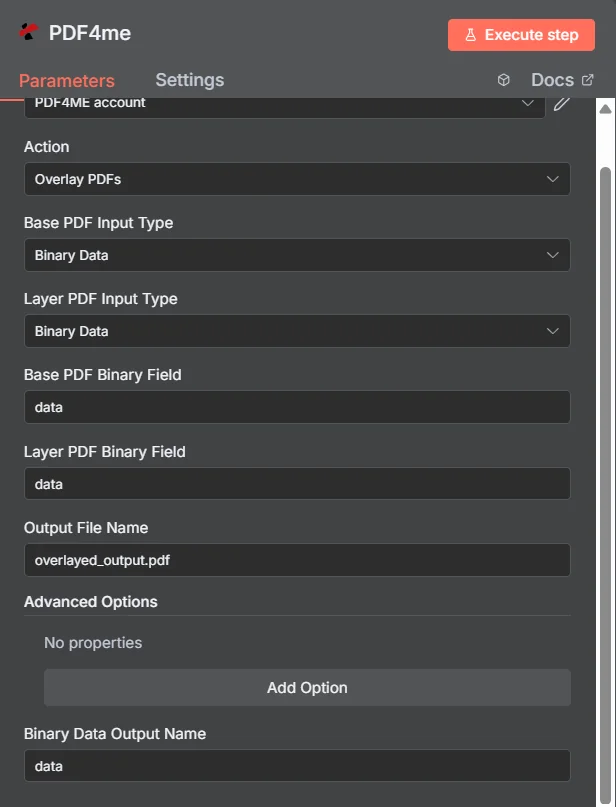
PDF4me かぶせる PDFs パラメーターパネル n8n両方の入力タイプがバイナリデータに設定されている場合
オーバーレイ vs マージ vs ウォーターマーク
追加コンテンツを PDFそれぞれが異なる文書を生成する。
| アプローチ | 影響 pages | 最適なフィット感 |
|---|---|---|
| Overlay PDFs | Both documents appear on the same pages, page count unchanged | Branding that already exists as a designed PDF, such as a letterhead or certificate frame |
| Merge PDFs | Documents follow one another, page counts add up | Content that genuinely belongs in sequence as one longer document |
| Add watermark | Simple text or a single image drawn onto the existing pages | A short notice such as DRAFT or CONFIDENTIAL, where no designed PDF layer exists |
Overlay のパラメータは何ですか? PDFs 必要?
必須: アクション、両方の入力タイプ、各入力タイプに対応するソースフィールド、および出力ファイル名。バイナリデータ出力名と詳細オプションの項目には、動作するデフォルト値が適用されます。
| パラメータ | 必須 | その機能 | 例 |
|---|---|---|---|
| Base PDF Input Type | Required | Choose how to provide the base PDF file. Options: Binary Data, Base64 String, URL. Default is `Binary Data`. | Binary Data |
| Base PDF Binary Field | Conditional | Name of the binary property containing the base PDF file. Shown when Base PDF Input Type is Binary Data. Default is `data`. | data |
| Base PDF Base64 Content | Conditional | Base64 encoded base PDF content. Shown when Base PDF Input Type is Base64 String. | JVBERi0xLjQK... |
| Base PDF URL | Conditional | URL to the base PDF file. Shown when Base PDF Input Type is URL. | https://example.com/base.pdf |
| Layer PDF Input Type | Required | Choose how to provide the layer PDF file. Options: Binary Data, Base64 String, URL. Default is `Binary Data`. | Binary Data |
| Layer PDF Binary Field | Conditional | Name of the binary property containing the layer PDF file. Shown when Layer PDF Input Type is Binary Data. Default is `data`. | data |
| Layer PDF Base64 Content | Conditional | Base64 encoded layer PDF content. Shown when Layer PDF Input Type is Base64 String. | JVBERi0xLjQK... |
| Layer PDF URL | Conditional | URL to the layer PDF file. Shown when Layer PDF Input Type is URL. | https://example.com/letterhead.pdf |
| Output File Name | Optional | Name for the output overlayed PDF file. Default is `overlayed_output.pdf`. | overlayed_output.pdf |
| Advanced Options | Optional | Optional settings, collapsed behind Add Option. | Add Option |
| Custom Profiles | Optional | Use "JSON" to adjust custom properties. Review Profiles at https://dev.pdf4me.com/apiv2/documentation/ to set extra options for API calls. | |
| Binary Data Output Name | Optional | Custom name for the binary data in n8n output. Default is `data`. | data |
出力フィールド
成功したランは1 n8n 複合品を運ぶアイテム PDF。
出力
ノードが返すフィールド。
| 分野 | タイプ | 内容物 |
|---|---|---|
fileName | String | File name of the resulting file. |
mimeType | String | MIME type of the resulting file, for example `application/pdf`. |
fileSize | Number | Size of the resulting file in bytes. |
success | Boolean | True when the operation succeeded. |
inputFileCount | String | Always 2 (base and layer PDF). |
data | Binary | The overlaid PDF. |
オーバーレイの設定方法を教えてください PDFs で n8n?
- 追加 PDF4me あなたの n8n ワークフローを選択し、 かぶせる PDFs アクション。
- で 接続するための認証情報選択してください PDF4me 認証情報またはクリック 新しい認証情報を作成する そしてあなたの API 鍵。
- セット ベース PDF 入力タイプ そして レイヤー PDF 入力タイプこれらは独立しているため、各ファイルは異なる方法で到着する可能性があります。
- 対応するソースフィールドに入力してください。例: ベース PDF バイナリフィールド そして レイヤー PDF バイナリフィールド両方ともデフォルトは
data。 - セット 出力ファイル名 (必ず
.pdf) - ノードを実行し、結合されたデータをルーティングします。 PDF露出した バイナリデータ出力名次のステップへ。
典型的な構成
ワークフローの例Common n8n workflow patterns using Overlay PDFs.
作成された文書のレターヘッド
- ブランド要素のないテンプレートから文書が生成されます。
- かぶせる PDFs 承認されたレターヘッドを適用します PDF から取得 URL レイヤーとして。
- ブランド化された製品は、デザイナーの手が一切入っていない状態で出荷される。
動的コンテンツ上の証明書フレーム
- コース完了データは平易な PDF 受取人名とともに。
- かぶせる PDFs デザインされた証明書の枠線をその上に重ねる。
- 完成した証明書はそれぞれ受取人にメールで送信されます。
審査書類への承認印
- 文書が提出されると、ワークフローにおける承認ステップが完了します。
- かぶせる PDFs 事前にデザインされ承認されたスタンプ層を適用します。
- 押印済みの控えは記録システムに登録されます。
バッチテンプレートアプリケーション
- 「アイテムのループ」ノードは、受信した仕入先文書のフォルダを反復処理します。
- かぶせる PDFs 同じレイヤーを適用する PDF から URL それぞれに。
- すべての文書は、一貫した枠組みの中でアーカイブに保存される。
実践的なヒント
Test both orderings before a batch run
Swapping which file is base and which is layer changes what stays visible. Prove it on one sample pair rather than discovering it across a hundred documents.
Design the layer with transparency in mind
A layer PDF with a solid white background will hide the base underneath. Frames, borders, and letterheads work best when the middle is genuinely empty.
Match page sizes where you can
A layer built at the same page size as the base lines up predictably. Mismatched geometry is the usual reason a stamp lands in the wrong place.
Mix input types to avoid extra nodes
Keeping a static letterhead at a URL while the base arrives as binary from the previous node saves fetching the template into the workflow separately.
Reach for merge when page count should grow
If the second document is meant to be read after the first rather than on top of it, Merge Multiple PDFs is the correct action.
Check overlayCompleted alongside success
The output carries an explicit overlay confirmation flag, which is a more specific signal than the generic success boolean alone.
チートシート
| 分野 | 価値 |
|---|---|
| Action | Overlay PDFs |
| Base PDF Input Type | Binary Data |
| Layer PDF Input Type | Binary Data |
| Base PDF Binary Field | data |
| Layer PDF Binary Field | data |
| Output File Name | overlayed_output.pdf |
| Binary Data Output Name | data |
| Advanced Options | No properties |
| Credentials | PDF4me API credential |
よくある質問
関連アクション
複数のものを結合する PDFs
文書が連続して表示され、ページ数が増える場合は、代わりにこちらを使用してください。
画像スタンプを追加する PDF
レイヤーがデザインされたものではなく単一の画像である場合の軽量オプション PDF。
テキストスタンプを追加する PDF
ドラフトや機密などの短い通知には、レイヤーはありません。 PDF 必要だ。
スプリット PDF
オーバーレイが必要な部分だけがある場合は、まず文書を分割してください。
他のプラットフォームでの同じタスク
マージオーバーレイ Make
同じオーバーレイエンジンは Make モジュールに配線され、 Make シナリオ。
マージ PDF オーバーレイ Zapier
トリガー PDF 数千ものSaaSアプリやWebhookからレイヤー化できます。
マージオーバーレイ Power Automate
Microsoft 365 流れ SharePoint、 OutlookTeams、およびDataverseとの連携。
マージオーバーレイ REST API
生 PDF4me エンドポイント。カスタムバックエンドコードやPostmanテスト用。