画像のサイズを変更する n8n
画像のサイズを変更する は PDF4me ノードアクション n8n 画像を元のサイズの割合で拡大縮小するか、ピクセル単位で正確な幅と高さに拡大縮小するかを選択でき、アスペクト比の維持は切り替え可能です。サムネイルの生成、ユーザーアップロード画像のハウスサイズへの正規化、ストレージに保存される前の大きすぎる写真の縮小などに使用できます。
このノードの機能
PDF4me画像サイズ変更 バイナリデータから画像を取得します。 Base64 Stringまたは URL そして、スケーリングされたコピーを返します。 サイズ変更タイプ フィールドによって方法が決まります。 パーセンテージ 元のサイズに比例して拡大縮小するため、様々なサイズの入力に適しています。 特定の 固定レイアウトスロットに対して、ピクセル単位で正確な幅と高さを指定します。このノードは入力アイテムごとに1回実行されるため、1つの設定済みノードでバッチ全体を同じ設定でリサイズできます。
認証 API リクエスト
毎 PDF4me ノード n8n 有効な 接続するための認証情報. 作成または選択して、 PDF4me API ワークフローがサイズ変更リクエストを安全に認証できるようにするためのキー。
見逃してはならない重要な事実
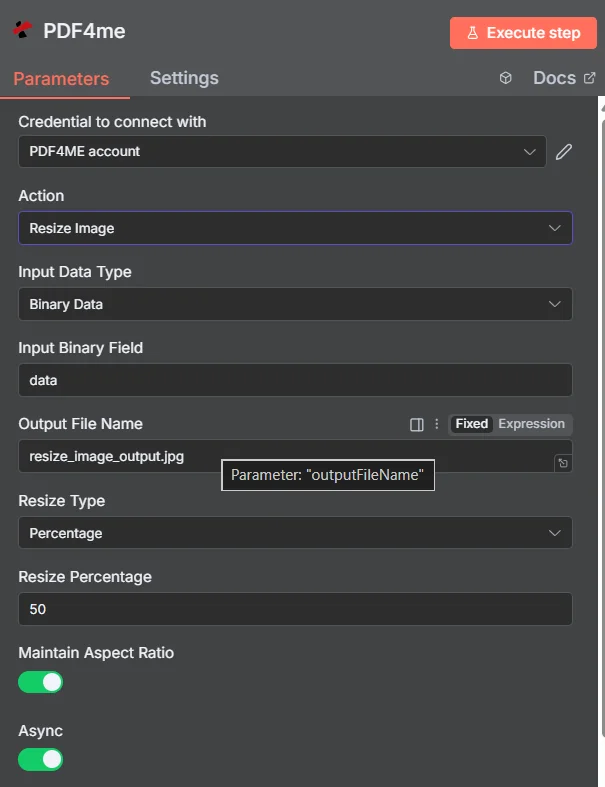
PDF4me 画像パラメータパネルのサイズ変更 n8nパーセンテージモードで表示
パーセンテージ指定と数値指定:どちらのサイズ変更方法を使うべきか?
これら2つのモードはそれぞれ異なる問題を解決するものであり、誤ったモードを選択することが、予期しない出力サイズが発生する最も一般的な原因です。
| サイズ変更タイプ | 入力するフィールド | 最適なフィット感 |
|---|---|---|
| Percentage | Resize Percentage, for example 50 to halve or 200 to double | Mixed-size inputs that should all shrink or grow by the same proportion, keeping their relative differences |
| Specific | Width and Height in pixels | A fixed layout slot, thumbnail grid, or platform that demands exact dimensions regardless of the source size |
画像サイズ変更に必要なパラメータは何ですか?
必須: アクション、入力データタイプ、その入力タイプに一致するフィールド、出力ファイル名、リサイズタイプ、およびリサイズタイプによって明らかになるディメンションフィールド。 Async バイナリデータ出力名には、動作中のデフォルト値が設定されています。
| パラメータ | 必須 | その機能 | 例 |
|---|---|---|---|
| Input Data Type | Required | Choose how to provide the image file to resize. Options: Binary Data, Base64 String, URL. Default is `Binary Data`. | Binary Data |
| Input Binary Field | Conditional | Name of the binary property that contains the image file. Shown when Input Data Type is Binary Data. Default is `data`. | data |
| Base64 Image Content | Conditional | Base64 encoded image content. Shown when Input Data Type is Base64 String. | /9j/4AAQSkZJRgAB... |
| Image URL | Conditional | URL to the image file to resize. Shown when Input Data Type is URL. | https://example.com/photo.jpg |
| Output File Name | Optional | Name for the output resized image file. Default is `resize_image_output.jpg`. | resize_image_output.jpg |
| Resize Type | Required | Resize type: by percentage or specific dimensions. Options: Percentage, Specific. Default is `Percentage`. | Percentage |
| Resize Percentage | Conditional | Resize percentage (used if Resize Type is Percentage). Shown when Resize Type is Percentage. Default is `50`. | 50 |
| Width | Conditional | Width in pixels (used if Resize Type is Specific). Shown when Resize Type is Specific. Default is `800`. | 800 |
| Height | Conditional | Height in pixels (used if Resize Type is Specific). Shown when Resize Type is Specific. Default is `600`. | 600 |
| Maintain Aspect Ratio | Optional | Whether to maintain aspect ratio when resizing. Default is `Yes`. | Yes |
| Async | Optional | Not used: the node always sends the request to PDF4me as asynchronous (IsAsync true), whatever this is set to. Default is `Yes`. | Yes |
| Binary Data Output Name | Optional | Custom name for the binary data in n8n output. Default is `data`. | data |
出力フィールド
成功したランは1 n8n サイズ変更された画像とその寸法レポートを含むアイテム。
出力
ノードが返すフィールド。
| 分野 | タイプ | 内容物 |
|---|---|---|
success | Boolean | True when the operation succeeded. |
message | String | Status message, `Image resized successfully`. |
fileName | String | File name of the resulting file. |
mimeType | String | Always `image/jpeg`, whatever the format of the input image. |
fileSize | Number | Size of the resulting file in bytes. |
resizeType | String | Resize Type that was used (Percentage or Specific). |
data | Binary | The resized image. |
画像サイズ変更の設定方法 n8n?
- 追加 PDF4me あなたの n8n ワークフローを選択し、 画像のサイズを変更する アクション。
- で 接続するための認証情報選択してください PDF4me 認証情報またはクリック 新しい認証情報を作成する そしてあなたの API 鍵。
- セット 入力データタイプ に バイナリデータ (デフォルト)、 Base64 String、 または URL そして、対応するソース画像フィールドを指定します。
- セット サイズ変更タイプ に パーセンテージ 記入する サイズ変更率または 特定の 記入する 幅 そして 身長。
- 離れる アスペクト比を維持する ストレッチを回避し、 Async 大きな画像や大量のデータを処理する場合に便利です。
- セット 出力ファイル名ノードを実行し、確認します。
newDimensions出力結果を確認する。
典型的な構成
ワークフローの例Common n8n workflow patterns using Resize Image.
- 新製品の画像がクラウドストレージに保存される。
- 画像サイズ変更は、サムネイルグリッドの寸法に合わせて特定モードで実行されます。
- サムネイル画像は、フルサイズのオリジナル画像の横に書き込まれています。
- ウェブフックは、フォームを通じて送信された写真を受け取ります。
- 画像サイズ変更はパーセンテージモードで実行され、比例的に縮小されます。
- より小さなファイルが保存されるため、ストレージ容量と帯域幅の使用量を抑えることができます。
- 「アイテムのループ」ノードは、様々なサイズの画像を含む既存のフォルダを反復処理します。
- 画像サイズ変更は、すべてのアイテムに一貫した設定を適用します。 Async 有効になっています。
- 誰もエディターを開かなくても、図書館は均一化してしまう。
- 編集用画像はCMSから取得されます。
- 画像サイズ変更機能は、まず表示幅に合わせて画像を縮小します。
- 画像を圧縮すると、公開前にファイルサイズがさらに縮小されます。
実践的なヒント
チートシート
| 分野 | 価値 |
|---|---|
| Action | Resize Image |
| Input Data Type | Binary Data |
| Input Binary Field | data |
| Output File Name | resize_image_output.jpg |
| Resize Type | Percentage |
| Resize Percentage | 50 |
| Width / Height (Specific mode) | 800 / 600 |
| Maintain Aspect Ratio | true |
| Async | true |
| Binary Data Output Name | data |