テキストを画像に置き換える n8n
テキストを画像に置き換える は n8n ノードによる PDF4me テキストプレースホルダーを正確な位置で見つける PDF そして、それを同じ寸法のロゴ、署名、または製品画像と置き換えます。テンプレートのブランディング、署名の挿入、または手動で編集することなく自動的なビジュアルのパーソナライズに使用します。 PDF。
このノードの機能
PDF4me: テキストを画像に置き換える スキャン PDF 正確なテキスト文字列に対して、対象ページ上の一致する箇所すべてを、指定した高さと幅に拡大縮小した画像に置き換えます。ソースコードとテキスト文字列の両方を受け入れます。 PDF バイナリデータによる置換イメージ、 Base64 文字列、または URL独立して。テンプレートにロゴ、署名、スタンプ、または製品写真を挿入するのに最適です。 PDFs。
関連ブログ記事
この機能に関するブログ記事はまだありません。近日公開予定です。
その間、PDF4me ブログを閲覧して、あらゆるプラットフォームのチュートリアルやワークフローをご覧ください。
ブログをご覧ください →
認証 API リクエスト
毎 PDF4me ノード n8n 有効な 接続するための認証情報. 作成または選択して、 PDF4me API ワークフローが交換リクエストを安全に認証できるようにするためのキー。
見逃してはならない重要な事実
置換するテキストは完全に一致する必要があります
PDF4me スペース、句読点、大文字小文字を含む正確なテキストマッチングを実行します。
[ここにロゴを挿入] 完全に一致する文字列のみに一致し、部分一致や大文字小文字の違いのあるバージョンには一致しません。PDF 画像入力は独立している
PDF 入力データタイプと画像入力データタイプは別々に設定され、一方はバイナリデータから、もう一方は URLテンプレートが PDF そして、ロゴは異なるシステムで存在している。
これは PDF アクション、Word バリアントではない
Word 文書内のテキストを画像に置き換える別のノードは、Word 固有のプレースホルダーを含む .docx ファイルを処理します。このノードは、ソース ドキュメントが既に PDF。
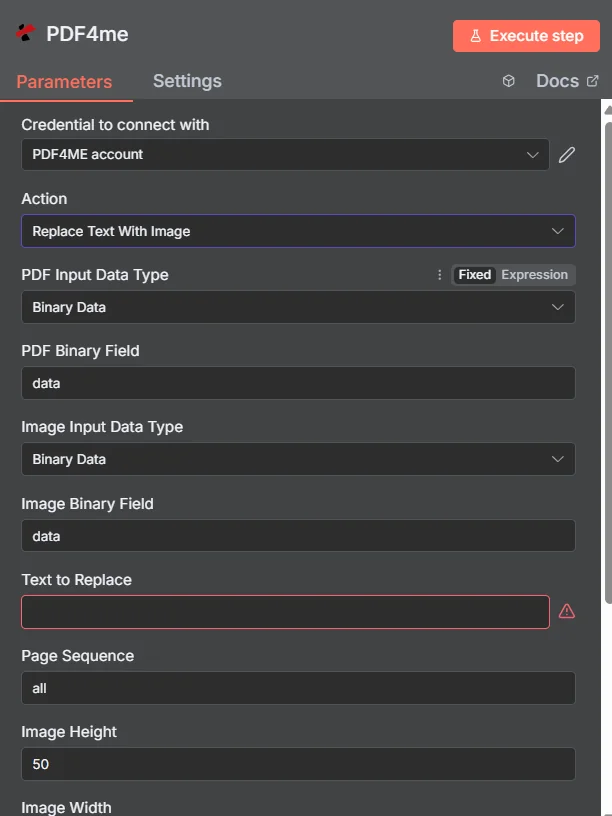
PDF4me 「テキストを画像に置き換える」ノードパラメータパネルで n8n
テキストを画像に置き換えるには、どのようなパラメータが必要ですか?
必須: PDF 入力データタイプ、画像入力データタイプ、置換するテキスト、画像の高さ、画像の幅、および出力ファイル名。条件付きフィールドは、親の入力データタイプが選択されている場合にのみ表示されます。ページシーケンス、 Async、およびバイナリデータ出力名はオプションであり、デフォルト値が使用されています。
| パラメータ | 必須 | その機能 | 例 |
|---|---|---|---|
| PDF Input Data Type | Required | Choose how to provide the PDF file. Options: Binary Data, Base64 String, URL. Default is `Binary Data`. | Binary Data |
| PDF Binary Field | Conditional | Name of the binary property that contains the PDF file. Shown when PDF Input Data Type is Binary Data. Default is `data`. | data |
| PDF Base64 Content | Conditional | Base64 encoded PDF content. Shown when PDF Input Data Type is Base64 String. | JVBERi0xLjQK... |
| PDF URL | Conditional | URL to the PDF file. Shown when PDF Input Data Type is URL. | https://example.com/sample.pdf |
| Image Input Data Type | Required | Choose how to provide the replacement image. Options: Binary Data, Base64 String, URL. Default is `Binary Data`. | Binary Data |
| Image Binary Field | Conditional | Name of the binary property that contains the image file. Shown when Image Input Data Type is Binary Data. Default is `data`. | data |
| Image Base64 Content | Conditional | Base64 encoded image content. Shown when Image Input Data Type is Base64 String. | /9j/4AAQSkZJRgAB... |
| Image URL | Conditional | URL to the image file. Shown when Image Input Data Type is URL. | https://example.com/logo.png |
| Text to Replace | Required | Text in the PDF to be replaced with the image. | [LOGO_HERE] |
| Page Sequence | Optional | Pages to apply the replacement (e.g., "all", "1", "1,3,5", "2-5"). Default is `all`. | all |
| Image Height | Optional | Height of the replacement image (integer). Default is `50`. | 50 |
| Image Width | Optional | Width of the replacement image (integer). Default is `100`. | 100 |
| Output File Name | Optional | Name for the output PDF file. Default is `replace_text_with_image.pdf`. | replace_text_with_image.pdf |
| Async | Optional | Not used: the node always sends the request to PDF4me as asynchronous (IsAsync true), whatever this is set to. Default is `Yes`. | Yes |
| Binary Data Output Name | Optional | Custom name for the binary data in n8n output. Default is `data`. | data |
出力フィールド
成功したランは1 n8n 持ち運んでいるアイテム JSON メタデータと更新されたバイナリ PDF。
出力
ノードが返すフィールド。
| 分野 | タイプ | 内容物 |
|---|---|---|
success | Boolean | True when the operation succeeded. |
message | String | Status message, `Text replaced with image successfully`. |
fileName | String | File name of the resulting file. |
mimeType | String | Always `application/pdf`. |
fileSize | Number | Size of the resulting file in bytes. |
data | Binary | The PDF with the text replaced by the image. |
テキストを画像に置き換える設定方法 n8n?
- 追加 PDF4me あなたの n8n ワークフローを選択し、 テキストを画像に置き換える アクション。
- で 接続するための認証情報選択してください PDF4me 認証情報またはクリック 新しい認証情報を作成する そしてあなたの API 鍵。
- セット PDF 入力データタイプ そして供給源を提供する PDF 経由 PDF バイナリフィールド、 Base64 PDF コンテンツ、 または PDF URL。
- セット 画像入力データタイプ そして、以下の方法で代替イメージを提供します。 画像バイナリフィールド、 Base64 画像コンテンツ、 または 画像 URL。
- 入力 置き換えるテキスト まさに表示されているとおりに PDF、そして設定する ページシーケンス 特定のページを対象とする必要がある場合。
- セット 画像の高さ そして 画像の幅 置換画像のサイズを変更し、 出力ファイル名。
- 有効にする Async 大型 PDFs 必要に応じて、ノードを実行し、更新されたデータをルーティングします。 PDF 次のステップへ。
典型的な構成
ワークフローの例Common n8n workflow patterns using Replace Text With Image.
提案書テンプレートへのクライアントロゴの挿入
- CRMのWebhookは、顧客向けに新しい提案書が作成された際に起動します。
- PDF4me 「テキストを画像に置き換える」は、「置き換えるテキスト」を「
[クライアントロゴ]画像入力データ型 URL クライアントのロゴを指差しながら。 - ブランドロゴ入りの提案書は、最終確認のため営業担当者にメールで送信されます。
作成された契約書への署名スタンプ
- 契約は以下によって生成されます PDF4me ドキュメントを生成する
[サイン]プレースホルダー。 - PDF4me 「テキストを画像に置き換える」機能は、署名者の署名画像と、最終ページのみを対象としたページシーケンスを使用して実行されます。
- 署名済みの契約書はアーカイブされています SharePoint。
カタログ内の商品画像の差し替え PDF
- 「アイテムのループ」ノードは、在庫データベースから製品レコードを反復処理します。
- PDF4me テキストを画像に置き換える処理はアイテムごとに実行され、
[商品画像]クラウドストレージから取得した各製品の写真を含むプレースホルダー。 - 各パーソナライズされたカタログページは、下流で単一の配布可能なデータに結合されます。 PDF。
承認印のグラフィック(署名後)
- 承認ウェブフックは、管理者が社内ツールで文書を承認済みとしてマークした時点で起動します。
- PDF4me テキストを画像に置き換える
[承認印]プレースホルダーが承認グラフィックに置き換えられました。 - 最終決定 PDF ファイル名に承認日を含めてアーカイブされます。
実践的なヒント
Use a distinctive placeholder string
A unique token like [CLIENT_LOGO] avoids accidentally matching unrelated text elsewhere in the document.
Match Image Height/Width to the source aspect ratio
Mismatched dimensions can stretch or squash the inserted image; check the source image proportions first.
Narrow Page Sequence when possible
Targeting only the pages that contain the placeholder is faster and avoids unintended matches on other pages.
PDF and image sources can differ
Pull the template PDF from Binary Data while sourcing the logo from a URL, or any other combination that fits your workflow.
Enable Async for large PDFs
Large documents benefit from asynchronous processing so the workflow execution does not time out.
Use the Word variant for .docx files
This node processes PDFs; for Word documents use the separate Replace Text With Image in Word Document node.
チートシート
| 分野 | 価値 |
|---|---|
| Action | Replace Text With Image |
| PDF Input Data Type | Binary Data |
| PDF Binary Field | data |
| Image Input Data Type | Binary Data |
| Image Binary Field | data |
| Text to Replace | [LOGO_HERE] |
| Page Sequence | all |
| Image Height | 50 |
| Image Width | 100 |
| Output File Name | replace_text_with_image.pdf |
| Credentials | PDF4me API credential |
よくある質問
関連アクション
Word文書内のテキストを画像に置き換える
テキストを画像に置き換える同じコンセプトを、Word固有のプレースホルダーの代わりに.docxファイルに適用します。 PDFs。
画像に透かしを入れる
特定のテキストプレースホルダーを置き換えるのではなく、画像全体にロゴや透かしを重ねて表示します。
画像を作成する PDF
変換する PDF ページを画像ファイルに変換する機能。テキストを画像に置き換えた結果をプレビューするのに便利です。
他のプラットフォームでの同じタスク
Makeでテキストを画像に置き換える
同じ PDF Makeモジュールとしてのテキスト画像変換エンジン、同じフィールドセットを使用したビジュアルシナリオ。
Zapierでテキストを画像に置き換える
6,000以上のプレースホルダー置換をトリガーします SaaS アプリとウェブフック。
テキストを画像に置き換える Power Automate
Microsoft 365 流れ SharePoint、 OutlookTeams、およびDataverseとの連携。