画像を反転 n8n
このノードの機能
PDF4me - 画像を反転 画像を水平方向、垂直方向、または両方向にミラーリングし、結果をバイナリデータとして返します。 n8n ワークフロー。前のノードからバイナリデータとしてソース画像を提供し、 Base64エンコードされた文字列、または公開 URL反転された出力は、クラウドストレージ、メール、データベース、またはさらなる画像処理ステップにすぐに転送できます。手動編集や外部ツールは不要です。
関連ブログ記事
この機能に関するブログ記事はまだありません。近日公開予定です。
その間、PDF4me ブログを閲覧して、あらゆるプラットフォームのチュートリアルやワークフローをご覧ください。
ブログをご覧ください →
認証 API リクエスト
毎 PDF4me ノード n8n 有効な 資格. お客様の情報を保持する資格情報を作成または選択します PDF4me API ノードが画像処理要求を安全に認証できるようにするためのキー。
見逃してはならない重要な事実
入力タイプは3種類あり、一度に1種類のみ必要です。
入力データタイプをバイナリデータに設定し、入力バイナリフィールドに入力するか、 Base64 ストリングとフィル Base64 画像コンテンツ、または URL そして画像を埋める URL選択した型に一致するフィールドのみに値を入力してください。エラーを避けるため、他の2つのグループは空欄のままにしてください。
水平方向と垂直方向の両方の反転を1つのコールに組み合わせます
方向タイプとして「水平」と「垂直」を選択すると、画像が両方向に同時に反転されます。これは180度回転と同じ結果になります。反転処理を2回連続して行うのではなく、左右反転と上下反転の両方が起こっている画像を修正する必要がある場合に、この方法を使用してください。
出力ファイル名はバイナリファイル名を設定します。適切な拡張子を使用してください。
指定した出力ファイル名は、返されるバイナリファイルの名前になります(拡張子を含む)。 JPEG 出力に名前を付ける
結果.png下流ノードでは、 MIME 型の不一致です。ストレージまたはメールノードへのスムーズな引き渡しのため、拡張子を実際の画像フォーマットに一致させてください。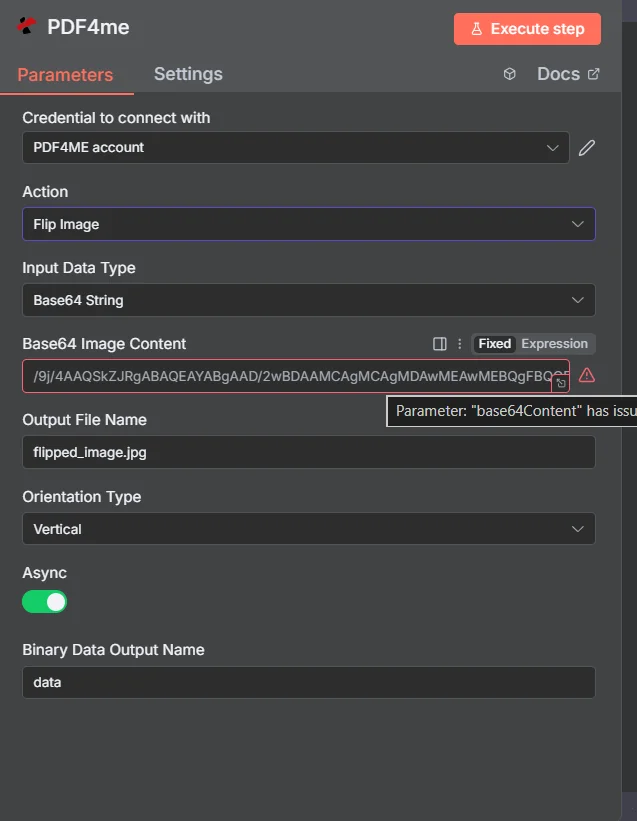
ワークフローを実行する前に、入力データタイプを設定し、画像ソースをマッピングし、正しい拡張子で出力ファイル名を設定し、方向タイプを選択してください。
パラメータ
必須: 入力データタイプ、そのタイプに一致する画像フィールド(入力バイナリフィールド、 Base64 画像コンテンツ、または画像 URL出力ファイル名、方向タイプ、バイナリデータ出力名。 Async 任意です。
| パラメータ | 必須 | その機能 | 例 |
|---|---|---|---|
| Input Data Type | Required | Choose how to provide the image file to flip. Options: Binary Data, Base64 String, URL. Default is `Binary Data`. | Binary Data |
| Input Binary Field | Conditional | Name of the binary property that contains the image file. Shown when Input Data Type is Binary Data. Default is `data`. | data |
| Base64 Image Content | Conditional | Base64 encoded image content. Shown when Input Data Type is Base64 String. | /9j/4AAQSkZJRgA... |
| Image URL | Conditional | URL to the image file to flip. Shown when Input Data Type is URL. | https://example.com/photo.jpg |
| Output File Name | Optional | Name for the output flipped image file. Default is `flipped_image.jpg`. | flipped_image.jpg |
| Orientation Type | Required | Orientation to flip the image. Options: Horizontal, Vertical, Horizontal and Vertical. Default is `Vertical`. | Vertical |
| Async | Optional | Not used: the node always sends the request to PDF4me as asynchronous (IsAsync true), whatever this is set to. Default is `Yes`. | Yes |
| Binary Data Output Name | Optional | Custom name for the binary data in n8n output. Default is `data`. | data |
出力
ノードが返すフィールド。
| 分野 | タイプ | 内容物 |
|---|---|---|
success | Boolean | True when the operation succeeded. |
message | String | Status message, `Image flipped successfully`. |
fileName | String | File name of the resulting file. |
mimeType | String | Always `image/jpeg`, whatever the format of the input image. |
fileSize | Number | Size of the resulting file in bytes. |
orientationType | String | Orientation Type that was used. |
data | Binary | The flipped image. |
クイックセットアップ
- 追加する PDF4me あなたのノードへ n8n ワークフローを選択して選択する 画像を反転 行動として。
- 選択または作成する 資格 あなたの PDF4me API 鍵。
- セット 入力データタイプ 一致するフィールド - バイナリデータを入力します。 Base64 画像コンテンツ、または画像 URL。
- 入力 出力ファイル名 正しい拡張子で。
- 選ぶ 方向タイプ 水平方向、垂直方向、または水平方向と垂直方向の両方。
- セット バイナリデータ出力名 (デフォルト:
data)そしてクリック Node.jsを実行する反転された画像は出力バイナリに含まれています。
ワークフローの例
ワークフローの例Common n8n workflow patterns using Flip Image.
カタログエクスポート用に製品画像をミラーリングする
- 1 HTTP リクエストノードが製品画像を取得します URLPIMシステムからのs API。
- Split In Batchesノードは各画像を処理します URL 個々に。
- フリップイメージは入力データタイプを次のように設定して実行されます。 URL、方向タイプを水平に設定し、各製品写真の左右反転を作成します。
- Googleドライブは、反転させた各画像を、製品SKUで命名された「ミラーリングされたアセット」フォルダにアップロードします。
上下逆さまにスキャンされた画像を自動的に修正します
- Dropboxの監視フォルダは、スキャンされた画像が受信フォルダに到着したときに作動します。
- Flip Imageは、スキャナーからの上下逆の向きを補正するために、方向タイプを「垂直」に設定して実行されます。
- 修正された画像は「処理済みスキャン」フォルダにアップロードされます。
- Slackの通知で、修正済みの画像がドキュメントチームに提供できる状態になったことが確認されます。
ソーシャルコンテンツ用のビフォー/アフター画像ペアを生成する
- Airtableは、コンテンツカレンダーベースに新しい画像レコードが追加されたときにトリガーされます。
- HTTP リクエストは、Airtable添付ファイルから元の画像をダウンロードします。 URL。
- 画像反転機能は、並べて比較する投稿の「後」フレーム用に、水平方向に反転した画像を作成します。
- 両方の画像はS3にアップロードされ、Airtableレコードはミラーリングされたアセットで更新されます。 URL。
よくある質問
関連ノード
画像メタデータを取得する
画像を反転させる前に、画像の幅、高さ、フォーマット、およびDPIを読み取り、寸法と向きがワークフローの要件に合致していることを確認してください。
画像を圧縮
ファイルサイズを管理しやすいように、画像を反転させた後、クラウドストレージにアップロードしたり、ドキュメントに埋め込んだりする前に、画像ファイルのサイズを縮小してください。
画像フォーマットを変換する
反転した画像を別の形式に変換する - 例えば PNG に JPEG - それを API または、特定のフォーマットを必要とするストレージシステム。