画像の切り抜き n8n アクション
PDF4me 画像の切り抜き 正確な画像領域を抽出する n8n 自動化ワークフロー。画像を処理 n8n トリガー、バイナリデータ、base64文字列、または公開 URL境界線削除(左/右/上/下から削除するピクセルを指定)または矩形選択(座標と寸法を定義)を使用して、画質を維持したまま柔軟なトリミングを行うことができます。このソリューションは、画像編集、境界線削除、コンテンツのフォーカス調整、サムネイル作成、Web最適化、ソーシャルメディアの準備、およびプロフェッショナルな出力とシームレスな統合による正確な領域選択を必要とする自動トリミングワークフローに最適です。
関連ブログ記事
この機能に関するブログ記事はまだありません。近日公開予定です。
その間、PDF4me ブログを閲覧して、あらゆるプラットフォームのチュートリアルやワークフローをご覧ください。
ブログをご覧ください →
設定
追加する PDF4me 「画像の切り抜き」ノードを n8n ワークフローを実行し、必要なパラメータを設定します。初期設定手順については、こちらをご覧ください。 n8n 統合ガイド。
前提条件:
- PDF4me API 資格
- n8n ワークフローへのアクセス
構成:
- 追加 PDF4me ノードからワークフローへ
- 「画像の切り抜き」アクションを選択します。
- 入力パラメータを設定します(下記参照)。
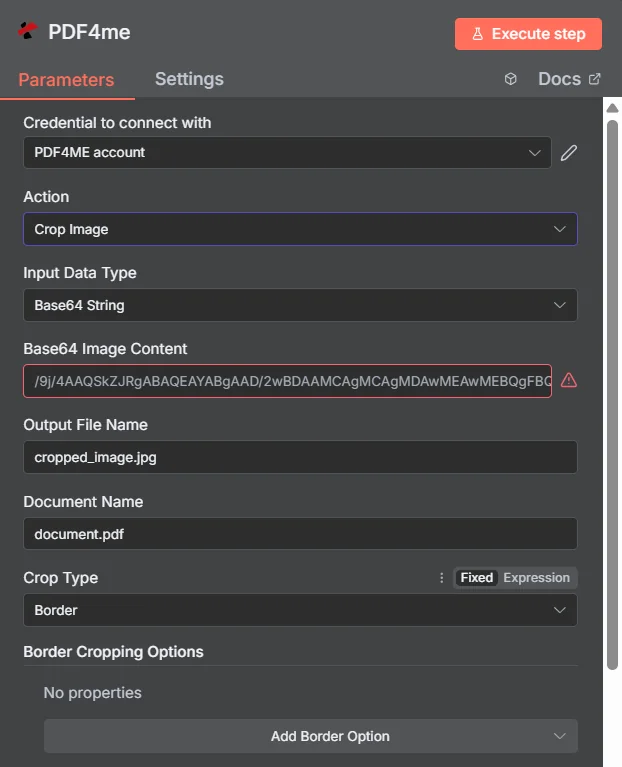
パラメータ
画像切り抜きアクションのパラメータ一覧です。これらのパラメータを設定することで、画像の切り抜きを制御できます。
重要: アスタリスク(***)が付いているパラメータは必須であり、アクションが正しく機能するためには必ず指定する必要があります。
| パラメータ | 必須 | その機能 | 例 |
|---|---|---|---|
| Input Data Type | Required | Choose how to provide the image file to crop. Options: Binary Data, Base64 String, URL. Default is `Binary Data`. | Binary Data |
| Input Binary Field | Conditional | Name of the binary property that contains the image file. Shown when Input Data Type is Binary Data. Default is `data`. | data |
| Base64 Image Content | Conditional | Base64 encoded image content. Shown when Input Data Type is Base64 String. | /9j/4AA... |
| Image URL | Conditional | URL to the image file to crop. Shown when Input Data Type is URL. | https://abc.com/demo.jpg |
| Output File Name | Optional | Name for the output cropped image file. Default is `cropped_image.jpg`. | cropped_image.jpg |
| Document Name | Optional | Name of the source image file for reference. Default is `image.jpg`. | image.jpg |
| Crop Type | Optional | Type of cropping to perform. Options: Border, Rectangle. Default is `Border`. | Border |
| Border Cropping Options | Conditional | Optional settings, collapsed behind Add Option. | Add Option |
| Left Border | Optional | Number of pixels to crop from the left border. Default is `10`. | 10 |
| Right Border | Optional | Number of pixels to crop from the right border. Default is `10`. | 10 |
| Top Border | Optional | Number of pixels to crop from the top border. Default is `20`. | 20 |
| Bottom Border | Optional | Number of pixels to crop from the bottom border. Default is `20`. | 20 |
| Rectangle Cropping Options | Conditional | Optional settings, collapsed behind Add Option. | Add Option |
| Upper Left X | Optional | X coordinate of the upper left corner of the crop rectangle. Default is `10`. | 10 |
| Upper Left Y | Optional | Y coordinate of the upper left corner of the crop rectangle. Default is `10`. | 10 |
| Width | Optional | Width of the crop rectangle in pixels. Default is `50`. | 50 |
| Height | Optional | Height of the crop rectangle in pixels. Default is `50`. | 50 |
| Output Binary Field Name | Optional | Name of the binary property to store the output image file. Default is `data`. | data |
| Advanced Options | Optional | Optional settings, collapsed behind Add Option. | Add Option |
| Custom Profiles | Optional | Use "JSON" to adjust custom properties. Review Profiles at https://developer.pdf4me.com/api/profiles/index.html to set extra options for API calls. | { 'outputDataFormat': 'base64' } |
出力
出力パラメータ
| 分野 | タイプ | 内容物 |
|---|---|---|
fileName | String | Output File Name; when it has no extension, the extension of the input image is added. |
mimeType | String | MIME type from the output file name extension, for example `image/jpeg` (`image/jpeg` when unknown). |
fileSize | Number | Size of the resulting file in bytes. |
success | Boolean | True when the operation succeeded. |
cropType | String | Crop Type that was used (Border or Rectangle). |
originalFileName | String | Name of the input image (for Base64 input, the Document Name field). |
message | String | Status message, `Image cropped successfully`. |
data | Binary | The cropped image. |
N8N 行動対応
の PDF4me 画像の切り抜き API 複数の形式で表示可能なレスポンスを返します。ニーズに最適な表示形式を選択してください。
- JSON
- Table
- Schema
- Binary
JSON 回答形式
生 JSON からの応答 API:
[
  {
    "success": true,
    "message": "Image cropped successfully",
    "fileName": "cropped_image.jpg",
    "mimeType": "image/jpeg",
    "fileSize": 125430,
    "originalFileSize": 245760,
    "cropDimensions": {
      "width": 800,
      "height": 600,
      "x": 100,
      "y": 50
    }
  }
]
テーブルビュー
構造化された表形式の応答データ:
| パラメータ | 価値 |
|---|---|
| success | true |
| message | Image cropped successfully |
| fileName | cropped_image.jpg |
| mimeType | image/jpeg |
| fileSize | 125430 |
| originalFileSize | 245760 |
| cropDimensions | {"width": 800, "height": 600, "x": 100, "y": 50} |
スキーマビュー
レスポンスのデータ構造と型:
1 item
success: ☑ true
message: AB Image cropped successfully
fileName: AB cropped_image.jpg
mimeType: AB image/jpeg
fileSize: # 125430
originalFileSize: # 245760
cropDimensions: {} width: # 800, height: # 600, x: # 100, y: # 50
タイプ指標:
AB= String#= 番号☑= Boolean{}= Object
バイナリデータビュー
切り抜かれた実際の画像ファイルデータとメタデータ:
data
─────────────────────────────
File Name: cropped_image.jpg
File Extension: jpg
Mime Type: image/jpeg
File Size: 122.5 KB
Crop Dimensions: 800x600
Original Size: 245.8 KB
バイナリデータアクセス:
- n8n バイナリオブジェクト:
$binary.data.data - Base64 コンテンツ直接使用可能
- ファイル操作ダウンロード、メール送信、または保存の準備ができました
ユースケース
コンテンツマーケティングとソーシャルメディア
- 商品画像をトリミングして主要な特徴に焦点を当て、視覚的な魅力を向上させます。
- さまざまなソーシャルメディアプラットフォーム向けに、特定の縦横比に合わせて画像を最適化します。
- マーケティング資料から不要な背景や枠線を削除する
Eコマースと製品管理
- オンラインカタログ全体で製品画像のサイズを標準化する
- 商品写真から透かしや不要な要素を削除する
- 商品リスト用に一貫性のあるサムネイル画像を作成する
文書および画像処理
- スキャンした文書から枠線と余白を削除する
- 特定のインターフェース要素に焦点を当てるためにスクリーンショットをトリミングする
- 不要な領域を削除して、ウェブ表示用に画像を最適化します。