画像を作成する PDF 使用 n8n アクション
PDF4me 画像を作成する PDF 改宗者 PDF ページを高品質の画像に変換 n8n 自動化ワークフロー。プロセス PDFs 経由 n8n トリガー、バイナリデータ、base64文字列、または公開 URL画像を生成するために (JPEG、 PNG特定のページ、ページ範囲、またはすべてのページから、カスタマイズ可能な解像度、幅設定、品質管理、および柔軟なページ選択オプションを使用して選択します。 特定ページ必要なものを入力してください ページ番号: 単一ページ、範囲、またはキーワードなど allこのソリューションは、 PDF プレビュー、サムネイル生成、Webコンテンツ作成、画像抽出、プレゼンテーションスライド、および自動化 PDFプロフェッショナルな品質での正確なレンダリングとシームレスな統合を必要とする画像変換ワークフロー。
設定
追加する PDF4me 「画像の作成」 PDF「ノードをあなたの n8n ワークフローを実行し、必要なパラメータを設定します。初期設定手順については、こちらをご覧ください。 n8n 統合ガイド。
前提条件:
- PDF4me API 資格
- n8n ワークフローへのアクセス
構成:
- 追加 PDF4me ノードからワークフローへ
- 「画像の作成元」を選択してください PDF" アクション
- 入力パラメータを設定します(下記参照)。
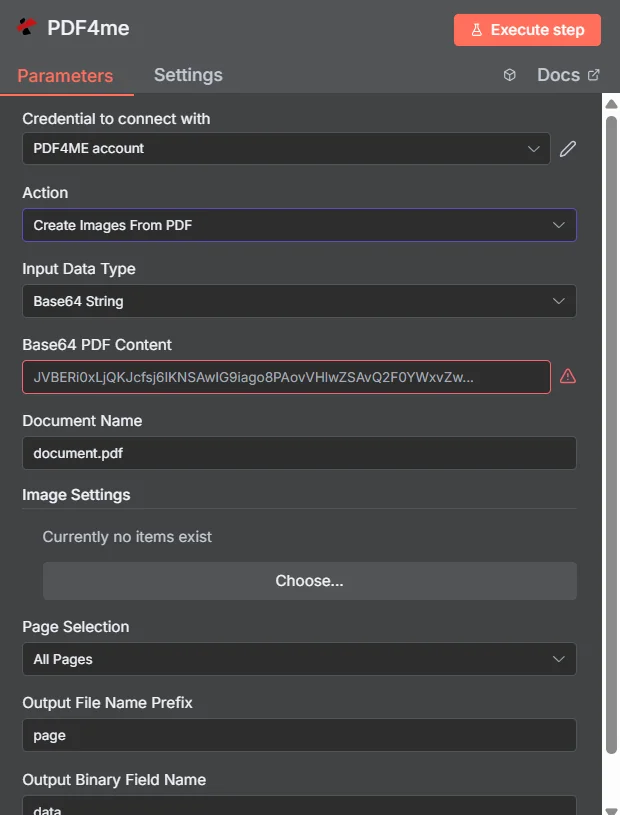
パラメータ
「画像の作成元」のパラメータ一覧 PDF アクション。これらのパラメーターを設定して制御します。 PDF 画像変換へ。
重要: アスタリスク(***)が付いているパラメータは必須であり、アクションが正しく機能するためには必ず指定する必要があります。
| パラメータ | 必須 | その機能 | 例 |
|---|---|---|---|
| Input Data Type | Required | Choose how to provide the PDF file to convert. Options: Base64 String, Binary Data, URL. Default is `Binary Data`. | Binary Data |
| Base64 PDF Content | Conditional | Base64 encoded PDF document content. Shown when Input Data Type is Base64 String. | JVBERi0x... |
| Input Binary Field | Conditional | Name of the binary property that contains the PDF file (usually "data" for file uploads). Shown when Input Data Type is Binary Data. Default is `data`. | data |
| PDF URL | Conditional | URL to the PDF file to convert. Shown when Input Data Type is URL. | https://abc.com/sample.pdf |
| Document Name | Optional | Name of the source PDF file for reference. Default is `document.pdf`. | document.pdf |
| Image Width (Pixels) | Optional | Width of the output images in pixels. Default is `800`. | 800 |
| Image Format | Optional | Output format for the images. Options: BMP, GIF, JB2, JP2, JPEG, JPF, JPG, JPX, PNG, TIF, TIFF. Default is `JPEG`. | JPEG |
| Page Selection | Optional | Choose which pages to convert to images. Options: All Pages, Page Range, Specific Pages. Default is `All Pages`. | All Pages |
| Page Numbers | Conditional | Supports: 3, 2-5, 4-, 1,3,5-7, -1, first, last, all, *. Shown when Page Selection is Page Range. | 1,3,5` or `all` or `1,2-3,5,7- |
| Page Numbers | Conditional | Supports: 3, 2-5, 4-, 1,3,5-7, -1, first, last, all, *. Shown when Page Selection is Specific Pages. | 1,3,5` or `all` or `1,2-3,5,7- |
| Output File Name Prefix | Optional | Prefix for output image files (e.g., "page" will create page_1.jpg, page_2.jpg, etc.). Default is `page`. | page |
| Output Binary Field Name | Optional | Base name of the binary property for the images. Each image is returned as its own item, stored in `<name>_<n>` (for example `data_1`, `data_2`). Default is `data`. | data |
- タイプ
allすべてのページを変換する。*(*)を使っても同じことができます。 lastこれは最終ページにすぎません。first、0または単に1すべて「最初のページだけ」という意味です。0これは単に1ページ目と言っているのと同じで、その後は2、3、4…と数えていく。-1これが最後のページです。-2それはその前のページです(12ページのファイルであれば11ページ目です)。- コンマを使うと、複数の要素をつなぎ合わせることができます。
1,2-3,5,7-1ページ目、2~3ページ目、5ページ目、そして7ページ目から最後までと読みます。7-これはサービスに対して「最後のページまで実行せよ」と指示するものです。
1,2-3,5,7- の代わりに 0,1-2,5,7-0,1-2,5,7- 合法だが、 0 そして 1-2 どちらにも1ページ目が含まれていますそのため、最初のページを誤って2回表示してしまう可能性があります。 1,2-3,5,7- 同じようなことを言っているが、重複する部分は少ない。
実務上の注意
7-ダッシュの後に何もない 「7ページ目から最終ページまで」という意味です。- 存在しないページ番号は無視されます。
7-3(逆方向) ページ7が存在する場合は、その部分からページ7を保持します。その部分からページ6とページ5は期待しないでください。- 同じページを複数回リストアップすることは可能です。リストアップするたびに、別の画像を表示できます。
出力
出力パラメータ
| 分野 | タイプ | 内容物 |
|---|---|---|
fileName | String | File name of the image: `<Output File Name Prefix>_<page number>.<Image Format>`, or the name returned by PDF4me in some response formats. |
pageNumber | String | Page number the image was created from. |
imageFormat | String | Image Format that was used. |
fileSize | Number | Size of the image in bytes. |
success | Boolean | True when the operation succeeded. |
operation | String | Always `Create Images From PDF`. |
inputType | String | Input Data Type that was used (binaryData, base64 or url). |
data | Binary | One image per output item, in a property named `<Output Binary Field Name>_<n>` (when PDF4me returns a single image object, the property is named after the image file name). MIME type is `image/<Image Format>`. |
N8N 行動対応
の PDF4me 画像を作成する PDF API 複数の形式で表示可能なレスポンスを返します。ニーズに最適な表示形式を選択してください。
- JSON
- Table
- Schema
- Binary
JSON 回答形式
生 JSON からの応答 API:
[
{
"fileName": "document_1.jpeg",
"pageNumber": 1,
"imageFormat": "jpeg",
"fileSize": 76832,
"success": true,
"operation": "Create Images From PDF",
"inputType": "base64"
},
{
"fileName": "document_2.jpeg",
"pageNumber": 2,
"imageFormat": "jpeg",
"fileSize": 76939,
"success": true,
"operation": "Create Images From PDF",
"inputType": "base64"
}
]
テーブルビュー
構造化された表形式の応答データ:
| パラメータ | 価値 |
|---|---|
| fileName | document_1.jpeg |
| pageNumber | 1 |
| imageFormat | jpeg |
| fileSize | 76832 |
| success | true |
| operation | Create Images From PDF |
| inputType | base64 |
スキーマビュー
レスポンスのデータ構造と型:
2 items
[0]
fileName: AB document_1.jpeg
pageNumber: # 1
imageFormat: AB jpeg
fileSize: # 76832
success: ☑ true
operation: AB Create Images From PDF
inputType: AB base64
[1]
fileName: AB document_2.jpeg
pageNumber: # 2
imageFormat: AB jpeg
fileSize: # 76939
success: ☑ true
operation: AB Create Images From PDF
inputType: AB base64
タイプ指標:
AB= String#= 番号☑= Boolean
バイナリデータビュー
実際の画像ファイルデータとメタデータ:
OUTPUT
─────────────────────────────
2 items

data_1
─────────────────────────────
File Name: document_1.jpeg
File Extension: jpeg
Mime Type: image/jpeg
File Size: 76.8 kB

data_2
─────────────────────────────
File Name: document_2.jpeg
File Extension: jpeg
Mime Type: image/jpeg
File Size: 76.9 kB
バイナリデータアクセス:
- n8n バイナリオブジェクト:
$binary.data_1.data、$binary.data_2.data - 複数のファイル各ページは個別のバイナリオブジェクトを生成します
- Base64 コンテンツ: 後続のノードで直接使用可能
- ファイル操作ダウンロード、メール送信、または保存の準備ができました
- 表示/ダウンロード各バイナリオブジェクトは個別に表示またはダウンロードできます。
ユースケース
文書の視覚化とプレゼンテーション
- 変換する PDF ウェブ表示およびモバイル閲覧用の画像プレゼンテーション
- ドキュメントライブラリとコンテンツ管理システム用のサムネイルプレビューを作成する
- 視覚的な要約を生成する PDF 迅速なレビューのためのレポートと文書
コンテンツ管理とアーカイブ
- 画像を抽出 PDF デジタル資産管理に関する文書
- 検索可能なビジュアルインデックスを作成する PDF コンテンツ
- 歴史的文書を保存およびアクセスしやすいように画像に変換する
Eコマースとマーケティング
- 製品画像を生成する PDF カタログと仕様書
- ソーシャルメディアやマーケティングキャンペーン向けのビジュアルコンテンツを作成する
- 変換する PDF パンフレットをウェブに適した画像形式に変換
エンタープライズ文書処理
- ワークフローシステム向けに文書から画像への変換を自動化する
- トレーニング資料と手順の視覚的なドキュメントを作成する
- 画像を生成 PDF データ視覚化のためのフォームとレポート