画像にテキスト透かしを追加する n8n アクション
PDF4me 画像にテキスト透かしを追加する 画像にカスタムテキスト透かしを追加する n8n 自動化ワークフロー。画像を処理 n8n トリガー、バイナリデータ、base64文字列、または公開 URLs テキスト(著作権表示、会社名、カスタムテキスト)を重ねて表示する際に、位置(角、中央、斜め、カスタム座標)、フォント選択、サイズ制御、カラーオプション、透明度設定、回転角度、オフセット調整などをカスタマイズできます。このソリューションは、画像ブランディング、著作権保護、透かし、バッチ画像処理、ソーシャルメディア準備、そして柔軟なフォーマットとシームレスな統合を備えたプロフェッショナルなテキスト透かしを必要とする自動テキスト重ね合わせワークフローに最適です。
設定
追加する PDF4me 「画像にテキスト透かしを追加」ノードを n8n ワークフローを実行し、必要なパラメータを設定します。初期設定手順については、こちらをご覧ください。 n8n 統合ガイド。
前提条件:
- PDF4me API 資格
- n8n ワークフローへのアクセス
構成:
- 追加 PDF4me ノードからワークフローへ
- 「画像にテキスト透かしを追加」アクションを選択します。
- 入力パラメータを設定します(下記参照)。
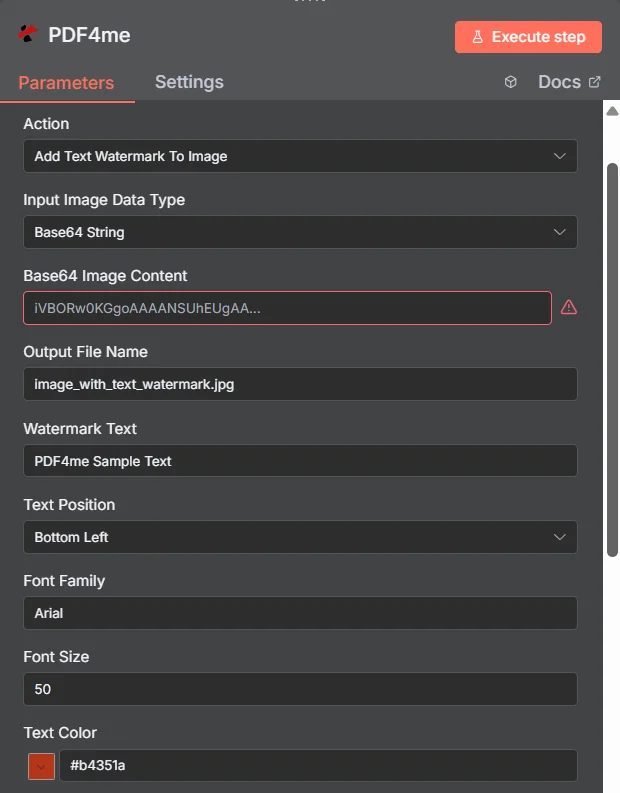
パラメータ
画像にテキスト透かしを追加するアクションのパラメータ一覧です。これらのパラメータを設定することで、テキスト透かしの適用方法を制御できます。
重要: アスタリスク(***)が付いているパラメータは必須であり、アクションが正しく機能するためには必ず指定する必要があります。
| パラメータ | 必須 | その機能 | 例 |
|---|---|---|---|
| Input Image Data Type | Required | Choose how to provide the image file to watermark. Options: Base64 String, Binary Data, URL. Default is `Binary Data`. | Binary Data |
| Base64 Image Content | Conditional | Base64 encoded image content. Shown when Input Image Data Type is Base64 String. | iVBORw0K... |
| Input Binary Field | Conditional | Name of the binary property that contains the image file. Shown when Input Image Data Type is Binary Data. Default is `data`. | data |
| Image URL | Conditional | URL to the image file. Shown when Input Image Data Type is URL. | https://abc.com/sam.jpg |
| Output File Name | Optional | Name for the output image file with watermark. Default is `image_with_text_watermark.jpg`. | image_with_text_watermark.jpg |
| Watermark Text | Optional | Text to be used as watermark. Default is `PDF4me Sample Text`. | PDF4me Sample Text |
| Text Position | Optional | Position of the watermark text on the image. Options: Bottom Left, Bottom Right, Central Horizontal, Central Vertical, Custom, Diagonal, Top Left, Top Right. Default is `Bottom Left`. | Bottom Left |
| Position X | Conditional | X position for custom positioning (float). Shown when Text Position is Custom. Default is `0`. | 0 |
| Position Y | Conditional | Y position for custom positioning (float). Shown when Text Position is Custom. Default is `0`. | 0 |
| Font Family | Optional | Font family for the watermark text. Default is `Arial`. | Arial |
| Font Size | Optional | Font size for the watermark text (integer). Default is `50`. | 50 |
| Text Color | Optional | Text color in hex format. Default is `#b4351a`. | #b4351a |
| Bold | Optional | Whether to make text bold. Default is `Yes`. | Yes |
| Underline | Optional | Whether to make text underlined. Default is `No`. | No |
| Italic | Optional | Whether to make text italic. Default is `Yes`. | Yes |
| Opacity | Optional | Text opacity (0.0 to 1.0). Default is `1`. | 1 |
| Rotation Angle | Optional | Rotation angle for the text (float). Default is `0`. | 0 |
| Binary Data Output Name | Optional | Custom name for the binary data in n8n output. Default is `data`. | data |
出力
出力パラメータ
| 分野 | タイプ | 内容物 |
|---|---|---|
success | Boolean | True when the operation succeeded. |
message | String | Status message, `Image with text watermark created successfully`. |
fileName | String | File name of the resulting file. |
mimeType | String | Always `image/jpeg`, whatever the format of the input image. |
fileSize | Number | Size of the resulting file in bytes. |
textPosition | String | Text Position that was used. |
watermarkText | String | Watermark Text that was added. |
data | Binary | The image with the text watermark. |
N8Nアクションレスポンス
の PDF4me 画像にテキスト透かしを追加する API 複数の形式で表示可能なレスポンスを返します。ニーズに最適な表示形式を選択してください。
- JSON
- Table
- Schema
- Binary
JSON 回答形式
生 JSON からの応答 API:
[
  {
    "success": true,
    "message": "Text watermark added successfully",
    "fileName": "image_with_text_watermark.jpg",
    "mimeType": "image/jpeg",
    "fileSize": 245760
  }
]
テーブルビュー
構造化された表形式の応答データ:
| パラメータ | 価値 |
|---|---|
| 成功 | true |
| メッセージ | Text watermark added successfully |
| ファイル名 | image_with_text_watermark.jpg |
| mimeタイプ | image/jpeg |
| ファイルサイズ | 245760 |
スキーマビュー
レスポンスのデータ構造と型:
1 item
success: ☑ true
message: AB Text watermark added successfully
fileName: AB image_with_text_watermark.jpg
mimeType: AB image/jpeg
fileSize: # 245760
タイプ指標:
AB= 文字列#= 番号☑= ブール値
バイナリデータビュー
透かしが入った実際の画像ファイルのデータとメタデータ:
data
─────────────────────────────
File Name: image_with_text_watermark.jpg
File Extension: jpg
Mime Type: image/jpeg
File Size: 240.0 KB
バイナリデータアクセス:
- n8n バイナリオブジェクト:
$binary.data.data - Base64 コンテンツ直接使用可能
- ファイル操作ダウンロード、メール送信、または保存の準備ができました
ユースケース
プロフェッショナルなイメージブランディング
- ブランド保護のため、製品画像に会社名と著作権表示を追加してください。
- 一貫したテキスト透かし配置でブランド化されたソーシャルメディアコンテンツを作成する
- カスタムテキストを使用してデジタル写真やアートワークの著作権保護を実装します
自動コンテンツ処理
- 大規模画像コレクションに対するテキスト透かしの一括処理
- テキスト透かしをコンテンツ管理ワークフローに統合する
- 動的なテキストを使用して、eコマースおよびマーケティング資料用の画像準備を自動化します。
企業イメージ管理
- 複数の部署間でテキストのブランディングを標準化する
- 文書および画像ワークフローに自動テキスト透かし機能を実装する
- すべてのデジタルアセットにカスタムテキストオーバーレイを適用して、一貫性のあるビジュアルアイデンティティを構築します。
動的テキスト透かし
- 文書のバージョン管理のためにタイムスタンプ付きの透かしを生成する
- 地理的コンテンツに位置情報に基づくテキスト透かしを追加する
- ユーザー固有の情報を使用して、パーソナライズされたテキスト透かしを作成します。