Wordで変更履歴の追跡を有効にする n8n
このノードの機能
PDF4me - Wordで変更履歴の追跡を有効にする あらゆるリビジョン追跡フラグをアクティブ化します DOCX ファイルの中 n8n ワークフロー。トラッキングが有効になると、レビュー担当者が行った挿入、削除、書式設定の変更はすべて、担当者の名前とタイムスタンプとともに記録され、承認/拒否レビューの準備が整います。前のノードからバイナリデータとしてドキュメントを提供します。 Base64 文字列、または公開 URLトラックチェンジ対応 DOCX メールへのルーティングのためにすぐに返送されます。 SharePointGoogle Drive、または下流のレビューワークフロー。
関連ブログ記事
この機能に関するブログ記事はまだありません。近日公開予定です。
その間、PDF4me ブログを閲覧して、あらゆるプラットフォームのチュートリアルやワークフローをご覧ください。
ブログをご覧ください →
認証 API リクエスト
毎 PDF4me ノード n8n 有効な 資格. お客様の情報を保持する資格情報を作成または選択します PDF4me API ノードがドキュメント処理要求を安全に認証できるようにするためのキー。
見逃してはならない重要な事実
のみ DOCX DOC や RTF はサポートされていません
このノードは最新の Open XML Word フォーマット (.docx) を処理します。ソース ドキュメントが古い .doc バイナリ フォーマットまたは RTF の場合は、 DOCX まず、Word を変換して PDF ここに渡す前に、フォームへの変換、または別の変換処理を行う必要があります。
既にトラッキングが有効になっているドキュメントでも安全に実行できます
ドキュメントに既に変更追跡が有効になっている場合、ノードは変更を加えず、成功ステータスでドキュメントを返します。つまり、既に追跡されているドキュメントで二重処理やエラーが発生するリスクを負うことなく、あらゆるレビューパイプラインの最初の予防措置として「変更追跡を有効にする」ステップを配置できます。
変更履歴をプログラムで読み取るには、「変更履歴の追跡を取得」と組み合わせて使用します。
レビュー担当者が文書を編集した後、[Word の変更履歴を取得] ノードは、記録されたすべての改訂を構造化して抽出します。 JSON レビュー担当者名、変更の種類、元のテキスト、および修正後のテキスト。これにより、ファイルを手動で開くことなく、変更内容が記録、比較、承認のためにルーティングされる、完全な承認パイプラインを構築できます。
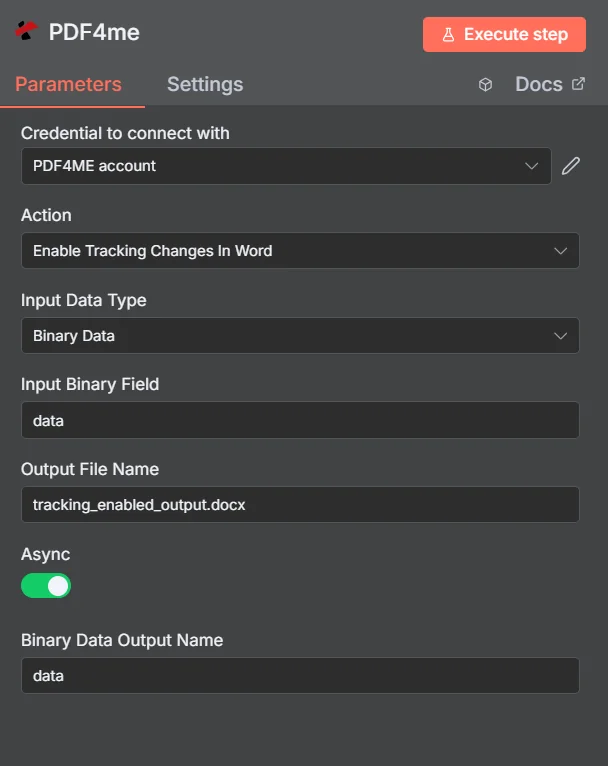
入力データタイプを設定し、マッピングします DOCX 前のノードから、拡張子「.docx」を付けた出力ファイル名を入力し、ワークフローを実行します。
パラメータ
必須: 入力データタイプ、そのタイプに一致するドキュメントフィールド(入力バイナリフィールド、 Base64 文書コンテンツまたはファイル URL出力ファイル名、バイナリデータ出力名。非同期プロファイルとカスタムプロファイルはオプションです。
| パラメータ | 必須 | その機能 | 例 |
|---|---|---|---|
| Input Data Type | Required | Choose how to provide the Word document to process. Options: Binary Data, Base64 String, URL. Default is `Binary Data`. | Binary Data |
| Input Binary Field | Conditional | Name of the binary property that contains the Word document (usually "data" for file uploads). Shown when Input Data Type is Binary Data. Default is `data`. | data |
| Base64 Word Content | Conditional | Base64 encoded Word document content. Shown when Input Data Type is Base64 String. | UEsDBBQABgAI... |
| Word Document URL | Conditional | URL to the Word document to process. Shown when Input Data Type is URL. | |
| Output File Name | Optional | Name for the output processed Word document. Default is `tracking_enabled_output.docx`. | tracking_enabled_output.docx |
| Async | Optional | Not used: the node always sends the request as asynchronous, whatever this setting. Default is `Yes`. | Yes |
| Binary Data Output Name | Optional | Custom name for the binary data in n8n output. Default is `data`. | data |
出力
ノードが返すフィールド。
| 分野 | タイプ | 内容物 |
|---|---|---|
data | Binary | The Word document with tracking changes enabled, stored under the Output File Name. |
クイックセットアップ
- 追加する PDF4me あなたのノードへ n8n ワークフローを選択して選択する Wordで変更履歴の記録を有効にする。
- 選択または作成する 資格 あなたの PDF4me API 鍵。
- セット 入力データタイプ そして地図 DOCX 一致するソースフィールドから。
- 入力 出力ファイル名 と
.docx拡大。 - クリック Node.jsを実行する返された DOCX 変更履歴の追跡が有効になっている場合、それをメール、ストレージ、またはレビュー手順にルーティングします。
ワークフローの例
ワークフローの例Common n8n workflow patterns using Enable Tracking Changes In Word.
追跡機能を事前に有効にした契約書をレビュー担当者に送信する
- Airtableは、契約記録が「法的審査準備完了」に移動されたときにトリガーされます。
- Googleドライブから契約書の草案をダウンロード DOCX。
- Wordで変更履歴の追跡を有効にすると、文書の改訂履歴の追跡が有効になります。
- Gmailは変更履歴を記録できる状態で送信します DOCX 法務チーム宛て。彼らが行った編集はすべて、名前とタイムスタンプとともに記録されます。
ポリシー文書レビューパイプラインを自動化する
- SharePoint 新しいポリシー文書が「ドラフトポリシー」ライブラリにアップロードされたときに、この監視機能が作動します。
- Wordで変更履歴の追跡を有効にすると、予防措置として最初のステップとして改訂履歴の追跡が有効になります。
- トラックに提出可能な文書は、確認のため部門長にメールで送信されます。
- レビュー済みのファイルが返送されると、「Wordの変更履歴を取得」は、コンプライアンスログ用にすべての改訂内容をGoogleスプレッドシートに抽出します。
すべてのテンプレート文書で一括追跡を有効にする
- スケジュールされたトリガーが毎週実行され、すべてをリストします DOCX Googleドライブの「Templates」フォルダ内のファイル。
- 「バッチ分割」ノードは、各テンプレートを個別に処理します。
- Wordで変更履歴の追跡を有効にすると、すべてのテンプレートで改訂履歴の追跡が有効になります。
- Googleドライブは、各ファイルをトラッキング機能が有効化されたバージョンに置き換えます。更新されたテンプレートの数は、Slackメッセージで報告されます。
よくある質問
関連ノード
Wordで変更履歴を追跡する
記録されたすべての改訂履歴を構造化して抽出する JSON レビュー担当者が文書を編集した後、レビュープロセスにおける自然な次のステップとして、次の段階に進みます。
Wordで変更履歴の記録を無効にする
すべての変更内容が確認され承認されたら、改訂履歴の記録をオフにして、きれいな最終文書を作成してください。
Word文書を比較する
2つの間のレッドライン比較を生成します DOCX バージョン管理は、手動で編集履歴を追跡することなく、下書きと最終版の違いを明らかにする必要がある場合に使用します。