フォームフィールドを追加する PDF 使用 n8n アクション
PDF4me フォームフィールドを追加する PDF 静的を変換します PDF 文書をインタラクティブな入力可能なフォームに変換する n8n 自動化ワークフロー。プロセス PDF離れて n8n トリガー、バイナリデータ、base64文字列、または公開 URLフォームフィールド(テキストボックス、チェックボックス)を、位置、フィールド名、デフォルト値、サイズ制御、ページ固有のターゲティング、柔軟な配置オプションなど、カスタマイズ可能な設定で追加できます。このソリューションは、フォームテンプレートの作成、インタラクティブなドキュメントの生成、データ収集フォーム、アンケートの作成、そして正確な位置設定とシームレスな統合が求められるプロフェッショナルなフォームフィールド作成のための自動フォームデザインワークフローに最適です。
設定
追加する PDF4me 「フォームフィールドを追加する」 PDF「ノードをあなたの n8n ワークフローを実行し、必要なパラメータを設定します。初期設定手順については、こちらをご覧ください。 n8n 統合ガイド。
前提条件:
- PDF4me API 資格
- n8n ワークフローへのアクセス
構成:
- 追加 PDF4me ノードからワークフローへ
- 「フォームフィールドを追加する」を選択してください PDF" アクション
- 入力パラメータを設定します(下記参照)。
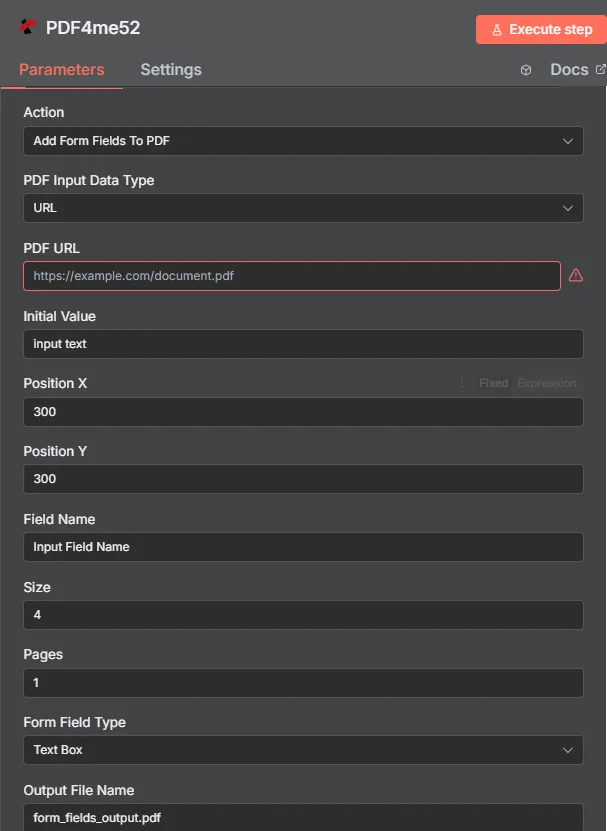
パラメータ
フォームフィールドの追加に使用するパラメーターの完全なリスト PDF アクション。これらのパラメータを設定して、フォームフィールドの追加を制御します。
重要: アスタリスク(***)が付いているパラメータは必須であり、アクションが正しく機能するためには必ず指定する必要があります。
| パラメータ | 必須 | その機能 | 例 |
|---|---|---|---|
| PDF Input Data Type | Required | Choose how to provide the PDF file. Options: Binary Data, Base64 String, URL. Default is `Binary Data`. | Binary Data |
| PDF Binary Field | Conditional | Name of the binary property that contains the PDF file. Shown when PDF Input Data Type is Binary Data. Default is `data`. | data |
| PDF Base64 Content | Conditional | Base64 encoded PDF content. Shown when PDF Input Data Type is Base64 String. | JVBERi... |
| PDF URL | Conditional | URL to the PDF file. Shown when PDF Input Data Type is URL. | https://abc.com/doc.pdf |
| Initial Value | Required | Initial value for the form field (must be a string). Default is `input text`. | input text |
| Position X | Required | X position of the form field (sent to PDF4me as positionX). Default is `300`. | 300 |
| Position Y | Required | Y position of the form field (sent to PDF4me as positionY). Default is `300`. | 300 |
| Field Name | Required | Name of the form field (must be a string). Default is `Input Field Name`. | Input Field Name |
| Size | Required | Size of the form field (integer). Default is `4`. | 4 |
| Pages | Required | Page indices as comma-separated values or ranges (e.g., "0, 1, 2-" or "1, 2, 3-7"). Leave empty to process all pages. Default is `1`. | 1 |
| Form Field Type | Required | Type of form field to add. Options: Text Box, Check Box. Default is `Text Box`. | Text Box |
| Output File Name | Optional | Name for the output PDF file with form fields. Default is `form_fields_output.pdf`. | form_fields_output.pdf |
| Async | Optional | Ignored: the node always sends the request with IsAsync true, whatever this is set to. Default is `Yes`. | Yes |
| Binary Data Output Name | Optional | Custom name for the binary data in n8n output. Default is `data`. | data |
出力
出力パラメータ
| 分野 | タイプ | 内容物 |
|---|---|---|
success | Boolean | True when the operation succeeded. |
message | String | Status message, `Form fields added to PDF successfully`. |
fileName | String | File name of the resulting file. |
mimeType | String | MIME type of the resulting file, for example `application/pdf`. |
fileSize | Number | Size of the resulting file in bytes. |
fieldName | String | Field Name that was added. |
formFieldType | String | Form Field Type that was added. |
initialValue | String | Initial Value of the field. |
position | String | Object with x and y: the Position X and Position Y values used. |
size | String | Size value used. |
pages | String | Pages value used, as entered. |
data | Binary | The PDF with the form field added. |
N8N 行動対応
の PDF4me フォームフィールドを追加する PDF API 複数の形式で表示可能なレスポンスを返します。ニーズに最適な表示形式を選択してください。
- JSON
- Table
- Schema
- Binary
JSON 回答形式
生 JSON からの応答 API:
[
  {
    "success": true,
    "message": "Form fields added to PDF successfully",
    "fileName": "form_fields_output.pdf",
    "mimeType": "application/pdf",
    "fileSize": 121883,
    "fieldName": "Test Box",
    "formFieldType": "TextBox",
    "initialValue": "input ",
    "position": {
      "x": 200,
      "y": 200
    },
    "size": 3,
    "pages": "1"
  }
]
テーブルビュー
構造化された表形式の応答データ:
| パラメータ | 価値 |
|---|---|
| success | true |
| message | フォームフィールドが追加されました PDF 成功 |
| fileName | form_fields_output.pdf |
| mimeType | application/pdf |
| fileSize | 121883 |
| fieldName | Test Box |
| formFieldType | TextBox |
| initialValue | input |
| position | {"x": 200, "y": 200} |
| size | 3 |
| pages | "1" |
スキーマビュー
レスポンスのデータ構造と型:
success: ✓ true
message: AB Form fields added to PDF successfully
fileName: AB form_fields_output.pdf
mimeType: AB application/pdf
fileSize: # 121883
fieldName: AB Test Box
formFieldType: AB TextBox
initialValue: AB input
position: {} {"x": 200, "y": 200}
size: # 3
pages: AB "1"
タイプ指標:
AB= String#= 番号✓= Boolean{}= Object
バイナリデータビュー
実際 PDF ファイルデータとメタデータ:
data
─────────────────────────────────────────
File Name: form_fields_output.pdf
File Extension: pdf
Mime Type: application/pdf
File Size: 119.0 KB
ユースケース
デジタルフォームの作成と変換**
- 紙のフォームをインタラクティブなデジタル形式に変換する PDF 入力可能なフィールドを備えたフォーム
- データ収集とユーザー入力のために、既存のドキュメントにフォームフィールドを追加する。
- アンケート、応募、フィードバック収集用のカスタムフォームテンプレートを作成する
ドキュメントの強化とインタラクティブ性
- 静的なドキュメントにインタラクティブな要素を追加して、ユーザーエンゲージメントを向上させましょう。
- 既存のデータにデータ収集機能を追加する PDF 文書および報告書
- 文書を自動データ処理用の入力可能なフォームに変換する
ワークフローの自動化とデータ収集
- 標準化されたデータ収集プロセスのためのフォーム作成を自動化する
- 文書処理ワークフローにフォームフィールドの追加機能を統合する
- さまざまなビジネスプロセスやアプリケーションに対応する動的なフォームを作成する