テキストを検索して置換する PDF と n8n
このノードの機能
PDF4me テキストの検索と置換 検索 PDF テキストパターンに対して、出現箇所すべてを新しいコンテンツに置き換えます。 n8n Adobe Acrobat で手動で編集することなくワークフローを自動化できます。ドキュメント全体または特定のページ範囲を対象とし、フォント、色、サイズ、周囲のレイアウトを保持し、複数の置換を連結して複合置換を実行できます。 買収後のベンダー名の一括変更、製品カタログ全体のブランディング刷新、誤字脱字の修正、見積書の価格更新、用語の標準化、テンプレートを使用した文書のパーソナライズ。
関連ブログ記事
この機能に関するブログ記事はまだありません。近日公開予定です。
その間、PDF4me ブログを閲覧して、あらゆるプラットフォームのチュートリアルやワークフローをご覧ください。
ブログをご覧ください →
認証 API リクエスト
毎 PDF4me ノード n8n 有効な 接続するための認証情報. 作成または選択して、 PDF4me API ワークフローがテキスト置換リクエストを安全に認証できるようにするためのキー。
見逃してはならない重要な事実
フォント、色、レイアウトをそのまま保持します
古いテキストの各出現箇所は、元のフォント、色、サイズを保持したまま、同じ文字位置に置き換えられます。周囲のテキスト、画像、ページ番号、および文書構造は変更されません。 PDF-to-Word-to-PDF 往復通信はレイアウトをずらしたり、書式を崩したりすることが多い。
ページ範囲を指定して、変更が必要な箇所のみを更新します。
ページシーケンスは以下をサポートします
全て、単一ページ(1、2、3)、範囲(1-5、10-15)、および混合(1,2,3-7,10) ドキュメントの残りの部分には手を加えず、表紙、署名ページ、または特定の章のみを更新します。大規模ドキュメントの非同期処理
大規模または高ボリュームのシナリオでは、非同期オプションを有効にしてください。操作はバックグラウンドで実行され、ワークフローのスループットが向上します。数十または数百の処理を行うエンタープライズシナリオに推奨されます。 PDF1回の実行あたり秒。
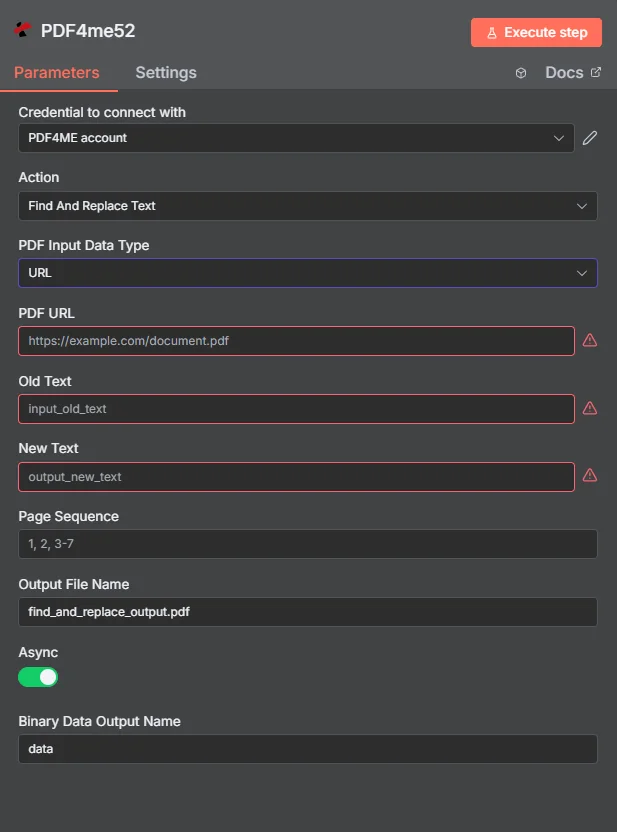
地図 PDF バイナリ、旧テキストと新テキストを入力し、ページシーケンスを設定して、変更された PDF 1つのノードで返されます。
パラメータ
必須: 接続するための認証情報、 PDF 入力データタイプ、古いテキスト、新しいテキスト、ページシーケンス、出力ファイル名、バイナリデータ出力名はすべて指定する必要があります。一致する入力フィールド(入力バイナリフィールド、 Base64 PDF コンテンツ、または PDF URL) は選択されたものに基づいて必要です PDF 入力データ型。
| パラメータ | 必須 | その機能 | 例 |
|---|---|---|---|
| PDF Input Data Type | Required | Choose how to provide the PDF file. Options: Binary Data, Base64 String, URL. Default is `Binary Data`. | Binary Data |
| PDF Binary Field | Conditional | Name of the binary property that contains the PDF file. Shown when PDF Input Data Type is Binary Data. Default is `data`. | data |
| PDF Base64 Content | Conditional | Base64 encoded PDF content. Shown when PDF Input Data Type is Base64 String. | JVBERi0xLjQK... |
| PDF URL | Conditional | URL to the PDF file. Shown when PDF Input Data Type is URL. | https://example.com/contract.pdf |
| Old Text | Required | Text to be searched and replaced in the PDF. | Old Vendor Inc. |
| New Text | Required | Text to replace the old text with. | New Vendor LLC |
| Page Sequence | Optional | Specify page indices as comma-separated values or ranges (e.g., "0, 1, 2-" or "1, 2, 3-7"). Leave empty to process all pages. | 1,2,3 |
| Output File Name | Optional | Name for the output PDF file. Default is `find_and_replace_output.pdf`. | find_and_replace_output.pdf |
| Async | Optional | Ignored: the node always sends the request with IsAsync true, whatever this is set to. Default is `Yes`. | Yes |
| Binary Data Output Name | Optional | Custom name for the binary data in n8n output. Default is `data`. | data |
ページシーケンスパターン
全て文書全体デフォルト設定。グローバルなブランド更新や用語の標準化のために、すべてのページにわたるすべての出現箇所を置換します。
1、2、3特定ページカンマ区切り。特定のページのみを更新できます。表紙、署名ページ、または既知の場所の更新に便利です。
1-5、10-15ページ範囲ハイフンで区切られた範囲。文書の残りの部分は変更せずに、特定の章またはセクションブロックのみを更新できます。
1,2,3-7,10混合ページ+範囲個々のページや範囲を組み合わせることができます。複数セクションからなる契約書や技術マニュアルなど、複雑な文書に最大限の柔軟性を提供します。
出力
ノードが返すフィールド。
| 分野 | タイプ | 内容物 |
|---|---|---|
success | Boolean | True when the operation succeeded. |
message | String | Status message, `Find and replace text operation completed successfully`. |
fileName | String | File name of the resulting file. |
mimeType | String | MIME type of the resulting file, for example `application/pdf`. |
fileSize | Number | Size of the resulting file in bytes. |
oldText | String | Text that was searched for. |
newText | String | Replacement text. |
pageSequence | String | Page Sequence that was used, or `all pages` when the field was empty. |
data | Binary | The PDF with the text replaced. |
クイックセットアップ
- 追加 PDF4me あなたの n8n ワークフローを選択して選択する テキストの検索と置換 行動として。
- で 接続するための認証情報選択してください PDF4me 認証情報を使用するか、またはあなたの API 鍵。
- セット PDF 入力データタイプ に バイナリデータ そして地図 入力バイナリフィールド 前のノード(Dropbox、Google Drive、HTTPリクエストなど)のバイナリ出力に渡します。
- 入力 古いテキスト: 見つける正確なテキストパターン PDF (例えば。
Old Vendor Inc.) - 入力 新しいテキスト: 置換テキスト (例:
New Vendor LLC) - セット ページシーケンス: 使用
allグローバル置換、または特定のページ/範囲など1,2,3または1-5,10-15。 - セット 出力ファイル名 希望のファイル名に(
.pdf拡張)および バイナリデータ出力名 にdata。 - オプションで有効化 非同期 大容量文書や大量処理向け。
- 実行します。出力バンドルには変更されたファイルが含まれています。 PDF すべての置換処理が完了し、アップロード、メール送信、またはさらなる処理の準備が整いました。
ワークフローの例
ワークフローの例Common n8n workflow patterns using Find and Replace Text.
買収後のベンダー名の一括変更 → すべての契約を更新
- 買収後、法務チームはすべての有効な契約を更新する必要がある。 PDF 新しい法人名を反映させるため。
- A SharePoint ウォッチファイルは、active-contractsフォルダ内の各契約に対してトリガーとなるイベントを発生させます。
- PDF4me 検索と置換機能を使用すると、すべてのページ(ページシーケンス=すべて)で、古い会社名が新しい組織名に置き換えられます。フォントとレイアウトは保持されます。
- 追加の「テキストの検索と置換」ノードにより、同じ文書内の登録住所が旧本社から新本社に更新されます。
- 更新された契約は保存されます SharePoint バージョン管理されたファイル名を使用。Slack通知で法務部門に更新が通知されます。数百件の契約書が数分で更新され、Acrobatでの手動編集に数週間かかっていた作業が大幅に短縮されます。
見積書PDFのパーソナライズ → 顧客プレースホルダーの置換
- ウェブフックからの CRM 販売が新しい見積もりを生成すると発火する PDF テンプレートから。
- PDF4me 検索と置換テキストは、4回連続して実行され(連鎖ノード)、それぞれが1つのプレースホルダーを置換します。
{{CUSTOMER_NAME}}、{{TOTAL_PRICE}}、{{VALID_UNTIL}}、{{ACCOUNT_MANAGER}}。 - パーソナライズされた見積もりは、件名と添付ファイルが動的に変化するGmail経由で顧客に送信されます。
- A Salesforce レコード更新ステップで最終見積もりを添付します PDF その機会に。
- Airtableのログには、顧客情報、見積もりID、合計金額、送信日時が記録され、売上報告に利用されます。
年間価格改定 → カタログ表紙のみ更新
- スケジュールトリガーは毎年1月1日に発動し、製品カタログを新しい価格で更新します。
- Googleドライブのリストステップでは、すべてのカタログを取得します。 PDF カタログフォルダ内。
- アイテムのループは、各アイテムを処理します。 PDF。 PDF4me 検索と置換テキスト「Pricing valid through 2024」を「Pricing valid through 2025」に更新し、ページシーケンスを
1,2(表紙と概要ページのみ。本文はそのまま残す。) - 2つ目の「テキストの検索と置換」ノードは、ページシーケンスの著作権表示の年フッターを更新します。
all。 - 更新されたカタログは、同じGoogleドライブの場所にアップロードされ、古いバージョンは上書きされます。マーケティング部門には、更新されたすべてのカタログを一覧表示するSlackサマリーが送信されます。
よくある質問
関連アクション
変換する PDF 編集可能 PDF 使用 OCR
スキャンした画像に検索可能なテキストレイヤーを追加する PDF写真やスキャンしたソース文書に対して検索と置換を実行する前に必要な設定です。
テキストスタンプを追加する PDF
「下書き」「機密」「バージョン」などのオーバーレイテキスト注釈を追加し、検索と置換機能と組み合わせることで、完全な文書管理ワークフローを実現できます。
追加 HTML ヘッダー フッター PDF
ヘッダーとフッターをカスタムヘッダーとフッターに追加または置き換える HTMLインラインテキストだけでなく、文書の構造的な更新が必要な場合に、検索と置換を補完する機能です。