ドキュメントを解析 n8n
PDF4me ドキュメントを解析する 保存した解析テンプレートを PDF 内部 n8n ワークフローを実行し、抽出されたフィールドを構造化データとして返します。前のノードからのバイナリデータ、 Base64 文字列、または公開 URLテンプレートを参照するには IDを解析結果をパイプで送る JSON、 XML、 または CSV Set、IF、HTTPリクエスト、または下流の任意の処理に直接接続します。 n8n ノード。テンプレートには抽出ロジックが含まれているため、同じノードで請求書、契約書、領収書、および設定したカスタムレイアウトを抽出できます。
このノードを実行する前に: 解析テンプレートを作成する PDF4me ダッシュボード。キャプチャキーを定義して選択します。 正規表現 安定したパターンまたは JavaScript 表現 条件付きロジックの場合。 n8n ノードは、そのテンプレートを参照します。 IDを解析。 見る ドキュメントの解析情報を準備する 完全なセットアップについては、正規表現の例(INV-\d{6,10}、 \d{2}/\d{2}/\d{4})、そして2人の作業員 JavaScript 表現分類器のサンプル。
認証 API リクエスト
の PDF4me ノード n8n 必要 PDF4me API 資格認証情報を一度作成します n8n あなたの API ダッシュボードからキーを取得し、すべてのキーを参照します。 PDF4me ワークフロー内のノード。
見逃してはならない重要な事実
文章 分類ルールとフォールバックルールのための変数。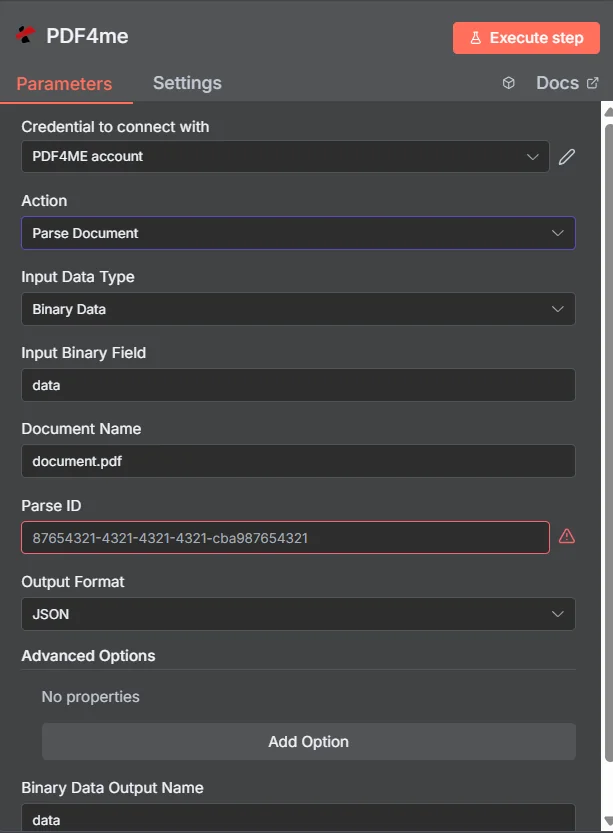
パラメータ
| パラメータ | 必須 | その機能 | 例 |
|---|---|---|---|
| Input Data Type | Required | Choose how to provide the document to parse. Options: Binary Data, Base64 String, URL. Default is `Binary Data`. | Binary Data |
| Input Binary Field | Conditional | Name of the binary property that contains the document file. Shown when Input Data Type is Binary Data. Default is `data`. | data |
| Base64 Document Content | Conditional | Base64 encoded document content. Shown when Input Data Type is Base64 String. | JVBERi0xLjQK... |
| Document URL | Conditional | URL to the document file to parse. Shown when Input Data Type is URL. | |
| Document Name | Required | Name of the source document file for reference. Default is `document.pdf`. | document.pdf |
| Parse ID | Required | GUID of the parse configuration to use (will also be used as Template ID). | 12345678-1234-1234-1234-123456789abc |
| Output Format | Optional | Format for the parsed document output. Options: JSON, Text File. Default is `JSON`. | JSON |
| Output File Name | Conditional | Name for the output file (only used when output format is text). Shown when Output Format is Text File. Default is `parsed_document.txt`. | parsed_document.txt |
| Advanced Options | Optional | Optional settings, collapsed behind Add Option. | Add Option |
| Custom Profiles | Optional | Use "JSON" to adjust custom properties. Review Profiles at https://developer.pdf4me.com/api/profiles/index.html to set extra options for API calls. | { "outputDataFormat": "json", "includeMetadata": true } |
| Binary Data Output Name | Optional | Custom name for the binary data in n8n output. Default is `data`. | data |
解析テンプレート内の式タイプ
キャプチャルールはテンプレート内にあり、 n8n ノード。どちらの式タイプもすべてのノードに付属しています。 PDF4me アカウント。
正規表現安定したパターンINV-\d{6,10})、日付(\d{2}/\d{2}/\d{4})、量($?\d{1,3}(?:,\d{3})*(?:.\d{2})?) 生産キーの約80%。JavaScript式条件論理と分類器文章; 文字列を返します。マルチマーカー分類、フォールバックルール、日付正規化。参照 ドキュメントの解析情報を準備する 2つの作業サンプルについて。出力
| 分野 | タイプ | 内容物 |
|---|---|---|
success | String | Text File format only: always true. |
message | String | Text File format only: `Document parsed successfully`. |
fileName | String | Text File format only: the Output File Name. |
mimeType | String | Text File format only: always `text/plain`. |
fileSize | Number | Text File format only: size of the text file in bytes. |
traceId | String | Text File format only: trace ID from PDF4me's response, if any. |
documentType | String | Text File format only: document type from PDF4me's response, if any. |
pageCount | String | Text File format only: page count from PDF4me's response, if any. |
data | Binary | Text File format only: a text file with a short header (date, trace ID, document type, page count) followed by PDF4me's full response as JSON. |
JSON 形式のみ: アイテムは PDF4me 応答は、上記のフィールドが一切含まれていない状態で返されます。解析テンプレートで読み取られた値が含まれます(Power Automate コネクタでは traceId と parseInfo オブジェクト)。応答がテキストでない場合は、 JSON、contentType 付きの rawContent として返されます。 text/plain正確なフィールドは PDF4me 応答。
JSON 形式のみ: アイテムは PDF4meの応答は、上記のフィールドが一切含まれていない状態です。解析テンプレートで読み取られた値(Power Automate コネクタでは traceId と parseInfo オブジェクト)が含まれています。応答がテキストでない場合は、 JSON、contentType 付きの rawContent として返されます。 text/plain正確なフィールドは以下に依存します PDF4meの返答。
解析されたキー/値データ自体は、あなたが指定したバイナリフィールドに格納されます。 出力バイナリフィールド名。
ワークフローの例
一般的なn8nワークフローパターンTypical ways to chain Parse Document into an n8n workflow.
- Gmailのトリガーは、「vendor-invoice」というラベルの付いた新しい請求書に対して作動します。
- フィルターは、拡張子が.pdfの添付ファイルのみを通過させます。
- Parse Documentは、バイナリ添付ファイルに対して請求書テンプレートを実行します。
- ノードマップを解析しました invoiceNumber、 totalAmount、 invoiceDate。
- PostgresのINSERT文は、行をaccounts_payableテーブルに書き込みます。
- Webhook は PDF パートナーアップロードポータルから。
- Parse Document はテンプレートを実行します JavaScript 文書タイプを返す式キー。
- 返されたタイプ(請求書/注文書/領収書)に基づいてノードの経路を切り替え、タイプ固有の下流ブランチに分岐します。
- 各ブランチは、解析されたフィールドを適切な宛先システムに送信します。
- トリガーの発火を15分ごとにスケジュール設定する。
- S3 リスト + オブジェクトの取得は、新しいオブジェクトをロードします PDF 受信バケット内。
- Parse Documentは、各バイナリアイテムに対してテンプレートを実行します。
- Airtableの「レコードの作成」機能は、解析されたフィールドを追跡ベースに書き込みます。