Word からテキストを抽出する n8n
ワードからテキストを抽出する は n8n ノードによる PDF4me .docxファイルからクリーンなテキストコンテンツを抽出します。抽出前にコメント、ヘッダー、フッターを削除したり、変更履歴を確定したりするオプションも用意されています。コンテンツ移行、テキストマイニング、または手動でのコピー&ペーストなしでドキュメントテキストを下流の分析に供給する場合に使用できます。
このノードの機能
PDF4me: Word からテキストを抽出する .docx ファイルを読み込み、テキスト コンテンツを返します。オプションでページ範囲を限定し、コメント、ヘッダー/フッター、未解決の変更履歴を削除します。バイナリ データによる入力を受け付けます。 Base64 文字列、または URLコンテンツ移行、編集上のクリーンアップ、検索インデックス作成、および文書テキストをテキストマイニングや分析パイプラインに供給するのに最適です。
関連ブログ記事
この機能に関するブログ記事はまだありません。近日公開予定です。
その間、PDF4me ブログを閲覧して、あらゆるプラットフォームのチュートリアルやワークフローをご覧ください。
ブログをご覧ください →
認証 API リクエスト
毎 PDF4me ノード n8n 有効な 接続するための認証情報. 作成または選択して、 PDF4me API ワークフローが抽出要求を安全に認証できるようにするためのキー。
見逃してはならない重要な事実
必須項目は2つだけです
Word文書の入力(入力データタイプ経由)と文書名。ページ範囲と3つのクリーンアップトグルはすべて、既に検証済みのものと同じパターンで動作するデフォルト設定を備えています。 Make このアクションのバージョン。
変更の承認は抽出後ではなく、抽出前に実行されます。
「変更を承認」を設定すると、ドキュメント内のすべての変更履歴が最初に確定され、抽出されたテキストは編集後のバージョンを反映します。編集前のソースと論理的に対応するテキストが必要な場合は、この設定をオフにしてください。
出力はバイナリファイルであり、単なる文字列ではありません。
抽出されたテキストは、出力バイナリフィールド名の下にバイナリファイルとして返されます。 JSONそれを下流のノードに渡して、実際のテキストコンテンツを読み取り、解析し、または保存します。
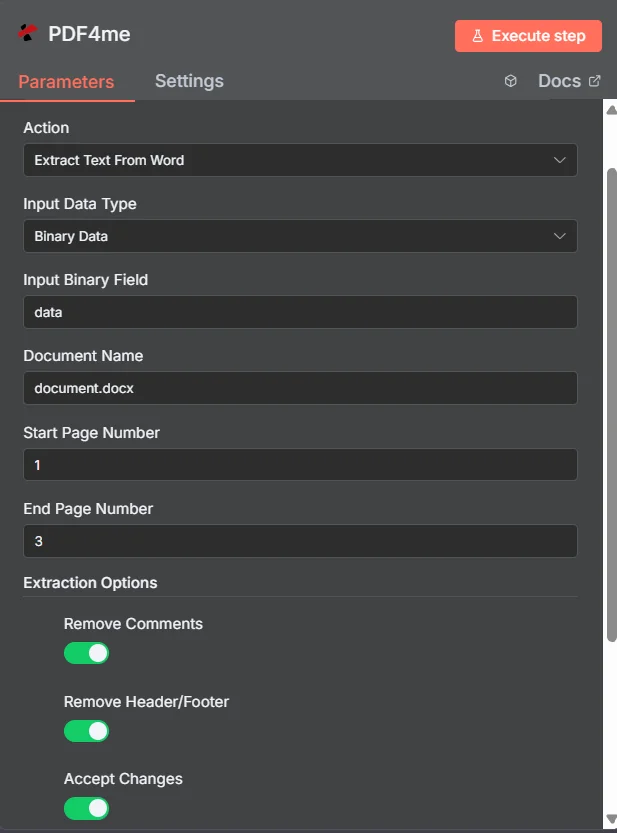
PDF4me 「Word からテキストを抽出する」ノードパラメータパネルで n8n
Wordからテキストを抽出するには、どのようなパラメータが必要ですか?
必須: 入力データタイプとドキュメント名、および選択した入力タイプに一致するフィールド(入力バイナリフィールド、 Base64 ワードコンテンツ、またはワードURL)。開始ページ番号、終了ページ番号、出力バイナリフィールド名、および3つの抽出オプションの切り替えはすべてオプションです。
| パラメータ | 必須 | その機能 | 例 |
|---|---|---|---|
| Input Data Type | Required | Choose how to provide the Word file to extract text from. Options: Binary Data, Base64 String, URL. Default is `Binary Data`. | Binary Data |
| Input Binary Field | Conditional | Name of the binary property that contains the Word file (usually "data" for file uploads). Shown when Input Data Type is Binary Data. Default is `data`. | data |
| Base64 Word Content | Conditional | Base64 encoded Word document content. Shown when Input Data Type is Base64 String. | UEsDBBQAAAAIAA... |
| Word URL | Conditional | URL to the Word file to extract text from. Shown when Input Data Type is URL. | https://example.com/document.docx |
| Document Name | Optional | Name of the document (used for processing). Default is `document.docx`. | document.docx |
| Start Page Number | Optional | Starting page number for text extraction. Default is `1`. | 1 |
| End Page Number | Optional | Last page to extract text from. Default is `3`. | 3 |
| Extraction Options | Optional | Optional settings, collapsed behind Add Option. | Add Option |
| Remove Comments | Optional | Whether to remove comments from the extracted text. Default is `Yes`. | Yes |
| Remove Header/Footer | Optional | Whether to remove headers and footers from the extracted text. Default is `Yes`. | Yes |
| Accept Changes | Optional | Whether to accept tracked changes in the document. Default is `Yes`. | Yes |
| Output Binary Field Name | Optional | Name of the binary property to store the output file. Default is `data`. | data |
| Advanced Options | Optional | Optional settings, collapsed behind Add Option. | Add Option |
| Custom Profiles | Optional | Use 'JSON' to adjust custom properties. Review Profiles at https://dev.pdf4me.com/apiv2/documentation/ to set extra options for API calls and may be specific to certain APIs. | |
出力
ノードが返すフィールド。
| 分野 | タイプ | 内容物 |
|---|---|---|
fileName | String | Name of the JSON file with the result, `word_text_extraction_results_<timestamp>.json`. |
mimeType | String | Always `application/json`. |
fileSize | Number | Size of the JSON file in bytes. |
success | Boolean | True when the operation succeeded. |
message | String | Status message, `Text extraction from Word completed successfully`. |
docName | String | The Document Name field. |
startPage | String | Start Page Number that was used. |
endPage | String | End Page Number that was used. |
data | Binary | A JSON file with PDF4me's response, which contains the extracted text; the text is not added to the item's JSON. |
Word からテキストを抽出する設定方法 n8n?
- 追加 PDF4me あなたの n8n ワークフローを選択し、 ワードからテキストを抽出する アクション。
- で 接続するための認証情報選択してください PDF4me 認証情報またはクリック 新しい認証情報を作成する そしてあなたの API 鍵。
- セット 入力データタイプ に バイナリデータ (デフォルト)、 Base64 弦、 または URL そして、対応するソースフィールドを指定します。
- セット 文書名 と共に
.docx拡大。 - オプションで設定可能 開始ページ番号 そして 最終ページ番号 抽出対象をページ範囲に限定する。
- セット コメントを削除、 ヘッダー/フッターを削除する、 そして 変更を受け入れる クリーンなバージョンまたは編集済みのバージョンを抽出するために必要な場合。
- ノードを実行し、抽出したテキストをコンテンツパイプライン、検索インデックス、または分析ワークフローにルーティングします。
典型的な構成
ワークフローの例Common n8n workflow patterns using Extract Text From Word.
CMSへのコンテンツ移行
- 移行フォルダに旧バージョンのWord文書が追加されると、Googleドライブのトリガーが作動します。
- PDF4me Word からテキストを抽出する際、ヘッダー/フッターの削除とコメントの削除が有効になっているため、本文のみのきれいな抽出が可能です。
- 抽出されたテキストは、ヘッドレスCMSに新しいコンテンツエントリとして投稿されます。
校閲後の編集上の修正
- 変更履歴とコメントが記録された査読済み原稿は、フォームを通じてアップロードされます。
- PDF4me 「Wordからテキストを抽出する」は、「変更を承認」と「コメントを削除」を有効にして実行され、クリーンな最終バージョンを作成します。
- 最終版のテキストは、校正または出版のプロセスに送られます。
ドキュメントライブラリから構築された検索インデックス
- アイテムのループノードは、Word ドキュメントを反復処理します。 SharePoint ドキュメントライブラリ。
- PDF4me 「Wordからテキストを抽出する」機能は、各ファイルに対してデフォルトの抽出オプションで実行されます。
- 抽出されたテキストは、ElasticsearchやAlgoliaなどの検索エンジンにインデックス化されます。
大規模レポートのセクションレベルの抽出
- ワークフローに必要なのは、長文レポートの要約部分だけです。
- PDF4me 「Wordからテキストを抽出する」機能は、開始ページ番号1と終了ページ番号2を指定して実行され、抽出対象を要約ページに限定します。
- 抽出された要約テキストは、テキスト要約または分析のステップに送られます。
実践的なヒント
Only Input and Document Name are required
Page range and the three cleanup toggles all have working defaults; set them only when your workflow needs the behavior to differ.
Use page range for large documents
Set Start Page Number and End Page Number to extract only the section you need instead of processing an entire long document.
Accept Changes changes the output text
With Accept Changes on, deleted text in tracked changes will not appear in the extraction; with it off, the pre-edit text may still be present.
Output is binary, read it downstream
The extracted text arrives as a binary file, not a plain n8n string field; use a node that reads binary content to access the actual text.
Document Name still matters with Binary Data
The extension drives format detection regardless of input type; keep it accurate even when the file itself comes from a previous node.
Remove Header/Footer helps content analysis
Running headers and footers (page numbers, document titles) can pollute text-mining results; strip them for cleaner analysis.
チートシート
| 分野 | 価値 |
|---|---|
| Action | Extract Text From Word |
| Input Data Type | Binary Data |
| Input Binary Field | data |
| Document Name | document.docx |
| Start Page Number | 1 (optional) |
| End Page Number | (optional, defaults to last page) |
| Remove Comments | true |
| Remove Header/Footer | true |
| Accept Changes | true |
| Credentials | PDF4me API credential |
よくある質問
関連アクション
PDFから表を抽出する
同じ抽出カテゴリですが、構造化テーブルデータを取得します PDF Wordの本文テキストの代わりにファイルを使用する。
PDFからフォームデータを抽出する
入力済みの AcroForm フィールド値を取得します PDFソースドキュメントにWordと入力可能な形式が混在している場合に補完的に機能します。 PDF フォーム。
式によるテキスト抽出
パターンに一致するテキストを抽出します PDFsは、文書全体のテキスト抽出後に特定のデータポイントを抽出する際に役立ちます。
他のプラットフォームでの同じタスク
Word からテキストを抽出する Make
テキスト抽出エンジンは Make モジュール、同じフィールドセットを使用したビジュアルシナリオ。
Word からテキストを抽出する Zapier
6,000以上のテキストからテキスト抽出をトリガーします SaaS アプリとウェブフック。
Word からテキストを抽出する Power Automate
Microsoft 365 流れ SharePoint、 OutlookTeams、およびDataverseとの連携。
ワードからテキストを抽出する REST API
生 PDF4me エンドポイント。カスタムバックエンドコードやPostmanテスト用。