添付ファイルを抽出する PDF 使用 n8n アクション
PDF4me 添付ファイルを抽出する PDF 埋め込みファイルを抽出する PDF 文書を通じて n8n 自動化ワークフロー。プロセス PDF離れて n8n トリガー、バイナリデータ、base64文字列、または公開 URL添付ファイル、画像、スプレッドシート、データファイル、その他の埋め込みコンテンツを自動的に検出して抽出します。ファイルの整合性、メタデータの保持、マルチフォーマットのサポートを維持します(PDFDOC、XLS、画像など)。このソリューションは、文書分析、ファイル復元、証拠抽出、添付ファイル管理、データ抽出ワークフロー、およびシームレスな統合による信頼性の高い組み込みファイル抽出を必要とする包括的な文書処理に最適です。
関連ブログ記事
この機能に関するブログ記事はまだありません。近日公開予定です。
その間、PDF4me ブログを閲覧して、あらゆるプラットフォームのチュートリアルやワークフローをご覧ください。
ブログをご覧ください →
設定
追加する PDF4me 「添付ファイルを抽出する PDF「ノードをあなたの n8n ワークフローを実行し、必要なパラメータを設定します。初期設定手順については、こちらをご覧ください。 n8n 統合ガイド。
前提条件:
- PDF4me API 資格
- n8n ワークフローへのアクセス
構成:
- 追加 PDF4me ノードからワークフローへ
- 「添付ファイルの抽出元」を選択してください PDF" アクション
- 入力パラメータを設定します(下記参照)。
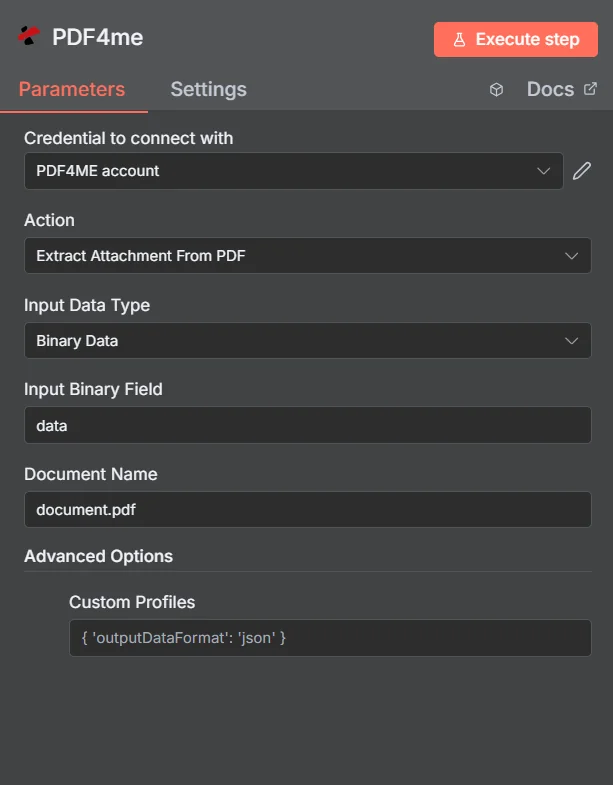
パラメータ
「添付ファイルの抽出」のパラメータ一覧 PDF アクション。添付ファイルの抽出を制御するために、これらのパラメータを設定します。
重要: アスタリスク(***)が付いているパラメータは必須であり、アクションが正しく機能するためには必ず指定する必要があります。
| パラメータ | 必須 | その機能 | 例 |
|---|---|---|---|
| Input Data Type | Required | Choose how to provide the PDF file to extract attachments from. Options: Binary Data, Base64 String, URL. Default is `Binary Data`. | Binary Data |
| Input Binary Field | Conditional | Name of the binary property that contains the PDF file (usually "data" for file uploads). Shown when Input Data Type is Binary Data. Default is `data`. | data |
| Base64 PDF Content | Conditional | Base64 encoded PDF document content. Shown when Input Data Type is Base64 String. | UEsDBBQABgAI... |
| PDF URL | Conditional | URL to the PDF file to extract attachments from. Shown when Input Data Type is URL. | |
| Document Name | Optional | Name of the document (used for processing). Default is `document.pdf`. | document.pdf |
| Binary Data Output Name | Optional | Custom name for the binary data in n8n output. Default is `data`. | data |
| Advanced Options | Optional | Optional settings, collapsed behind Add Option. | Add Option |
| Custom Profiles | Optional | Use 'JSON' to adjust custom properties. Review Profiles at https://dev.pdf4me.com/apiv2/documentation/ to set extra options for API calls and may be specific to certain APIs. | {"outputDataFormat": "json", "extractMetadata": true} |
出力
出力パラメータ
| 分野 | タイプ | 内容物 |
|---|---|---|
success | Boolean | True when the operation succeeded. |
message | String | Status message, `Attachment extracted successfully and converted to binary`. |
fileName | String | File name of the first attachment, as returned by PDF4me. |
mimeType | String | MIME type set from the attachment's extension (txt, pdf, jpg, jpeg, png, zip), `application/octet-stream` otherwise. |
fileSize | Number | Size of the first attachment in bytes. |
sourceFileName | String | Name of the input PDF: the input file's name for Binary Data, the last part of the URL for URL, and Document Name for Base64. |
processingTimestamp | String | Time the node received the result, ISO 8601. |
totalAttachments | Number | Number of attachments PDF4me found in the PDF (only the first is returned). |
data | Binary | The first attachment of the PDF. The node fails when the PDF has no attachments. |
抽出された添付ファイルオブジェクト構造
| 分野 | タイプ | 内容物 |
|---|---|---|
success | Boolean | True when the operation succeeded. |
message | String | Status message, `Attachment extracted successfully and converted to binary`. |
fileName | String | File name of the first attachment, as returned by PDF4me. |
mimeType | String | MIME type set from the attachment's extension (txt, pdf, jpg, jpeg, png, zip), `application/octet-stream` otherwise. |
fileSize | Number | Size of the first attachment in bytes. |
sourceFileName | String | Name of the input PDF: the input file's name for Binary Data, the last part of the URL for URL, and Document Name for Base64. |
processingTimestamp | String | Time the node received the result, ISO 8601. |
totalAttachments | Number | Number of attachments PDF4me found in the PDF (only the first is returned). |
data | Binary | The first attachment of the PDF. The node fails when the PDF has no attachments. |
N8N 行動対応
の PDF4me 添付ファイルを抽出する PDF API 複数の形式で表示可能なレスポンスを返します。ニーズに最適な表示形式を選択してください。
- JSON
- Table
- Schema
- Binary
JSON 回答形式
生 JSON からの応答 API:
[
  {
    "documents": null,
    "outputDocuments": [
      {
        "fileName": "sample.txt",
        "barcodeText": null,
        "docText": null,
        "image": null
      }
    ],
    "traceId": null,
    "jobId": null,
    "statusUrl": null,
    "subscriptionUsage": null,
    "_metadata": {
      "success": true,
      "message": "Attachments extracted successfully",
      "processingTimestamp": "2025-09-23T20:04:09.290Z",
      "sourceFileName": "document.pdf",
      "operation": "extractAttachmentFromPdf"
    }
  }
]
テーブルビュー
構造化された表形式の応答データ:
| パラメータ | 価値 |
|---|---|
| documents | null |
| outputDocuments[0].fileName | sample.txt |
| outputDocuments[0].barcodeText | null |
| outputDocuments[0].docText | null |
| outputDocuments[0].image | null |
| traceId | null |
| jobId | null |
| statusUrl | null |
| subscriptionUsage | null |
| _metadata.success | true |
| _metadata.message | Attachments extracted successfully |
| _metadata.processingTimestamp | 2025-09-23T20:04:09.290Z |
| _metadata.sourceFileName | document.pdf |
| _metadata.operation | extractAttachmentFromPdf |
スキーマビュー
レスポンスのデータ構造と型:
1 item
documents: null
outputDocuments: [
  {
    fileName: AB sample.txt
    barcodeText: null
    docText: null
    image: null
  }
]
traceId: null
jobId: null
statusUrl: null
subscriptionUsage: null
_metadata: {
  success: ☑ true
  message: AB Attachments extracted successfully
  processingTimestamp: AB 2025-09-23T20:04:09.290Z
  sourceFileName: AB document.pdf
  operation: AB extractAttachmentFromPdf
}
タイプ指標:
AB= String#= 番号☑= Boolean{}= Object[]= Array
バイナリデータビュー
実際の添付ファイルデータとメタデータ:
outputDocuments
─────────────────────────────
File Count: {{ $json.outputDocuments.length }}
Success Status: {{ $json._metadata.success }}
Processing Time: {{ $json._metadata.processingTimestamp }}
ユースケース
文書コンテンツ復旧
- 埋め込みファイルの復元: 使用する
outputDocuments埋め込まれたファイルを復元するための配列 PDF 文書、元の資料へのアクセスを復元する - ファイル名の復元: 元のファイル名を抽出します
fileName適切なファイル識別と整理を維持するためのフィールド - 紛失した書類の復元: 以前に埋め込まれていたドキュメントを復元します PDFそれらは元々の形式では入手できなくなっている。
コンテンツ処理と分析
- 愛着分析: 個々のファイルを処理します
outputDocumentsコンテンツの分析、データの抽出、または各ファイルタイプに対する特定の操作を実行するためのコレクション - バーコード処理: 活用する
barcodeText在庫管理、追跡、または識別目的で添付ファイルからバーコード情報を抽出および処理するためのフィールド - テキストコンテンツ抽出: 活用する
docText検索、分析、またはデータ処理ワークフローのために、ドキュメント添付ファイルからテキストコンテンツを抽出するためのフィールド
ワークフローの自動化と統合
- ファイル配布ファイルの種類と内容分析に基づいて、抽出した添付ファイルを適切なシステム、フォルダ、またはユーザーに自動的に配布します。
- コンテンツのアーカイブ: 使用する
_metadata.traceId抽出結果を監査証跡として保持しつつ、抽出したファイルを構造化されたアーカイブシステムに整理する。 - マルチシステム統合抽出したファイルを外部の文書管理システム、クラウドストレージプラットフォーム、またはビジネスアプリケーションと統合する