文書を分類する n8n アクション
PDF4me 文書を分類する 自動的に分析および分類します PDF ドキュメントを使用する AI- による機械学習 n8n 自動化ワークフロー。プロセス PDF離れて n8n トリガー、バイナリデータ、base64文字列、または公開 URLドキュメントの種類 (請求書、契約書、領収書、フォーム、レポート) を識別し、分類メタデータ、信頼度スコア、代替分類、構造化データを抽出する。 JSON インテリジェントな文書ルーティングのための出力。このソリューションは、自動文書仕分け、コンテンツ管理システム、コンプライアンスワークフロー、郵便室の自動化、請求書処理、および正確な出力が求められるインテリジェントな文書ルーティングに最適です。 AIリアルタイム分析とシームレスな統合を備えた、高度な分類機能。
設定
追加する PDF4me 「ドキュメントを分類」ノードを n8n ワークフローを実行し、必要なパラメータを設定します。初期設定手順については、こちらをご覧ください。 n8n 統合ガイド。
前提条件:
- PDF4me API 資格
- n8n ワークフローへのアクセス
構成:
- 追加 PDF4me ノードからワークフローへ
- 「文書を分類する」アクションを選択します。
- 入力パラメータを設定します(下記参照)。
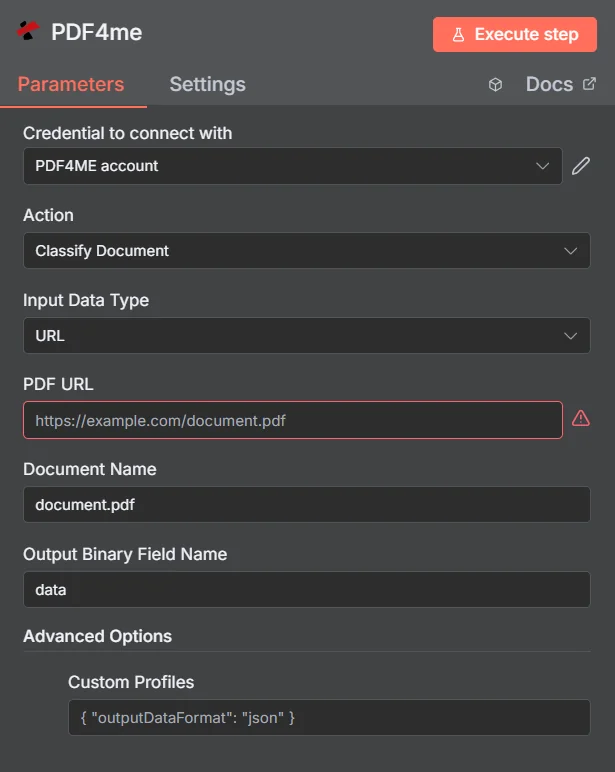
パラメータ
文書分類アクションのパラメータ一覧です。これらのパラメータを設定することで、文書の分類を制御できます。
重要: アスタリスク(***)が付いているパラメータは必須であり、アクションが正しく機能するためには必ず指定する必要があります。
| パラメータ | 必須 | その機能 | 例 |
|---|---|---|---|
| Input Data Type | Required | Choose how to provide the PDF file to classify. Options: Binary Data, Base64 String, URL. Default is `Binary Data`. | Binary Data |
| Input Binary Field | Conditional | Name of the binary property that contains the PDF file (usually "data" for file uploads). Shown when Input Data Type is Binary Data. Default is `data`. | data |
| Base64 PDF Content | Conditional | Base64 encoded PDF document content. Shown when Input Data Type is Base64 String. | UEsDBBQABgAI... |
| PDF URL | Conditional | URL to the PDF file to classify. Shown when Input Data Type is URL. | |
| Document Name | Optional | Name of the document (used for processing). Default is `document.pdf`. | document.pdf |
| Output Binary Field Name | Optional | Not used: this operation returns no file, only the classification result as JSON. Default is `data`. | data |
| Advanced Options | Optional | Optional settings, collapsed behind Add Option. | Add Option |
| Custom Profiles | Optional | Use 'JSON' to adjust custom properties. Review Profiles at https://dev.pdf4me.com/apiv2/documentation/ to set extra options for API calls and may be specific to certain APIs. | { "OutputDataFormat": "json" } |
出力
出力パラメータ
| 分野 | タイプ | 内容物 |
|---|---|---|
_metadata | String | Object added by the node: success (always true), message (`Document classified successfully`), processingTimestamp (time the node received the result, ISO 8601), sourceFileName (the input file's name for Binary Data, the last part of the URL for URL, and Document Name for Base64) and operation (`classifyDocument`). |
すべての分野 PDF4me 応答はアイテムにコピーされます: 分類結果、ドキュメントのクラス名など (className Power Automate コネクタ内)。正確なフィールドは、 PDF4me 応答。
すべての分野の PDF4meの応答はアイテムにコピーされます: 分類結果、ドキュメントのクラス名など (className Power Automate コネクタ内)。正確なフィールドは、 PDF4meの返答。
JSON ファイル構造
ダウンロード可能な JSON ファイルには、以下の形式の文書分類データが含まれています。
| 分野 | タイプ | 内容物 |
|---|---|---|
_metadata | String | Object added by the node: success (always true), message (`Document classified successfully`), processingTimestamp (time the node received the result, ISO 8601), sourceFileName (the input file's name for Binary Data, the last part of the URL for URL, and Document Name for Base64) and operation (`classifyDocument`). |
N8N 行動対応
の PDF4me 文書を分類する API 複数の形式で表示可能なレスポンスを返します。ニーズに最適な表示形式を選択してください。
- JSON
- Table
- Schema
- Binary
JSON 回答形式
生 JSON からの応答 API:
[
  {
    "fileName": "classification_results_1756990750241.json",
    "mimeType": "application/json",
    "fileSize": 221,
    "success": true,
    "message": "Document classification completed successfully",
    "docName": "document.pdf"
  }
]
テーブルビュー
構造化された表形式の応答データ:
| パラメータ | 価値 |
|---|---|
| fileName | classification_results_1756990750241.json |
| mimeType | application/json |
| fileSize | 221 |
| success | true |
| message | Document classification completed successfully |
| docName | document.pdf |
スキーマビュー
レスポンスのデータ構造と型:
1 item
fileName: AB classification_results_1756990750241.json
mimeType: AB application/json
fileSize: # 221
success: ☑ true
message: AB Document classification completed successfully
docName: AB document.pdf
タイプ指標:
AB= String#= 番号☑= Boolean{}= Object[]= Array
バイナリデータビュー
実際 JSON ファイルデータとメタデータ:
data
─────────────────────────────
File Name: classification_results_1756990750241.json
File Extension: json
Mime Type: application/json
File Size: 0.22 KB
JSON ファイル内容の例:
{
  "className": "invoice",
  "templateId": "00000000-0000-0000-0000-000000000000",
  "classificationTimestamp": "2025-09-23T18:33:43.457Z",
}
ユースケース
文書の分類とルーティング
- インテリジェントな文書ルーティングダウンロードして処理します JSON 抽出するファイル
className文書の種類に基づいて、文書を適切な部署、システム、または処理キューに自動的にルーティングするためのフィールド - テンプレートベース処理: 活用する
templateIdから JSON 類似の文書タイプを一貫して処理するために、特定の文書テンプレートと処理ルールを適用するファイル - 自動ワークフロートリガー: 解析する JSON ファイルとトリガー固有の n8n ワークフローは
className文書固有のビジネスプロセスを開始するための価値
監査およびコンプライアンス追跡
- トレーサビリティを要求する: 生成されたものを使用する JSON 文書処理パイプライン全体を通して、完全な監査証跡とリクエスト追跡のためのファイルを作成します。
- 処理タイムスタンプの監視: 活用する
classificationTimestampから JSON 処理時間を監視し、SLA遵守を確保するためのファイル - 操作ログ: すべての分類操作を追跡するには、 JSON 包括的な活動記録とコンプライアンス報告のためのファイル
文書管理と整理
- ソースファイル追跡: 使用する
docName文書の来歴を維持し、処理ワークフローを通じて元のファイル名を追跡するためのフィールド - 成功状況の監視エラー処理と再試行ロジックを実装します。
success堅牢な文書処理のステータス - ファイルベース管理生成されたドキュメントを処理して整理します JSON 一貫した分類と文書標準化のためのファイル