テキストスタンプを追加する PDF で n8n
テキストスタンプを追加する PDF は n8n ノードによる PDF4me カスタムテキスト(機密、下書き、承認済み、または任意のカスタム文字列)を重ねて表示します PDF 正確な配置、フォント、色、透明度、回転を制御できるページ。機密マーク、承認スタンプ、下書きラベル、手動編集不要の自動文書ブランディングなどにご利用いただけます。
このノードの機能
PDF4me: テキストスタンプを追加 PDF 選択した水平方向と垂直方向の位置に、対象とするすべてのページにテキスト文字列をレンダリングします。フォントサイズ、フォントカラー、不透明度、回転角度、余白、背景/前景レイヤーを制御できます。ソースを受け入れます。 PDF バイナリデータを介して、 Base64 文字列、または URL機密ラベル、下書きマーカー、承認スタンプ、著作権表示、斜め透かしスタイルのブランディングに最適です。
認証 API リクエスト
毎 PDF4me ノード n8n 有効な 接続するための認証情報. 作成または選択して、 PDF4me API ワークフローがスタンプ発行リクエストを安全に認証できるようにするためのキー。
見逃してはならない重要な事実
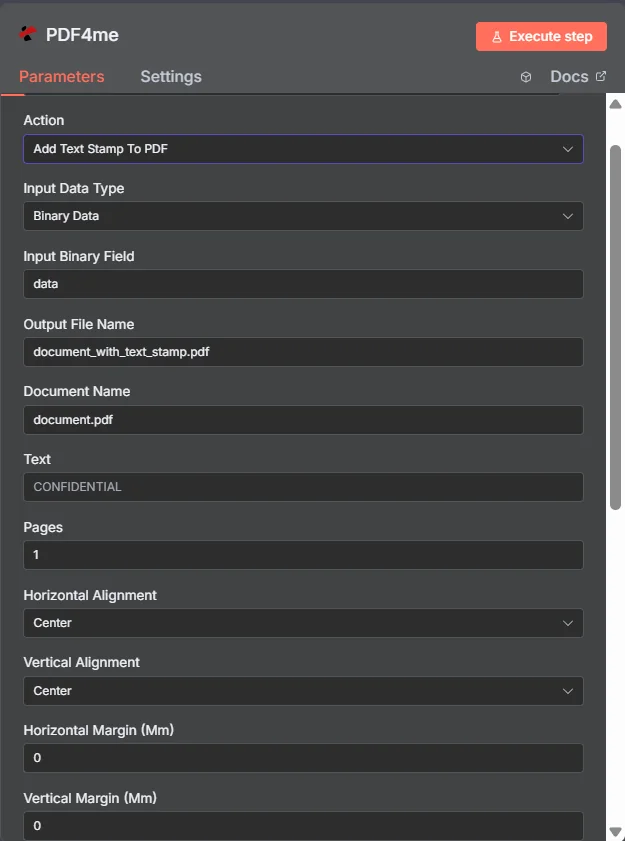
PDF4me テキストスタンプを追加する PDF ノードパラメータパネル n8n
Add Text Stamp はどのようなパラメータを使用しますか? PDF 必要?
必須: 入力データタイプ、出力ファイル名、テキスト、ページ数、水平方向の配置、垂直方向の配置。条件付きフィールド(入力バイナリフィールド、Base64ドキュメントコンテンツ、ファイルURL)は、親の入力データタイプが選択されている場合にのみ表示されます。ドキュメント名、余白、不透明度、フォント、回転、背景、非同期処理、バイナリデータ出力名など、その他の項目はすべてオプションで、デフォルト値が設定されています。
| パラメータ | 必須 | その機能 | 例 |
|---|---|---|---|
| Input Data Type | Required | Choose how to provide the PDF file to add text stamp to. Options: Binary Data, Base64 String, URL. Default is `Binary Data`. | Binary Data |
| Input Binary Field | Conditional | Name of the binary property that contains the PDF file. Shown when Input Data Type is Binary Data. Default is `data`. | data |
| Base64 PDF Content | Conditional | Base64 encoded PDF document content. Shown when Input Data Type is Base64 String. | JVBERi0xLjQK... |
| PDF URL | Conditional | URL to the PDF file to add text stamp to. Shown when Input Data Type is URL. | |
| Output File Name | Optional | Name for the output PDF file with text stamp. Default is `document_with_text_stamp.pdf`. | document_with_text_stamp.pdf |
| Document Name | Optional | Name of the source PDF file for reference. Default is `document.pdf`. | document.pdf |
| Text | Required | Text to be stamped on the PDF. | CONFIDENTIAL |
| Pages | Optional | Page range where text stamp should be applied. Default is `all`. | all |
| Horizontal Alignment | Optional | Horizontal alignment of the text stamp. Options: Left, Center, Right. Default is `Center`. | Center |
| Vertical Alignment | Optional | Vertical alignment of the text stamp. Options: Top, Center, Bottom. Default is `Center`. | Center |
| Horizontal Margin (Mm) | Optional | Horizontal margin in millimeters. Default is `0`. | 0 |
| Vertical Margin (Mm) | Optional | Vertical margin in millimeters. Default is `0`. | 0 |
| Opacity | Optional | Opacity of the text stamp (50 = 50% transparent). Default is `50`. | 50 |
| Font Size | Optional | Font size (8-72). Default is `24`. | 24 |
| Font Color | Optional | Font color for the text stamp (hex color code). Default is `#FF0000`. | #FF0000 |
| Rotation | Optional | Rotation angle of the text stamp in degrees. Default is `45`. | 45 |
| Background | Optional | Whether the text stamp is placed in the background. Default is `No`. | No |
| Advanced Options | Optional | Optional settings, collapsed behind Add Option. | Add Option |
| Custom Profiles | Optional | Use "JSON" to adjust custom properties. Review Profiles at https://dev.pdf4me.com/apiv2/documentation/ to set extra options for API calls. | |
| Binary Data Output Name | Optional | Custom name for the binary data in n8n output. Default is `data`. | data |
出力フィールド
成功したランは1 n8n 持ち運んでいるアイテム JSON メタデータと刻印されたバイナリ PDF。
出力
ノードが返すフィールド。
| 分野 | タイプ | 内容物 |
|---|---|---|
fileName | String | Output File Name; `.pdf` is set as extension when it does not end in .pdf. |
mimeType | String | MIME type of the resulting file, for example `application/pdf`. |
fileSize | Number | Size of the resulting file in bytes. |
success | Boolean | True when the operation succeeded. |
message | String | Status message, `Text stamp added successfully`. |
data | Binary | The PDF with the text stamp. |
テキストスタンプを追加するにはどうすればいいですか? PDF で n8n?
- 追加 PDF4me あなたの n8n ワークフローを選択し、 テキストスタンプを追加する PDF アクション。
- で 接続するための認証情報選択してください PDF4me 認証情報またはクリック 新しい認証情報を作成する そしてあなたの API 鍵。
- セット 入力データタイプ に バイナリデータ (デフォルト)、 Base64 弦、 または URL 対応するソースを提供する PDF 分野。
- セット 出力ファイル名 (必ず
.pdf)そしてオプションで 文書名 追跡のため。 - 入力 文章 (例えば。
CONFIDENTIAL) ページ ターゲットにし、 水平方向の配置 / 垂直方向の配置。 - オプションで調整 水平余白、 垂直マージン、 不透明度、 フォントサイズ、 フォントの色、 回転、 そして 背景。
- 有効にする 非同期処理 必要に応じて大きなドキュメントの場合。ノードを実行し、スタンプされた PDF 次のステップへ。
典型的な構成
ワークフローの例Common n8n workflow patterns using Add Text Stamp to PDF.
- Googleドライブのトリガーは、新しいファイルが送信ドキュメントフォルダに保存されたときに作動します。
- PDF4me テキストスタンプを追加する PDF テキスト「機密」、水平方向の中央揃え、垂直方向の上揃え、フォントの色は赤で実行されます。
- 刻印 PDF レビュー済みのフォルダにアップロードされ、受信者にメールで送信されます。
- スケジュールトリガーは週次レポートを生成します PDF 経由 PDF4me ドキュメントを生成します。
- PDF4me テキストスタンプを追加する PDF テキストを「下書き」、回転角度を45度、不透明度を30度、背景を「true」に設定して実行すると、微妙な斜めの透かしが表示されます。
- 透かし入りの下書きは、最終承認前にSlackのレビューチャンネルに投稿されます。
- 承認ウェブフックは、管理者が社内ツールで文書を承認済みとしてマークした時点で起動します。
- PDF4me テキストスタンプを追加する PDF テキスト承認済み、ページ設定は署名ページのみ、垂直方向の配置は下向きで実行されます。
- 最終決定 PDF アーカイブされています SharePoint ファイル名に承認日を含める。
- Loop Over Itemsノードはドキュメントのリストを反復処理します URLデータベースのエクスポートから取得したデータ。
- PDF4me テキストスタンプを追加する PDF 入力データ型で実行 URL、 ファイル URL アイテムごとに設定され、信頼性を高めるために非同期処理が有効になっています。
- スタンプが押された各出力は、ソースレコードIDをファイル名としてクラウドストレージに書き込まれます。
実践的なヒント
チートシート
| 分野 | 価値 |
|---|---|
| Action | Add Text Stamp To PDF |
| Input Data Type | Binary Data |
| Input Binary Field | data |
| Output File Name | document_with_text_stamp.pdf |
| Text | CONFIDENTIAL |
| Pages | 1 (or "all") |
| Horizontal Alignment | Center |
| Vertical Alignment | Center |
| Opacity | 50 (lower for subtle watermark) |
| Rotation | 0 (45 for diagonal watermark) |
| Credentials | PDF4me API credential |