余白を追加 PDF で n8n
余白を追加 PDF は PDF4me ノードアクション n8n 左、右、上、下の余白を追加する PDFそれぞれミリメートル単位で計測されます。印刷されたレポートの綴じ込みスペースを作成したり、配布資料に注釈を書き込むためのスペースを確保したり、受信した文書を社内レイアウトの標準に自動的に合わせたりするのに使用できます。
このノードの機能
PDF4me: 余白を追加する PDF 取る PDF バイナリデータから、 Base64 Stringまたは URL 指定した4つの余白値をミリメートル単位で適用した新しいファイルを返します。各辺は独立して設定できるため、非対称の綴じ込み余白は左側の値を大きくするだけで済みます。ワークフローのステップとして実行されるため、デスクトップエディタを開くことなく、到着するすべてのドキュメントに同じ余白基準を適用できます。
関連ブログ記事
この機能に関するブログ記事はまだありません。近日公開予定です。
その間、PDF4me ブログを閲覧して、あらゆるプラットフォームのチュートリアルやワークフローをご覧ください。
ブログをご覧ください →
認証 API リクエスト
毎 PDF4me ノード n8n 有効な 接続するための認証情報. 作成または選択して、 PDF4me API ワークフローがマージン要求を安全に認証できるようにするためのキー。
見逃してはならない重要な事実
すべての値はミリメートル単位です
入力欄には「(Mm)」と明記されています。印刷仕様がインチ単位の場合は、入力前に変換してください。1インチは25.4mmです。
四方すべてが独立している
左、右、上、下はそれぞれ独立したフィールドなので、非対称の綴じマージンを実現するには、左側の数値を大きくするだけで済みます。
印刷前に1つのファイルを校正する
結果の見た目は元のページの形状によって異なるため、印刷バッチを送信する前に、代表的なドキュメントで一度処理を行い、出力結果を確認してください。
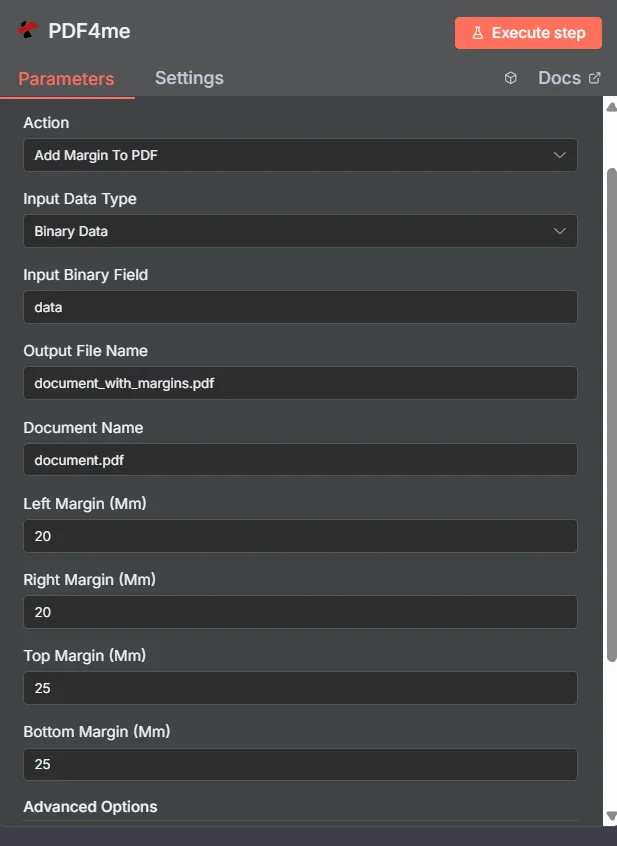
PDF4me 余白を追加 PDF パラメーターパネル n8n
自動マージン(n8nデスクトップとの比較 PDF 編集者
この検索結果のほとんどは、一度に1つのファイルしか編集できないエディタです。違いは、作業が行われる場所にあります。
| アプローチ | トリガー | 最適なフィット感 |
|---|---|---|
| Desktop editor or online margin tool | A person opens and adjusts one file by hand | A single document you are already working on |
| PDF4me Add Margin To PDF in n8n | A generated report, an upload, or a scheduled batch | Applying one house margin standard to every document that arrives, unattended |
マージンを追加するパラメータは何ですか? PDF 必要?
必須: アクション、入力データタイプ、その入力タイプに一致するフィールド、出力ファイル名、ドキュメント名、および4つのマージン値すべて。バイナリデータ出力名とカスタムプロファイルには、動作するデフォルト値が含まれています。
| パラメータ | 必須 | その機能 | 例 |
|---|---|---|---|
| Input Data Type | Required | Choose how to provide the PDF file to add margins to. Options: Binary Data, Base64 String, URL. Default is `Binary Data`. | Binary Data |
| Input Binary Field | Conditional | Name of the binary property that contains the PDF file. Shown when Input Data Type is Binary Data. Default is `data`. | data |
| Base64 PDF Content | Conditional | Base64 encoded PDF document content. Shown when Input Data Type is Base64 String. | JVBERi0xLjQK... |
| PDF URL | Conditional | URL to the PDF file to add margins to. Shown when Input Data Type is URL. | |
| Output File Name | Optional | Name for the output PDF file with margins. Default is `document_with_margins.pdf`. | document_with_margins.pdf |
| Document Name | Optional | Name of the source PDF file for reference. Default is `document.pdf`. | document.pdf |
| Left Margin (Mm) | Optional | Left margin in millimeters (0-100). Default is `20`. | 20 |
| Right Margin (Mm) | Optional | Right margin in millimeters (0-100). Default is `20`. | 20 |
| Top Margin (Mm) | Optional | Top margin in millimeters (0-100). Default is `25`. | 25 |
| Bottom Margin (Mm) | Optional | Bottom margin in millimeters (0-100). Default is `25`. | 25 |
| Advanced Options | Optional | Optional settings, collapsed behind Add Option. | Add Option |
| Custom Profiles | Optional | Use "JSON" to adjust custom properties. Review Profiles at https://dev.pdf4me.com/apiv2/documentation/ to set extra options for API calls. | { "preserveContentQuality": true } |
| Binary Data Output Name | Optional | Custom name for the binary data in n8n output. Default is `data`. | data |
出力フィールド
成功したランは1 n8n アイテム PDF マージンを適用した状態。
出力
ノードが返すフィールド。
| 分野 | タイプ | 内容物 |
|---|---|---|
fileName | String | Output File Name; `.pdf` is set as extension when it does not end in .pdf. |
mimeType | String | MIME type of the resulting file, for example `application/pdf`. |
fileSize | Number | Size of the resulting file in bytes. |
success | Boolean | True when the operation succeeded. |
message | String | Status message, `Margins added successfully`. |
data | Binary | The PDF with the added margins. |
余白を追加するにはどうすればいいですか? PDF で n8n?
- 追加 PDF4me あなたの n8n ワークフローを選択し、 余白を追加 PDF アクション。
- で 接続するための認証情報選択してください PDF4me 認証情報またはクリック 新しい認証情報を作成する そしてあなたの API 鍵。
- セット 入力データタイプ に バイナリデータ (デフォルト)、 Base64 String、 または URL 対応するソースを提供する PDF 分野。
- 入力 左余白(mm)、 右余白(mm)、 上部余白(mm)、 そして 下部余白(mm) ミリメートル単位。
- セット 出力ファイル名 (必ず
.pdf) そして 文書名 ソースファイルの場合。 - ノードを実行し、返されたデータをルーティングします。 PDF ストレージ、メール、印刷キューなど、次のステップに進みます。
典型的な構成
ワークフローの例Common n8n workflow patterns using Add Margin to PDF.
印刷レポートの綴じ余白
- スケジュールされたレポートは次のように生成されます PDF 一晩中。
- 余白を追加 PDF 左余白を広くし、右、上、下の余白を狭く設定します。
- 結果は、スパイラル綴じまたはコーム綴じ用の余裕を残した状態で印刷キューに送られます。
配布資料への注釈スペース
- 研修資料は共有フォルダにアップロードされます。
- 余白を追加 PDF 読者がメモを書き込めるように、右側の余白を広げます。
- 注釈付きの原稿が参加者に配布される。
受信ファイルにおける住宅レイアウトの標準
- ウェブフックが受信する PDFs レイアウトに一貫性のない外部サプライヤーからのもの。
- 余白を追加 PDF すべてのファイルに同じ4つの値を適用します。
- 文書は統一されたページ形式でアーカイブに収蔵される。
余白、次にページ番号
- 統合文書は、複数の情報源から構成される。
- 余白を追加 PDF まず底部のクリアランスを確保します。
- ページを追加 Number に PDF そして、新しいフッタースペース内に番号を配置します。
実践的なヒント
Convert inches before you type
The fields only accept millimetres. A one inch margin is 25.4 and a half inch is 12.7, so convert a print spec once and reuse the numbers.
Add margin before adding page numbers
Creating the bottom clearance first gives a page number or footer stamp somewhere clean to sit, rather than crowding existing content.
Proof a representative file, not the simplest one
Pick a document with dense edge-to-edge content for the test run, since that is where a margin change is most visible.
Use an asymmetric left value for binding
Anything that will be bound, punched, or stapled needs more room on the binding edge than on the outer edge.
Split first if pages need different margins
The values apply across the document, so a mixed layout needs a split, per-part margin run, and merge back together.
Branch on the success field
Test the returned success boolean before sending the file onward so a failed run raises an alert instead of quietly forwarding the original.
チートシート
| 分野 | 価値 |
|---|---|
| Action | Add Margin To PDF |
| Input Data Type | Binary Data |
| Input Binary Field | data |
| Output File Name | document_with_margins.pdf |
| Document Name | document.pdf |
| Left / Right Margin (Mm) | 20 / 20 |
| Top / Bottom Margin (Mm) | 25 / 25 |
| Binary Data Output Name | data |
| Credentials | PDF4me API credential |
よくある質問
関連アクション
ページを追加 Number に PDF
下部の余白を設定することで、すっきりとしたフッタースペースが確保されたら、次に取るべき自然なステップはこれです。
追加 HTML ヘッダー フッター PDF
新しくできた上下の空きスペースに、ブランドロゴ入りのヘッダーとフッターのコンテンツを配置してください。
テキストスタンプを追加する PDF
先ほど作成した余白領域にテキストスタンプを配置してください。
ドキュメントを回転する
まずページの向きを修正して、左余白が綴じ目と一致するようにしてください。
他のプラットフォームでの同じタスク
余白を追加 PDF で Make
同じマージンエンジンは Make モジュールに配線され、 Make シナリオ。
余白を追加 PDF で Zapier
数千ものSaaSアプリやWebhookから、マージン調整をトリガーできます。
余白を追加 PDF で Power Automate
Microsoft 365 流れ SharePoint、 OutlookTeams、およびDataverseとの連携。
余白を追加 PDF REST API
生 PDF4me エンドポイント。カスタムバックエンドコードやPostmanテスト用。