添付ファイルを追加 PDF で n8n
添付ファイルを追加 PDF は PDF4me ノードアクション n8n 1つ以上のファイルを PDFスプレッドシート、画像、アーカイブ、または2番目の PDF 書類と並行してではなく、書類と一緒に輸送されます。契約書に裏付けとなる証拠書類を添付したり、報告書の隣に生データを送付したり、コンプライアンス申請書類に証明書を同梱したりする際に使用できます。
このノードの機能
PDF4me: 添付ファイルを追加 PDF ホストを取る PDF バイナリデータから、 Base64 Stringまたは URLすると、リストした各ファイルが埋め込まれます。 添付ファイル 添付ファイルは、別個のオブジェクトとして内部に格納されます。マージとは異なり、添付ファイルは独自のフォーマットとファイル名を保持し、受信者は個別に開いたり保存したりできます。各添付ファイルは異なるソースから取得できるため、前のノードからのバイナリファイルと、次のノードから取得したファイルなどが含まれます。 URL 同じ実行に組み込むことができます。
認証 API リクエスト
毎 PDF4me ノード n8n 有効な 接続するための認証情報. 作成または選択して、 PDF4me API ワークフローが添付ファイル要求を安全に認証できるようにするためのキー。
見逃してはならない重要な事実
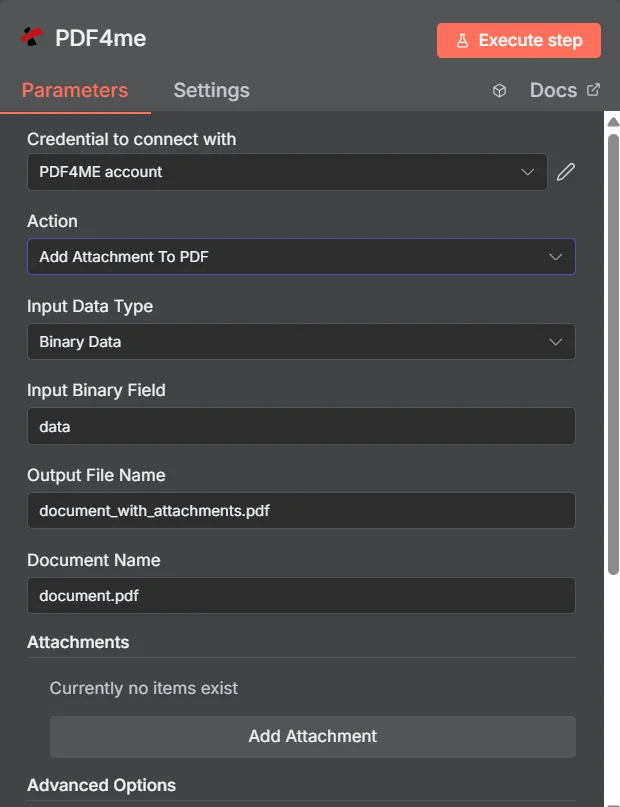
PDF4me 添付ファイルを追加 PDF パラメーターパネル n8n最初のエントリが追加される前に添付ファイルコレクションが空になっている
添付 vs 結合 vs 圧縮
複数のファイルを1つのファイルとして送信する方法は3つあり、それぞれ受信者にとって異なる影響があります。
| アプローチ | 受取人が受け取るもの | 最適なフィット感 |
|---|---|---|
| Add Attachment to PDF | One PDF that opens normally, with the extra files available in the attachments panel | Supporting material that must stay in its original format, such as a spreadsheet or an archive |
| Merge PDFs | One continuous document where all pages read in sequence | Content that genuinely belongs together as a single readable document |
| Zip the files together | An archive that must be unpacked before anything can be read | Bulk transfer where nothing needs to be readable without extracting first |
添付ファイルを追加するパラメータは何ですか PDF 必要?
必須: アクション、入力データタイプ、その入力タイプに一致するフィールド、出力ファイル名、ドキュメント名、および添付ファイルの下に少なくとも1つのエントリが必要です。バイナリデータ出力名とカスタムプロファイルには、動作するデフォルト値が設定されています。
| パラメータ | 必須 | その機能 | 例 |
|---|---|---|---|
| Input Data Type | Required | Choose how to provide the PDF file to add attachments to. Options: Binary Data, Base64 String, URL. Default is `Binary Data`. | Binary Data |
| Input Binary Field | Conditional | Name of the binary property that contains the PDF file (usually "data" for file uploads). Shown when Input Data Type is Binary Data. Default is `data`. | data |
| Base64 PDF Content | Conditional | Base64 encoded PDF document content. Shown when Input Data Type is Base64 String. | SGVsbG8gV29ybGQ= |
| PDF URL | Conditional | URL to the PDF file to add attachments to. Shown when Input Data Type is URL. | |
| Output File Name | Optional | Name for the output PDF file with attachments. Default is `document_with_attachments.pdf`. | document_with_attachments.pdf |
| Document Name | Optional | Name of the source PDF file for reference. Default is `document.pdf`. | document.pdf |
| Attachments | Optional | Files to attach to the PDF document. | One entry per embedded file |
| Advanced Options | Optional | Optional settings, collapsed behind Add Option. | Add Option |
| Custom Profiles | Optional | Use "JSON" to adjust custom properties. Review Profiles at https://dev.pdf4me.com/apiv2/documentation/ to set extra options for API calls. | { "preserveMetadata": true } |
| Binary Data Output Name | Optional | Custom name for the binary data in n8n output. Default is `data`. | data |
各添付ファイルエントリ内のフィールド
あなたが作成するすべてのエントリ 添付ファイルを追加 独自のフィールドセットを公開します。
出力フィールド
成功したランは1 n8n アイテム PDF 埋め込みファイルを含む。
出力
ノードが返すフィールド。
| 分野 | タイプ | 内容物 |
|---|---|---|
success | Boolean | True when the operation succeeded. |
message | String | Status message, `PDF with attachments created successfully`. |
fileName | String | Output File Name; `.pdf` is set as extension when it does not end in .pdf. |
mimeType | String | MIME type of the resulting file, for example `application/pdf`. |
fileSize | Number | Size of the resulting file in bytes. |
attachmentCount | Number | Number of attachments that were added. |
data | Binary | The PDF with the attachments. |
添付ファイルを追加するにはどうすればいいですか? PDF で n8n?
- 追加 PDF4me あなたの n8n ワークフローを選択し、 添付ファイルを追加 PDF アクション。
- で 接続するための認証情報選択してください PDF4me 認証情報またはクリック 新しい認証情報を作成する そしてあなたの API 鍵。
- セット 入力データタイプ に バイナリデータ (デフォルト)、 Base64 String、 または URL 対応するホストを提供する PDF 分野。
- 下 添付ファイル、 クリック 添付ファイルを追加 ファイルごとに一度設定し、 添付ファイルコンテンツタイプ、 添付ファイル名、および一致するソースフィールド。
- セット 出力ファイル名 (必ず
.pdf) そして 文書名 ソースファイルの場合。 - ノードを実行し、返されたデータをルーティングします。 PDF 前進、確認中
attachmentCount予想していたファイル数と比較して。
典型的な構成
ワークフローの例Common n8n workflow patterns using Add Attachment to PDF.
- 請求書 PDF 請求データから生成されます。
- 添付ファイルを追加 PDF 対応する領収書と承認記録を埋め込みます。
- 1つのファイルは、すべての証拠書類を同梱した状態で、買掛金担当部署に送られます。
- スケジュールされた分析レポートは、 PDF。
- 添付ファイルを追加 PDF 基盤となるものを埋め込む CSV 名前付き添付ファイルとしてエクスポートします。
- 読者は物語の流れを理解でき、必要に応じて生の数値を取り出して検証することができる。
- 署名依頼に応じて、テンプレートに基づいて契約書が作成されます。
- 添付ファイルを追加 PDF 証明書とスケジュールを埋め込む URLs。
- 相手方は、署名するための単一の完結した文書を受け取ります。
- アイテムループノードは、提出期間の証拠ファイルを収集します。
- 添付ファイルを追加 PDF それぞれを表紙書類に埋め込む。
- バンドルはアーカイブされており、添付ファイルを抽出します PDF ご要望があれば、後ほど解凍いたします。
実践的なヒント
チートシート
| 分野 | 価値 |
|---|---|
| Action | Add Attachment To PDF |
| Input Data Type | Binary Data |
| Input Binary Field | data |
| Output File Name | document_with_attachments.pdf |
| Document Name | document.pdf |
| Attachments | One entry per file, added with Add Attachment |
| Attachment Content Type | Binary Data |
| Attachment Name | supporting_data.xlsx |
| Binary Data Output Name | data |
| Credentials | PDF4me API credential |