変換する VISIO 使用 n8n アクション
PDF4me 変換する VISIO マイクロソフトを変革する Visio 高品質な図表 PDF 文書を通じて n8n 自動化ワークフロー。プロセス Visio ファイル(.vsd、.vsdx)を介して n8n トリガー、バイナリデータ、base64文字列、または公開 URL生成する PDF保存された図、フローチャート、組織図、ネットワーク図、技術図面、図形、コネクタ、複数ページ処理、および書式設定を備えたこのソリューションは、正確な処理を必要とする技術文書、プロセス文書、図のアーカイブ、エンジニアリング図面、ワークフローの視覚化、および自動図変換ワークフローに最適です。 Visio プロフェッショナルなレンダリング PDF 出力とシームレスな統合。
関連ブログ記事
この機能に関するブログ記事はまだありません。近日公開予定です。
その間、PDF4me ブログを閲覧して、あらゆるプラットフォームのチュートリアルやワークフローをご覧ください。
ブログをご覧ください →
設定
追加する PDF4me "変換する VISIO「ノードをあなたの n8n ワークフローを実行し、必要なパラメータを設定します。初期設定手順については、こちらをご覧ください。 n8n 統合ガイド。
前提条件:
- PDF4me API 資格
- n8n ワークフローへのアクセス
構成:
- 追加 PDF4me ノードからワークフローへ
- 「変換」を選択してください VISIO" アクション
- 入力パラメータを設定します(下記参照)。
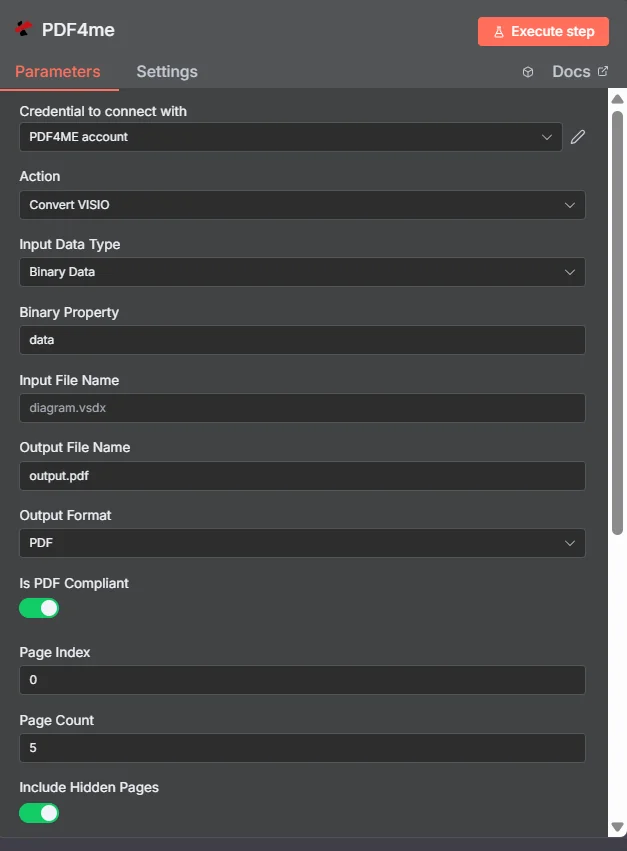
パラメータ
Convertのパラメータ一覧 VISIO アクション。これらのパラメーターを設定して制御します。 VISIO ファイル変換。
重要: アスタリスク(***)が付いているパラメータは必須であり、アクションが正しく機能するためには必ず指定する必要があります。
| パラメータ | 必須 | その機能 | 例 |
|---|---|---|---|
| Input Data Type | Required | How to provide the input VISIO file. Options: Binary Data, Base64 String, URL. Default is `Binary Data`. | Binary Data |
| Binary Property | Conditional | Name of the binary property containing the VISIO file to convert. Shown when Input Data Type is Binary Data. Default is `data`. | data |
| Input File Name | Conditional | Name of the input VISIO file (including extension). If not provided, will use the filename from binary data. Shown when Input Data Type is Binary Data. | diagram.vsdx |
| Base64 Content | Conditional | Base64 encoded content of the VISIO file to convert. Shown when Input Data Type is Base64 String. | UEsDBBQABgAI... |
| Input File Name | Conditional | Name of the input VISIO file (including extension). Shown when Input Data Type is Base64 String. | diagram.vsdx |
| Input File Name | Conditional | Name of the input VISIO file (including extension). Shown when Input Data Type is URL. | diagram.vsdx |
| File URL | Conditional | URL of the VISIO file to convert to PDF. Shown when Input Data Type is URL. | https://abc.com/sample.vsdx |
| Output File Name | Optional | Name for the output PDF file. Default is `output.pdf`. | output.pdf |
| Output Format | Required | Desired output format. Options: PDF, JPG, PNG, TIFF. Default is `PDF`. | PDF |
| Is PDF Compliant | Required | Whether to make PDF compliant with standards. Default is `Yes`. | Yes |
| Page Index | Required | Start from first page (0-indexed). Default is `0`. | 0 |
| Page Count | Required | Number of pages to convert (1-100). Default is `5`. | 5 |
| Include Hidden Pages | Required | Whether to include hidden pages (True/False). Default is `Yes`. | Yes |
| Save Foreground Page | Required | Whether to save foreground elements (True/False). Default is `Yes`. | Yes |
| Save Tool Bar | Required | Whether to include toolbar (True/False). Default is `Yes`. | Yes |
| Auto Fit | Required | Whether to auto-fit content to page (True/False). Default is `Yes`. | Yes |
| Async | Required | Whether to enable asynchronous processing. Default is `Yes`. | Yes |
| Advanced Options | Optional | Optional settings, collapsed behind Add Option. | Add Option |
| Custom Profiles | Optional | Use "JSON" to adjust custom properties. Review Profiles at https://dev.pdf4me.com/apiv2/documentation/ to set extra options for API calls. | { "outputDataFormat": "base64", "preserveVectorGraphics": true } |
| Binary Data Output Name | Optional | Custom name for the binary data in n8n output. Default is `data`. | data |
出力
出力パラメータ
| 分野 | タイプ | 内容物 |
|---|---|---|
fileName | String | File name of the resulting file. |
mimeType | String | MIME type of the resulting file, for example `application/pdf`. |
fileSize | Number | Size of the resulting file in bytes. |
success | Boolean | True when the operation succeeded. |
inputDataType | String | Input Data Type that was used (how the file was provided). |
sourceFileName | String | Name of the input file. |
conversionOptions | String | The conversion settings that were sent to PDF4me (output format, page range and the other options). |
data | Binary | The converted file, in the chosen Output Format. |
N8N 行動対応
の PDF4me 変換する VISIO API 複数の形式で表示可能なレスポンスを返します。ニーズに最適な表示形式を選択してください。
- JSON
- Table
- Schema
- Binary
JSON 回答形式
生 JSON からの応答 API:
{
  "fileName": "output.pdf",
  "mimeType": "application/pdf",
  "fileSize": 64725,
  "success": true,
  "inputDataType": "base64",
  "sourceFileName": "sample.vsdx",
  "conversionOptions": {
    "outputFormat": "PDF",
    "pageIndex": 0,
    "pageCount": 5,
    "includeHiddenPages": true,
    "saveForegroundPage": true,
    "isPdfCompliant": true,
    "saveToolBar": true,
    "autoFit": true
  }
}
テーブルビュー
構造化された表形式の応答データ:
| パラメータ | 価値 |
|---|---|
| fileName | output.pdf |
| mimeType | application/pdf |
| fileSize | 64725 |
| success | true |
| inputDataType | base64 |
| sourceFileName | sample.vsdx |
| conversionOptions | Object 変換設定を含む |
| conversionOptions.outputFormat | PDF |
| conversionOptions.pageIndex | 0 |
| conversionOptions.pageCount | 5 |
| conversionOptions.includeHiddenPages | true |
| conversionOptions.saveForegroundPage | true |
| conversionOptions.isPdfCompliant | true |
| conversionOptions.saveToolBar | true |
| conversionOptions.autoFit | true |
スキーマビュー
レスポンスのデータ構造と型:
1 item
fileName: AB output.pdf
mimeType: AB application/pdf
fileSize: # 64725
success: ☑ true
inputDataType: AB base64
sourceFileName: AB sample.vsdx
conversionOptions: {}
conversionOptions.outputFormat: AB PDF
conversionOptions.pageIndex: # 0
conversionOptions.pageCount: # 5
conversionOptions.includeHiddenPages: ☑ true
conversionOptions.saveForegroundPage: ☑ true
conversionOptions.isPdfCompliant: ☑ true
conversionOptions.saveToolBar: ☑ true
conversionOptions.autoFit: ☑ true
タイプ指標:
AB= String#= 番号☑= Boolean
バイナリデータビュー
実際 PDF ファイルデータとメタデータ:
data
─────────────────────────────
File Name: output.pdf
File Extension: pdf
Mime Type: application/pdf
File Size: 240.0 KB
バイナリデータアクセス:
- n8n バイナリオブジェクト:
$binary.data.data - Base64 コンテンツ直接使用可能
- ファイル操作ダウンロード、メール送信、または保存の準備ができました
ユースケース
技術文書とシステムアーキテクチャ
- 変換する Visio 図、フローチャート、技術図面 PDF 技術文書、システムアーキテクチャ文書、およびエンジニアリング仕様のフォーマット
- プロセスネットワーク図、インフラストラクチャマップ、システム設計を変換して PDF プロジェクト文書、クライアントプレゼンテーション、および技術レビューのフォーマット
- プロセスフローチャート、ワークフロー図、組織図を変換して PDF ビジネスプロセス文書、トレーニング資料、および運用手順のフォーマット
プロジェクト管理と業務プロセス文書化
- 変換する Visio プロジェクト計画、ガントチャート、タイムライン図 PDF プロジェクト文書、ステークホルダーとのコミュニケーション、およびプロジェクト管理レポートのフォーマット
- ビジネスプロセスマップ、ワークフロー図、組織図を変換して処理します。 PDF プロセス改善、トレーニング、コンプライアンス文書のフォーマット
- 意思決定ツリー、因果関係図、品質管理図を変換して PDF ビジネス分析、問題解決、継続的改善イニシアチブのためのフォーマット
コンプライアンスおよび規制関連文書
- 変換する Visio コンプライアンス図、規制フローチャート、監査証跡 PDF 規制当局への提出書類、コンプライアンス報告、監査文書のフォーマット
- プロセス安全図、緊急手順、リスク評価チャートを変換して PDF 安全に関する文書、トレーニング、および規制遵守のためのフォーマット
- 品質管理図、検査手順、認証フローチャートを変換して PDF 品質管理、認証プロセス、および規制遵守のためのフォーマット