変換する URL に PDF 使用 n8n アクション
PDF4me 変換する URL に PDF ウェブページを高品質に変換します PDF 文書を通じて n8n 自動化ワークフロー。プロセスウェブ URL離れて n8n 完全なウェブページをキャプチャするためのトリガー HTML、 CSS、 JavaScript画像、フォント、インタラクティブ要素を正確なレンダリング、レスポンシブレイアウト処理、フルページキャプチャ、プロフェッショナルなフォーマットで表示します。このソリューションは、信頼性の高いWebページアーカイブ、ドキュメント生成、コンテンツ保存、コンプライアンスレポート作成、Webスクレイピング、自動スナップショット、デジタル記録管理ワークフローに最適です。 URL-に-PDF 正確なウェブレンダリングとシームレスな統合による変換。
設定
追加する PDF4me "変換する URL に PDF「ノードをあなたの n8n ワークフローを実行し、必要なパラメータを設定します。初期設定手順については、こちらをご覧ください。 n8n 統合ガイド。
前提条件:
- PDF4me API 資格
- n8n ワークフローへのアクセス
構成:
- 追加 PDF4me ノードからワークフローへ
- 「変換」を選択してください URL に PDF" アクション
- 入力パラメータを設定します(下記参照)。
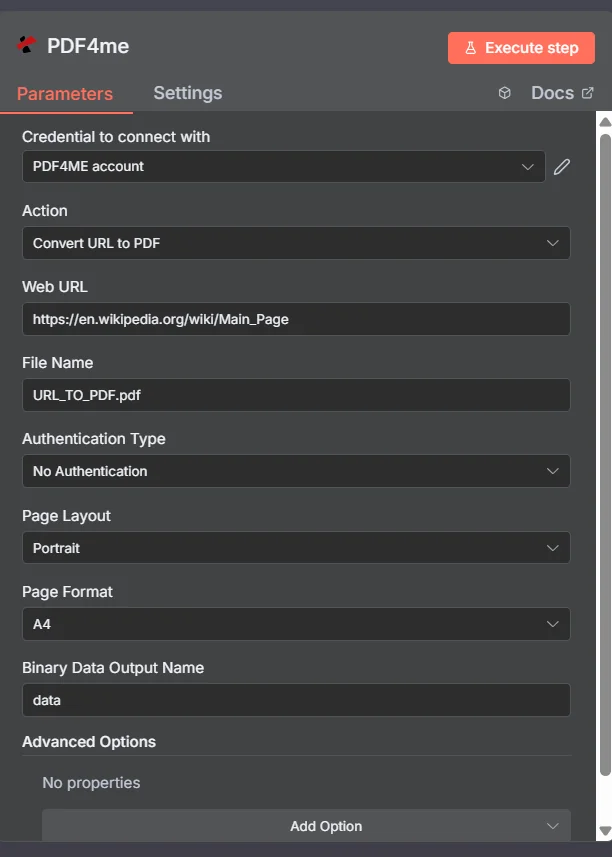
パラメータ
Convertのパラメータ一覧 URL に PDF アクション。これらのパラメーターを設定して制御します。 URL に PDF 変換。
重要: アスタリスク(***)が付いているパラメータは必須であり、アクションが正しく機能するためには必ず指定する必要があります。
| パラメータ | 必須 | その機能 | 例 |
|---|---|---|---|
| Web URL | Required | Web URL of the page to be converted to PDF. | https://example.com/page |
| File Name | Optional | Output PDF file name with extension. Default is `converted_page.pdf`. | converted_page.pdf |
| Authentication Type | Optional | Authentication type for the target website. Options: No Authentication, Basic Authentication. Default is `No Authentication`. | No Authentication |
| Username | Conditional | Username if authentication is required. Shown when Authentication Type is Basic Authentication. | |
| Password | Conditional | Password if authentication is required. Shown when Authentication Type is Basic Authentication. | |
| Page Layout | Optional | Page orientation for the PDF. Options: Portrait, Landscape. Default is `Portrait`. | Portrait |
| Page Format | Optional | Page format for the PDF. Options: A0, A1, A2, A3, A4, A5, A6, A7, A8, Executive, Legal, Statement, Tabloid. Default is `A4`. | A4 |
| Binary Data Output Name | Optional | Custom name for the binary data in n8n output. Default is `data`. | data |
| Advanced Options | Optional | Optional settings, collapsed behind Add Option. | Add Option |
| Bottom Margin | Optional | Bottom margin of PDF (e.g., 20px, 1cm, 0.5in). Default is `20px`. | 20px |
| Custom Profiles | Optional | Use "JSON" to adjust custom properties. Review Profiles at https://developer.pdf4me.com/api/profiles/index.html to set extra options for API calls. | { "outputDataFormat": "base64" } |
| Display Header Footer | Optional | Whether to show header and footer in PDF. Default is `No`. | No |
| Left Margin | Optional | Left margin of PDF (e.g., 20px, 1cm, 0.5in). Default is `20px`. | 20px |
| Print Background | Optional | Whether to include background colors and images. Default is `Yes`. | Yes |
| Right Margin | Optional | Right margin of PDF (e.g., 20px, 1cm, 0.5in). Default is `20px`. | 20px |
| Scale | Optional | Scale factor for the web page (e.g., 0.8 = 80%). Default is `1`. | 1 |
| Top Margin | Optional | Top margin of PDF (e.g., 20px, 1cm, 0.5in). Default is `20px`. | 20px |
出力
出力パラメータ
| 分野 | タイプ | 内容物 |
|---|---|---|
fileName | String | File name of the resulting file. |
mimeType | String | MIME type of the resulting file, for example `application/pdf`. |
fileSize | Number | Size of the resulting file in bytes. |
success | Boolean | True when the operation succeeded. |
sourceUrl | String | Web URL that was converted. |
layout | String | Page layout (orientation) that was used. |
format | String | Page format (size) that was used. |
data | Binary | The resulting PDF. |
###N8N 行動対応
の PDF4me 変換する URL に PDF API 複数の形式で表示可能なレスポンスを返します。ニーズに最適な表示形式を選択してください。
- JSON
- Table
- Schema
- Binary
JSON 回答形式
生 JSON からの応答 API:
[
  {
    "fileName": "URL_TO_PDF.pdf",
    "mimeType": "application/pdf",
    "fileSize": 1347439,
    "success": true,
    "sourceUrl": "https://en.wikipedia.org/wiki/Main_Page",
    "layout": "portrait",
    "format": "A4"
  }
]
テーブルビュー
構造化された表形式の応答データ:
| パラメータ | 価値 |
|---|---|
| fileName | URL_TO_PDF.pdf |
| mimeType | application/pdf |
| fileSize | 1347439 |
| success | true |
| sourceUrl | https://en.wikipedia.org/wiki/Main_Page |
| layout | portrait |
| format | A4 |
スキーマビュー
レスポンスのデータ構造と型:
1 item
fileName: AB URL_TO_PDF.pdf
mimeType: AB application/pdf
fileSize: # 1347439
success: ☑ true
sourceUrl: AB https://en.wikipedia.org/wiki/Main_Page
layout: AB portrait
format: AB A4
タイプ指標:
AB= String#= 番号☑= Boolean
バイナリデータビュー
実際 PDF ファイルデータとメタデータ:
data
─────────────────────────────
File Name: URL_TO_PDF.pdf
File Extension: pdf
Mime Type: application/pdf
File Size: 1.35 MB
バイナリデータアクセス:
- n8n バイナリオブジェクト:
$binary.data.data - Base64 コンテンツ直接使用可能
- ファイル操作ダウンロード、メール送信、または保存の準備ができました
ユースケース
ウェブコンテンツのアーカイブと法的文書作成
- ウェブページ、オンライン記事、デジタルコンテンツを変換して PDF 法的証拠、コンプライアンス文書、および規制記録の保管のためのフォーマット
- 動的なウェブコンテンツ、ソーシャルメディアの投稿、オンラインコミュニケーションを変換して処理します。 PDF 法的証拠開示、訴訟支援、および証拠保全のためのフォーマット
- ウェブサイトのスナップショット、オンラインドキュメント、デジタルアセットをアーカイブして PDF 歴史的保存、コンプライアンス監査、および規制報告のためのフォーマット
ビジネスインテリジェンスと競合分析
- 競合他社のウェブサイト、市場調査ページ、業界レポートを変換して PDF 競合分析、市場情報、戦略計画のためのフォーマット
- オンラインダッシュボード、分析レポート、ビジネス指標を変換して処理します。 PDF 経営幹部向け報告書、取締役会向けプレゼンテーション、および利害関係者向けコミュニケーションのフォーマット
- ウェブベースのアンケート、顧客からのフィードバック、オンラインレビューを変換して PDF 分析、報告、およびビジネス上の意思決定のためのフォーマット
コンテンツ管理とデジタル出版
- ウェブベースのコンテンツ、オンライン記事、デジタル出版物を変換して PDF 印刷配布、オフラインアクセス、コンテンツアーカイブのためのフォーマット
- オンラインフォーム、Webアプリケーション、デジタルワークフローを変換して処理します。 PDF 記録管理、コンプライアンス文書、およびプロセス文書のフォーマット
- ウェブベースのカタログ、製品ページ、マーケティングコンテンツを変換して PDF オフライン配布、印刷物によるマーケティング、顧客コミュニケーションのためのフォーマット