変換する PDF Word に n8n アクション
PDF4me 変換する PDF ワード 変換する PDF ドキュメントを完全に編集可能な Word ファイルに変換 n8n 自動化ワークフロー。プロセス PDF離れて n8n トリガー、バイナリデータ、base64文字列、または公開 URL生成する DOCX インテリジェントな段落検出、書式保持、抽出されたテキストと画像、表構造保持を備えたファイル、 OCR スキャンされたドキュメントと編集可能なコンテンツレイヤーをサポートします。このソリューションは、ドキュメント編集、コンテンツの再利用、テンプレート作成、契約書の変更、提案書の編集、および正確なWord文書作成を必要とする自動Word生成ワークフローに最適です。 PDF プロフェッショナルなフォーマットとシームレスな統合による変換。
設定
追加する PDF4me "変換する PDF 「Word」ノードをあなたの n8n ワークフローを実行し、必要なパラメータを設定します。初期設定手順については、こちらをご覧ください。 n8n 統合ガイド。
前提条件:
- PDF4me API 資格
- n8n ワークフローへのアクセス
構成:
- 追加 PDF4me ノードからワークフローへ
- 「変換」を選択してください PDF 「Word」アクション
- 入力パラメータを設定します(下記参照)。
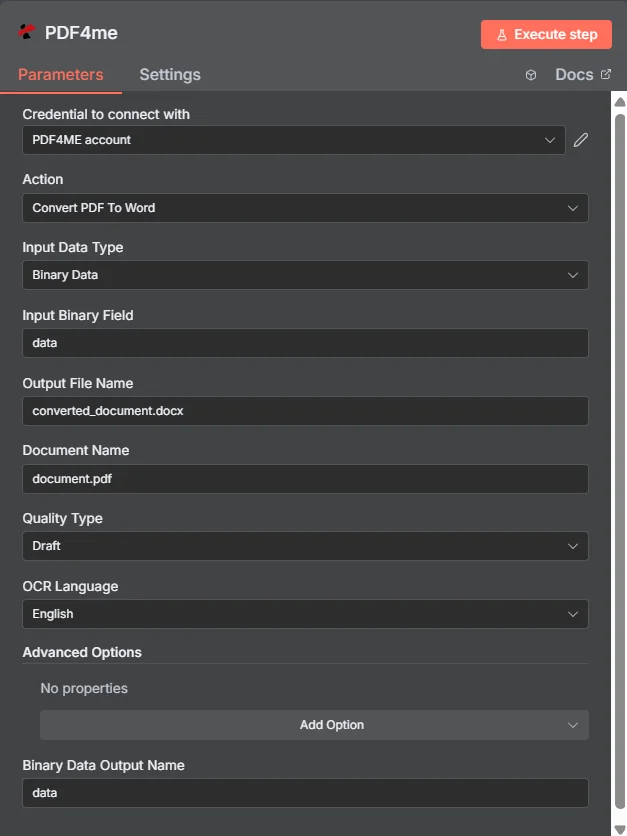
パラメータ
Convertのパラメータ一覧 PDF Word アクション。これらのパラメーターを設定して制御します。 PDF Wordへの変換。
重要: アスタリスク(***)が付いているパラメータは必須であり、アクションが正しく機能するためには必ず指定する必要があります。
| パラメータ | 必須 | その機能 | 例 |
|---|---|---|---|
| Input Data Type | Required | Choose how to provide the PDF file to convert. Options: Binary Data, Base64 String, URL. Default is `Binary Data`. | Binary Data |
| Binary Property | Conditional | Name of the binary property containing the file to convert. Shown when Input Data Type is Binary Data. Default is `data`. | data |
| Input File Name | Conditional | Name of the input file (including extension). If not provided, will use the filename from binary data. Shown when Input Data Type is Binary Data. | converted_document.docx |
| Base64 Content | Conditional | Base64 encoded content of the file to convert. Shown when Input Data Type is Base64 String. | UEsDBBQABgAI... |
| Input File Name | Conditional | Name of the input file (including extension). Shown when Input Data Type is Base64 String. | converted_document.docx |
| File URL | Conditional | URL of the file to convert. Shown when Input Data Type is URL. | https://abc.com/sample.pdf |
| Input File Name | Conditional | Name of the input file (including extension). Shown when Input Data Type is URL. | converted_document.docx |
| Output File Name | Optional | Name for the output Word document file. Default is `converted_document.docx`. | converted_document.docx |
| Document Name | Optional | Name of the source PDF file for reference. Default is `document.pdf`. | document.pdf |
| Quality Type | Required | Choose the quality type. Options: Draft, High. Default is `Draft`. | Draft |
| OCR Language | Optional | OCR language for text recognition in images/scanned PDFs. Options: Arabic, Chinese (Simplified), Chinese (Traditional), Danish, Dutch, English, Finnish, French, German, Italian, Japanese, Korean, Norwegian, Portuguese, Russian, Spanish, Swedish. Default is `English`. | English |
| Advanced Options | Optional | Optional settings, collapsed behind Add Option. | Add Option |
| Custom Profiles | Optional | Use "JSON" to adjust custom properties. Review Profiles at https://dev.pdf4me.com/apiv2/documentation/ to set extra options for API calls. | { "outputDataFormat": "base64", "preserveFormatting": true } |
| Max Retries | Optional | Maximum number of polling attempts for async processing (increased for complex PDFs). Default is `30`. | 30 |
| Merge All Sheets | Optional | Whether to combine multiple pages into single document flow. Default is `Yes`. | Yes |
| Preserve Output Format | Optional | Whether to preserve original formatting when possible. Default is `Yes`. | Yes |
| Retry Delay (Seconds) | Optional | Base seconds to wait between polling attempts (actual delay increases exponentially). Default is `15`. | 15 |
| Use OCR When Needed | Optional | Whether to use OCR (Optical Character Recognition) for scanned PDFs. Default is `Yes`. | Yes |
| Binary Data Output Name | Optional | Custom name for the binary data in n8n output. Default is `data`. | data |
出力
出力パラメータ
| 分野 | タイプ | 内容物 |
|---|---|---|
fileName | String | File name of the resulting file. |
mimeType | String | MIME type of the resulting file, for example `application/pdf`. |
fileSize | Number | Size of the resulting file in bytes. |
success | Boolean | True when the operation succeeded. |
inputDataType | String | Input Data Type that was used (how the file was provided). |
sourceFileName | String | Name of the input file. |
originalFileName | String | Name of the input file. |
qualityType | String | Quality Type that was used for the conversion. |
language | String | OCR language that was used. |
data | Binary | The resulting Word document. |
N8N 行動対応
の PDF4me 変換する PDF ワード API 複数の形式で表示可能なレスポンスを返します。ニーズに最適な表示形式を選択してください。
- JSON
- Table
- Schema
- Binary
JSON 回答形式
生 JSON からの応答 API:
{
  "fileName": "converted_document.docx",
  "mimeType": "application/vnd.openxmlformats-officedocument.wordprocessingml.document",
  "fileSize": 8782,
  "success": true,
  "inputDataType": "base64",
  "sourceFileName": "document.pdf",
  "qualityType": "Draft",
  "language": "English"
}
テーブルビュー
構造化された表形式の応答データ:
| パラメータ | 価値 |
|---|---|
| fileName | converted_document.docx |
| mimeType | application/vnd.openxmlformats-officedocument.wordprocessingml.document |
| fileSize | 8782 |
| success | true |
| inputDataType | base64 |
| sourceFileName | document.pdf |
| qualityType | Draft |
| language | English |
スキーマビュー
レスポンスのデータ構造と型:
1 item
fileName: AB converted_document.docx
mimeType: AB application/vnd.openxmlformats-officedocument.wordprocessingml.document
fileSize: # 8782
success: ☑ true
inputDataType: AB base64
sourceFileName: AB document.pdf
qualityType: AB Draft
language: AB English
タイプ指標:
AB= String#= 番号☑= Boolean
バイナリデータビュー
実際のWordファイルデータとメタデータ:
data
─────────────────────────────
File Name: converted_document.docx
File Extension: docx
Mime Type: application/vnd.openxmlformats-officedocument.wordprocessingml.document
File Size: 240.0 KB
バイナリデータアクセス:
- n8n バイナリオブジェクト:
$binary.data.data - Base64 コンテンツ直接使用可能
- ファイル操作ダウンロード、メール送信、または保存の準備ができました
ユースケース
文書編集とコンテンツ管理
- 変換する PDF 複数のチームメンバーが変更を加える必要がある共同編集、コンテンツ更新、および文書改訂ワークフローのために、文書をWord形式に変換します。
- スキャンした文書を処理し、 PDF レポートをWord形式に変換して、テキスト編集、書式調整、および内容変更を行う
- 変身 PDF 契約書、合意書、および法的文書をWord形式に変換し、法律およびビジネスプロセスにおける編集、交渉、およびバージョン管理に活用する。
コンテンツ移行とシステム統合
- 移行 PDF コンテンツをWord形式に変換し、編集可能なドキュメント形式を必要とするコンテンツ管理システム、ドキュメントワークフロー、コラボレーションプラットフォームとの統合を可能にする。
- 変換する PDF レポートや分析文書をWord形式に変換し、さらなる分析、データ操作、およびビジネスインテリジェンスツールとの統合を行う。
- プロセス PDF フォームやテンプレートをWord形式に変換して、カスタマイズ、ブランディングの更新、テンプレートの変更を行う
学術研究用途
- 変換する PDF 研究論文、学術記事、学術文書をWord形式に変換し、編集、注釈付け、共同研究プロジェクトに活用する。
- プロセス PDF 教科書や教育資料をWord形式に変換し、コンテンツの適応、ローカライズ、カリキュラム開発に活用する。
- 変身 PDF 論文、学位論文、学術論文をWord形式に変換し、編集、書式設定、学術機関への提出を行う。