変換する HTML に PDF 使用 n8n アクション
PDF4me 変換する HTML に PDF 変換する HTML コンテンツを高品質に PDF 文書を通じて n8n 自動化ワークフロー。プロセス HTML ファイル経由 n8n トリガー、バイナリデータ、base64文字列、または公開 URL生成する PDF保存されたs CSS スタイル、埋め込み画像、フォント、レスポンシブレイアウト、動的コンテンツレンダリング。このソリューションは、Web ページのアーカイブ、自動レポート生成、電子メールからWeb ページのアーカイブに最適です。PDF 変換、請求書作成、文書システム、および正確な情報を必要とするコンテンツ公開ワークフロー HTML プロフェッショナルなレンダリング PDF 出力とシームレスな統合。
設定
追加する PDF4me "変換する HTML に PDF「ノードをあなたの n8n ワークフローを実行し、必要なパラメータを設定します。初期設定手順については、こちらをご覧ください。 n8n 統合ガイド。
前提条件:
- PDF4me API 資格
- n8n ワークフローへのアクセス
構成:
- 追加 PDF4me ノードからワークフローへ
- 「変換」を選択してください HTML に PDF" アクション
- 入力パラメータを設定します(下記参照)。
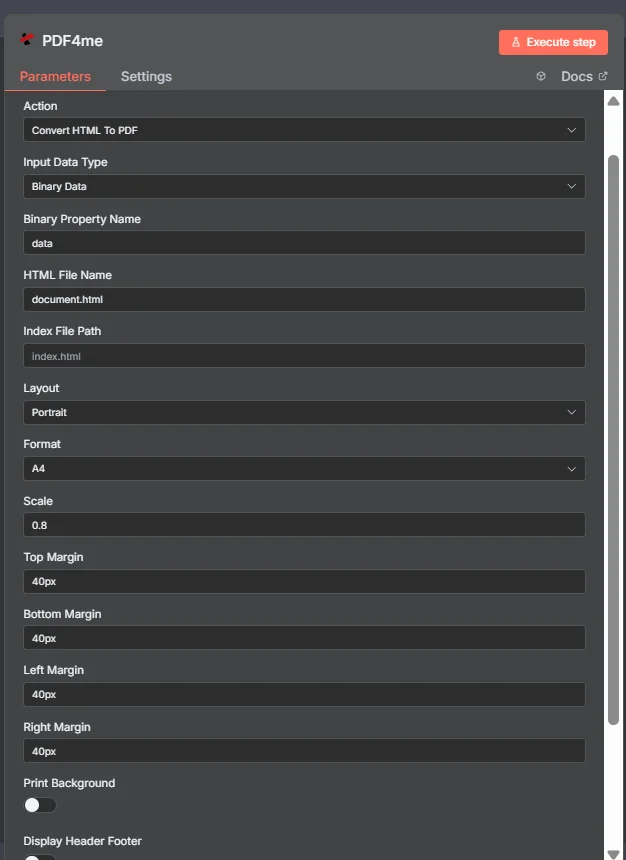
パラメータ
Convertのパラメータ一覧 HTML に PDF アクション。これらのパラメーターを設定して制御します。 HTML に PDF 変換。
重要: アスタリスク(***)が付いているパラメータは必須であり、アクションが正しく機能するためには必ず指定する必要があります。
| パラメータ | 必須 | その機能 | 例 |
|---|---|---|---|
| Input Data Type | Required | Choose how to provide the HTML file to convert. Options: Base64 String, Binary Data, HTML Code, URL. Default is `Binary Data`. | Binary Data |
| Base64 HTML Content | Conditional | Provide the HTML content already encoded in base64 format (not raw HTML code). Example: PGEgaHJlZj0iaHR0cDovL2V4YW1wbGUuY29tIj5MaW5rPC9hPg==. Shown when Input Data Type is Base64 String. | PGh0bWw+ |
| Binary Property Name | Conditional | Name of the binary property that contains the HTML file. Shown when Input Data Type is Binary Data. Default is `data`. | data |
| HTML Code | Conditional | Write your HTML code here. It will be automatically converted to base64. Shown when Input Data Type is HTML Code. | <html>Hello</html> |
| HTML URL | Conditional | URL to the HTML file to convert. Shown when Input Data Type is URL. | https://abc.com/page.html |
| HTML File Name | Required | The source HTML file name with .html extension. Default is `document.html`. | document.html |
| Index File Path | Optional | Index file path required when the input file is ZIP. | index.html |
| Layout | Required | The layout of the output PDF file. Options: Landscape, Portrait. Default is `Portrait`. | Portrait |
| Format | Required | Page size for the PDF. Options: A0, A1, A2, A3, A4, A5, A6, A7, A8, Executive, Legal, Statement, Tabloid. Default is `A4`. | A4 |
| Scale | Required | Scaling factor for content (0 to 0.8). Default is `0.8`. | 0.8 |
| Top Margin | Required | Top margin spacing (e.g., "40px", "2cm", "1in"). Default is `40px`. | 40px |
| Bottom Margin | Required | Bottom margin spacing (e.g., "40px", "2cm", "1in"). Default is `40px`. | 40px |
| Left Margin | Required | Left margin spacing (e.g., "40px", "2cm", "1in"). Default is `40px`. | 40px |
| Right Margin | Required | Right margin spacing (e.g., "40px", "2cm", "1in"). Default is `40px`. | 40px |
| Print Background | Required | Whether to include background colors and images of the HTML page in the PDF. Default is `No`. | No |
| Display Header Footer | Required | Whether to print a header and footer on each page of the PDF. Default is `No`. | No |
| Output File Name | Optional | Name for the output PDF file. Default is `output.pdf`. | output.pdf |
| Binary Data Output Name | Optional | Custom name for the binary data in n8n output. Default is `data`. | data |
出力
出力パラメータ
| 分野 | タイプ | 内容物 |
|---|---|---|
fileName | String | File name of the resulting file. |
mimeType | String | MIME type of the resulting file, for example `application/pdf`. |
fileSize | Number | Size of the resulting file in bytes. |
success | Boolean | True when the operation succeeded. |
message | String | Status message, `HTML converted to PDF successfully`. |
data | Binary | The resulting PDF. |
N8N 行動対応
の PDF4me 変換する HTML に PDF API 複数の形式で表示可能なレスポンスを返します。ニーズに最適な表示形式を選択してください。
- JSON
- Table
- Schema
- Binary
JSON 回答形式
生 JSON からの応答 API:
{
  "fileName": "output.pdf",
  "mimeType": "application/pdf",
  "fileSize": 30063,
  "success": true,
  "message": "HTML converted to PDF successfully"
}
テーブルビュー
構造化された表形式の応答データ:
| パラメータ | 価値 |
|---|---|
| fileName | output.pdf |
| mimeType | application/pdf |
| fileSize | 30063 |
| success | true |
| message | HTML 変換済み PDF 成功 |
スキーマビュー
レスポンスのデータ構造と型:
fileName: AB output.pdf
mimeType: AB application/pdf
fileSize: # 30063
success: ☑ true
message: AB HTML converted to PDF successfully
タイプ指標:
AB= String#= 番号☑= Boolean
バイナリデータビュー
実際 PDF ファイルデータとメタデータ:
data
─────────────────────────────
File Name: output.pdf
File Extension: pdf
Mime Type: application/pdf
File Size: 1.35 MB
バイナリデータアクセス:
- n8n バイナリオブジェクト:
$binary.data.data - Base64 コンテンツ直接使用可能
- ファイル操作ダウンロード、メール送信、または保存の準備ができました
ユースケース
ウェブコンテンツのアーカイブと文書化
- 動的なウェブページ、オンライン記事、デジタルコンテンツをPDF形式に変換し、長期保存、コンプライアンス文書作成、法的記録保管に活用しましょう。
- ウェブベースのレポート、ダッシュボード、分析ページをPDF形式に変換して処理し、オフラインでのアクセス、共有、プレゼンテーションに利用できるようにする。
- ウェブサイトのスナップショットやオンラインドキュメントを、HTMLコンテンツをPDF形式に変換してアーカイブし、歴史的保存や参照に役立てる。
メールマーケティングとデジタルコミュニケーション
- HTMLメールテンプレートとニュースレターをPDF形式に変換し、印刷配布、オフライン共有、およびメールマーケティング規制への準拠に活用します。
- ウェブベースのフォームやアンケートを処理するために、HTML形式の送信データをPDF形式に変換し、記録保存、分析、および規制遵守に役立てる。
- ウェブベースのカタログ、パンフレット、販促資料のPDF版を作成し、オフライン配布や印刷物を使ったマーケティングキャンペーンに活用します。
ウェブアプリケーションとシステム統合
- ウェブベースのレポートやデータビジュアライゼーションをPDF形式に変換し、自動レポート生成、システム統合、ビジネスインテリジェンスワークフローに活用します。
- ウェブベースの請求書、領収書、財務書類を処理するために、HTMLコンテンツをPDF形式に変換して会計システムや財務記録管理に利用します。
- ウェブベースの契約書、合意書、および法的文書のPDF版を生成し、電子署名、アーカイブ、および法的コンプライアンスに活用します。