バーコードを追加する PDF 使用 n8n アクション
PDF4me バーコードを追加する PDF 強化する PDF カスタマイズ可能なバーコードを追加してドキュメントと QR コードを通じて n8n 自動化ワークフロー。プロセス PDF離れて n8n トリガー、バイナリデータ、base64文字列、または公開 URL100種類以上のバーコードを生成する(QR Code、 Code 128、 Data Matrix、 EAN-13、 PDF417正確な位置決め、カスタマイズ可能なサイズ設定、透明度制御、柔軟な配置オプションを備えたバーコード生成機能を提供します。このソリューションは、文書追跡、在庫管理、資産ラベル作成、自動化されたワークフロー、およびプロフェッショナルなフォーマットとシームレスな統合による信頼性の高いバーコード生成が求められるコンプライアンス要件に最適です。
設定
追加する PDF4me 「バーコードを追加 PDF「ノードをあなたの n8n ワークフローを実行し、必要なパラメータを設定します。初期設定手順については、こちらをご覧ください。 n8n 統合ガイド。
前提条件:
- PDF4me API 資格
- n8n ワークフローへのアクセス
構成:
- 追加 PDF4me ノードからワークフローへ
- 「バーコードを追加」を選択してください PDF" アクション
- 入力パラメータを設定します(下記参照)。
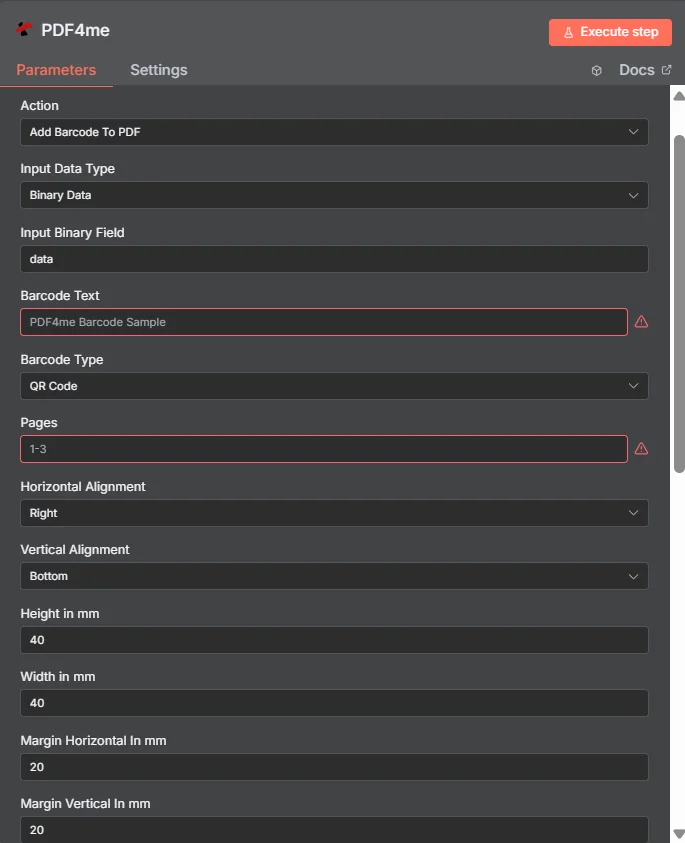
パラメータ
バーコードを追加する際のパラメータの完全なリスト PDF アクション。これらのパラメータを設定して、バーコードの配置と外観を制御します。
重要: アスタリスク(***)が付いているパラメータは必須であり、アクションが正しく機能するためには必ず指定する必要があります。
| パラメータ | 必須 | その機能 | 例 |
|---|---|---|---|
| Input Data Type | Required | Choose how to provide the PDF file to add barcode to. Options: Base64 String, Binary Data, URL. Default is `Binary Data`. | Binary Data |
| Base64 PDF Content | Conditional | Base64 encoded PDF document content. Shown when Input Data Type is Base64 String. | UEsDBBQABgAI... |
| Input Binary Field | Conditional | Name of the binary property that contains the PDF file (usually "data" for file uploads). Shown when Input Data Type is Binary Data. Default is `data`. | data |
| PDF URL | Conditional | URL to the PDF file to add barcode to. Shown when Input Data Type is URL. | |
| Barcode Text | Required | Text to encode in the barcode. | PDF4me Barcode Sample |
| Barcode Type | Required | Select the type of barcode to add to the PDF. Options: Australian Post Custom, Australian Post Custom 2, Australian Post Custom 3, Australian Post Redirection, Australian Post Reply Paid, Australian Post Routing, Aztec, CEP Net, Codabar, Codabar 18, Codabar 2, Codablock F, Code 11, Code 128, Code 128 Subset A, Code 128 Subset B, Code 128 Subset C, Code 2 of 5 Data Logic, Code 2 of 5 IATA, Code 2 of 5 Industry, Code 2 of 5 Matrix, Code 2 of 5 Standard, Code 32, Code 39, Code 39 Extended, Code 93, Code 93 Extended, Data Matrix, Deutsche Post Identcode, Deutsche Post Leitcode, Dot Code, DPD, EAN UCC 128, EAN-13, EAN-13 with 2 Addon, EAN-13 with 5 Addon, EAN-14, EAN-8, EAN-8 with 2 Addon, EAN-8 with 5 Addon, FIM, Flattermarken, GS1 DataBar, GS1 DataBar Expanded, GS1 DataBar Expanded Stacked, GS1 DataBar Limited, GS1 DataBar Stacked, GS1 DataBar Stacked Omnidirectional, GS1 DataBar Truncated, GS1-128, Han Xin, HIBC LIC 128, HIBC LIC 3OF9, HIBC LIC Aztec, HIBC LIC CODABLOCK_F, HIBC LIC Data Matrix, HIBC LIC MPDF417, HIBC LIC PDF417, HIBC LIC QR Code, HIBC PAS 128, HIBC PAS 3OF9, HIBC PAS Aztec, HIBC PAS CODABLOCK_F, HIBC PAS Data Matrix, HIBC PAS MPDF417, HIBC PAS PDF417, HIBC PAS QR Code, Interleaved 2 of 5, ISBN-13, ISBN-13 with 5 Addon, ISMN, ISSN, ISSN with 2 Addon, Italian Postal 2 of 5, Italian Postal 3 of 9, ITF-14, Japanese Postal, KIX, Korean Postal Authority, LOGMARS, Mailmark 2D, Mailmark 4state, Maxicode, Micro PDF417, Micro QR Code, MSI, NTIN, NVE-18, PDF417, PDF417 Truncated, Pharmacode One Track, Pharmacode Two Track, Planet 12, Planet 14, Plessey, Plessey Bidirectional, PPN, PZN-7, PZN-8, QR Code, QR Code 2005, RM4SCC, SSCC-18, Swedish Postal Shipment ID, Swiss QR Code, Telepen, Telepen Alpha, UCC-128, UPC-12, UPC-A, UPC-A with 2 Addon, UPC-A with 5 Addon, UPC-E, UPC-E with 2 Addon, UPC-E with 5 Addon, UPU S10, USPS IM Package, USPS Intelligent Mail, USPS Postnet 10, USPS Postnet 11, USPS Postnet 12, USPS Postnet 5, USPS Postnet 6, USPS Postnet 9, VIN. Default is `QR Code`. | QR Code |
| Pages | Required | Page options: empty for all pages, "1", "1,3,5", "2-5", "1,3,7-10", "2-". | 1-3 |
| Horizontal Alignment | Required | Set the horizontal alignment of the Barcode. Options: Center, Left, Right. Default is `Right`. | Right |
| Vertical Alignment | Required | Set the vertical alignment of the Barcode. Options: Bottom, Middle, Top. Default is `Bottom`. | Bottom |
| Height in Mm | Required | Height of the barcode in millimeters or "0" for auto-detect. Default is `40`. | 40 |
| Width in Mm | Required | Width of the Barcode in millimeters. "0" for auto-detect. Default is `40`. | 40 |
| Margin Horizontal In Mm | Required | Margin from left origin of the Barcode in millimeters. Default is `20`. | 20 |
| Margin Vertical In Mm | Required | Margin from the top origin of the Barcode in millimeters. Default is `20`. | 20 |
| Height In Pt | Required | Height of the barcode in points(pt). or "0" for auto-detect. Default is `113`. | 113 |
| Width In Pt | Required | Width of the Barcode in points(pt). "0" for auto-detect. Default is `113`. | 113 |
| Margin X In Pt | Required | Horizontal margin of the barcode in points (pt). Default is `10`. | 10 |
| Margin Y In Pt | Required | Vertical margin of the barcode in points (pt). Default is `10`. | 10 |
| Opacity | Required | Give a value between 0 to 100 where "0" is completely transparent. Default is `100`. | 100 |
| Display Text | Optional | Where to display the barcode text. Options: Above, Below, None. Default is `Below`. | Below |
| Hide Text | Required | Whether to hide the text of the barcode (true) or display it alongside the barcode (false). Default is `No`. | No |
| Show Only In Print | Required | Whether to show the barcode only when the PDF is printed. Default is `No`. | No |
| Is Text Above | Required | Whether to show the barcode text above the barcode. Default is `No`. | No |
| Output Options | Optional | Optional settings, collapsed behind Add Option. | Add Option |
| Output File Name | Optional | Name for the output PDF file. Default is `output_with_barcode.pdf`. | output_with_barcode.pdf |
| Custom Profiles | Optional | Use JSON to adjust custom properties. See https://dev.pdf4me.com/documentation/ for details. | { "outputDataFormat": "base64", "preserveMetadata": true } |
| Binary Data Output Name | Optional | Custom name for the binary data in n8n output. Default is `data`. | data |
出力
出力パラメータ
| 分野 | タイプ | 内容物 |
|---|---|---|
fileName | String | Output File Name from Output Options; when empty, the input file name with `_with_barcode.pdf` (`document_with_barcode.pdf` for Base64 input). |
mimeType | String | MIME type of the resulting file, for example `application/pdf`. |
fileSize | Number | Size of the resulting file in bytes. |
success | Boolean | True when the operation succeeded. |
message | String | Status message, `Barcode added to PDF successfully`. |
data | Binary | The PDF with the barcode. |
N8N 行動対応
の PDF4me バーコードを追加する PDF API 複数の形式で表示可能なレスポンスを返します。ニーズに最適な表示形式を選択してください。
- JSON
- Table
- Schema
- Binary
JSON 回答形式
生 JSON からの応答 API:
{
  "fileName": "document_with_barcode.pdf",
  "mimeType": "application/pdf",
  "fileSize": 104989,
  "success": true,
  "message": "Barcode added to PDF successfully"
}
テーブルビュー
構造化された表形式の応答データ:
| パラメータ | 価値 |
|---|---|
| fileName | document_with_barcode.pdf |
| mimeType | application/pdf |
| fileSize | 104989 |
| success | true |
| message | バーコードが追加されました PDF 成功 |
スキーマビュー
レスポンスのデータ構造と型:
1 item
fileName: AB document_with_barcode.pdf
mimeType: AB application/pdf
fileSize: # 104989
success: ☑ true
message: AB Barcode added to PDF successfully
タイプ指標:
AB= String#= 番号☑= Boolean{}= Object
バイナリデータビュー
実際の強化 PDF ファイルデータとメタデータ:
data
─────────────────────────────
File Name: document_with_barcode.pdf
File Extension: pdf
Mime Type: application/pdf
File Size: 240.0 KB
バイナリデータアクセス:
- n8n バイナリオブジェクト:
$binary.data.data - Base64 コンテンツ直接使用可能
- ファイル操作ダウンロード、メール送信、または保存の準備ができました
ユースケース
在庫管理と資産追跡
- 倉庫や小売環境におけるスキャンと追跡作業を効率化するために、製品カタログ、在庫シート、資産文書に固有のバーコードを自動的に追加します。
- 配送ラベルと物流書類に追跡バーコードを埋め込むことで、倉庫管理システムと連携し、荷物の自動ルーティングと配送確認を実現します。
- FDAおよび国際基準を満たすために、医療機器、医薬品包装、規制対象製品向けに業界標準のバーコードを使用したコンプライアンス文書を作成します。
文書認証とセキュリティ
- 法的契約書や公式文書に、デジタル署名、検証リンク、改ざん防止識別子を含むQRコードを組み込むことで、文書の認証を安全に強化します。
- 身分証明書や証明書に検証データベースにリンクする固有のバーコードを追加することで、文書の真正性を確保し、偽造を防止する。
- 建物のセキュリティシステムや来訪者管理プラットフォームと連携する、バーコードが埋め込まれた安全なアクセス文書を作成し、施設へのアクセスを制御します。
マーケティングと顧客エンゲージメント
- 顧客エンゲージメントを高めるために、製品情報、特別オファー、インタラクティブコンテンツにリンクするQRコード付きの販促資料やマーケティング資料を作成する。
- イベントチケットや入場パスを固有のバーコードで処理することで、迅速な入場確認、参加者の追跡、イベント後の分析が可能になり、イベント管理に役立ちます。
- 連絡先情報、ソーシャルメディアリンク、ポートフォリオへのアクセスを含むQRコード付きのインタラクティブな名刺や連絡先資料を作成し、スムーズなネットワーキングを実現しましょう。