Wordからメタデータを抽出する Make
メタデータの抽出 は Make モジュール PDF4me Word文書の組み込みプロパティとカスタムプロパティ、タイトル、作成者、件名、キーワード、作成日、更新日を読み取り、構造化された形式で返します。 JSONドキュメントの目録作成、コンプライアンス監査証跡の作成、または各ファイルを手動で開くことなくコンテンツ管理システムにデータを入力する場合に使用できます。
このモジュールの機能
PDF4me Wordからメタデータを抽出する Word ファイルから組み込みプロパティ (タイトル、作成者、件名、キーワード、会社、作成日、更新日、ページ数、単語数) およびカスタムドキュメントプロパティを読み取り、構造化された形式で返します。 JSON 内部のオブジェクト Make シナリオ。
関連ブログ記事
この機能に関するブログ記事はまだありません。近日公開予定です。
その間、PDF4me ブログを閲覧して、あらゆるプラットフォームのチュートリアルやワークフローをご覧ください。
ブログをご覧ください →
認証方法 Make シナリオ?
毎 PDF4me モジュール Make 有効な 繋がり. 作成または選択して、 PDF4me API シナリオがメタデータ抽出要求を安全に認証できるようにするためのキー。
見逃してはならない重要な事実
組み込み型とカスタム型の両方のプロパティが含まれます
タイトル、著者、件名などの標準フィールドは、組織が追加したカスタムドキュメントプロパティとともにすべて1つにまとめられます。 JSON 応答。
.doc および .docx ファイルに対応しています。
ファイル名には正しい拡張子が付いている必要があります。そうすることで、モジュールは従来の.doc形式または最新の.docx形式のいずれからもプロパティを正しく読み取ることができます。
空のプロパティはエラーではなく空として返されます
入力されていないドキュメントプロパティ(未使用の会社フィールドなど)は、モジュールのエラーではなく、空の文字列として返されます。
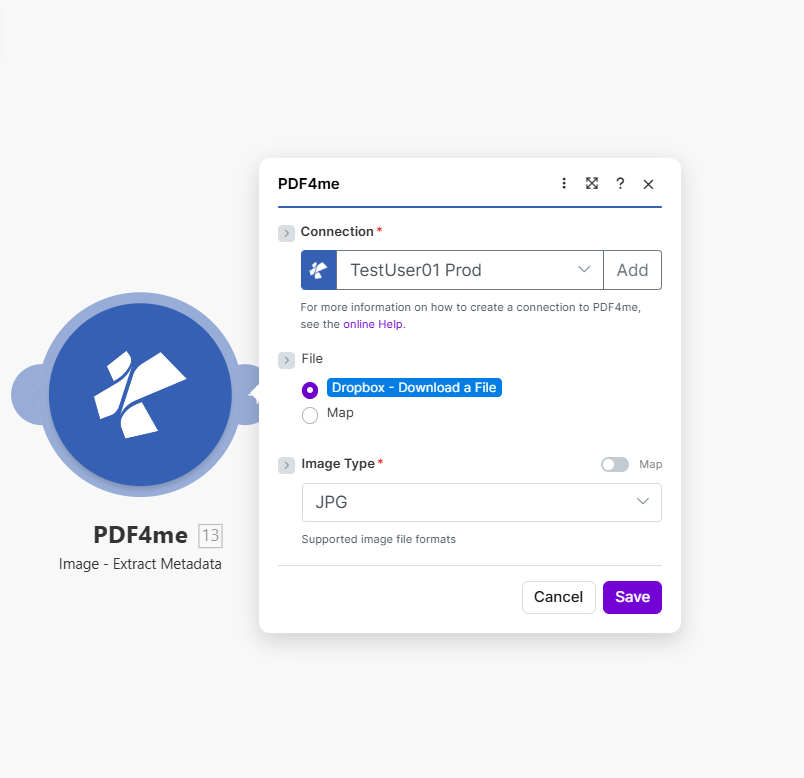
ファイル名とドキュメントをマッピングし、シナリオを実行して組み込みおよびカスタムの Word ドキュメント プロパティを取得します。 JSON。
パラメータ
必須: 接続情報、ファイル名、およびドキュメントのすべてを指定する必要があります。
| パラメータ | 必須 | その機能 | 例 |
|---|---|---|---|
| Connection | Required | PDF4me API connection. Click Add and paste your API key if connecting for the first time. | My PDF4me connection |
| File Name | Required | Filename of the Word document with proper extension (.doc or .docx), used for processing identification. | document.docx |
| Document | Required | Word file buffer mapped from a preceding module such as Dropbox, Google Drive, or SharePoint. | [Buffer from Get File] |
出力フィールド
| 分野 | タイプ | 内容物 |
|---|---|---|
Metadata | Object | Container object with all extracted document properties, both built-in and custom. |
Title | String | The document title property. |
Author | String | The document author property. |
Subject | String | The document subject property. |
Keywords | String | The document keywords/tags property. |
CreatedDate | String | The document creation timestamp. |
ModifiedDate | String | The document last-modified timestamp. |
PageCount | Number | Total number of pages in the document. |
WordCount | Number | Total word count in the document. |
Success | Boolean | True if metadata extraction completed successfully; false if it failed. |
メタデータ抽出の設定方法 Make?
- 追加 PDF4me → メタデータの抽出 あなたの Make シナリオ。
- 選択 繋がり (またはクリック) 追加 あなたと一緒に作成する PDF4me API 鍵)。
- 地図 ファイル名 拡張子付きのファイル名(
.docまたは.docx) - 地図 書類 ソースモジュールからのバイナリコンテンツ: Dropbox、Google Drive、または SharePoint。
- シナリオを実行します。
Metadataオブジェクトが出力に表示され、カタログ、コンプライアンスログ、またはCMSにマッピングする準備が整います。
典型的な構成
ワークフローの例Common Make scenario patterns using Extract Metadata.
文書ライブラリの目録作成
- Dropboxの監視フォルダのトリガーは、新しいWord文書がライブラリにアップロードされたときに作動します。
- メタデータ抽出機能は、ファイルからタイトル、著者、キーワード、日付を読み取ります。
- Airtableの「レコードの作成」ステップでは、抽出されたプロパティを使用してドキュメントにインデックスを作成し、検索やフィルタリングに利用できるようにします。
- タグは、ドキュメントカタログのキーワードプロパティから自動的に生成されます。
コンプライアンス監査証跡
- スケジュールされたトリガーは、コンプライアンスフォルダ内のすべての管理対象文書を一覧表示します。
- イテレータは各ファイルをループ処理し、ファイルの取得→メタデータの抽出を実行します。
- フィルタは、 ModifiedDate 想定される審査期間外に該当する。
- フラグが立てられた文書とそのメタデータは、コンプライアンス監査レポートに記録されます。
CMS アップロードされたドキュメントからの人口
- ドキュメントは、 Make。
- メタデータ抽出機能は、タイトル、著者、主題、キーワードを読み取ります。
- 1 HTTP モジュール POST抽出された特性を CMS API 新しいコンテンツレコードを作成する。
- 元の文書は、 CMS 記録が作成されたことが確認されました。
実践的なヒント
File Name extension must match the real format
A .docx file mapped with a .doc extension (or vice versa) can cause the module to misread properties. Map the source filename directly rather than hardcoding an extension.
Empty properties are normal, not errors
Documents created without filling in Title, Subject, or Company return those fields as empty strings. Handle empty values in downstream Filters rather than assuming every field is populated.
CreatedDate reflects the file, not the content
CreatedDate and ModifiedDate come from the document's file-level properties, they can differ from dates mentioned inside the document body itself.
Custom properties depend on the template
Only documents built from templates with custom document properties will return them. A plain Word file created without a template typically has none.
This module reads properties, it does not edit them
Extract Metadata is read-only. To change a document's title or author property, use a Word editing module instead.
Pair with an Iterator for folder-wide audits
To audit an entire folder of documents, loop the module inside a Make Iterator rather than calling it once per manually selected file.
チートシート
| 分野 | 価値 |
|---|---|
| Module | Extract Metadata (Word) |
| Connection | PDF4me API key |
| Supported extensions | .doc, .docx |
| Key output fields | Metadata.Title, Author, Subject, Keywords, CreatedDate, ModifiedDate |
| Empty property behavior | Returns empty string, not an error |
| Custom properties | Included when present in the source template |
よくある質問
業界におけるユースケースとアプリケーション
- Compliance & Audit
- Content Management
- Legal & Professional
- Publishing & Documentation
- 文書監査証跡コンプライアンス監査の証拠として、変更日と変更者を抽出する
- バージョン管理追跡作成日時と変更日時を使用して文書のバージョンを監視する
- 著者認証文書作成者が承認された担当者リストと一致することを検証する
- 保持ポリシーの実施: 保存決定のために、作成日を保存スケジュールと照合する
- 文書管理ISO/品質管理準拠のための文書プロパティを追跡する
- CMS 統合コンテンツ管理システムに文書のタイトル、著者、キーワードを入力する
- 検索インデックス作成全文検索エンジンのインデックス作成のためにキーワードと主題を抽出する
- 文書分類: 主題とキーワードのメタデータに基づいて文書を分類する
- 図書館目録作成抽出したプロパティを使用して企業文書ライブラリをインデックス化する
- 世代キーワードと件名フィールドからドキュメントタグを自動生成する
- 案件文書追跡: 法務関連文書管理システムのメタデータを抽出する
- 発見文書のインデックス作成: 発見文書を著者、日付、主題別に一覧表示してレビューする
- 契約管理契約データベースへのデータ入力のため、契約当事者、日付、契約内容を抽出する。
- 特権ログ生成: ドキュメントメタデータを使用して権限ログエントリを自動生成する
- 文書作成訴訟データベースシステム向けに、制作文書のメタデータを追跡する
- 原稿追跡原稿管理システム向けに著者、タイトル、単語数を抽出します。
- 公開ワークフロー: 作成者と更新日のメタデータに基づいてドキュメントをルーティングする
- スタイルガイドへの準拠: 文書のプロパティが出版スタイルガイドの要件と一致しているか確認してください
- コンテンツ分析コンテンツプランニングのために文書統計(単語数、ページ数)を分析する
- 複数著者による調整共同プロジェクトにおける文書作成者と更新日を追跡する
関連アクション
文書を比較する
2つのWord文書の内容の違いを比較でき、メタデータに基づくバージョン管理との相性も抜群です。
ドキュメントを結合する
複数のWord文書を1つに結合し、その後メタデータを抽出して結合結果をカタログ化する。
目次を更新
ドキュメントの目次を更新します。これは、ドキュメントのメタデータを追跡するのと同じパブリッシングワークフローで役立ちます。
他のプラットフォームでの同じタスク
n8n: Word文書からメタデータを抽出する
同じメタデータ抽出ノード n8n ワークフローを自己ホスト型またはクラウドに接続します n8n インスタンスの代わりに Make。
Power Automate: メタデータの抽出
Microsoft に対しても同じメタデータ抽出アクション Power Automate 流れ、適合する SharePoint 文書ライブラリのワークフロー。
Zapier: メタデータの抽出
メタデータ抽出の手順は同じです。 ZapierすでにZapに登録されているGoogleドライブまたはDropboxのトリガーに接続します。
PDF4me API: メタデータの抽出
同じメタデータ抽出エンドポイントを直接呼び出すには、 REST カスタム統合の場合 Make。