AIプロセスヘルスカード Make
AIプロセス健康カード は PDF4me AIモジュール Make 健康保険証の画像から構造化フィールドを抽出する、または PDF1を返します 健康データ その情報を構造化データ(JSON)として保持するフィールド、メンバー名、メンバーID、グループ番号、プランタイプ、保険会社、 ISO 8601 資格要件、オンボーディング、および請求処理のワークフローに関する補償開始日 HIPAA 取り扱い規則。
このモジュールの機能
PDF4meAIプロセスヘルスカード 健康保険証の画像を読み取るか、 PDF そして、保険データを単一の健康データフィールド(メンバーID、グループ番号、プランタイプ、保険会社、メンバー名、生年月日、補償期間、処方箋BIN、PCN、グループ、およびサービスタイプごとの自己負担情報)に構造化データ(JSON)として返します。作成するテンプレートも、設定するフィールド位置もありません。AIはあらゆる保険会社のカードレイアウトを自動的に認識するため、患者受付ポータル、保険確認ワークフロー、および給付事前承認シナリオに実用的です。 Make 様々なプロバイダーからカードが届く場所。
認証 API リクエスト
毎 PDF4me モジュール Make 有効な 繋がり. 作成または選択して、 PDF4me API シナリオがAIヘルスカードサービスを安全に呼び出せるようにするためのキー。
見逃してはならない重要な事実
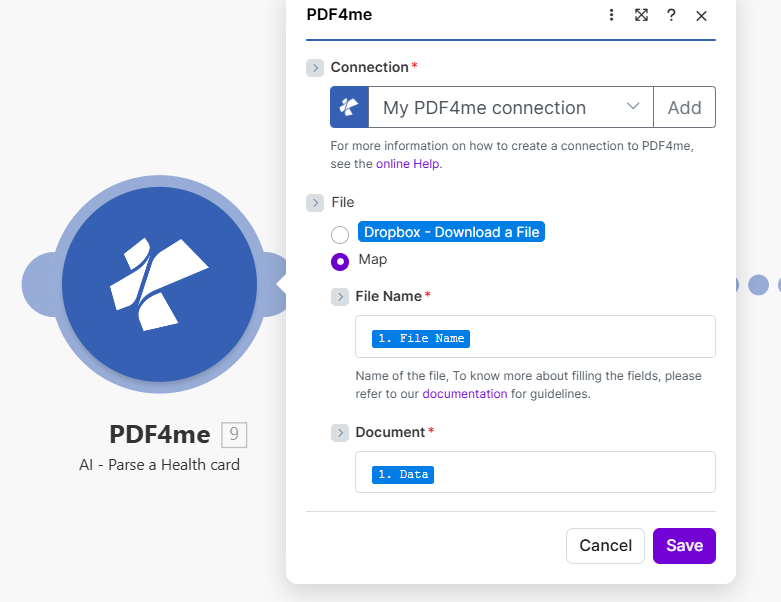
セット ファイル に 地図ワイヤー ファイル名 そして 書類 健康診断カードファイルをダウンロードまたは受信した手順から。
AI-Process Health Card はどのようなパラメータを使用しますか? Make?
必須: 繋がり、 ファイル名、 そして 書類。 セット ファイル に 地図 まず、これによりモジュールパネルにファイル名とドキュメントのフィールドが表示されます。
| パラメータ | 必須 | その機能 | マッピング例 |
|---|---|---|---|
| Connection | Required | PDF4me API connection that authenticates the AI health card request. Click Add to create one by pasting your PDF4me API key: reused automatically across all PDF4me modules in your scenarios. | My PDF4me connection |
| File | Required | How the health card file is supplied to the module. Choose Map when passing binary content from a prior download step. Choose Dropbox, Download a File to pull directly from a Dropbox trigger without a separate download step. | Map |
| File Name | Required | Filename of the health card including extension (.pdf, .png, .jpg, or .jpeg). Used by the AI to detect the input format. Map from the filename output of your source module: e.g. the File Name field of a Dropbox or Google Drive download step. | 1. File Name |
| Document | Required | Binary content of the health card file. Must be raw file bytes from a download or upload module: the Data field in Dropbox, Google Drive, or OneDrive. Do not pass a URL string or filename here; the module requires actual binary to run AI processing. | 1. Data |
出力フィールド
このモジュールは単一のフィールドを返します。 PDF4me リクエストをバックグラウンドジョブとして処理し、 Make 次のモジュールを実行する前に、結果を待ちます。
| 分野 | タイプ | 内容物 |
|---|---|---|
Health Data | Text | The health card details extracted by the AI, as structured data (JSON). Map it into the next module to store the whole record, or parse it first to use the individual values separately. |
健康データフィールドの内容
これらの値は単一の内容です 健康データ フィールド、個別のモジュール出力ではありません。 健康データ で Make それらを個別に読む。
| 価値 | タイプ | 内容物 |
|---|---|---|
memberId | String | Unique member identification number printed on the card. Use it in patient records or in a Router to look up existing members. |
groupNumber | String | Group or policy number. Used in insurance verification API calls and claims submissions. |
planType | String | Type of health plan: PPO, HMO, EPO, Medicare, Medicaid, etc. Use in a Router to branch scenario logic per plan type. |
insuranceProvider | String | Name of the insurance company (e.g. Blue Cross Blue Shield, Aetna, UnitedHealth). Store in EHR or billing records. |
memberName | String | Full name of the insured member as printed on the card. |
dateOfBirthStr | String | Member date of birth in ISO 8601 format. Use to cross-verify against registration data. |
effectiveDateStr | String | Date when coverage became or becomes effective. Use in a Filter to reject expired coverage before scheduling. |
rxBin | String | Prescription BIN number for drug coverage routing through pharmacy networks. |
rxPcn | String | Prescription PCN (Processor Control Number) for pharmacy claims. |
rxGroup | String | Prescription group identifier for pharmacy benefit management. |
copayInfo | Array | Copay entries: each with a service type (e.g. Primary Care, Specialist, Emergency) and copay amount. Use in a Slack notification or patient-facing email. |
AIプロセスヘルスカードの設定方法 Make?
- 追加 PDF4me → AIプロセス健康カード あなたの Make シナリオ。 Make モジュールをリストします AI - ヘルスカードを解析する。
- 選択 繋がり (またはクリック) 追加 あなたと一緒に作成する PDF4me API 鍵)。
- 下 ファイル、 選ぶ 地図 ファイル名とドキュメントのフィールドを表示します。
- 地図 ファイル名 ソースステップのファイル名出力に拡張子を含める(
.pdf、.png、.jpg、 または.jpeg) - 地図 書類 同じステップのバイナリデータフィールドへ: 通常は次のように命名されます データ で Dropbox、 Google Drive、 または OneDrive モジュール。
- 保存 そしてクリック 1回実行モジュールは1つのフィールドを返します。 健康データ抽出された詳細を構造化データとして保持する(JSON): それをマッピングする EHR APIsデータベースや通知モジュール、または個々の値を個別に使用するために最初に解析します。
ワークフローの例
ワークフローの例Common Make scenario patterns using AI-Process Health Card.
- 新規患者は、健康保険証の画像をアップロードします。 Typeform または JotForm 受付窓口。
- AIプロセス健康カード アップロードされた画像から、memberId、planType、insuranceProvider、およびcopayInfoを抽出します。
- ルーターはプランタイプごとに分岐し、PPO患者は1つのプランタイプにルーティングされます。 EHR ワークフロー、HMOから別のHMOへ。
- 1 HTTP モジュールは新しい患者レコードを作成します EHR 抽出されたすべての保険関連項目が事前に入力されたシステム。
- Gmail 一般的なサービスに対する自己負担額を記載した確認書を患者に送信する。
- Gmail 患者が診察前に健康保険証の画像を添付ファイルとしてメールで送信した際に作動します。
- AIプロセス健康カード memberId、groupNumber、effectiveDateStr、およびrxBinを抽出します。
- フィルターは、effectiveDateStrが過去の日付である場合、そのシナリオをブロックし、患者に最新の保険情報を提供するよう求める自動メールを送信します。
- 1 HTTP モジュールは保険会社の資格を呼び出します API 有効な特典を確認するには、memberIdとgroupNumberが必要です。
- A Slack 患者が到着する前に、自己負担額とプランの種類をメッセージで受付チャネルに送信します。
- スケジュールされたシナリオでは、すべての健康保険カード画像がリストされます。 Dropbox 「年次再検証」フォルダ。
- イテレータは各ファイルをループして、それを AIプロセス健康カード。
- このモジュールは、各カードについて、保険提供者、プランタイプ、有効開始日文字列、およびグループ番号を再抽出します。
- 1 Airtable または Google Sheets このモジュールは、更新された保険データを用いて患者記録を更新します。
- 2つ目のフィルターは、保険会社またはグループ番号が昨年から変更されたレコードを特定し、手動レビューの対象とします。