メインコンテンツへスキップ

AIプロセス契約 Make

AIプロセス契約 は Make モジュール PDF4me それは PDF または画像法的契約と返品1 契約データ メタデータを構造化データ(JSON)として格納するフィールド:当事者、実行日、発効日、有効期限、期間、管轄区域。これを利用して、契約ライフサイクル管理システムへのデータ入力、有効期限リマインダーの自動化、抽出コードを記述することなく契約を法律顧問に送付するなどのことが可能です。

このモジュールの機能

PDF4me AIプロセス契約 構造化メタデータを抽出する PDF または、あなたの Make AI を使用したシナリオ。MSA、NDA、SOW、雇用契約、または任意のビジネス契約を入力すると、モジュールは単一の 契約データ 畑の保有 関係者全員(氏名、住所、役割を含む)、締結日、発効日、満了日、契約期間、および管轄裁判所 構造化データとして(JSON)、契約ライフサイクル管理に必要な正確な情報(CLM有効期限の追跡、自動更新リマインダー、契約書リポジトリのインデックス作成、コンプライアンスレポート作成などに対応。テンプレートの設定は不要。世界中のコモンローおよび大陸法の契約書作成規則に対応。

関連ブログ記事
この機能に関するブログ記事はまだありません。近日公開予定です。
その間、PDF4me ブログを閲覧して、あらゆるプラットフォームのチュートリアルやワークフローをご覧ください。
ブログをご覧ください →

認証方法 Make シナリオ?​

毎 PDF4me モジュール Make 有効な 繋がり. 作成または選択して、 PDF4me API シナリオがAI契約抽出要求を安全に認証できるようにするための鍵。

見逃してはならない重要な事実​

当事者は配列として戻り、複数当事者契約をサポートする。
二者間協定、三者間コンソーシアム契約、複雑な流通ネットワークはすべて同じパーティ配列を内部で使用している。 契約データ各項目には、名前、住所、参照指定(購入者、販売者、ライセンサー、開示者など)が含まれます。複数当事者が関わる場合でも、特別な処理は必要ありません。
ISO 8601 日付文字列が有効期限追跡を駆動する
executionDateStr、effectiveDateStr、expirationDateStrはすべて、 ISO 8601 (YYYY-MM-DD)形式。毎日スケジュールする Make 30日、60日、90日以内に期限切れとなる契約を照会し、更新リマインダーをトリガーすることで、更新漏れや意図しない自動更新を削減するシナリオ。
管轄権オブジェクトは、準拠法と裁判地を捉える。
内部 契約データ管轄区域とは、準拠法、合意された裁判所または仲裁地、および地域を含む構造化されたオブジェクトです。コンプライアンスダッシュボード、制裁スクリーニング、および適用される管轄区域に基づいて適切な法律顧問に契約をルーティングするために使用できます。
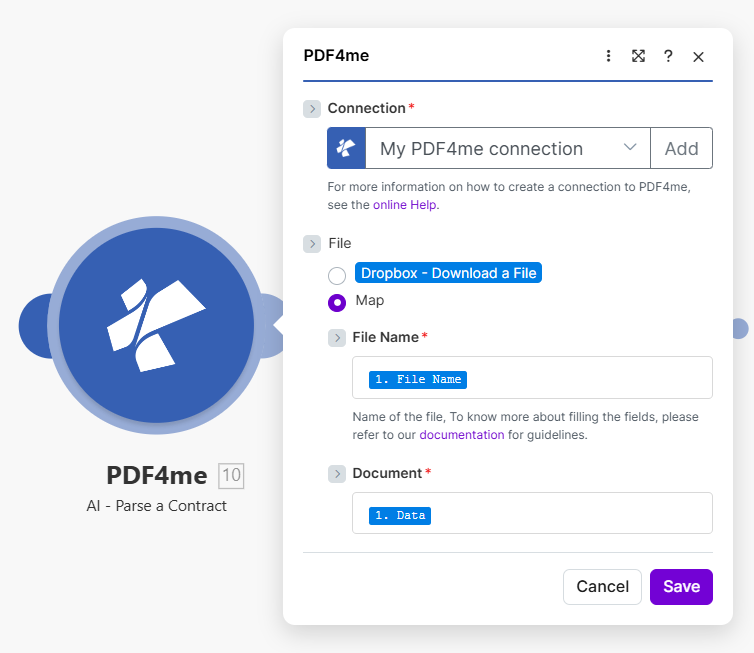
PDF4me AI - 契約解析モジュールを、接続設定を「マイ PDF4me 接続」、ファイル設定を「ファイル名とドキュメントを前のファイルソース手順からマッピングしたマップ」に設定して構成し、当事者、実行日、発効日、有効期限、契約期間、管轄区域を抽出できるようにします。

前のモジュールから「ファイルをマップに設定」し、「ファイル名」と「ドキュメント」を連携させます。契約データ出力には、当事者、重要な日付、期間、管轄区域が含まれ、これらはCLMおよびコンプライアンスワークフローの基盤となります。

パラメータ​

必須: 繋がり、 ファイル名、 そして 書類。 セット ファイル に 地図 まず、これによりモジュールパネルにファイル名とドキュメントのフィールドが表示されます。

パラメータ必須その機能例
ConnectionRequiredPDF4me API connection. Click Add and paste your API key the first time. Reused automatically across all PDF4me modules in your scenarios.My PDF4me connection
FileRequiredHow the contract file is supplied to the module. Choose Map to wire binary content from a prior step such as DocuSign, Adobe Sign, SharePoint, or Dropbox. Choose Dropbox, Download a File to pull straight from a Dropbox trigger without a separate download step.Map
File NameRequiredFilename of the contract including its extension (.pdf, .png, .jpg, .jpeg). Map it from the filename output of your source module.msa-2024.pdf
DocumentRequiredBinary content of the contract file. Map it from the file data returned by the source module: the Data field of DocuSign, Adobe Sign, SharePoint, OneDrive, or Dropbox.1. Data

出力フィールド​

このモジュールは単一のフィールドを返します。 PDF4me リクエストをバックグラウンドジョブとして処理し、 Make 次のモジュールを実行する前に、結果を待ちます。

分野タイプ内容物
Contract DataTextThe contract details extracted by the AI, as structured data (JSON). Map it into the next module to store the whole record, or parse it first to use the individual values separately.

契約データフィールドの内容​

これらの値は単一の内容です 契約データ フィールド、個別のモジュール出力ではありません。 契約データ で Make それらを個別に読む。

価値タイプ内容物
partiesArrayContract parties. Each entry has name, address, and a reference designation (Disclosing Party, Receiving Party, Buyer, Seller, Licensor, Licensee, etc.). Covers two-party and multi-party contracts.
executionDateStrStringDate when the contract was executed or signed, in ISO 8601 format (YYYY-MM-DD).
effectiveDateStrStringDate when the contract becomes effective, in ISO 8601 format. May differ from the execution date.
expirationDateStrStringDate when the contract expires, in ISO 8601 format. Use for renewal reminders and expiration tracking.
contractDurationStringDuration or term of the contract as stated in the document (e.g. "3 years", "12 months", "perpetual until terminated").
jurisdictionObjectGoverning law, the agreed court or arbitration venue, and the region. Use for compliance routing and sanctions screening.

AIプロセス契約の設定方法 Make?​

  1. 追加 PDF4me → AIプロセス契約 あなたの Make シナリオ。 Make モジュールをリストします AI - 契約書の解析。
  2. 選択 繋がり (またはクリック) 追加 あなたと一緒に作成する PDF4me API 鍵)。
  3. 下 ファイル、 選ぶ 地図 ファイル名とドキュメントのフィールドを表示します。
  4. 地図 ファイル名 拡張子付きのファイル名(.pdf、 .png、 .jpg、 または .jpeg)
  5. 地図 書類 ソースモジュールからのバイナリコンテンツへ: データ の分野 DocuSign、 Adobe Sign、 SharePoint、 OneDrive、 または Dropbox モジュール。
  6. クリック 保存 そしてシナリオを実行します。 契約データ に CLM プラットフォーム(Ironclad、 ContractWorks、 DocuSign CLM)、契約リポジトリ(SharePoint、 Airtable)、またはコンプライアンスダッシュボードの場合、個々の値が必要な場合はまずそれを解析します。

典型的な構成​

ワークフローの例Common Make scenario patterns using AI-Process Contract.
署名済み DocuSign エンベロープ → AI抽出 → CLM リポジトリ
  1. A DocuSign 契約書にすべての当事者が署名を完了すると、「完了済み封筒」トリガーが作動します。
  2. 署名 PDF AIプロセス契約に渡されます。契約データ出力には、当事者、実行日時(文字列)、有効日時(文字列)、有効期限(文字列)、および管轄区域が含まれます。
  3. A SharePoint アップロード手順では署名済みのものを保存します PDF 契約リポジトリ内の、主要当事者と実行年を名前にしたフォルダに保存されます。
  4. 1 Airtable レコード作成ステップでは、検索、フィルタリング、レポート作成のために、抽出されたすべてのメタデータを使用して契約にインデックスを作成します。
  5. A Slack 通知では、すべての重要な日付と関係者名を記載して、新しい契約を法務運用部門に通知します。
定期スキャン → 期限切れ契約 → 更新リマインダー
  1. スケジュールされたトリガーは、平日の午前9時に作動します。
  2. 1 Airtable 検索ステップでは、有効期限が今後30日、60日、または90日以内である契約をクエリします。
  3. A Make イテレータは、期限切れとなる各契約を処理します。90日後の契約の場合、 Slack 契約更新が必要な場合は、契約所有者に更新を促すメッセージが送信されます。60日経過した場合はフォローアップメールが送信され、30日経過した場合は弁護士にエスカレーションされます。
  4. 各通知には、当事者、expirationDateStr、および署名済み契約への直接リンクが含まれます。 SharePoint。
  5. 1 Airtable 更新処理では、契約行にタイムスタンプ付きの「リマインダー送信済み」というフラグが付けられるため、次回のスケジュール実行時に同じリマインダーが再送信されません。
ベンダー契約のアップロード → 管轄区域の確認 → 弁護士への連絡
  1. A SharePoint 調達部門が法務審査のためにベンダー契約の草案をアップロードすると、監視ファイルが火災を引き起こす。
  2. AI-Process Contractは、当事者、管轄対象、準拠法、裁判地、地域を含む契約データを返します。
  3. ルーターは、管轄区域.地域に基づいて分岐します。米国の契約は米国の弁護士に、EUの契約はEUの弁護士に、アジア太平洋はAPの弁護士にルーティングされ、各分岐は Asana 適切な法務チームメンバーにタスクを割り当てる。
  4. ツールセット変数ステップでは、パーティ配列を制裁スクリーニングリストと照合します。フラグが立てられたパーティはワークフローを停止し、コンプライアンス部門に直ちに通知します。 Slack。
  5. 契約メタデータはログに記録されます Airtable 担当レビュー担当者、管轄区域、および「レビュー中」というステータスが表示され、レビュー担当者が分析を完了次第更新できる状態になっています。

実践的なヒント​

Set File to Map before wiring fields
File Name and Document only appear in the module panel once File is set to Map. Choose Map first, then map both fields from the same source step.
File Name needs the real extension
The module uses the filename extension to route the document to the right parser. A file mapped as "contract" with no extension can fail; always map the source filename or add one explicitly, e.g. msa-2024.pdf.
jurisdiction can return partial data
If a contract omits an explicit governing-law clause, the jurisdiction entry inside Contract Data may come back empty or partial. Add a Router branch to flag contracts missing jurisdiction data for manual legal review.
Scanned contracts need legible resolution
For scanned paper contracts, low-resolution or skewed scans reduce field-extraction accuracy. Scan at 300 DPI or higher and keep pages flat before uploading.
parties array order is not signature order
Do not assume parties[0] is always the first signatory. Match on the reference designation (Buyer, Seller, Disclosing Party, etc.) rather than array position when routing logic depends on a specific role.
Document must carry real binary content
Map the file data field from the source module, not a filename or a link. The module reads the bytes you pass in Document, so an empty or text-only mapping fails before the AI runs.

チートシート​

分野価値
ModuleAI-Process Contract
Module name in MakeAI - Parse a Contract
ConnectionPDF4me API key
FileMap (reveals File Name and Document)
File Name formatfilename.pdf / .png / .jpg / .jpeg
DocumentBinary content of the contract file
Output fieldContract Data (Text, structured JSON)
Values inside Contract Dataparties, executionDateStr, effectiveDateStr, expirationDateStr, contractDuration, jurisdiction
Date formatISO 8601 (YYYY-MM-DD)

よくある質問​

What contract fields does AI-Process Contract extract?+
The module returns one field, Contract Data, holding the extracted metadata as structured data (JSON). Parse it in Make to read the individual values used for contract lifecycle management: parties (array of all contract parties with names, addresses, and reference designations like Buyer, Seller, Licensor, Licensee, Disclosing Party, Receiving Party), executionDateStr (signing date in ISO 8601), effectiveDateStr (start date in ISO 8601), expirationDateStr (end date in ISO 8601), contractDuration (term or duration string), and jurisdiction (object with governing law, court venue, and region). Together these are the values most CLM platforms, contract repositories, and compliance dashboards need for tracking, renewal, and audit. See the <a href="https://www.law.cornell.edu/wex/contract" target="_blank" rel="noopener noreferrer">Cornell Law School definition of a contract</a> for the underlying legal elements the AI is trained to recognize.
What types of contracts work best with the parser?+
The AI handles a wide range of business contracts: Master Service Agreements (MSAs), Statements of Work (SOWs), Non-Disclosure Agreements (NDAs), employment contracts, supply contracts, distribution agreements, software licensing contracts, lease agreements, partnership agreements, consulting agreements, and vendor contracts. Both digitally produced contracts (Word or contract software output) and scanned executed contracts (signed paper versions) are supported in PDF, PNG, JPG, and JPEG formats.
How can I track contract expiration dates automatically with this parser?+
Pair AI-Process Contract with a Make scheduled scenario. Extract the expirationDateStr from every contract uploaded to your repository and log it to Airtable, Google Sheets, or a CLM system. A separate scheduled scenario queries that table daily for contracts expiring in 30, 60, or 90 days and sends Slack messages or emails to the contract owner with the expiration date and a link to the signed PDF. This reduces missed renewals and surprise expirations, a common cause of unintended contract auto-renewals and compliance gaps.
Does the parser identify all parties in multi-party contracts?+
Yes. Inside Contract Data, parties is an array: each entry contains the party name, registered address, and reference designation (Disclosing Party, Receiving Party, Buyer, Seller, Licensor, Licensee, etc.). This works correctly for two-party contracts (vendor-customer, employer-employee) and complex multi-party agreements (consortium agreements, distribution networks, partnership agreements with three or more parties) without any configuration changes. Parse Contract Data and iterate over the parties array in Make to handle each party in your downstream workflow.
How accurate is the AI at extracting jurisdiction and governing law?+
Inside Contract Data, jurisdiction is a structured object that captures the governing-law clause: the law cited (State of Delaware, Laws of England and Wales, German law, etc.), the agreed court or arbitration venue, and the broader region. The AI is trained on contract templates from major jurisdictions including the US (state-by-state), UK, EU member states, India, Australia, Singapore, and UAE, and handles both common-law and civil-law drafting conventions accurately. Use the jurisdiction region value to route contracts to the correct legal counsel automatically.

関連アクション​

他のプラットフォームでの同じタスク​

ヘルプが必要な場合​