AI請求書パーサー Make
非推奨のモジュールです。 Make このモジュールをリストします AI - 請求書の解析 [非推奨] そして PDF4me 新しいものを推奨します AI - 請求書解析ツール 代わりにモジュールを使用してください。既にそのモジュールを使用しているシナリオは引き続き実行されます。新しいシナリオは、新しいモジュール上で構築してください。
このモジュールの機能
PDF4me AI請求書解析ツール 構造化データを抽出する PDF または、請求書を画像として保存します。 Make AI を使用したシナリオ、テンプレート設定なし、フィールド座標なし、維持するルールなし。 PDF、 PNG、 JPG、 または JPEG そしてモジュールは単一の値を返します 請求書処理モデル 畑の保有 仕入先の詳細、明細項目、金額、日付、税金、通貨、支払条件 構造化データとして(JSON数百ものベンダーやフォーマットに対応できる、買掛金自動化、経費管理、財務照合、請求書デジタル化ワークフローに最適です。
認証 API リクエスト
毎 PDF4me モジュール Make 有効な 繋がり. 作成または選択して、 PDF4me API シナリオがAIによる請求書抽出要求を安全に認証できるようにするための鍵。
見逃してはならない重要な事実
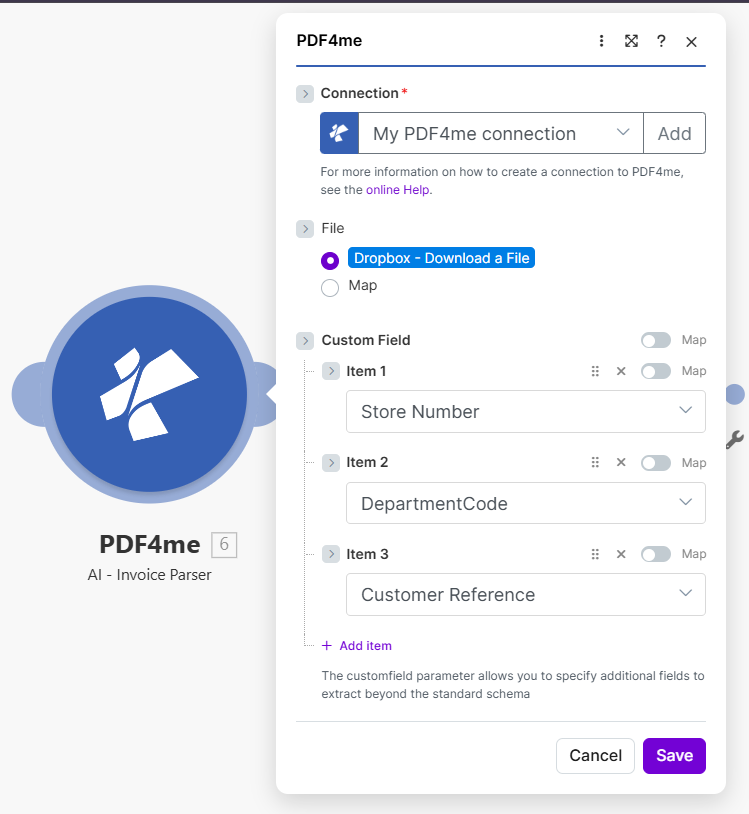
ファイルをマップに設定し、前のモジュールからファイル名とドキュメントを接続します。
パラメータ
必須: 繋がり、 ファイル名、 そして 書類。 セット ファイル に 地図 まず、これによりモジュールパネルにファイル名とドキュメントのフィールドが表示されます。
| パラメータ | 必須 | その機能 | 例 |
|---|---|---|---|
| Connection | Required | PDF4me API connection. Click Add and paste your API key the first time. Reused automatically across all PDF4me modules in your scenarios. | My PDF4me connection |
| File | Required | How the invoice file is supplied to the module. Choose Map to wire binary content from a prior step such as Dropbox, Google Drive, OneDrive, or a Gmail attachment. Choose Dropbox, Download a File to pull straight from a Dropbox trigger without a separate download step. | Map |
| File Name | Required | Filename of the invoice including its extension (.pdf, .png, .jpg, .jpeg). Map it from the filename output of your source module. | invoice.pdf |
| Document | Required | Binary content of the invoice file. Map it from the file data returned by the source module: the Data field of Dropbox, Google Drive, OneDrive, or a Gmail attachment module. | 1. Data |
出力フィールド
このモジュールは単一のフィールドを返します。 PDF4me リクエストをバックグラウンドジョブとして処理し、 Make 次のモジュールを実行する前に、結果を待ちます。
| 分野 | タイプ | 内容物 |
|---|---|---|
Process Invoice Model | Text | The invoice details extracted by the AI, as structured data (JSON). Map it into the next module to store the whole invoice, or parse it first to use the individual values separately. |
プロセス請求書モデルフィールドの内容
これらの値は単一の内容です 請求書処理モデル フィールドであり、個別のモジュール出力ではありません。 Make それらを個別に読む。
| 価値 | タイプ | 内容物 |
|---|---|---|
invoiceNumber | String | Extracted invoice number or reference identifier (e.g. INV-2024-001). |
vendorName | String | Complete name of vendor or supplier as printed on the invoice. |
vendorAddress | String | Complete vendor address including street, city, state, and postal code. |
vendorEmail | String | Vendor email address when present on the invoice. |
vendorPhone | String | Vendor phone number when present on the invoice. |
billToName | String | Name of the entity being billed (your company or end customer). |
billToAddress | String | Complete billing address. |
invoiceDate | String | Invoice issue date in ISO 8601 format (YYYY-MM-DD). |
dueDate | String | Payment due date in ISO 8601 format. |
subTotal | Number | Subtotal amount before taxes. |
total | Number | Final total amount including all taxes and adjustments. |
currency | String | Currency code in ISO 4217 format (USD, EUR, GBP, INR, CHF, etc.). |
paymentTerms | String | Payment terms and conditions (e.g. Net 30, Due on receipt). |
lineItems | Array | Line items with description, quantity, unitPrice, total, and HSN code when present. |
cgst / sgst / igst | Number | Indian tax values when present on the invoice: central, state, and integrated GST amounts. |
クイックセットアップ
- 追加 PDF4me → AI請求書解析ツール あなたの Make シナリオ。 Make モジュールをリストします AI - 請求書の解析 [非推奨]。
- 選択 繋がり (またはクリック) 追加 あなたと一緒に作成する PDF4me API 鍵)。
- 下 ファイル、 選ぶ 地図 ファイル名とドキュメントのフィールドを表示します。
- 地図 ファイル名 ソースファイルのファイル名に(含む)
.pdf、.png、.jpg、 または.jpeg) - 地図 書類 ソースモジュールからのバイナリコンテンツへ: 通常は データ の分野 Dropbox、 Google Drive、 OneDrive、 または Gmail 添付ファイルモジュール。
- クリック 保存 そしてシナリオを実行します。 請求書処理モデル の中へ QuickBooks、 Xero、 Airtable、 Google Sheets、 Slack 承認、または HTTP モジュールを使用する場合は、個々の値が必要な場合はまず解析してください。
ワークフローの例
ワークフローの例Common Make scenario patterns using AI-Invoice Parser.
- Gmail 既知のベンダーアドレスからメールが届いたときにトリガーされます PDF 請求書添付書類。
- 添付ファイルはAI請求書パーサーに渡されます。請求書処理モデルには、ベンダー名、請求書番号、明細項目、合計金額、通貨、および支払条件が含まれます。
- A Make フィルターは解析された合計とベンダー名をチェックし、請求書のいずれかが欠落している場合は Slack 人間によるレビューのためのチャネル。
- 完成した請求書は QuickBooks ベンダー、支払期日、明細項目、および勘定科目のマッピングが自動的に適用された新規請求書として作成されます。
- 1 Airtable ログ記録には、監査報告のために、請求書番号、ベンダー、金額、ステータス、およびタイムスタンプが記録されます。
- A Dropbox ウォッチファイルは新しい請求書があるたびに火災をトリガーします PDF 会計部門の受信トレイフォルダにドロップされます。
- AI-Invoice Parserは、Process Invoice Modelで請求書のペイロード全体を返し、ベンダー、合計、日付、および以下の行の明細項目に解析します。
- A Google Sheets 「行の追加」モジュールは、請求書、仕入先、合計金額、通貨、発注書、部門、支払期日ごとに、正規化された元帳行を1つ追加します。
- 2つ目のモジュールは、各lineItemを繰り返し処理し、支出分析用の別のLine Itemsシートに追加します。
- 請求書 PDF 受信トレイを次回の実行のために整理するため、年月別のサブフォルダに移動してアーカイブします。
- ウェブフックは内部ポータルから請求書を受信します。ドキュメントバイナリはAI請求書パーサーに渡されます。
- ルーターは抽出された合計金額に基づいて分岐します。10,000ドルを超える請求書はCFOの承認が必要で、1,000ドルを超える請求書はマネージャーの承認が必要、1,000ドル未満の請求書は自動承認されます。
- 各支店は Slack ベンダー、合計金額、明細項目、および元のリンクを含む承認メッセージ PDF。
- 承認が届くと、請求書は Xero 請求書として作成され、解析された仕入先名と明細項目の説明からGL勘定が選択されます。
- 最後に Airtable この行には、承認者、承認日時、およびコンプライアンス監査証跡のための最終処理結果が記録されます。