メタデータを保存する PDF で Make
メタデータを保存する PDF は PDF4me モジュール Make その編集 PDF メタデータ: それは書き込む Title、 Author、 Creator、 Producer、 Subject、 そして Keywords 畑を PDF お客様のシナリオに基づきます。すべてのフィールドはオプションですので、空白のままにしたフィールドは既存の値が保持されます。これを使用して、検索用のドキュメントにタグを付けたり、アーカイブを標準化したり、ファイルを開かずに生成されたレポートにスタンプを付けたりできます。
このモジュールの機能
PDF4me、 PDF PDFのメタデータを保存する タイトル、著者、作成者、プロデューサー、主題、キーワードのフィールドを直接書き込みます PDF から Make シナリオ。すべてのフィールドはオプションです。いずれかのフィールドを空白のままにすると、ドキュメント内の既存の値が保持されます。前の手順で取得した値をマッピングすることで、ファイルを手動で開くことなく、ドキュメントライブラリ全体にわたってメタデータタグ付けを自動化できます。
APIリクエストの認証
毎 PDF4me モジュール Make 有効な 繋がり. 作成または選択して、 PDF4me API シナリオがメタデータ書き込みサービスを安全に呼び出せるようにするためのキー。
見逃してはならない重要な事実
毎回すべてのメタデータを再入力する必要はありません。空欄のままにしたフィールドは無視され、既に保存されている値が使用されます。 PDF 残ります。変更が必要な箇所のみを更新してください。
Google の読み上げ PDF クロール時のメタデータ。 Title このフィールドは検索結果の見出しに表示される場合があります。 Keywords 関連性シグナルに貢献します。公開前にこれらを設定してください。 PDFs あなたのウェブサイトへの直接 SEO アクション。
メタデータは文書情報辞書に格納されており、ページコンテンツとは完全に分離されています。これらのフィールドを変更しても、閲覧者がファイルを開いたときに表示される内容には影響しません。
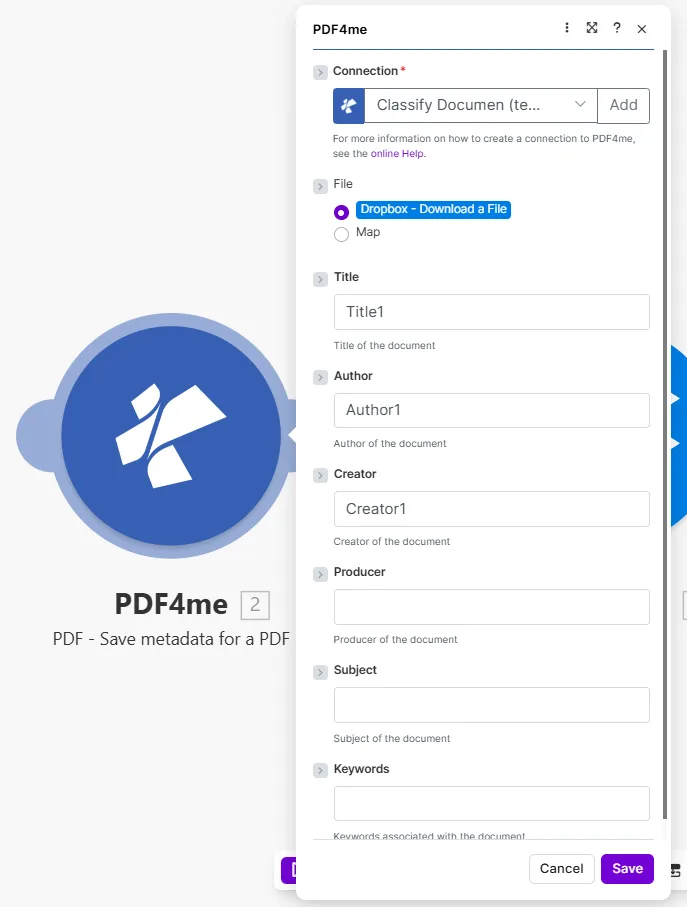
更新したいフィールドのみを入力してください。空欄のフィールドは、入力された値がそのまま保持されます。 PDF すでにそうなっています。
何 PDF メタデータフィールドは設定できますか Make?
このモジュールは6つの標準を書き込む PDF ドキュメント情報フィールド。すべてオプションです。指定した値のみがドキュメントに書き込まれます。基となる仕様については、以下を参照してください。 PDF ドキュメント情報辞書 PDF 1.7 / ISO 32000 仕様 そして Google Search Central のガイダンス PDF ベストプラクティス。
必須: Connection、 File、 File name、 そして Documentメタデータフィールドはすべて任意入力です。入力された値のみがドキュメントに書き込まれます。
| パラメータ | 必須 | その機能 | 例 |
|---|---|---|---|
| Connection | Required | PDF4me API connection used to authenticate metadata write requests. | Your PDF4me connection |
| File | Required | Source PDF. Choose Dropbox - Download a File for a direct Dropbox trigger, or Map to supply filename and binary content from a prior module. | Dropbox - Download a File |
| File name | Required | Name of the PDF to process, including its extension. Map it from the file name returned by a previous module, such as a cloud storage download. | 1. File Name |
| Document | Required | Content (binary data) of the PDF to process. Map it from the file data returned by a previous module, such as a cloud storage download. | 1. Data |
| Title | Optional | Title of the document, written into the PDF info dictionary. Appears in viewer title bars and is indexed by Google when the PDF is published on the web. | Q4 Financial Report 2025 |
| Author | Optional | Author of the document. Used for attribution in viewers and document management systems. | Finance Department |
| Creator | Optional | Creator of the document - the application that originally authored it, for example Microsoft Word or Adobe InDesign. | Microsoft Word |
| Producer | Optional | Producer of the document - the tool that generated the final PDF bytes, for example a PDF library or a print-to-PDF driver. | PDF4me |
| Subject | Optional | Subject of the document. Visible in the document properties dialog and used by some search systems. | Quarterly earnings summary |
| Keywords | Optional | Keywords associated with the document, comma-separated. Contributes to Google indexing and internal search when the PDF is hosted online. | finance, Q4, 2025, earnings |
編集するにはどうすればいいですか? PDF メタデータ Make シナリオ?
- 追加 PDF4me そして選択する PDF PDFのメタデータを保存する。
- 選択 Connection (またはクリック) 追加 あなたと一緒に作成する API 鍵)。
- セット File に Dropbox - ファイルをダウンロードする または 地図 前のモジュールから。
- 更新したいメタデータ項目を入力してください。 Title、 Author、 Creator、 Producer、 Subject、 Keywords現在の値を保持するには、いずれかのフィールドを空白のままにしてください。
- 値を自動化するには、以前のモジュールから値をマッピングします。タイトルはAirtableフィールドから取得するか、ファイル名から導き出します。
- 保存 そしてクリック 1回実行出力には以下が含まれます File Name そして Document: その PDF メタデータプロパティが更新されました。
出力
PDF4me リクエストをバックグラウンドジョブとして処理し、 Make 次のモジュールを実行する前に、結果を待ちます。
| 分野 | タイプ | 内容物 |
|---|---|---|
File Name | File name | File name of the output PDF with updated metadata. |
Document | File (binary data) | Content (binary data) of the PDF with the new metadata written in. Map this into an upload, archive, or email module. |
ワークフローの例
ワークフローの例Common Make scenario patterns that use PDF - Save metadata for a PDF to tag, standardize, and optimize document properties.
- 新しいホワイトペーパー PDF 監視対象のGoogleドライブフォルダにアップロードされます。
- ドキュメントのタイトル、作成者名、 SEO キーワードはファイル名で検索されます。
- PDFのメタデータを保存する 書く Title、 Author、 そして Keywords シートからフィールドへ PDF。
- タグ付けされた PDF 公開ウェブサイトフォルダにアップロードされると、Google はインデックスを作成するための適切なメタデータを取得できます。
- Slackの通知で確認 PDF メタデータが適用された状態で稼働中です。
- スケジュールされたシナリオはすべてを反復します PDFs 旧アーカイブフォルダ内。
- 文書情報を取得する チェックします Author このフィールドには既にデータが入力されています。
- フィルターは既に作成者が登録されているファイルをスキップし、残りのファイルは処理を続行します。
- PDFのメタデータを保存する 組織名を書き込む Author 標準キーワードセット Keywords。
- 更新されたファイルはアーカイブに保存され、準拠した検索インデックス作成の準備が整います。
- 月次報告書 PDF データテンプレートから自動的に生成されます。
- このシナリオでは、現在の月と年を Title フィールド(例:2026年4月の売上レポート)。
- 部門名は以下のようにマッピングされます Author;関連する製品キーワードを Keywords。
- PDFのメタデータを保存する 3つのフィールドすべてを一度に書き込みます。
- メタデータタグ付きレポートはアーカイブされます SharePoint そして、配信リストにメールで送信しました。