サイズ変更 PDF で Make
このモジュールの機能
PDF4mePDF - PDFのサイズ変更 ページ寸法を変更する PDF 内部 Make シナリオでは、デスクトップソフトウェアは必要ありません。ページをリサイズして A4USレター、リーガル、または任意のカスタムミリメートルサイズを指定し、特定のページまたはすべてのページを対象とし、次の2つのモードから選択できます。ページキャンバス自体を再スケーリングするか、ページサイズはそのままにして既存のコンテンツの周囲にパディング余白を追加するかです。
APIリクエストの認証
毎 PDF4me モジュール Make 有効な 繋がり. 作成または選択して、 PDF4me API シナリオがサイズ変更サービスを安全に呼び出せるようにするためのキー。
見逃してはならない重要な事実
IsPageSizeRequested = はい 実際のページキャンバスを、指定したサイズに変更します。 いいえ ページサイズはそのままに、コンテンツの周囲に余白を追加します。間違ったオプションを選択すると、予期しない結果になる可能性があります。
Page Sequence 単一の数値、カンマ区切りのリスト、2-4 のような範囲、または単に 全てシーケンス外のページは、元の寸法で返されます。
Custom Width(mm)、 Custom Height(mm)また、4 つのパディングフィールドはすべて mm 単位の値を取り、0.0 から始まります。 A4 = 210 x 297 mm、USレター = 215.9 x 279.4 mm、リーガル = 215.9 x 355.6 mm。
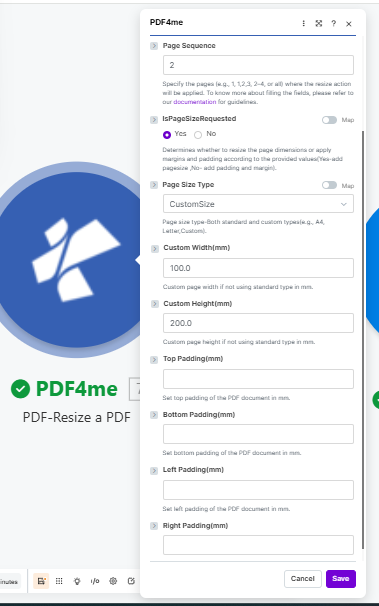
セット IsPageSizeRequested キャンバスのサイズを変更するには「はい」を選択し、標準サイズを選択するか、カスタム寸法をミリメートル単位で入力します。
パラメータ
必須: Connection、 File、 File name、 Document、 そして IsPageSizeRequested。 Custom Width(mm) そして Custom Height(mm) のみ表示されます Page Size Type 設定されています CustomSizeパディングフィールドは、 IsPageSizeRequested は「いいえ」に設定されています。
| パラメータ | 必須 | その機能 | 例 |
|---|---|---|---|
| Connection | Required | PDF4me API connection used to authenticate resize requests. | Your PDF4me connection |
| File | Required | Source PDF. Choose Dropbox - Download a File for a direct Dropbox trigger, or Map to wire filename and binary content from a prior module. | Dropbox - Download a File |
| File name | Required | Name of the PDF to process, including its extension. Map it from the file name returned by a previous module, such as a cloud storage download. | 1. File Name |
| Document | Required | Content (binary data) of the PDF to process. Map it from the file data returned by a previous module, such as a cloud storage download. | 1. Data |
| Page Sequence | Optional | Pages to resize. Accepts a single number, a comma-separated list (1,3,5), a range (2-4), or all. Page numbering starts at 1 and unspecified pages keep their original size. Defaults to all. | all |
| IsPageSizeRequested | Required | Yes rescales the page canvas to your target size. No leaves the canvas as-is and adds padding margins around the content instead. | Yes |
| Page Size Type | Optional | Target paper format. Options: CustomSize, A0, A1, A2, A3, A4, A5, A6, B5, Letter, Legal, Ledger, p11x17. Pick CustomSize to enter exact dimensions. Defaults to A4. | A4 |
| Custom Width(mm) | Conditional | Custom page width in mm, shown when Page Size Type is set to CustomSize. Defaults to 0.0. | 210 |
| Custom Height(mm) | Conditional | Custom page height in mm, shown when Page Size Type is set to CustomSize. Defaults to 0.0. | 297 |
| Top Padding(mm) | Optional | White-space margin added to the top of the page in mm. Applies when IsPageSizeRequested is set to No. Defaults to 0.0. | 10 |
| Bottom Padding(mm) | Optional | White-space margin added to the bottom of the page in mm. Applies when IsPageSizeRequested is set to No. Defaults to 0.0. | 10 |
| Left Padding(mm) | Optional | White-space margin added to the left of the page in mm. Applies when IsPageSizeRequested is set to No. Defaults to 0.0. | 10 |
| Right Padding(mm) | Optional | White-space margin added to the right of the page in mm. Applies when IsPageSizeRequested is set to No. Defaults to 0.0. | 10 |
クイックセットアップ
- 追加 PDF4me → PDF - PDFのサイズを変更する あなたのシナリオに当てはめて。
- 選択 Connection (またはクリック) 追加 あなたと一緒に作成する API 鍵)。
- セット File に Dropbox - ファイルをダウンロードする ソースがDropboxの場合、または 地図 以前のモジュールから取得する。
- 入力 Page Sequence: タイプ
allすべてのページをリサイズしたり、特定のページをターゲットにしたり1,3または2-4。 - セット IsPageSizeRequested: はい ページキャンバスを変更するには、 いいえ ページサイズを変更せずにパディングを追加する。
- もし はい: 選択する Page Size Type (A4 デフォルトでは; CustomSize、 A0-A6、 B5(レター、リーガル、レジャー、p11x17も利用可能)。 CustomSize、 入力 Custom Width(mm) そして Custom Height(mm)。 もし いいえ必要なパディングフィールドを入力してください。 トップ、 底、 左、 右 単位はミリメートルです。
- 保存 そしてクリック 1回実行出力バンドルには File Name そして Document 下流へ通過する準備が整いました。
出力
PDF4me リクエストをバックグラウンドジョブとして処理し、 Make 次のモジュールを実行する前に、結果を待ちます。
| 分野 | タイプ | 内容物 |
|---|---|---|
File Name | File name | File name of the resized PDF, based on the source file name. |
Document | File (binary data) | Content (binary data) of the resized PDF. Map this into an upload, send, or further processing module. |
ワークフローの例
ワークフローの例Real Make scenario patterns that use PDF-Resize a PDF to solve format inconsistency, print prep, and archiving.
- 新しい PDFs 複数のソースから共有Dropboxフォルダに届くもの、 A4レターサイズ、カスタムサイズなど。
- PDF - PDFのサイズを変更する 各受信ファイルに対して実行 Page Sequence 設定 all そして Page Size Type 設定 A4。
- すべてのファイルは、同じキャンバスサイズでモジュールから出力されます。
- PDF結合モジュールは、ページ境界のずれなくそれらを結合します。
- 結合された文書はアーカイブフォルダに保存され、チームにメールで送信されます。
- 報告書 PDF ページ全体を端から端まで埋め尽くすコンテンツで生成されます。
- PDF - PDFのサイズを変更する 実行 IsPageSizeRequested 設定は「いいえ」にして、四方すべてに10mmのパッドを貼ってください。
- ページキャンバスは余白に合わせて拡大され、既存のコンテンツは移動またはサイズ変更されません。
- パッド入り PDF データはプリンターモジュールに送信され、すべてのページに安全な余白が確保されます。
- スケジュールされたシナリオでは、米国形式のテンプレート(215.9 x 279.4 mm)から週次レポートを取得します。
- PDF - PDFのサイズを変更する すべてのページを変換して A4 (210 x 297 mm)はヨーロッパの受取人向けです。
- サイズ変更された PDF 地域固有の場所にアップロードされます SharePoint フォルダ。
- 通知メール A4 バージョンは地域別配布リストに送信されます。