修理 PDF で Make
このモジュールの機能
PDFs 自動化されたパイプラインのあらゆる段階で破損する - クラウドアップロードが転送途中でドロップされる、メールサーバーがバイナリ添付ファイルを再エンコードする、 ZIP 部分的にしか抽出できないアーカイブ、または長年の保管によるビット腐敗を受けたレガシーファイル。 PDF 下流モジュール(コンバータ、 AI パーサー、フォーム抽出器 - シナリオ全体が失敗します。 PDF4me - PDFの修復 問題が伝播する前にそれを阻止します。欠落している相互参照テーブルを再構築し、破損したストリームオブジェクト境界を修正し、ページツリーを再構築し、ファイル終端マーカーを修正して、すべての下流モジュールが処理できる構造的に健全なドキュメントを返します。損傷のないファイルは変更されずに通過するため、このモジュールをすべてのプロセスに普遍的な予防措置として安全に追加できます。 PDF 入力 Make シナリオ - 条件分岐は不要です。
関連ブログ記事
この機能に関するブログ記事はまだありません。近日公開予定です。
その間、PDF4me ブログを閲覧して、あらゆるプラットフォームのチュートリアルやワークフローをご覧ください。
ブログをご覧ください →
APIリクエストの認証
毎 PDF4me モジュール Make 有効な 繋がり. 作成または選択して、 PDF4me API シナリオが安全に修理サービスを呼び出すためのキー。
見逃してはならない重要な事実
ドキュメントは実際のバイナリデータである必要があり、URLやファイル名であってはなりません。
セット File に Map そして配線する Document 現場から実際の PDF ダウンロードモジュールからのバイト数 - Data Dropbox、Google Drive、OneDrive のフィールド、または HTTPファイルを渡す URL または、ここにファイル名文字列があると、修復の試みではなく、即座に実行が失敗します。モジュールは、生のバイナリを検査および再構築する必要があります。 PDF 構造。
健全なファイルには安全 - PDFが破損していない場合は変更は行われません
もし PDF 構造検証に合格すると、モジュールはそれをバイト単位で変更せずに返します。正常なドキュメントを変更したり再エンコードしたりするリスクはありません。つまり、Repair PDF をあらゆるパイプラインの恒久的なステップとして配置できます。請求書パーサーの前、コンバーターの前、 AI 抽出器 - 最初に損傷をチェックする条件を必要としない。
回復は保証されません。必ずエラーハンドラーを追加してください。
このモジュールは、破損した外部参照テーブル、アライメントのずれたストリーム、切り詰められたボディなど、構造的な損傷を修復できますが、バイナリコンテンツの大部分が欠落しているファイルや、不明なパスワードで暗号化されたファイルは復元できません。このような場合、モジュールはエラーをスローします。モジュールを右クリックしてエラーハンドラーを追加し、復元できないファイルをSlackアラート、メール通知、または隔離フォルダにルーティングすることで、パイプラインから何も静かに消えてしまうことがなくなります。
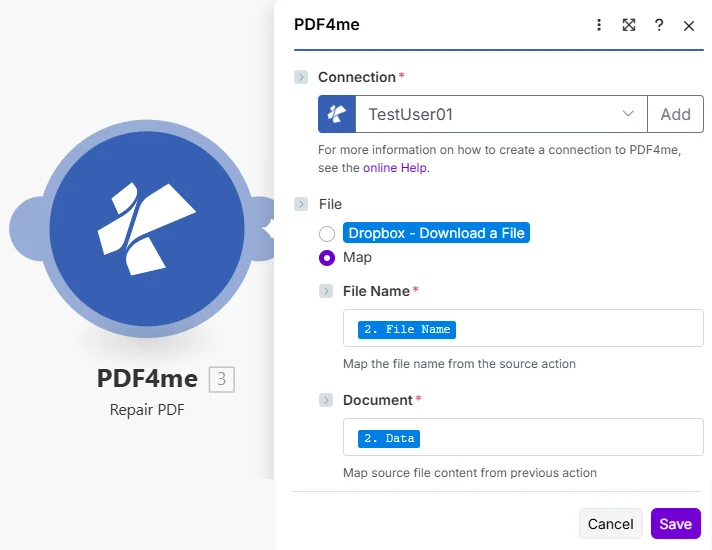
セット File に Map次に接続します File Name そして Document ダウンロードしたモジュールから PDF. Document 出力は、再構築されたファイルを次のステップに渡します。
パラメータ
必須: Connection、 File Name、 そして Document。 セット File に Map まず、これは File Name そして Document モジュールパネル内のフィールド。
| パラメータ | 必須 | その機能 | マッピング例 |
|---|---|---|---|
| Connection | Required | PDF4me API connection that authenticates the repair request. Click Add to create one by pasting your PDF4me API key - reused automatically across all PDF4me modules in your scenarios. | Your PDF4me connection |
| File | Required | How the PDF is supplied to the module. Always choose Map when passing binary content from a prior download step. The Map option reveals the File Name and Document fields below. | Map |
| File Name | Required | Original filename of the PDF including the .pdf extension. Used to name the repaired output file returned in the File Name field. Map from the filename output of your Dropbox, Google Drive, OneDrive, or HTTP module. | 2. File Name |
| Document | Required | Binary content of the PDF to repair. Must be raw file bytes from a download module - the Data field in Dropbox, Google Drive, or OneDrive. Do not pass a file URL or a filename string here; the module requires actual binary to inspect and reconstruct the file structure. | 2. Data |
出力フィールド
| 分野 | タイプ | 内容物 |
|---|---|---|
File Name | File name | Filename of the repaired PDF derived from the File Name you supplied. Map this into storage module name fields. |
Document | File (binary data) | Content (binary data) of the rebuilt PDF. Map directly into any upload, send, convert, or processing module. For Google Drive or Dropbox upload, this maps to the Data field. |
クイックセットアップ
- 追加 PDF4me → 修理PDF あなたの Make シナリオ。
- 選択 Connection またはクリック 追加 そしてあなたの API 作成するための鍵。
- 下 File、 選ぶ Map 明らかにするために File Name そして Document 分野。
- 地図 File Name ダウンロード手順のファイル名出力に(以下を含める必要があります)
.pdf) - 地図 Document 同じステップのバイナリデータフィールドへ - 通常は Data。
- モジュールを右クリックして追加します Error Handler 復元不可能なファイルを検出するため。
- 保存 そしてクリック 1回実行. Document 出力には修復されたものが含まれています PDF ファイル - それを下流のストレージアップロード、変換、または処理モジュールに接続します。
ワークフローの例
ワークフローの例Common Make scenario patterns that include a Repair PDF step.
メール添付ファイルの受信 → 修復 → AI請求書解析
- GmailのWatch Emailsは、新しいメッセージでトリガーされます。 PDF 既知のサプライヤードメインからの添付ファイル。
- 修理PDF すべての添付ファイルで実行されます - メールサーバー MIME 再エンコードは、転送中のバイナリストリームを頻繁に破損させる。
- 修理された Document 供給する AI請求書解析ツール 構造的に破損した入力による実行失敗はありません。
- 抽出された請求書フィールド(仕入先、金額、支払期日)は、GoogleスプレッドシートまたはAirtableのレコードに自動的に書き込まれます。
- エラーハンドラーは、回復不可能な添付ファイルをSlackアラートに送信し、手動でのフォローアップを促します。
レガシーアーカイブの移行 → 修復 → PDF/Aの検証 → 新しいストレージ
- スケジュールされたシナリオには、すべてがリストされています。 PDFs 2010年から2018年までの文書を含む、古いDropboxフォルダ内。
- 各ファイルはダウンロードされ、通過されます。 修理PDF 長年にわたって蓄積されたビット腐敗やエンコードのずれを修正するため。
- PDF/Aを検証する 修復後の出力の適合性を確認します。
- 適合ファイルは新しい場所にアップロードされます SharePoint アーカイブライブラリ。規格に適合しないファイルは、ファイル名とエラー内容とともにGoogleスプレッドシートに記録され、手動で確認できるようになっています。
クライアントポータルへのアップロード → 修復 → PDF/Aへの変換 → コンプライアンスアーカイブ
- クライアントが署名済みの契約書をアップロードします PDF TypeformまたはJotformポータル経由でアップロードする場合、接続速度が遅いとアップロードが中断され、ファイルが途中で切れてしまうことがよくあります。
- 修理PDF 処理を開始する前に、アップロードされたデータによる構造的な損傷を修復します。
- PDF/A を作成する 修復された文書を長期保存用のアーカイブ形式に変換します。
- の PDF/ファイルは保存されます SharePoint コンプライアンスフォルダ。ダウンロードリンク付きの確認メールがクライアントに自動的に送信されます。
よくある質問
関連モジュール
検証する PDF/A
修理後に走る PDF 再構築された文書が要件を満たしていることを確認する PDFアーカイブまたは配布前の適合性確認 - コンプライアンスワークフローのための2段階品質ゲート。
文書情報を取得する
修復後の出力について、ページ数、メタデータ、およびドキュメントのプロパティを検査し、構造が損なわれておらず、コンテンツが完全であることを確認してから、さらに処理を進めてください。
作成する PDF/A
修理された PDF へ PDF長期保存または規制遵守のためのアーカイブプロファイル - 構造復旧後の自然な次のステップ。