読む PDF メタデータ Make: 文書情報を取得する
PDF4me ドキュメント情報を取得する Make モジュールが PDF ソースファイルを変更することなく、タイトル、著者、ページ数、ファイルサイズなど、14個のメタデータフィールドを返します。キーワードによるドキュメントのルーティング、変換前のサイズ超過アップロードのブロック、アーカイブファイルの自動カタログ化(スプレッドシートへの入力)などに活用できます。
このモジュールの機能
PDF4me - 文書情報を取得する メタデータと構造プロパティを読み取る PDF ソースファイルを変更せずに返します。 14の個別分野 - タイトル、件名、ページ数、著者、作成方法、作成者、作成日、更新日、ファイルサイズ、暗号化されているか、高速ウェブビュー、PDF準拠レベル、署名されているか、PDFバージョン - マッピング可能なトークンとして直接接続できます Make フィルター、ルーター、データベースモジュール、通知ステップなど、様々な用途に使用できます。変換ステップの前にドキュメントサイズを事前スクリーニングしたり、作成者や部署のキーワードでファイルをルーティングしたり、アーカイブアップロードをAirtableやGoogle Sheetsに自動的にカタログ化したり、承認メールにページ数を表示してレビュー担当者が承認内容を把握できるようにしたりするのに活用できます。
認証 API リクエスト
毎 PDF4me モジュール Make 有効な 繋がり. 作成または選択して、 PDF4me API シナリオがメタデータサービスを安全に呼び出せるようにするためのキー。
見逃してはならない重要な事実
このモジュールはファイル構造を読み取り、データを返します。元のデータにはバイトはありません。 PDF 書き込み、並べ替え、削除は行われません。マッピングするドキュメントは、下流に渡されるドキュメントと同一であるため、ソースコードを変更するリスクなく、本番ファイルで安全に実行できます。
タイトル、件名、ページ数、作成者、作成方法、作成者、作成日、更新日、ファイルサイズ、暗号化の有無、高速ウェブビュー、PDF準拠レベル、署名の有無、PDFバージョンはすべて、出力バンドル内の個別のマッピング可能なトークンとして利用できます。個々の値を抽出するために解析手順やカスタム関数は必要ありません。
ページ数、著者、または暗号化されたマップを直接 Make ドキュメントのプロパティに基づいてシナリオを分岐させるには、フィルターまたはルーターを使用します。サイズが大きすぎるファイルは拒否パスにルーティングし、作成者タグ付きのファイルも送信します。 PDFs 一致するフォルダに移動するか、パスワードで保護されたファイルを別のブランチに転送します。
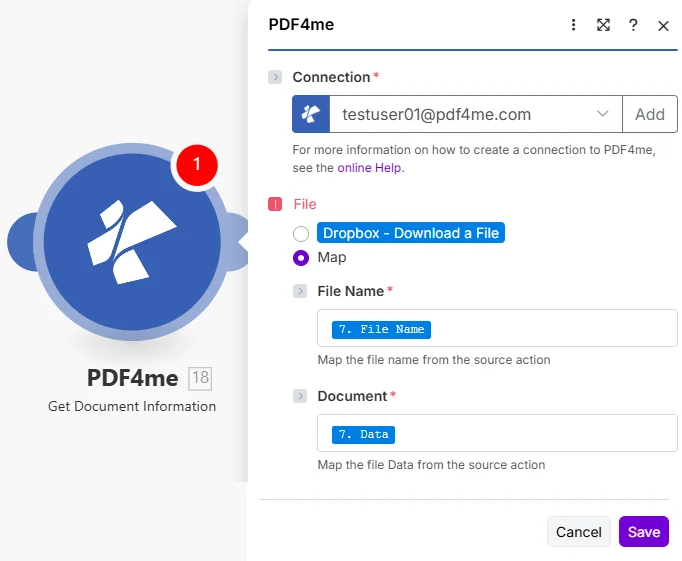
選択 地図 ファイル、マップの順に選択してください。 ファイル名 そして 書類 ダウンロードしたステップから PDF。
パラメータ
必須: 繋がり、 ファイル名、 そして 書類。 セット ファイル に 地図 まず、両方の入力フィールドが表示されるようにしてください。ドキュメントにはバイナリファイルバイトが必要です。URL文字列やファイル名だけでは機能しません。
| パラメータ | 必須 | その機能 | マッピング例 |
|---|---|---|---|
| Connection | Required | PDF4me API connection used by the scenario to authenticate metadata requests. Click Add and paste your API key if connecting for the first time. | Your PDF4me connection |
| File | Required | Determines how the PDF is supplied. Choose Map to wire File Name and Document from a prior module's output - the most common setup for multi-step scenarios. | Map |
| File Name | Required | Filename with .pdf extension from the source module, supplied when File is set to Map. Map from the file name field of your Dropbox, Drive, or OneDrive step. | 7. File Name |
| Document | Required | Binary PDF content from the download step, supplied when File is set to Map. Must be actual file bytes - not a URL or a filename string. Map from the Data field of Dropbox or the equivalent binary field of SharePoint. | 7. Data |
読み方は PDF メタデータ Make?
- 追加 PDF4me → 文書情報を取得する あなたのシナリオに当てはめて。
- 選択 繋がり (またはクリック) 追加 あなたと一緒に作成する API 鍵)。
- 下 ファイル、 選ぶ 地図。
- 地図 ファイル名 ダウンロード手順のファイル名フィールドに以下を含めます。
.pdf拡大。 - 地図 書類 同じステップからのバイナリデータフィールドへ(通常は データ Dropbox内、またはSharePoint/OneDriveモジュール内の同等のバイナリフィールド)。
- 保存 そしてクリック 1回実行出力バンドルを展開します。14個のメタデータフィールドはそれぞれ独立したマッピング可能なトークンであり、後続のモジュールに接続できます。
このモジュールはどのようなメタデータフィールドを返しますか?
モジュールは以下を返します 14個の個別メタデータフィールド - それぞれ独立してマッピング可能です。タイトル、主題、著者、作成方法、制作者は PDF文書情報辞書 (第 14.3.3 項 PDF 32000-1:2008 仕様)は、ページ数、ファイルサイズ、暗号化されているかどうか、高速ウェブビュー、PDF 準拠レベル、署名されているかどうか、および PDF バージョンは、ファイル構造自体から読み取られます。
| 分野 | タイプ | 内容物と使用方法 |
|---|---|---|
Title | Text | Title stored in the PDF document properties. Empty when not set. Map into an Airtable record or email subject line. |
Subject | Text | Subject stored in the PDF document properties. Often populated by enterprise document management systems. |
Number of Pages | Number (whole) | Number of pages in the PDF. Use in a Filter to block files over a page limit or route short vs. long documents to different processing branches. |
Author | Text | Author stored in the PDF document properties. Use in a Router to send files to department-specific folders based on author. |
Created Using | Text | Application used to create the original document - for example Microsoft Word or Adobe InDesign. |
Produced By | Text | Application that produced the PDF. Differs from Created Using when a Word file was later exported to PDF. |
Created Date | Text | Date and time the PDF was created. Use in a Filter to process only documents created within a target date range. |
Modified Date | Text | Date and time the PDF was last modified. Compare to a stored baseline to detect documents that have changed since last processing. |
File Size | Number (whole) | Size of the PDF file in bytes. Gate on this before a conversion or email step - reject oversized files and notify the submitter to re-upload a compressed version. |
Is Encrypted | Yes/No | Whether the PDF is encrypted (password protected). Branch password-protected files to a separate path instead of letting a later module fail. |
Fast Web View | Yes/No | Whether the PDF is linearized for Fast Web View - useful when files are served for progressive download in a browser. |
PDF Compliance Level | Text | PDF/A (or other) compliance level of the file, if any. Check it before routing a document into a regulated archive. |
Is Signed | Yes/No | Whether the PDF contains a digital signature. Use it to separate already-signed contracts from documents still awaiting signature. |
PDF Version | Text | PDF version of the file, for example 1.7. Verify conformance before routing to an archive that requires a specific version. |
「ドキュメント情報取得」はどのような場合に使用すべきですか?
典型的な構成Common Make scenario patterns that use Get Document Information to drive routing, validation, or cataloging.
- 新しい PDF 共有Dropbox受信トレイフォルダに届き、シナリオがトリガーされます。
- 文書情報を取得する 件名メタデータフィールドを抽出します。
- A Make ルーターは、件名を部門名(財務、法務、人事)と照合します。
- 各支社は、Googleドライブ内の対応するチームフォルダにファイルをアップロードします。
- Slack通知は、文書のタイトルとページ数を宛先チームに通知します。
- フォーム送信により、添付されたシナリオがトリガーされます。 PDF。
- 文書情報を取得する ページ数とファイルサイズを返します。
- フィルターは、50MBを超えるファイル、または1ページ未満のファイルの処理をブロックします。
- 有効な文書は、変換モジュールまたは電子署名モジュールに進みます。
- 拒否されたファイルに対しては、送信者により小さなバージョンのファイルを再アップロードするよう求めるメールが返信されます。
- スケジュールされたシナリオは新しいものを反復します PDFs OneDriveのアーカイブフォルダ内。
- 文書情報を取得する ファイルごとに14個のメタデータフィールドすべてを抽出します。
- Airtableモジュールは、タイトル、作成者、作成日、ページ数を含む新しいレコードを作成します。
- この記録は、ワンクリックでファイルを取得できるよう、OneDriveのファイルURLにリンクされています。
- フィルターは、既に一致するAirtableレコードが存在するファイルをスキップすることで、重複を防ぎます。
実践的なヒント
チートシート
| 分野 | 価値 |
|---|---|
| File | Map |
| File Name | 7. File Name |
| Document | 7. Data |
| Always populated | Number of Pages, File Size, PDF Version |
| Can be empty | Title, Author, Subject, Created Using, Produced By |