PDF ハイパーリンクを抽出する Make
このモジュールの機能
PDF4me、 PDF - ハイパーリンクの抽出 クリック可能なハイパーリンクをすべて読み取ります PDF そしてそれらを構造化された形で返します Hyperlinks 配列、見つかったリンクごとに1つのアイテム、ドキュメントを変更せずに。完全に非破壊的。 n8n このデータを取得するには、別途 PDF.co アクションが必要です。 PDF4me ネイティブに単一の Make 追加機能のないモジュール API またはサービスが必要です。
APIリクエストの認証
毎 PDF4me モジュール Make 有効な 繋がり. 作成または選択して、 PDF4me API シナリオがリンク抽出サービスを安全に呼び出せるようにするためのキー。
見逃してはならない重要な事実
このモジュールは単一の出力を返します。 Hyperlinks、タイプ 配列スキャンしたページで見つかったリンクごとに1つのアイテムを追加します。 イテレータ モジュール終了後、項目を一つずつ確認していく。
このモジュールは読み取りのみを行い、変更されたデータを返しません。 PDFDropbox、Google Drive、またはその他の場所に保存されているソースドキュメントは、一切変更されません。リンク管理ワークフローの開始時に自由にご利用いただけます。
まず抽出して、存在するリンクを正確にログに記録し、次に同じファイルをDelete Hyperlinkに渡して削除します。削除されたすべてのリンクの完全な監査証跡が得られるため、コンプライアンスや変更レビューに役立ちます。
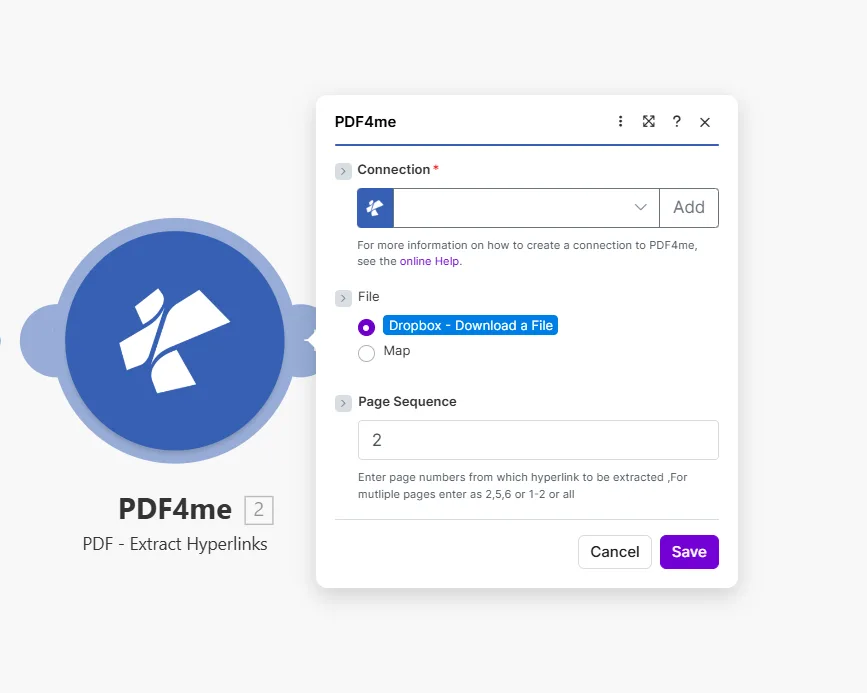
1ページ、カンマ区切りのリスト、範囲、または all 文書全体にわたるすべてのリンクをスキャンする。
パラメータ
必須: Connection、 File、 PDF File Name、 そして PDF File。 Page Sequence 任意です。
| パラメータ | 必須 | その機能 | 例 |
|---|---|---|---|
| Connection | Required | PDF4me API connection used to authenticate extraction requests. Click Add to create one with your API key. | Your PDF4me connection |
| File | Required | Source PDF to scan. Choose Dropbox - Download a File for a direct Dropbox trigger, or Map to supply the filename and binary content from a prior module. | Dropbox - Download a File |
| PDF File Name | Required | Name of the PDF to process, including its extension. Map it from the file name returned by a previous module, such as a cloud storage download. | 1. File Name |
| PDF File | Required | Content (binary data) of the PDF to process. Map it from the file data returned by a previous module, such as a cloud storage download. | 1. Data |
| Page Sequence | Optional | Which pages to scan for hyperlinks. Accepts a single page, comma-separated list, a range, or all to read the entire document at once. Page numbering starts at 1. Defaults to all. | 2 or 2,5,6 or 1-2 or all |
出力
このモジュールは1つのフィールドを返します。 PDF4me リクエストをバックグラウンドジョブとして処理し、 Make 次のモジュールを実行する前に、結果を待ちます。
| 分野 | タイプ | 説明 |
|---|---|---|
| Hyperlinks | Array | The hyperlinks found on the selected pages, one item per link. Add an Iterator after this module to loop over the items, then expand an item in the mapping panel to pick the values you need. |
配列、または各項目をマップします。 イテレータGoogle スプレッドシートの行、Airtable レコードに、 HTTP リクエスト、またはフィルター条件 Make シナリオ。
クイックセットアップ
- 追加 PDF4me → PDF - ハイパーリンクの抽出 あなたの Make シナリオ。
- 選択 Connection (またはクリック) 追加 あなたと一緒に作成する API 鍵)。
- セット File に Dropbox - ファイルをダウンロードする または 地図 前のモジュールから出力される PDF バイナリ。
- スキャンするページを入力してください Page Sequence: 使用
all文書内のすべてのリンクを一度に読み込む。 - 保存 そしてクリック 1回実行出力には Hyperlinks 配列: 追加 イテレータ このモジュールの後に、各リンクを個別にループ処理します。
ワークフローの例
ワークフローの例Common Make scenario patterns that use PDF - Extract Hyperlinks for auditing, cataloguing, and link management.
- Google Drive は、 PDF 「レポート」フォルダに追加されます。
- PDF - ハイパーリンクの抽出 スキャン Page Sequence 設定 all。
- イテレータはループします Hyperlinks 配列。
- HTTP 作る HEAD 各リクエスト URL また、フィルターは200以外の応答をチェックします。
- Slackは壊れたアラートを投稿します URL そして、それが見つかったページ。
- Dropboxは、「共有ドキュメント」フォルダに新しいファイルが保存されるとトリガーされます。
- PDF - ハイパーリンクの抽出 すべてのページにあるすべてのリンクを読み取ります。
- イテレータはループします Hyperlinks 配列。
- Google スプレッドシートは、リンクごとに行を追加し、ドキュメント名と抽出日も併せて表示します。
- 外部配布が承認された文書に対して、Webhookが起動します。
- PDF - ハイパーリンクの抽出 見つかったすべてのリンクをタイムスタンプとともにGoogleスプレッドシートに記録します。
- PDF - ハイパーリンクを削除 そして、すべてのページからすべてのリンクを削除します。
- Gmailは、サニタイズされた情報を送信します。 PDF 受取人に対し、削除された内容の永久記録を添えて送付する。