作成する ZUGFeRD 請求書 Make
作成する ZUGFeRD 請求書 は Make モジュール PDF4me ハイブリッドを生成する ZUGFeRD/Factur-X 電子請求書 CSV、 JSON、 または XML 請求書データ。これを使用して、 PDF/A-3 機械可読な文書 XML 内部に埋め込まれ、位置合わせされています EN 16931 欧州の電子請求書規格。購入者または顧客の要件に合わせて、適合レベルと仕様バージョンを選択してください。 ERP システム要件。
このモジュールの機能
PDF4me作成する ZUGFeRD 請求書 ハイブリッド電子請求書を社内で直接生成します Make シナリオ。請求書データを供給します CSV、 JSON、 または XMLモジュールは PDF/A-3 機械可読なドキュメント ZUGFeRD XML その中に埋め込まれたファイルまたは XML-出力のみ ERP 独自のレンダリングを処理するシステム。結果は、 EN 16931 欧州の電子請求書規格であり、 Factur-X フランスおよびEU市場全体で利用可能です。適合レベルと仕様バージョンは、購入者または公共部門の受領者のニーズに正確に合致するように設定できます。
認証 API リクエスト
毎 PDF4me モジュール Make 有効な 繋がり. 作成または選択して、 PDF4me API シナリオが請求書生成サービスを安全に呼び出せるようにするためのキー。
見逃してはならない重要な事実
ハイブリッド出力は PDF/A-3 文書。 ZUGFeRD XML ファイル内に、準拠した添付ファイルとして埋め込まれています。 ERP システムは抽出します XML 自動的に; 人間は依然として開いて読むことができます PDF 標準ビューアで設定します。 請求書をPDF形式でレンダリングする 請求書の明細項目をページ上に視覚的に表示するには、「はい」を選択してください。
バージョン1.0は以下をサポートします ベーシック、コンフォート、エクステンデッドバージョン2+では、 最低限、基本WL、基本、 EN16931、拡張、 XRECHNUNG。 XRECHNUNG そして EN16931 ドイツの公共部門における請求書発行には、これらのファイルが必要です。バージョンとレベルは、必ず購入者のシステムが想定しているものと一致させてください。
選択 XML 表示 請求書XMLデータ 分野; JSON 請求書のJSONデータを表示します。 CSV 請求書のCSVデータを表示します。選択した形式に一致するフィールドのみを入力します。 XML フォーマットでは、モジュールは ファイル ラジオを引っ張って XML Dropboxから直接取得するか、前のモジュールからマッピングします。
どれの ZUGFeRD 使用すべきバージョンは?
このモジュールは 2 つの仕様バージョンをサポートし、デフォルトは 2歳以上ほとんどの新規統合ではバージョン2以降を使用する必要があります。バージョン1.0はレガシーシステムとの相互運用性のために残されています。
Make 古いものもまだリストされています 作成する ZUGFeRD 請求書 [非推奨] モジュール。このページでは現在の 作成する ZUGFeRD 請求書 モジュールを作成し、それに基づいて新しいシナリオを構築します。
ZUGFeRD 2.0+ 推奨
現在の仕様適合レベル: 最小、 ベーシックWL、 ベーシック、 EN16931 (コンフォート、ドイツの法的デフォルト) 拡張版、 XRECHARGE相互互換性あり Factur-Xと組み合わせる 2.0 XML サンプル、 2.0 EN16931 JSON サンプル、 または 2.0 CSV サンプル以下のスクリーンショットは、2.0以降のUIが現在どのように表示されるかを正確に示しています。
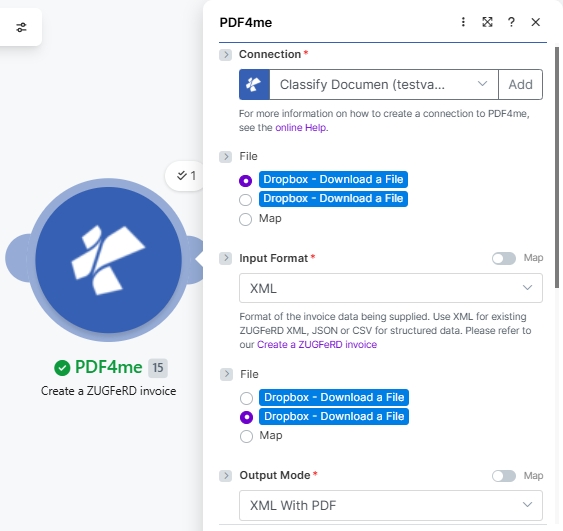
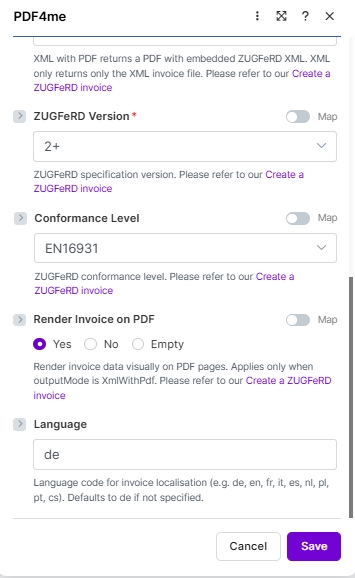
ZUGFeRD 1.0 遺産
プレEN 16931 仕様適合レベル: ベーシック、 快適、 拡張版受取人が ERP または、購入者システムが明示的に 1.0 を要求する (2022 年以降はまれ)。 1.0 XML サンプル、 基本 JSON サンプルまたは 1.0 CSV サンプルその他のフィールドはすべて同じように機能します。変更されるのは適合レベルのドロップダウンメニューのみです。
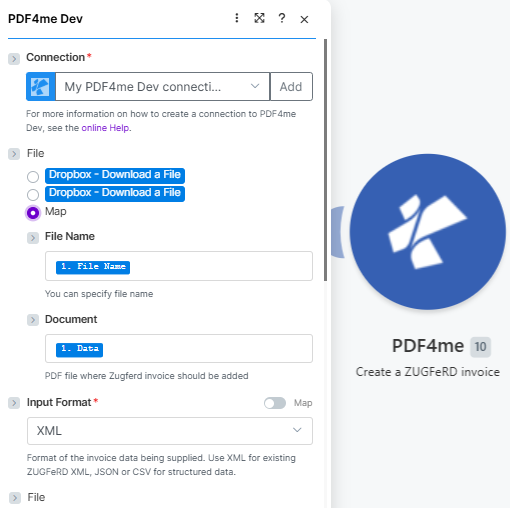
始めに 繋がり次に、基地をマッピングします。 PDF (ファイル名、 書類)そして設定する 入力形式 (ここ XML)
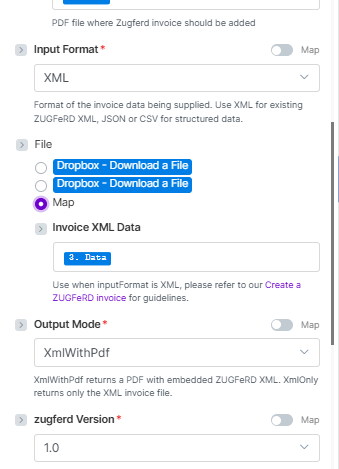
と ファイル = 地図地図 請求書XMLデータ、 セット 出力モード (XmlWithPdf または XMLのみ)、次に選択 zugferd バージョン (ここ 1.0)
パラメータ
必須: 繋がり、 入力形式、 出力モード、 ZUGFeRD バージョン請求書データフィールド(請求書XMLデータ、 請求書JSONデータ、 または 請求書のCSVデータ入力フォーマットの選択に基づいて動的に表示されます。該当するフィールドのみを入力すれば十分です。
なぜ ファイル 2.0以降のスクリーンショットに2回表示される? 入力フォーマットが XML そしてファイルは 地図モジュールは2つ目のファイルピッカーをレンダリングするので、(a)ベース PDF の ZUGFeRD 請求書は埋め込まれるべきであり、(b)ソース ZUGFeRD XML ファイル。両方のピッカーは同じラジオオプションを表示します。入力フォーマットが JSON または CSV 2 番目のピッカーは対応するものに置き換えられます 請求書JSONデータ または 請求書のCSVデータ テキストフィールド。
| パラメータ | 必須 | その機能 | 例/オプション |
|---|---|---|---|
| Connection | Required | PDF4me API connection used to authenticate invoice generation requests. Click Add and paste your API key if connecting for the first time. | Your PDF4me connection |
| File | Conditional | Source of the base PDF where the ZUGFeRD invoice will be embedded (when Output Mode is XmlWithPdf). Radio button with two options: Dropbox - Download a File (pulls directly from a Dropbox account without a prior download step) or Map (supplies the PDF from a prior module. Dropbox, Google Drive, OneDrive, HTTP, etc.). Choose Map for the most flexible workflow. When Map is selected, the two sub-fields below appear. | Map |
| File → File Name | Optional | Sub-field of File (visible when Map is selected). Filename of the base PDF including the .pdf extension. Map from the prior module's filename output. for example, the File Name field of a Dropbox or Google Drive Download module. | 1. File Name |
| File → Document | Optional | Sub-field of File (visible when Map is selected). Binary PDF content where the ZUGFeRD XML will be embedded. Map from the prior module's binary data field. typically the Data field of Dropbox, Google Drive, or OneDrive download modules. Hint shown in module: "PDF file where Zugferd invoice should be added". | 1. Data |
| Input Format | Required | Format of the invoice data being supplied. Use XML for existing ZUGFeRD XML; JSON or CSV for structured data. Options: XML, JSON, CSV. Defaults to XML. | XML sampleXML 2.0 sampleJSON 2.0 EN16931 sampleJSON (basic)CSV sampleCSV 2.0 sample |
| Invoice XML Data | Conditional | The ZUGFeRD XML invoice content to embed. Appears when Input Format = XML and File = Map. Hint: "Use when inputFormat is XML, please refer to our Create a ZUGFeRD invoice for guidelines." Map from a prior Dropbox download or HTTP module output. | XML sampleXML 2.0 sample3. Data (mapped) |
| Invoice JSON Data | Conditional | Structured invoice data in JSON format. Appears when Input Format = JSON. Map a JSON string from a Google Sheets, Airtable, or HTTP module. See sample JSON below. | JSON 2.0 EN16931 sampleJSON (basic)(mapped JSON string) |
| Invoice CSV Data | Conditional | Invoice row data in CSV format. Appears when Input Format = CSV. Map a CSV row from an iterator, Google Sheets, or file download module. See sample CSV below. | CSV sampleCSV 2.0 sample(mapped CSV row) |
| Output Mode | Required | XML With PDF (a.k.a XmlWithPdf in API requests) returns a PDF/A-3 file with the ZUGFeRD XML embedded inside, the standard hybrid e-invoice. XML Only (XmlOnly) returns just the XML invoice file without a PDF wrapper. Options: XML With PDF, XML Only. Defaults to XML With PDF. | XML With PDF |
| ZUGFeRD Version | Required | ZUGFeRD specification version. Set to match what the recipient ERP or buyer system expects. Options: 1.0, 2+. The two have different conformance level sets (see table below). Defaults to 2+. | 2+ |
| Conformance Level | Conditional | ZUGFeRD conformance profile, shown once a ZUGFeRD Version is chosen. Available levels differ by version: 1.0 offers BASIC, COMFORT, EXTENDED; 2+ offers MINIMUM, BASICWL, BASIC, EN16931, EXTENDED, XRECHNUNG. Use EN16931 for German legal e-invoicing compliance. See the Conformance Level Reference table below. Defaults to BASIC. | EN16931 |
| Render Invoice on PDF | Optional | When set to Yes, invoice line items are drawn visually on the PDF pages. Applies only when Output Mode is XML With PDF. Options: Yes, No. Defaults to Yes. | Yes |
| Language | Optional | Two-letter locale code for invoice label localisation. Supported: de, en, fr, it, es, nl, pl, pt, cs. Leave it empty and the module uses German (de), as the field hint states. | de |
適合レベル基準
利用可能な適合レベルは、 ZUGFeRD バージョン常に購入者または顧客のニーズに合わせてレベルを調整してください。 ERP システム要件。
| レベル | 使用する場合 |
|---|---|
BASIC | Mandatory EN 16931 fields only. Widest compatibility, safe default. |
COMFORT | Adds optional fields for line-item detail and additional references. |
EXTENDED | Full field set for complex B2B invoices with delivery, allowances, and charges. |
| レベル | 使用する場合 |
|---|---|
MINIMUM | Absolute minimum fields. Buyer reference and totals only. |
BASICWL | BASIC without line items. Header-level data only. |
BASIC | Mandatory EN 16931 fields. Recommended starting point. |
EN16931 | Full EN 16931 compliance for cross-border and public sector. |
EXTENDED | Full field set including German-specific extensions. |
XRECHNUNG | German public-sector e-invoice mandate (XRechnung profile). |
サンプル請求書ファイル
実際のデータソースを接続する前に、これらのサンプルファイルを使用して各入力形式でモジュールをテストしてください。ドイツのB2B生産ワークフローの場合は、まず sample-invoice-zugferd-2.0-en16931.json (ZUGFeRD 2.0、 EN16931 適合性)。
ZUGFeRD-invoice-sample.xmlZUGFeRD-invoice-sample-2.0.xmlsample-invoice-zugferd-2.0-en16931.jsonsample-invoice.jsontest-invoice.csvzugferd-invoice-2.0.csvCSV 列参照
の CSV 入力は必ずこの列順序に従ってください。各行から1枚の請求書が生成されます。
| カラム | 説明 | 例 |
|---|---|---|
InvoiceId | Unique invoice identifier | INV-2025-001 |
IssueDate | Invoice issue date (YYYY-MM-DD) | 2025-01-15 |
SellerName | Seller company name | Test Company |
SellerStreet | Seller street address | 123 Main St |
SellerCity | Seller city | Test City |
SellerPostalCode | Seller postal / ZIP code | 12345 |
SellerCountry | ISO 3166-1 alpha-2 country code | DE |
SellerVatId | Seller VAT registration number | DE123456789 |
BuyerName | Buyer company or person name | Customer Inc |
BuyerStreet | Buyer street address | 456 Oak Ave |
BuyerCity | Buyer city | Customer City |
BuyerPostalCode | Buyer postal / ZIP code | 67890 |
BuyerCountry | ISO 3166-1 alpha-2 country code | DE |
ProductName | Line item product or service name | Test Product |
Quantity | Quantity of the line item | 10.0 |
UnitPrice | Net unit price | 9.90 |
TaxPercent | VAT / tax percentage | 19.0 |
Currency | ISO 4217 currency code | EUR |
PaymentReference | Payment reference string | PAY-REF-001 |
IBAN | Payee IBAN for bank transfer | DE08700901001234567890 |
BIC | Payee bank BIC / SWIFT code | GENODEF1M04 |
JSON 請求書の構成
使用する際 入力形式: JSONペイロードには、以下の最上位キーを含める必要があります。ネストされたオブジェクトと配列はすべて、サンプルファイルに示されている構造に従います。
| 鍵 | タイプ | 説明 |
|---|---|---|
InvoiceId | String | Unique invoice number, e.g. "471102" |
IssueDate | String (ISO 8601) | Invoice date, e.g. "2013-03-05T00:00:00" |
InvoiceType | String | Document type label, e.g. "RECHNUNG" |
TypeCode | String | UN/EDIFACT document type code. 380 for standard invoice |
IsTest | Boolean | true for test runs, false / omit for production |
Notes | Array of strings | Free-text notes shown in the invoice header (payment terms, GLN, etc.) |
Seller | Object | Seller party: Name, Address (Street, City, PostalCode, Country), TaxId, VatId, GLN |
Buyer | Object | Buyer party: Name, Address (Street, City, PostalCode, Country, LineTwo), GLN |
Payment | Object | Payment details: PaymentReference, Currency, IBAN, BIC |
DeliveryDate | String (ISO 8601) | Actual delivery date, e.g. "2013-03-05T00:00:00" |
LineItems | Array of objects | Invoice lines. each with Quantity, UnitCode, UnitPrice, LineTotal, ProductName, GTIN, SellerProductId |
Totals | Object | Monetary totals: LineTotal, ChargeTotal, AllowanceTotal, TaxBasisTotal, TaxTotal, GrandTotal, TaxPercent, Currency |
作成方法 ZUGFeRD 請求書 Make?
- 追加 PDF4me → 作成する ZUGFeRD 請求書 あなたのシナリオに当てはめて。
- 選択 繋がり (またはクリック) 追加 あなたと一緒に作成する API 鍵)。
- 選ぶ 入力形式。 XML、 JSON、 または CSV表示されるデータフィールドは、この選択内容によって異なります。
- セット ファイル に 地図 そして、前のモジュールの出力から請求書データフィールド(請求書XMLデータ/JSONデータ/CSVデータ)を接続します。または、 Dropbox - ファイルをダウンロードする Dropboxからファイルを直接取得する。
- セット 出力モード に XMLとPDF (デフォルト)ハイブリッドの場合 PDF/A-3 請求書、または XMLのみ のために XML のみ。
- セット ZUGFeRD バージョン (1.0または2+、デフォルト) 2歳以上) 次に選択 適合レベル バージョンに応じたセットから始めます。 ベーシック。
- XMLとPDFを使用する場合: 請求書をPDF形式でレンダリングする で はい 項目を視覚的に描画し、設定する 言語 ターゲットのロケール (例:
de、en、fr) - 保存 そしてクリック 1回実行ルート 書類 Dropbox、Google Drive、および ERP ウェブフック、またはメールモジュール。
出力フィールド
PDF4me リクエストをバックグラウンドジョブとして処理し、 Make 次のモジュールを実行する前に、結果を待ちます。
| 分野 | タイプ | 内容物 |
|---|---|---|
Name | File name | File name of the generated invoice file (PDF with embedded XML, or XML only). e.g. invoice-471102.pdf or invoice-471102.xml. |
Document | File (binary data) | Content (binary data) of the ZUGFeRD hybrid PDF/A-3 or XML file. Map into an upload, email attachment, or ERP HTTP module for the next step in your scenario. |
ワークフローの例
ワークフローの例Common Make scenario patterns using Create ZUGFeRD Invoice for automated e-invoicing.
- 注文は発送済みとしてマークされます ERP またはAirtable。シナリオがトリガーされます。
- 明細項目、価格、購入者の住所、および税金データが取得され、組み立てられます。 JSON ペイロード。
- 作成する ZUGFeRD 請求書 入力フォーマットで実行 JSON出力モード XmlWithPdfバージョン 2歳以上適合レベル ベーシック、 言語
の。 - ハイブリッド PDF 請求書はGmail経由で購入者にメールで送信され、コピーはGoogleドライブの請求書アーカイブにアップロードされます。
- 会計は CSV 毎月の請求書のファイルをDropboxに保存する。
- ウォッチファイルトリガーが新しいファイルを検出し、イテレータが各行を処理します。
- 作成する ZUGFeRD 請求書 入力フォーマットで行ごとに実行 CSVハイブリッドを1つ生成 PDF 請求書1件につき。
- 全て PDFs ファイルは構造化されたアーカイブフォルダにアップロードされ、完了概要メールが財務チームに送信されます。
- 政府契約の請求書は、Airtableのレコードから発行されます。
- 作成する ZUGFeRD 請求書 入力フォーマットで実行 JSON出力モード XMLのみバージョン 2歳以上適合レベル XRECHARGE。
- の XML ファイルは購入者のPeppol互換デバイスに直接POSTされます ERP API 経由 HTTP モジュール。
- 成功またはエラーの応答は、財務チームが確認できるようGoogleスプレッドシートに記録されます。