マージ PDF オーバーレイ Make
マージオーバーレイ は Make モジュール PDF4me それは1つのスタンプを押す PDF ベースの上に重ねる PDF同じ透かし、ヘッダー、またはテンプレートをすべてのページに適用します。バッチブランディング、法的通知、およびスタンプに使用します。このモジュールはベースドキュメントとレイヤードキュメントを受け取り、結合されたドキュメントを返します。 PDF 送信準備完了。
認証 API リクエスト
アクセスするには PDF4me ウェブ API を通して Makeすべてのリクエストには適切な認証情報を含める必要があります。認証により安全な通信が保証され、承認されたユーザーとしての身元が検証され、シームレスな統合が可能になります。 Make シナリオと PDF4meのオーバーレイマージサービス。
見逃してはならない重要な事実
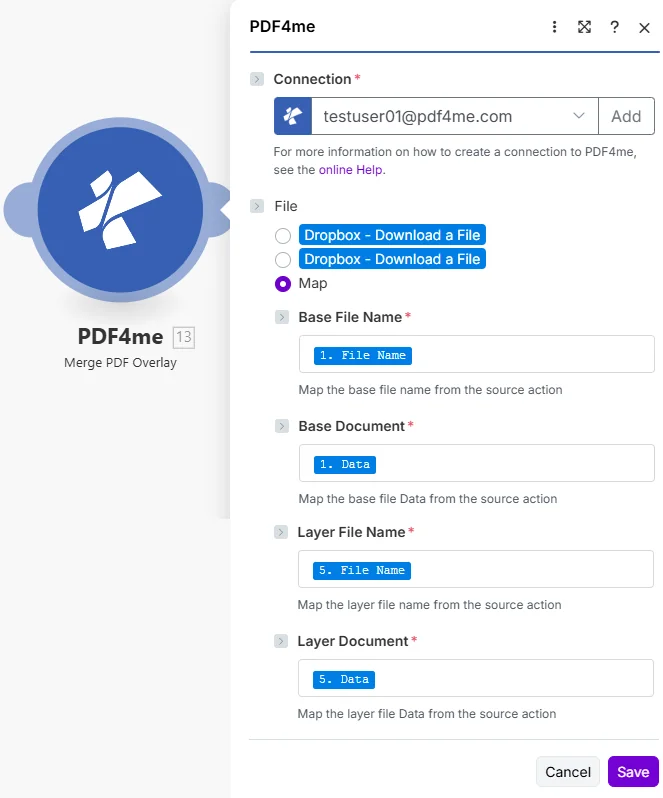
ソースからのマップベースファイル名とベースドキュメント PDF次に、オーバーレイからレイヤーファイル名とレイヤードキュメントをマッピングします。 PDF 上部に刻印してほしいもの。
Merge Overlay とは何ですか? Make?
マージオーバーレイは Makeの PDF4me 1つのモジュールを合成するためのモジュール PDF 別のものの上に。それは塩基を受け入れる。 PDF そして層 PDFそして、ベースページの上にレイヤーが描画された単一のドキュメントを返します。各ファイルに手作業でスタンプを押すのとは異なり、このモジュールは自動化されたシナリオ内で、複数のドキュメントに同じオーバーレイを適用します。
パラメータ
| パラメータ | 必須 | その機能 | 例 |
|---|---|---|---|
| Connection | Required | PDF4me connection holding your API key. Click Add and paste your key from dev.pdf4me.com/dashboard if connecting for the first time. | My PDF4me connection |
| File | Required | How the two PDFs reach the module. The radio lists your connected storage actions (for example Dropbox - Download a File) and Map. Choose Map to wire the four fields below from earlier modules: Base File Name, Base Document, Layer File Name and Layer Document only appear once Map is selected. | Map |
| Base File Name | Required | Filename of the base PDF that receives the overlay, including the .pdf extension. Map it from the prior module output. | 1. File Name |
| Base Document | Required | Binary content of the base PDF from a prior download module Data field. | 1. Data |
| Layer File Name | Required | Filename of the overlay PDF, the watermark, header, or template that sits on top. | 5. File Name |
| Layer Document | Required | Binary content of the overlay PDF from a prior download module Data field. | 5. Data |
出力
| 分野 | タイプ | 内容物 |
|---|---|---|
| Name | File name | Output filename for the overlaid PDF, derived from the Base File Name input. Use it in the destination upload module File Name field. |
| Document | File (binary data) | Binary content of the merged PDF with the layer stamped on top. Map it into a cloud-storage upload module or an email attachment. |
Merge Overlay モジュールはどのように機能しますか Make?
このモジュールは両方を読み取ります PDFs次に、レイヤー ドキュメントをベース ドキュメントにページごとに描画し、単一の結合ファイルを返します。レイヤーは上に合成されるため、透明な透かしによってベース コンテンツが透けて見えます。これは、バッチにブランドを刻印する標準的な方法です。 PDFs. PDF フォーマット自体はオープンです ISO 標準、 ウィキペディア PDF ページシナリオ構築パターンについては、以下を参照してください。 Make ヘルプセンター。
典型的な構成
- 新しい請求書をトリガーする PDF クラウドストレージに。
- 請求書をベースとしてダウンロードし、レターヘッドもダウンロードしてください。 PDF レイヤーとして。
- マージオーバーレイを実行して、レターヘッドをすべてのページに合成します。
- ブランドロゴ入りの請求書をアップロードするか、メールで送信してください。
- リスト PDFs フォルダに保存して、それらを反復処理します。
- 1ページ分の透明な透かしを使用する PDF レイヤードキュメントとして。
- マージオーバーレイは、各ベースに透かしを刻印します。
- 結果を透かし入りのフォルダに保存してください。
- レポートと機密オーバーレイをダウンロードしてください PDF。
- マージオーバーレイで合成します。
- 捺印済みの報告書を審査員に送付してください。
実践的なヒント
チートシート
| 分野 | 価値 |
|---|---|
| Module | PDF4me > Merge Overlay |
| Connection | Your PDF4me connection |
| Base File Name | 1. File Name |
| Base Document | 1. Data |
| Layer File Name | 5. File Name |
| Layer Document | 5. Data |
| Output | Name + Document (overlaid PDF) |
| Credits | 1 per document |