複数のものを結合する PDFs で Make
PDF4me 複数のものを結合する PDFs は Make 任意の数の組み合わせを持つモジュール PDF ファイルはそれぞれ繰り返し可能なアイテムとして追加され、1つの統合されたアイテムにまとめられます。 PDF シナリオ内でドキュメントを作成します。これを使用して、請求書、レポート、契約書などを結合し、必要に応じてパスワードで保護されたファイルをスキップして、結合された出力をメール、ストレージ、または別のモジュールに送信します。
このモジュールの機能
PDF4me 複数のものを結合する PDFs 任意の数の別々の PDF ファイルとファイルを結合し、リストした順序で単一の出力ドキュメントにまとめます。各ソースファイルを、前のモジュールからマッピングするか、公開ファイルとして提供して、「ファイル」の下に個別の項目として追加します。 URLマージされた出力に名前を付け、パスワードで保護されたファイルをスキップするかどうかを選択します。 PDFs 途中で。手動でのドラッグアンドドロップも、デスクトップツールも不要。バッチ全体があなたの中でマージされます。 Make シナリオ。
認証 API リクエスト
毎 PDF4me モジュール Make 有効な 繋がり. 作成または選択して、 PDF4me API シナリオがマージリクエストを安全に認証できるようにするためのキー。
見逃してはならない重要な事実
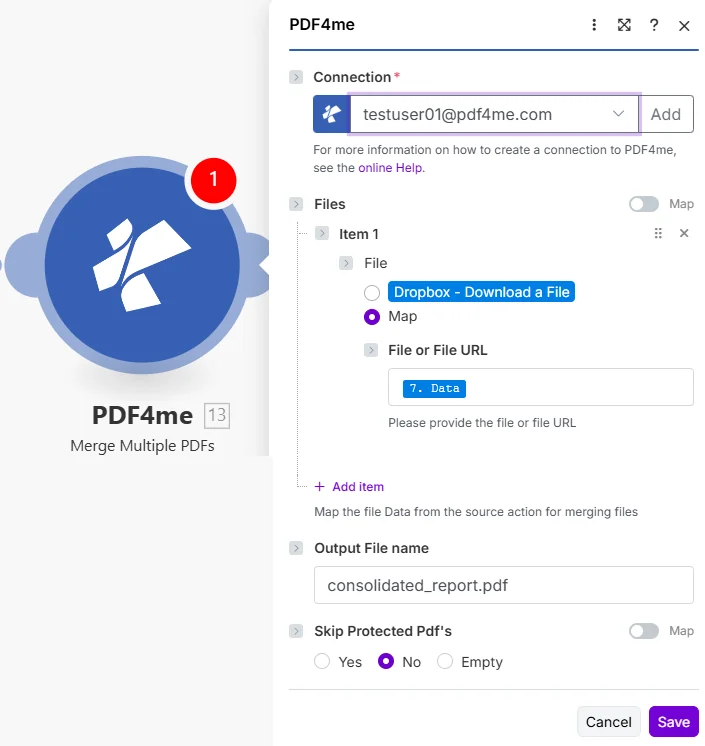
それぞれ PDF ファイルの下に独自の項目として追加されます。出力ファイル名は結合されたファイル名を設定し、保護された PDF をスキップすると暗号化するかどうかを制御します。 PDFs 除外されます。
パラメータ
必須: 接続、ファイル(少なくとも1項目)、ファイル(項目ごと)、および出力ファイル名は必ず指定する必要があります。ファイルまたはファイルURLは、ファイルがマップに設定されている場合にのみ必要です。保護されたPDFをスキップするかどうかは任意です。
| パラメータ | 必須 | その機能 | 例 |
|---|---|---|---|
| Connection | Required | PDF4me API connection. Click Add and paste your API key if connecting for the first time. | [email protected] |
| Files | Optional | Repeatable list of source PDFs. Click Add item for each PDF, in the order they should appear in the merged output. | Item 1, Item 2, ... |
| File (per item) | Required | Source input method for that item. Choose Dropbox - Download a File for a direct Dropbox trigger, or Map to supply the file from a prior module. | Map |
| File or File URL | Conditional | Either the binary content of a PDF from a prior module, or a public file URL, required when File is set to Map. | 7. Data |
| Output File name | Optional | Filename for the merged PDF, including the .pdf extension. | consolidated_report.pdf |
| Skip Protected Pdf's | Optional | Whether to exclude password-protected PDFs from the merge. Yes skips them, No attempts to include them, Empty leaves it unset. | No |
出力
| 分野 | タイプ | 内容物 |
|---|---|---|
| Name | File name | Filename of the merged output PDF. |
| Document | File (binary data) | The merged PDF file content, ready to attach in Gmail, upload to Drive or Dropbox, or pass to another PDF4me module. |
| Document Url | Text | Link to the merged PDF. Returned when PDF4me processes the request as a background job. |
複数のデータを結合するにはどうすればよいですか? PDFs で Make?
- 追加 PDF4me に 複数のものを結合する PDFs あなたの Make シナリオ。
- 選択 繋がり (またはクリック) 追加 あなたと一緒に作成する API 鍵)。
- クリック アイテムを追加 下 ファイル 各 PDF。 セット ファイル 地図を作成して接続する ファイルまたはファイルURL 前のモジュールから、または公開ファイルを貼り付ける URL 直接。
- すべての PDFマージされた出力に表示させたい順序で入力します。
- 入力 出力ファイル名 統合されたもの PDF、 のような
consolidated_report.pdf。 - セット 保護されたPDFをスキップする 暗号化を希望する場合は「はい」を選択してください。 PDFs 除外するか、No のままにしておきます。
- 保存して実行します。出力結果
Documentマージされたものですか PDFGmail、Google Drive、Dropbox、またはあらゆる下流モジュールに対応可能です。
複数の項目を結合する機能はいつ使用すべきですか? PDFs?
典型的な構成Common Make scenario patterns using Merge Multiple PDFs.
- 毎月末に、スケジュールされたトリガーが作動します。
- GoogleドライブまたはDropboxにはすべての請求書が一覧表示されます PDFs 今月中にアップロードされました。
- イテレータモジュールは結果をループ処理し、各ファイルをそれぞれ独自のファイルアイテムにマッピングします。
- 複数のものを結合する PDFs それらを単一の統合されたものに組み合わせる PDF保護された PDF をスキップする設定が No になっている場合。
- 合併した PDF 財務チーム向けに「会計」フォルダにアップロードされます。
- A CRM 取引が署名段階に移行した際に、ウェブフックが作動します。
- 基本契約書、追加契約書、および価格表は、それぞれ個別のファイル項目として、固定された順序でマッピングされます。
- 複数のものを結合する PDFs 署名可能な1つの統合文書を作成します。
- 合併した PDF デジタル署名モジュールに送信されるか、Gmail経由でクライアントにメールで送信されます。
- 以前の PDF4me モジュールがレポートを生成する PDF から HTML またはテンプレートデータ。
- 保存済みの表紙テンプレート PDF 最初のファイル項目として追加され、生成されたレポートが2番目に追加されます。
- 複数のものを結合する PDFs 表紙から順に、その順番で掲載されています。
- 最後の PDF は SharePoint または送信メールに添付されます。
実践的なヒント
チートシート
背景については、 PDF ページ順序とドキュメント連結はファイル形式レベルで機能します。 PDF 協会の技術概要 PDF 仕様 そして ISO 32000 PDF 標準概要。
| 分野 | 価値 |
|---|---|
| Files | Add item per PDF |
| File (per item) | Map |
| File or File URL | 7. Data or a public URL |
| Output File name | consolidated_report.pdf |
| Skip Protected Pdf's | Yes / No / Empty |
| Output | Name, Document, Document Url |