画像サイズ変更 - スマートスケーラー Make
画像のサイズを変更する は Make モジュール PDF4me 指定したシナリオ内で画像をパーセンテージで拡大縮小します。これを使えば、ストアフロント用の商品写真を縮小したり、サムネイルを生成したり、Web対応のアセットを自動的に準備したりできます。ファイルごとに画像エディタを開く必要はありません。
このモジュールの機能
PDF4me 画像のサイズを変更する 自動画像リサイズ機能を提供します Make パーセンテージベースのスケーリングを使用したシナリオ。画像サイズを調整しながら品質を維持し、Web 最適化、サムネイル作成、 レスポンシブデザイン 準備、および複数デバイスでの画像ワークフロー。
関連ブログ記事
この機能に関するブログ記事はまだありません。近日公開予定です。
その間、PDF4me ブログを閲覧して、あらゆるプラットフォームのチュートリアルやワークフローをご覧ください。
ブログをご覧ください →
認証方法 Make シナリオ?
アクセスするには PDF4me ウェブ API を通して Makeすべてのリクエストには有効な 繋がり あなたの PDF4me API キー。これにより、お客様の間で安全で認証された通信が可能になります。 Make シナリオと PDF4meの画像サイズ変更サービス。
見逃してはならない重要な事実
サイズ変更率は元のサイズに対する割合です。
「パーセンテージ」フィールドでは、両方の寸法が同じ係数で拡大縮小されます。そのため、50を指定すると半分のサイズの画像が生成され、25を指定すると4分の1のサイズの画像が生成されます。正確な幅と高さが必要な場合は、「指定」を選択してください。
接続は必要ですが、見落としやすいです
毎 PDF4me モジュールには、接続を保持する必要があります API キー。一度設定すれば Make あらゆる場面で再利用 PDF4me シナリオ内のモジュール。
一括サイズ変更とは、このモジュールをイテレータでラップすることです。
専用のバッチリサイズモードはありません。画像のフォルダをループ処理して Make イテレータは、同じパーセンテージ設定でファイルごとに一度だけ画像のサイズ変更を実行します。
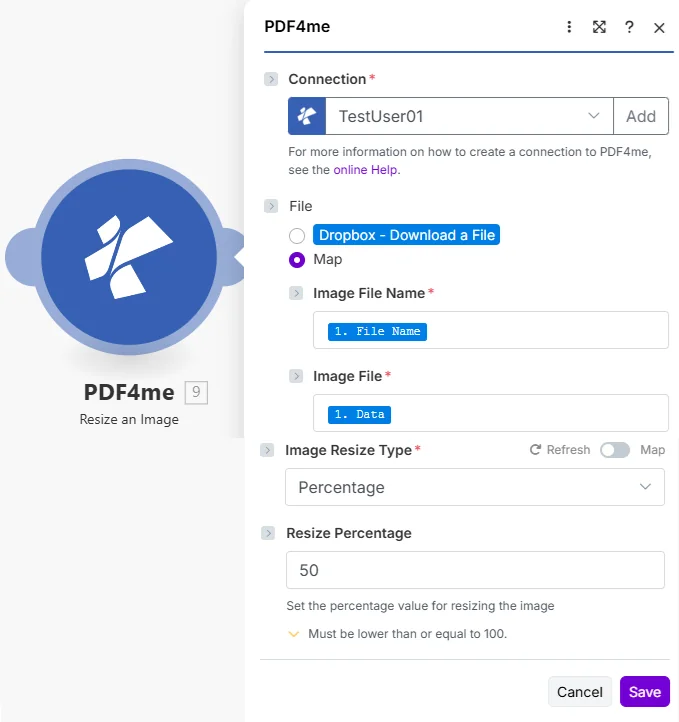
画像サイズ変更タイプを「パーセンテージ」に設定し、サイズ変更率を入力してください。50と入力すると、半分のサイズの画像が作成されます。
画像のリサイズにはどのようなパラメータが必要ですか?
必須: 接続情報、画像ファイル名、画像ファイル、および画像サイズ変更タイプは必ず入力してください。選択したサイズ変更タイプの設定は、選択後に表示されます。
| パラメータ | 必須 | その機能 | 例 |
|---|---|---|---|
| Connection | Required | PDF4me API connection. Click Add and paste your API key the first time. Reused automatically across all PDF4me modules in your scenarios. | TestUser01 |
| File | Required | How the source image reaches the module. The radio lists your connected storage actions (for example Dropbox - Download a File) and Map. Choose Map to wire the fields below from earlier modules: Image File Name and Image File only appear once Map is selected. | Map |
| Image File Name | Required | Filename of the source image. Map from a previous module or set explicitly. | product.jpg |
| Image File | Required | Binary content of the source image. Map from Dropbox, Google Drive, or any previous module that outputs image binary data. | 1. Data |
| Image Resize Type | Required | Resize method. Percentage scales the image by a percentage. Specific resizes it to a width and height you enter. The settings for the chosen type appear after you select it. Defaults to Percentage. | Percentage |
選択したサイズ変更タイプの設定
サイズ変更タイプを選択すると、そのタイプのフィールドが読み込まれます。 PDF4me: サイズ変更率 パーセンテージ幅、高さ、アスペクト比を維持するかどうか 特定の。
出力
PDF4me リクエストをバックグラウンドジョブとして処理し、 Make 次のモジュールを実行する前に、結果を待ちます。
| 分野 | タイプ | 内容物 |
|---|---|---|
Name | File name | File name of the resulting image. Map it together with Document into the next module, for example to upload or email the file. |
Document | File (binary data) | Content (binary data) of the resulting image. Map it together with the file name into the next module, for example to upload or email the file. |
典型的な構成
ワークフローの例Common Make scenario patterns using Resize an Image.
商品写真フォルダ → サムネイルの一括生成
- Dropboxの「ファイルの監視」トリガーは、新しい商品写真がアップロードされたときに作動します。
- イテレータは、バッチ内の各新しい画像をループ処理します。
- 画像サイズ変更機能は、各写真を25%の縮小率で縮小し、小さなサムネイル画像を作成します。
- Dropboxのアップロード手順では、サムネイルが元の画像と同じフォルダ内のサムネイルサブフォルダに保存されます。
- 商品カタログの更新手順では、サムネイルが商品レコードにリンクされます。
フル解像度アップロード → ウェブ最適化アセット
- ウェブサイトに高解像度画像がアップロードされると、トリガーが作動します。
- 画像のサイズ変更機能は、画像の縮小率を50%に設定してサイズを縮小し、ページの読み込み速度を向上させます。
- 画像圧縮のステップでは、画質を損なうことなくファイルサイズをさらに削減できます。
- アップロード先 CDN このステップでは、最適化されたイメージを公開します。
- ページレコードの更新手順では、新しいアセットのURLがリンクされます。
メール添付ファイル → サイズ変更された画像返信
- 顧客がサイズ制限を超える写真添付ファイルを送信した場合、メールが送信される。
- 画像サイズ変更機能は、添付ファイルをメールに適したより小さなサイズに縮小します。
- ルーターは、サイズ変更後のファイルがサイズ要件を満たしているかどうかを確認します。
- サイズ変更された画像は、サポートチケットシステムに転送されます。
- 自動返信で受信確認メールが送信され、サイズ変更された添付ファイルが添付されます。
実践的なヒント
Percentage and Specific are the two resize types
Percentage scales the image by a factor of its current size. Specific resizes it to a width and height you enter, with an option to keep the aspect ratio.
There is no dedicated batch mode
Resize an Image processes one file per run. For a folder of images, wrap the module in a Make Iterator so it runs once per file.
Aspect ratio is preserved automatically in Percentage mode
Because Percentage scales both dimensions by the same factor, the output keeps the original aspect ratio. Use Crop an Image afterward if you need a specific fixed aspect ratio, like a square thumbnail.
Image File and Image File Name must match
Map the filename and binary content from the same source file. Mismatched pairs (e.g. a filename from one image mapped alongside binary data from another) will not error cleanly but will produce a mislabeled output.
Very small percentages can make text illegible
A Resize Percentage below 10-15 on images containing text or fine detail (like screenshots or scanned documents) can make that content unreadable. See <a href="https://web.dev/learn/images/" target="_blank" rel="noopener noreferrer">web.dev's guide to image optimization</a> for general sizing guidance. Test the target percentage on a sample before applying it across a full batch.
The output is a file, not a path
The module returns Name (the file name) and Document (the binary file content), not a filesystem path or a link. Map both into an Upload or Create a File module to persist the result.
チートシート
| 分野 | 価値 |
|---|---|
| Module | Resize an Image |
| Connection | PDF4me API key |
| Image Resize Type (relative scale) | Percentage |
| Resize Percentage (half size) | 50 |
| Resize Percentage (thumbnail) | 25 |
| Bulk processing | Wrap in a Make Iterator |
| Output fields | Name + Document |
よくある質問
関連アクション
画像を圧縮する
寸法を変更せずにファイルサイズを縮小し、ウェブ最適化効果を最大限に高めるために、サイズ変更後に実行してください。
画像をトリミングする
画像をリサイズした後、特定の固定アスペクト比に切り抜く機能。正方形のサムネイルやバナーサイズに便利です。
画像フォーマットを変換する
ファイル形式を変更する(BMP、 GIF、 JPG、 PNG、 TIFターゲットプラットフォームの要件に合わせてサイズ変更された画像。
他のプラットフォームでの同じタスク
n8n画像サイズ変更
同じパーセンテージベースのリサイズノード n8n ワークフローを自己ホスト型またはクラウドに接続します n8n インスタンスの代わりに Make。
Power Automate画像サイズ変更
Microsoft の場合も同じサイズ変更アクション Power Automate 流れ、適合する SharePoint そして、Teamsの画像ワークフロー。
Zapier画像サイズ変更
同じサイズ変更手順 Zapierそれを、すでにZapに登録されているGoogle Drive、Dropbox、またはShopifyのトリガーに接続します。
PDF4me API画像サイズ変更
同じサイズ変更操作を直接呼び出すには REST API ノーコードプラットフォーム以外のカスタム統合の場合。