ドキュメントを生成する Make
PDF4me ドキュメントを生成する は Make マージするモジュール JSON または XML データを Word または HTML テンプレートを返し、完成した PDF、 Word、 または Excel ファイル。配置 {{fieldName}} テンプレート内のプレースホルダーに一致するキーと値のペアデータを指定すると、モジュールがサーバー側で置換処理を実行します。これは従来の文書生成モジュールです。複雑な条件ロジックを含む新しいシナリオでは、代わりに「Generate Document Single」を使用してください。
このモジュールの機能
PDF4meドキュメントを生成する マージ JSON または XML データを Word または HTML テンプレートを作成し、結果を完成品として返します。 PDF、 Word 文書、または Excel ファイルを、メール送信、保存、または処理の続行の準備ができています。 {{fieldName}} テンプレート内のプレースホルダーに一致するキーと値のデータを供給し、モジュールがサーバー側で置換を完全に実行します。 レガシー文書生成モジュール: 複雑な条件ロジックやループ構造を持つ新しいシナリオの場合は、 ドキュメントを生成 シングル 代わりに、完全なサポートを提供します PDF4me LINQ テンプレート構文。
認証 API リクエスト
毎 PDF4me モジュール Make 有効な 繋がり. 作成または選択して、 PDF4me API シナリオが文書生成要求を安全に認証できるようにするためのキー。
見逃してはならない重要な事実
invoice_template.docxDropbox、Google Drive、または OneDrive のダウンロード手順のファイル名出力からマッピングされます。これはテンプレート ID ではありません。 PDF4me ダッシュボードでは、実際のテンプレートバイナリは別々に提供されます 文書データファイル。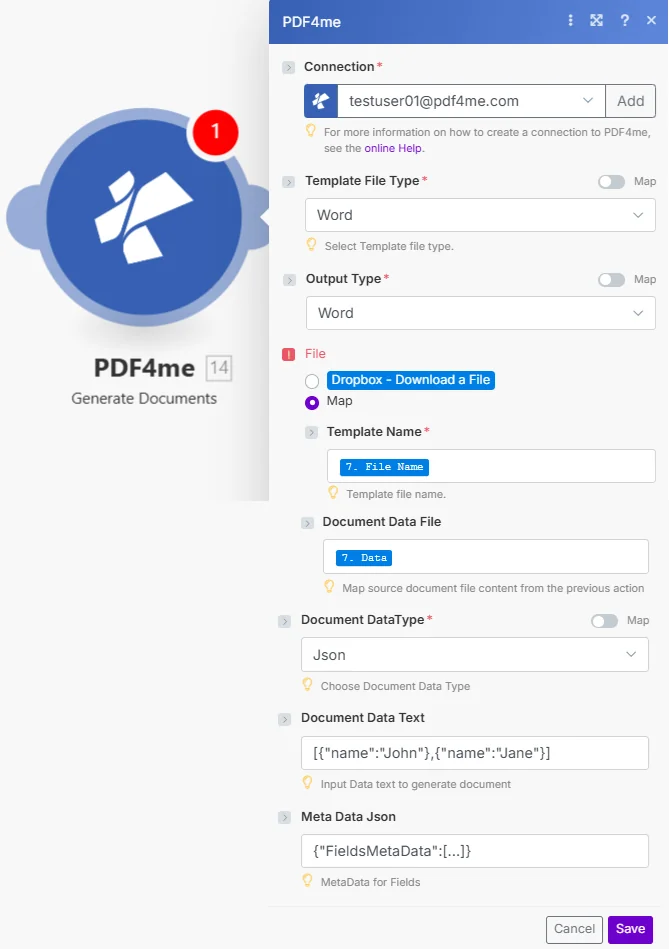
セット テンプレートファイルの種類 そして 出力タイプ まず、次にワイヤー テンプレート名 そして テンプレート テンプレートをダウンロードした手順から。マージデータを提供するには、 文書データテキスト または 文書データファイル。
パラメータ
必須: 繋がり、 テンプレートファイルの種類、 出力タイプ、 テンプレート名、 テンプレート、 そして ドキュメントデータ型。 セット ファイル に 地図 まず、テンプレート名とテンプレートを表示します。 オプション: 文書データテキスト、文書データファイル、およびメタデータJSON。
| パラメータ | 必須 | その機能 | 例 |
|---|---|---|---|
| Connection | Required | PDF4me API connection. Click Add and paste your API key to create one. | [email protected] |
| Template File Type | Required | Format of the template file. Options: Word, Html, Pdf. Defaults to Word. Has a Map toggle for dynamic scenarios. Hint: "Select Template file type." | Word |
| Output Type | Required | Format of the generated document. The formats offered depend on the Template File Type: with Word it offers Pdf, Word, Excel and defaults to Word, with Html it offers Html only and defaults to Html, and with Pdf it offers Pdf, Word, Excel and defaults to Pdf. | Pdf |
| Keep PDF Editable | Conditional | Shown only when Template File Type is Pdf. Yes keeps the filled form fields editable in the results, No flattens the forms. Defaults to No. | No |
| File | Conditional | How the template is supplied. Choose Map to wire Template Name and Template from a prior module. Choose Dropbox, Download a File for a direct Dropbox trigger. | Map |
| Template Name | Required | Filename of the template including extension (e.g. invoice_template.docx). Hint: "Template file name." Map from the File Name output of your download step. | 7. File Name |
| Template | Required | Binary content of the template file used for generating the documents. Hint: "Template file for generating document." Map from the Data output of your download step. | 7. Data |
| Document DataType | Required | Format of the data source. Options: Json, XML, Csv. Defaults to Json. Has a Map toggle. Hint: "Choose Document Data Type." | Json |
| Document Data Text | Optional | JSON, XML, or CSV data as a text string: paste a literal payload or map from a prior module output. Hint: "Input Data text to generate document." Example: [{"name":"John"},{"name":"Jane"}] | [{"name":"John"}] |
| Document Data File | Optional | Binary content of a data file from a storage module. Hint: "Map source document file content from the previous action." Use it instead of Document Data Text for larger payloads. | 8. Data |
| Meta Data Json | Optional | JSON for field formatting. Use FieldType 2 for date fields, FieldType 0 for checkboxes, FieldType 1 for HTML content. Hint: "MetaData for Fields." | {"FieldsMetaData":[...]} |
出力フィールド
| 分野 | タイプ | 内容物 |
|---|---|---|
Generated Documents | Array | The generated documents, one per data record. Each item contains the file name and file content. Pass it to an Iterator to handle the items one by one. |
Generated Documents[].File Name | File name | File name of this item. Map into the file name field of your storage upload or email step. |
Generated Documents[].Document | File (binary data) | Content (binary data) of this item. Wire directly into a Create file action in SharePoint, Google Drive, Dropbox, or OneDrive, or attach it to a Gmail send action. |
ドキュメント生成の設定方法 Make
- 追加 PDF4me → ドキュメントを生成する あなたの Make シナリオ。
- 選択 繋がり (またはクリック) 追加 あなたと一緒に作成する API 鍵)。
- セット テンプレートファイルの種類 に Wordテンプレートの形式に合わせて、HTML、PDF、またはPDF形式で出力してください。
- セット 出力タイプ ご希望の形式に変換します。 Word また、PDF テンプレートは PDF を提供します。 Word、および Excel。HTML テンプレートは HTML のみを提供します。
- セット ファイル に 地図ワイヤー テンプレート名 ファイル名出力と 文書データファイル テンプレートのダウンロード手順に含まれるバイナリコンテンツへ。
- セット ドキュメントデータ型 JSON、XML、またはCSVに変換します。データを入力またはマッピングします。 文書データテキストまたは、データが既に文書データファイル経由で接続されている場合は、空欄のままにしてください。
- 保存 そしてクリック 1回実行. 生成されたドキュメント 配列にはデータレコードごとに1つの項目が保持され、それぞれに ファイル名 そして 書類:それをイテレータに渡し、各項目をストレージへのアップロードまたはメール送信のステップに接続します。
「文書生成」と「単一文書生成」の違いは何ですか?
ドキュメントを生成する は、マスタッシュスタイルを使用するレガシーモジュールです。 {{fieldName}} プレースホルダー JSON または XML データ、サポート PDF、 Word、 または Excel 出力。 ドキュメントを生成 シングル フル交換が推奨されます LINQ レポートエンジンの構文: <<foreach>> ループ、 <<if>> 条件文、そして <<var>> 変数。既存の口ひげテンプレートにはドキュメントの生成を使用します。 XML データソース。複雑なロジックを持つ新しいテンプレートには「Generate Document Single」を使用します。 Make PDF4me 統合 そして PDF4me API ドキュメント 詳細については、こちらをご覧ください。
ワークフローの例
ワークフローの例Common Make scenario patterns using Generate Documents.
- ShopifyまたはWooCommerceで新規注文が確定すると、Webhookが起動します。
- Google Drive は
invoice_template.docxチームドライブに保存されています。 - ドキュメントを生成する テンプレート ファイル タイプを設定したテンプレートに、注文ペイロード (顧客名、明細項目、合計、支払期日) をマージします。 Word 出力タイプはPDFに設定されています。
- 生成された PDF 顧客に即座に送信されるGmailメッセージに添付されます。
- 別のGmailアカウントが、会計記録のためにGoogleドライブの「Invoices/2026」フォルダにコピーをアップロードします。
- 毎週月曜日の朝にスケジュールされたシナリオが実行され、Googleスプレッドシートから前週のKPIデータが取得されます。
- A Make テキストモジュールはシートデータを組み立てて JSON レポートテンプレートのプレースホルダーに一致するフィールドを持つオブジェクト。
- ドキュメントを生成する を統合する JSON へ Word 出力タイプが設定されたレポートテンプレート Word。
- 生成された Word 午前9時の朝礼の前に、編集可能な添付ファイルとして文書が経営陣にメールで送信されます。
- Typeformのトレーニング完了フォームは、参加者の名前、コース、日付を含むシナリオをトリガーします。
- Dropboxはダウンロードします HTML チームアカウントに保存されている証明書テンプレート。
- ドキュメントを生成する 参加者データを統合して HTML テンプレートファイルタイプがhtml、出力タイプがPdfに設定されたテンプレート。
- 証明書 PDF 参加者にメールで送信され、 SharePoint コンプライアンス記録用の「証明書」ライブラリ。