HTML テンプレート Make
の HTML テンプレートファミリー は Make ドキュメントを生成する単一のオプションで、 .html レイアウトを完成したドキュメントに統合します。受信者名フィールドや明細項目ループなどのマスタッシュタグを、 JSON データと出力 PDF または HTML ファイル。すでに維持管理しているチームに適しています。 HTML またはメールテンプレート。
関連ブログ記事
この機能に関するブログ記事はまだありません。近日公開予定です。
その間、PDF4me ブログを閲覧して、あらゆるプラットフォームのチュートリアルやワークフローをご覧ください。
ブログをご覧ください →
始める前に
HTML 口ひげタグ付きテンプレート
サンプル
invoice_sample_1.html ネストされたパスと完全な請求書レイアウトです。 サブ情報 項目ループ。パスは一致する必要があります JSON 構造はまさにその通りです。一致するデータファイル
使用
invoice_sample_data_1.json (推奨)、 test.xml、 または テスト.csv。 JSON ネストされたオブジェクトと サブ情報 配列。PDF4me 接続 Make
作成する PDF4me 接続 Make そしてあなたの API キー。同じキーがすべての場所で機能します PDF4me シナリオ内のモジュール。
サンプルファイルパック
以下のファイルをダウンロードしてください。 HTML テンプレートと一致するデータ JSON、 XML、 そして CSV。
invoice_sample_1.html
請求書全文 HTML 口ひげタグ付き
invoice_sample_data_1.json
入れ子構造 JSON subInfo配列を使用
test.xml
同じ請求書データ XML
テスト.csv
平らになった CSV (2行の明細項目)
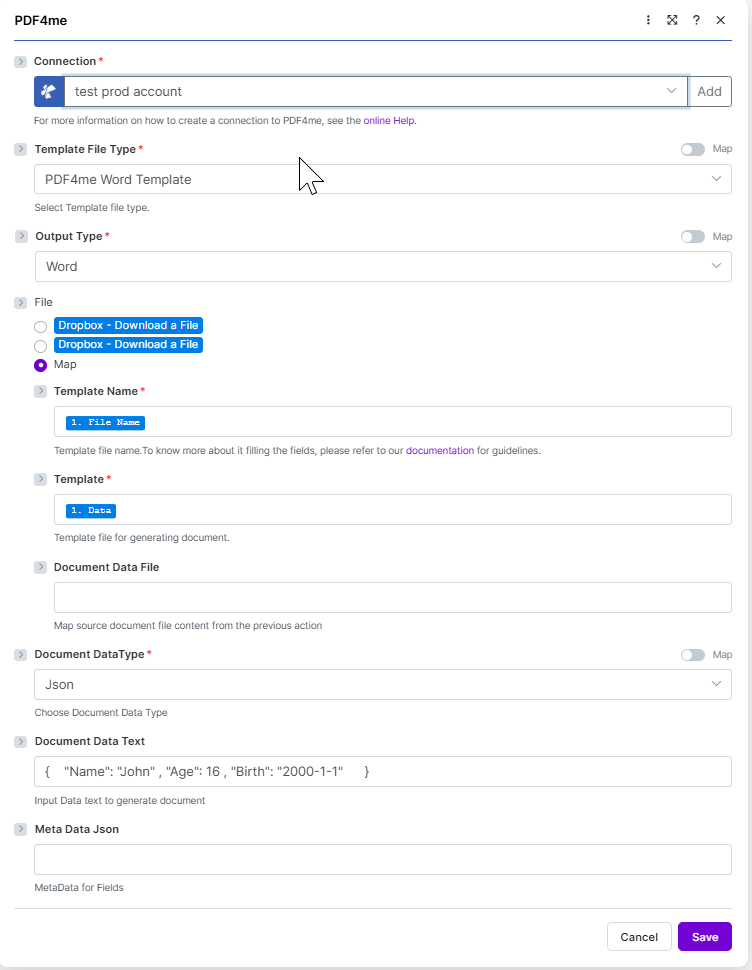
ターゲット構成: PDF4me HTML テンプレート + JSON で 文書データテキスト + PDF 出力。
何が HTML テンプレート テンプレート Make?
の HTML テンプレートファミリーはブラウザスタイルの .html インラインレイアウト CSS ドキュメントに挿入します。Mustache構文で記述されたプレースホルダーは、データから置き換えられ、ループブロックが挿入されます。 {{#each subInfo}} 行ごとに表の行が繰り返されます。マーケティング用途にお選びください。 PDFs そして、チームが既に管理しているブランドスタイルの請求書 HTML。
設定方法は? HTML テンプレート Make?
モジュールフィールドを以下のように設定します。必須フィールドは赤いアスタリスクでマークされています。 Make UI。
| パラメータ | 必須 | その機能 | 例 |
|---|---|---|---|
| Connection | Required | PDF4me connection for the scenario. Click Add to create one with your API key. | My PDF4me connection |
| Template File Type | Required | Set to Html for this template family. Options: PDF4me Word Template, Html, Mail Merge, Google Docs, Pdf Form. Defaults to PDF4me Word Template. | Html |
| Output Type | Conditional | Format of the generated document. The Html template family offers Html only. Defaults to Html. | Html |
| File | Required | How the template file reaches the module. The radio lists your connected storage actions (for example Dropbox - Download a File) and Map. Choose Map to wire the fields below from earlier modules: Template Name, Template and Document Data File only appear once Map is selected. | Map |
| Template Name | Required | Template file name including extension. Map from the prior module file name output. | invoice_sample_1.html |
| Template | Required | Template file binary. Map from the prior module data output (for example 1. Data from Dropbox Download a File). | 1. Data |
| Document DataType | Required | Format of the data payload. Options: Json, XML, Csv. Defaults to Json. | Json |
| Document Data Text | Optional | Inline JSON or XML data. Use when Document Data File is empty. | invoice_sample_data_1.json |
| Document Data File | Optional | Mapped data file from a prior module. Use when Document Data Text is empty. | 1. Data |
| Meta Data Json | Optional | Optional JSON describing advanced field settings for the template. | |
出力
このモジュールは実行ごとに 1 つのバンドルを返します。生成されたファイルは 書類 出力フィールド。 PDF4me リクエストをバックグラウンドジョブとして処理し、 Make 次のモジュールを実行する前に、結果を待ちます。
| 分野 | タイプ | 内容物 |
|---|---|---|
File Name | File name | Output filename based on Template Name with the extension matching Output Type. |
Document | File (binary data) | The generated document. Map into a downstream Upload File or Send Email Attachment module. |
生産パターン
HTMLテンプレート用の一般的なMakeパターンReplace the manual test with these once the sample works.
クラウドストレージからのテンプレート
- Dropbox または Google Drive 店舗
invoice_sample_1.html。 - ファイルをダウンロードすると、テンプレートがバイナリファイルとして読み込まれます。
- ドキュメントの単一マップを生成する。テンプレート名とテンプレート。
- データは以下のものから構築されます Sheets またはウェブフックとして JSON。
配信されたWebhook PDF
- Webhookはレコードペイロードを受信します。
- ドキュメントを個別に生成すると、テンプレートとマージされます。
- 出力タイプは PDF。
- メール送信またはファイルアップロードでドキュメントが送信されます。
データソースからのバッチ
- レコード検索では多数の行が返されます。
- イテレータは一度に1つのレコードをループ処理します。
- ドキュメント生成処理は、レコードごとに1回実行されます。
- 各ファイルはレコードごとのフォルダにアップロードされます。
よくある質問
関連ガイド
基盤となるテンプレートエンジンについては、以下を参照してください。 言葉のポーズ .NET ドキュメント そして Make データ構造リファレンス。