ドキュメントを1つ生成 Make
ドキュメントを生成 シングル は PDF4me モジュール Make これは、1 つのテンプレートを 1 つのデータセットとマージし、実行ごとに 1 つの完成ドキュメントを返します。5 つのテンプレート ファミリーをサポートしています (Word、 HTML、 PDF フォーム、メールマージ、 Google Docs)と2つのデータ形式(JSON そして XML)、そして出力 PDF、 Word、 Excel、 または HTMLコードを書かずに、請求書、契約書、証明書、およびパーソナライズされた手紙に使用できます。
このモジュールの機能
PDF4me ドキュメントを生成 シングル をマージする PDF4me Word テンプレート、HTML、メールマージ、 Google Docsまたは、PDFフォームテンプレート JSON、 XML、 または CSV データに基づいてパーソナライズされた Pdf、 Word、 または Html 1つのファイルに Make モジュール。複数のステップからなるメールマージシナリオを、単一の設定可能なアクションに置き換えます。任意のクラウドストレージモジュールからテンプレートファイルをマッピングします(Dropbox、 Google Drive、 OneDriveデータをインラインまたはマップされたファイルとして提供し、生成されたデータをパイプで渡します。 書類 出力は直接ファイルのアップロード、メール送信、または下流の任意の処理に渡されます。 Make モジュール。
テンプレートの種類を選択してください
あなたに合ったガイドを選んでください テンプレートファイルの種類各ページには、正確なサンプル テンプレート、データ ファイル (JSON、 XML、 CSV)、推奨フィールド値、およびクイックテストシナリオ Make。
.docx 口ひげのプレースホルダー付き。出力 PDF または Word. 含まれる テンプレート.docx + data.json。テンプレート.pdf + formdata.json。simple_mail_merge_template.docx。.docx出力 PDF または Word. 含まれる google-docs-template.docx。認証 API リクエスト
毎 PDF4me モジュール Make 有効な 繋がり. 作成または選択して、 PDF4me API シナリオが文書生成要求を安全に認証できるようにするためのキー。
見逃してはならない重要な事実
.docx マッピングされた HTML 選択した型が実行時にエラーになります。各テンプレートファミリーが使用する正確なプレースホルダー構文については、上記の該当ガイドを参照してください。書類 出力フィールド、その名前は ファイル名ペアを直接アップロードファイルにパイプします(Dropbox、 ドライブ、 OneDrive)、メール添付ファイルの送信、またはバイナリを受け入れる下流モジュール。 PDF4me リクエストをバックグラウンドジョブとして処理し、 Make 次のモジュールを実行する前に、結果を待ちます。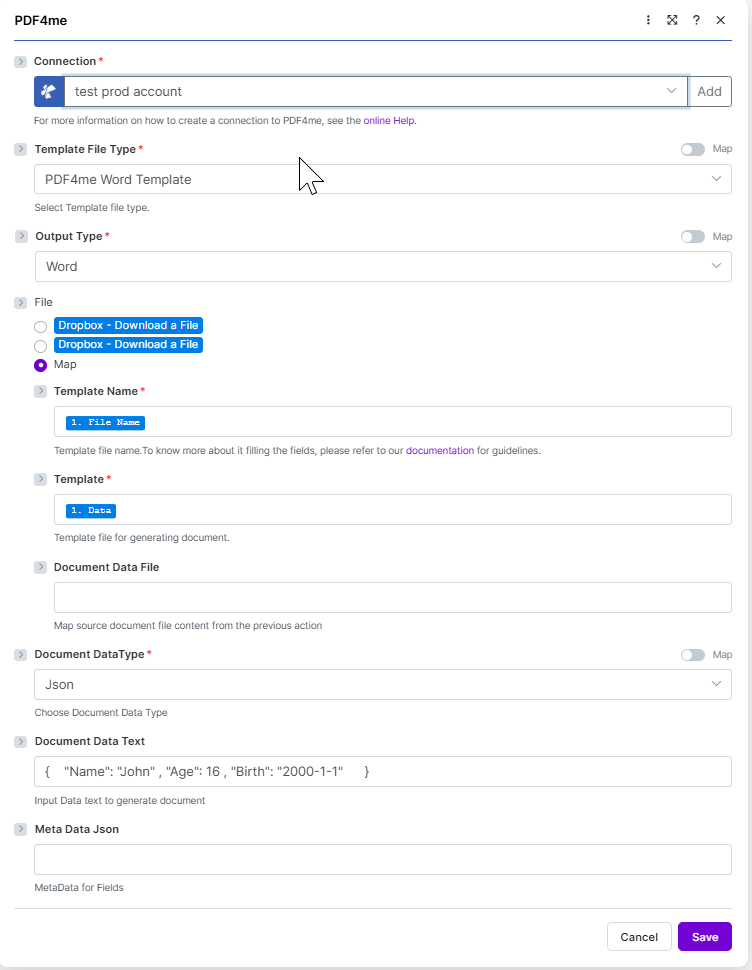
ドキュメントを生成する シングルモジュール構成 Make必須項目(赤いアスタリスク):接続、テンプレートファイルタイプ、出力タイプ、テンプレート名、テンプレート、およびドキュメントデータタイプ。ファイルがマップに設定されている場合、前のモジュールからテンプレート名とテンプレートを接続し、ドキュメントデータテキストまたはドキュメントデータファイルを介してデータを提供します。
ドキュメント生成シングルユースのパラメータは何ですか? Make?
必須 Make UI: 接続、テンプレートファイルの種類、テンプレート名、テンプレート、およびドキュメントのデータ型(すべて赤いアスタリスクでマークされています)。 条件付き: テンプレートファイルタイプが設定されると表示される出力タイプと、 PDF 編集可能(PDFフォームテンプレートでのみ表示されます)。 オプション: ドキュメントデータテキスト、ドキュメントデータファイル、メタデータJSONの3種類がありますが、いずれか一方のデータフィールドにペイロードが格納されている必要があります。
| パラメータ | 必須 | その機能 | 例 |
|---|---|---|---|
| Connection | Required | PDF4me connection for the scenario. Click Add to create a connection with your API key, or select an existing connection from the dropdown. | My PDF4me connection |
| Template File Type | Required | Select the template family. Options: PDF4me Word Template, Html, Mail Merge, Google Docs, Pdf Form. Defaults to PDF4me Word Template. Open the matching guide for placeholder syntax. | PDF4me Word Template |
| Output Type | Conditional | Format of the generated document. The formats offered and the default both depend on Template File Type: with Mail Merge, Google Docs or Pdf Form it defaults to Pdf, with Html to Html, and with PDF4me Word Template the spec records Docx. See the table under How do I choose the Output Type for every option list. | Pdf |
| Keep PDF Editable | Conditional | Appears only when Template File Type is Pdf Form. Yes keeps the filled form fields editable in the result, No flattens the form so the values can no longer be changed. Defaults to No. | No |
| File | Required | How the template file is supplied. Choose a storage module shortcut (for example Dropbox Download a File) or select Map to wire Template Name and Template from any prior step. | Map |
| Template Name | Required | Template file name including extension. Map from the previous module filename output (shown as 1. File Name when Dropbox Download a File is upstream). | 1. File Name |
| Template | Required | Template file binary for document generation. Map from the previous module data output (shown as 1. Data when Dropbox Download a File is upstream). | 1. Data |
| Document Data File | Optional | Map source document file content from a previous action when your data payload is a file rather than inline text. Use when Document Data Text is empty. | 1. Data |
| Document DataType | Required | Choose document data type. Options: Json, XML, Csv. Defaults to Json. | Json |
| Document Data Text | Optional | Input data text to generate the document. Paste JSON, XML, or CSV inline or build it with Make expressions. Use when Document Data File is empty. | { "Name": "John", "Age": 16 } |
| Meta Data Json | Optional | MetaData for fields. Shown without an asterisk in the Make UI. Leave empty for most templates. | |
出力タイプを選択するにはどうすればいいですか Make?
出力タイプ 一度だけ出現します テンプレートファイルの種類 設定されており、各テンプレートファミリーは独自のリストを提供します。
| テンプレートファイルの種類 | 出力タイプのオプション | デフォルト |
|---|---|---|
| PDF4me Word テンプレート | PDF、 Word | Docx |
| HTML | HTML | HTML |
| メールマージ | PDF、 Word | |
| Google Docs | PDF、 Word | |
| PDF形式 |
の PDF4me Word テンプレート行は統合仕様に記録されているとおりです。デフォルトは Docx その家族向けのオプションリストは Pdf そして WordPDFフォームテンプレートでは、 保つ PDF 編集可能。
PdfPrint-ready, locked layoutWordEditable .docx outputHtmlWeb-ready HTML出力
このモジュールは1を返します バンドル 実行ごとに、生成されたファイルを 書類 そしてその名前は ファイル名下流モジュールが標準経由で取得できるように準備されています Make データマッピング。 PDF4me リクエストをバックグラウンドジョブとして処理し、 Make 次のモジュールを実行する前に、結果を待ちます。
| 分野 | タイプ | 内容物 |
|---|---|---|
File Name | File name | File name of the resulting generated document. Map it together with Document into the next module, for example to upload or email the file. |
Document | File (binary data) | Content (binary data) of the resulting generated document, in the format chosen under Output Type. Map this into a downstream Upload File, Send Email Attachment, or any module that accepts binary input. |
シナリオ例
一般的なMakeシナリオパターンTypical ways to chain Generate Document Single into a Make flow.
- Webhookが受信する JSON 新しい請求書のために。
- Dropbox ファイルをダウンロードすると請求書が読み込まれます Word テンプレート。
- ドキュメントを生成する シングル マップ テンプレート名とテンプレートから Dropbox ステップでは、DataTypeをJsonに設定し、Webhookを読み取ります。 JSON ドキュメントデータテキストに変換します。
- メール送信:顧客に請求書を送付する際に、メールにドキュメントを添付します。
- 毎日午前9時に予定通り発砲されます。
- Airtable 検索レコードは、新しいコース修了情報を取得します。
- イテレータは各レコードをループ処理します。
- ドキュメントを生成するシングルマージ Word 記録データと出力を含む証明書テンプレート PDF。
- Google Drive ファイルアップロード機能は、各証明書を受信者の名前が付けられた共有フォルダに保存します。
- 毎月1日に火災発生を計画してください。
- Google Sheets 検索行は月ごとの集計データを取得します。
- 変換モジュールは行を JSON テンプレートが想定する構造。
- ドキュメント生成シングルは、データを含むレポートテンプレートをレンダリングします。出力タイプ PDF。
- OneDrive ファイルのアップロード アーカイブ PDF そして Slack 「メッセージを送信」すると、ダウンロードリンクが投稿されます。
よくある質問
関連アクション
ヘルプが必要な場合
すべてのテンプレートファミリーを支えるテンプレートエンジンとマスタッシュ構文については、以下を参照してください。 言葉のポーズ .NET ドキュメント そして Make データ構造リファレンス。