記入する PDF フォーム Make: フィールドを自動入力する PDF4me
PDF4me 記入する PDF 形状 は Make 入力可能なインタラクティブフィールドにデータを入力するモジュール PDF マッピングされた値を持つテンプレートまたは JSON ペイロードを開封せずに Acrobat. 契約を生成するために使用します CRM データ、証明書の発行 LMSまたは、フォーム送信を入力済みのフォームに変換する PDF 自動的に記録します。
このモジュールの機能
PDF4me 記入する PDF 形状 入力可能な PDF テンプレートを作成し、マップフィールドを介して一度に1つのフィールドに、またはJSONペイロードを介して一度にすべてのフィールドに値を書き込みます。 PDF Editableは、完成したドキュメントがインタラクティブなフィールドを保持するか、送信またはアーカイブ用に静的なコンテンツにフラット化するかを決定します。
関連ブログ記事(2)
認証方法 Make シナリオ?
毎 PDF4me モジュール Make 有効な 繋がり. 作成または選択して、 PDF4me API シナリオがフォーム入力要求を安全に認証できるようにするためのキー。
見逃してはならない重要な事実
テンプレートには実際の AcroForm フィールドが必要です
記入する PDF フォームは PDF 既にインタラクティブな入力可能なフィールドを備えています。フラットで入力不可能な PDF 値をマッピングするものが何もないので、まずフィールドを構築します PDF4me フォームフィールドを追加する PDF または次のようなツール Acrobat。
データを送信する2つの方法
入力タイプの選択では、テンプレート内の各フォームフィールドに対応するフィールドを表示するマップフィールドと、すべての値をJSON形式で指定できるJSONのどちらかを選択します。 JSON選択したオプションのフィールドは、それを選択すると表示されます。マップフィールドがデフォルトです。データが既にデータベースから取得されている場合は、JSON を選択してください。 API オブジェクトとして呼び出します。
保つ PDF 編集可能のデフォルトは「いいえ」です
保つ PDF 編集可能は必須項目で、デフォルトは「いいえ」です。「いいえ」の場合、入力済みのフィールドは静的な編集不可コンテンツとして扱われます。後続の手順や受信者がフィールドを編集する必要がある場合にのみ、「はい」に切り替えてください。
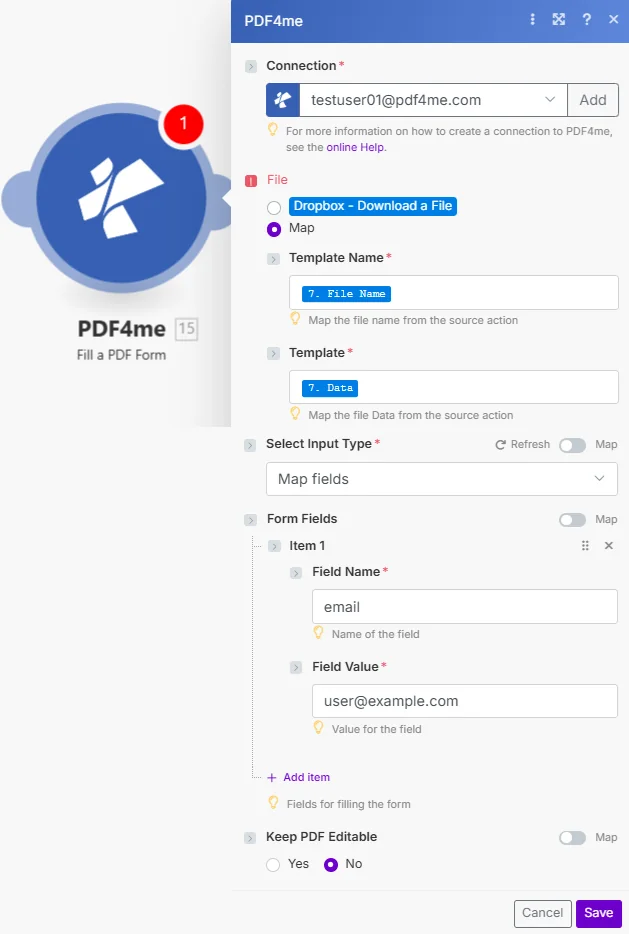
ファイル設定をマップに設定し、前のモジュールからテンプレート名とテンプレートを接続し、「入力タイプの選択」を選択して、表示される値を入力するか、JSONペイロードを指定し、「保持」を設定します。 PDF 編集可能。
パラメータ
必須: 接続、ファイル、テンプレート名、テンプレート、入力タイプの選択、保持 PDF 編集可能な項目はすべて提供する必要があります。入力タイプの選択により、どの値フィールドを使用するかが決まります。 Make そして、表示される。
| パラメータ | 必須 | その機能 | 例 |
|---|---|---|---|
| Connection | Required | PDF4me API connection. Click Add and paste your API key if connecting for the first time. | My PDF4me connection |
| File | Required | Radio button picking how the fillable template arrives. Pick a quick storage option (Dropbox - Download a File) or choose Map to bind Template Name and Template from any prior module. | Map |
| Template Name | Required | Name of the PDF form template file, including the .pdf extension. Choose Map under File to bind it from a prior module. | contract_template.pdf |
| Template | Required | Content (binary data) of the PDF form template to fill in, mapped from the prior module Data output. You can also enter a publicly accessible URL of the file. | [Document from Get a File] |
| Select Input Type | Required | How to provide the form data. Defaults to Map fields, which shows a field for each form field in the template; Json lets you provide all values as JSON. The fields for the chosen option appear after you select it. | Map fields |
| Keep PDF Editable | Required | If enabled, the filled form fields stay editable in the result; otherwise the form is flattened so the values can no longer be changed. Defaults to No. | No |
出力フィールド
| 分野 | タイプ | 内容物 |
|---|---|---|
File Name | File name | File name of the resulting filled PDF form. Map it together with Document into the next module. |
Document | File (binary data) | Content (binary data) of the resulting filled PDF form, ready to upload, email, or archive. |
設定方法 PDF フォーム Make?
- 追加 PDF4me → 記入する PDF 形状 あなたの Make シナリオ。
- 選択 繋がり (またはクリック) 追加 あなたと一緒に作成する PDF4me API 鍵)。
- 下 ファイル、 選ぶ 地図 ワイヤー テンプレート名 そして テンプレート 前のモジュールから(Dropbox、 Google Drive、 または HTTP)
- 離れる 入力タイプを選択してください の上 マップフィールド そして値を入力してください Make テンプレート内の各フォームフィールドに対して表示、または設定します。 JSON そして1つ供給する JSON ペイロード。
- 離れる 保つ PDF 編集可能 で いいえ 下流でフィールドがインタラクティブな状態を維持する必要がある場合を除く。シナリオを実行します。 ファイル名 そして 書類 満杯の荷物を運ぶ PDF バイナリファイルデータとして。
典型的な構成
ワークフローの例Common Make scenario patterns using Fill a PDF Form.
契約生成 CRM
- A CRM 取引が最終段階に達したときに、発火の引き金となる。
- このシナリオでは、顧客名、金額、条件を CRM 記録。
- Get File は、入力可能な契約テンプレートを取得します。 Google Drive。
- 記入する PDF フォームマップ CRM 「入力タイプの選択」が「マップフィールド」に設定されているフィールド。
- 記入済みの契約書はアップロードされます Dropbox そして顧客にメールで送信しました。
コース修了証の発行
- 学生がコースを修了するとトリガーが作動します。 LMS。
- このシナリオでは、学生名、コース名、修了日を含むJSONペイロードを作成します。
- Get Fileは、入力可能な証明書テンプレートを取得します。
- 記入する PDF フォームは入力タイプ選択をJsonに設定して入力されます。 PDF 編集可能 左端 No.
- 完成した証明書は学生にメールで送信され、アーカイブされます。 Google Drive。
フォーム送信 PDF
- 新しい Google Forms 送信によってシナリオがトリガーされます。
- このシナリオでは、レスポンスから送信されたすべての回答を読み取ります。
- Get Fileは、入力可能なアプリケーションテンプレートを取得します。
- 記入する PDF フォームは、各回答をテンプレート内の対応するフォームフィールドに書き込みます。
- 完成した申請書 PDF は Dropbox そして、申請者に確認メールが送信されます。
実践的なヒント
Confirm the template has real fillable fields first
Open the PDF in Acrobat or a form viewer and check for clickable fields. A flat scan or a print-to-PDF export has nothing for this module to fill.
Match the field names exactly, including case
Map values against the internal field names defined in the PDF template, not just the visible labels on the page.
Use Json for large or dynamic field sets
When the number of fields varies per document or comes straight from an API response, Json input is far less fragile than maintaining dozens of Map fields entries by hand.
Flatten before sending externally
Leave Keep PDF Editable at No for anything you send outside your organization, otherwise recipients can alter the values you just filled in.
Reuse one template across an iterator
Map the same Template Name and Template on every run and loop the field values or Json through a Make Iterator to fill dozens of contracts or certificates from one source template.
チートシート
| 分野 | 価値 |
|---|---|
| Module | Fill a PDF Form |
| Connection | PDF4me API key |
| Template source | File = Map (Template Name + Template) |
| Input type options | Map fields / Json |
| Map fields shape | [{Name: "field", Value: "value"}, ...] |
| Default Keep PDF Editable | No (flattened) |
| Output | File Name + Document (binary file data) |
よくある質問
業界におけるユースケースとアプリケーション
- Sales & Business Development
- Human Resources
- Education & Training
- Healthcare & Medical
- 契約書作成: 販売契約書に記入してください CRM データ
- 提案書の作成提案書フォームに機会の詳細を入力する
- 見積もり生成価格情報を見積書に記入する
- 契約処理: 記入済みの契約書を作成する
- 内定通知書求人情報に候補者のデータを入力する
- オンボーディングフォーム新規採用者の書類を自動的に作成する
- 業績評価従業員データを用いて評価フォームに記入する
- 解雇に関する書類: 従業員情報を含む退職書類を作成する
- 証明書の発行証明書に学生情報を記入する
- 入学申込書学生データを使って入学書類を作成する
- 転写産物生成成績証明書用紙に学業成績を記入する
- 評価フォーム評価フォームに結果を入力する
- 患者用書類患者データを入力用紙に記入する
- 保険金請求医療情報を入力して請求書を作成する
- 処方箋用紙処方箋テンプレートに患者の詳細を記入する
- 同意書患者情報を含む同意書を作成する
関連アクション
フォームフィールドを追加する PDF
入力可能なものを作成する AcroForm 平地に広がる畑 PDF まず、これを使用してからFill a PDF テンプレートにまだフィールドがない場合は、フォームを作成してください。
平らにする PDF
既存の入力済みフォームフィールドをフラット化 PDFKeep の代替案 PDF 編集可能は上流で「はい」のまま残されました。
サイン PDF
記入済みの文書に署名を追加します。記入後に自然にペアになります。 PDF 契約書および合意書の書式。
他のプラットフォームでの同じタスク
n8n: 記入する PDF 形状
同じフォーム入力ノード n8n ワークフローを自己ホスト型またはクラウドに接続します n8n インスタンスの代わりに Make。
Power Automate: 記入する PDF 形状
同じフォーム入力アクション Microsoft Power Automate 流れ、適合する SharePoint およびDataverseワークフロー。
Zapier: 記入する PDF 形状
同じフォーム入力手順 Zapierそれを接続します Google Sheets、 Airtable、 または CRM 既にZapに登録されているトリガー。
PDF4me API: 記入する PDF 形状
同じフォーム入力エンドポイントを直接呼び出すには、 REST カスタム統合の場合 Make。