フォームフィールドを追加する PDF のために Make
フォームフィールドを追加する PDF は Make 任意の場所に、インタラクティブなフォームフィールド(テキストボックスとチェックボックス)を正確なX/Y座標に配置するモジュール PDF ページ。契約書、人事オンボーディング、アンケート、および受信者が記入する必要があるあらゆるワークフローの入力可能なフォームの作成を自動化するために使用します。 PDF デジタル的に処理されます。結果はファイル(バイナリデータ)として返され、フィル処理の準備が整います。 PDF フォームモジュールまたは直接アップロード。
このモジュールの機能
このモジュールの機能: の PDF4me フォームフィールドを追加する PDF モジュールは、インタラクティブなフォームフィールド(テキストボックスとチェックボックス)を、任意のページの正確なX/Y座標に配置します。 PDF あなたの Make シナリオ。 PDF から Google Drive、 Dropbox、または以前のモジュールで、各フィールドの名前、タイプ、位置を定義し、返される 入力可能 PDF バイナリファイルデータとして アップロード、メール送信、またはフィルに渡す準備ができています PDF フォームモジュール。 フォームフィールド 配列なので、1回の呼び出しで複数のフィールドを一度に追加できます - マニュアルはありません PDF 編集者募集中。
認証 API リクエスト
毎 PDF4me モジュール Make 有効な API キー。接続 PDF4me 一度 Makeの接続マネージャー - キーは安全に保存され、すべての場所で再利用されます PDF4me すべてのシナリオでモジュールが自動的に使用されます。
見逃してはならない重要な事実
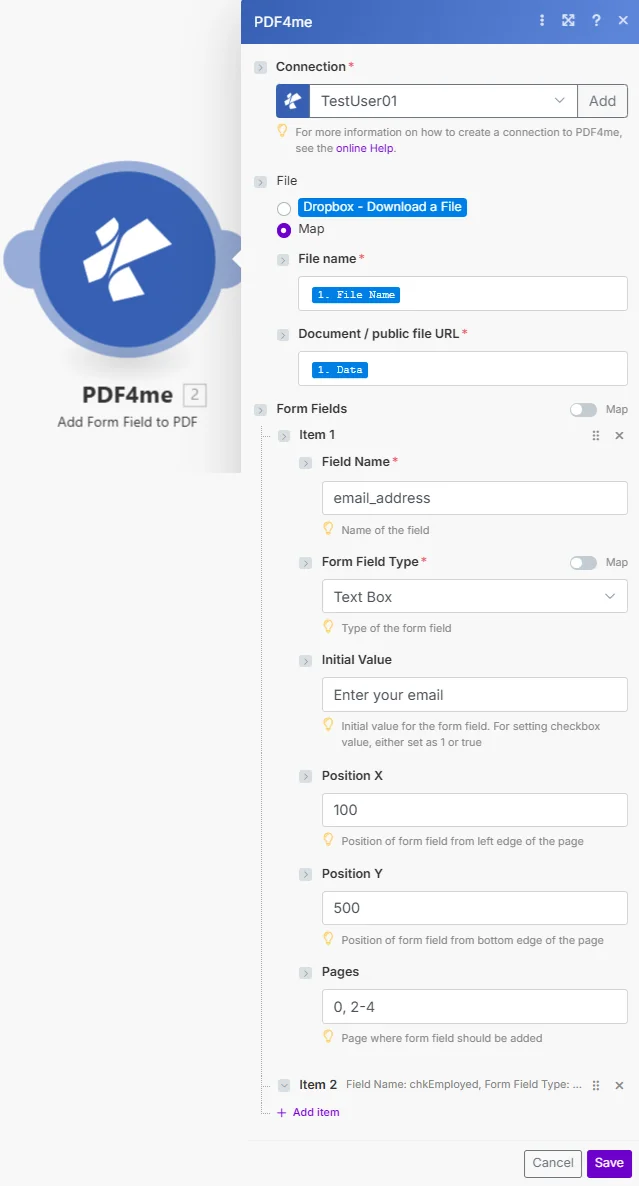
パラメータ
⚠️ ファイル名とドキュメント名は必須です。 フォームフィールドはオプションです。各フォームフィールド項目内では、フィールド名とフォームフィールドタイプを入力する必要がありますが、初期値、位置X、位置Y、およびページはオプションです。
| パラメータ | 必須 | その機能 | 例 |
|---|---|---|---|
| File | Required | How the source PDF reaches the module. The radio lists your connected storage actions (for example Dropbox - Download a File) and Map. Choose Map to wire the fields below from earlier modules: File Name and Document / public file URL only appear once Map is selected. | Map |
| File Name | Required | Name of the source PDF including the .pdf extension. Map from the previous module's file name output or enter a static name. Used for output identification and file format validation. | application_form.pdf |
| Document / public file URL | Required | Content (binary data) of the PDF to process. Map from a Get File module (Google Drive, Dropbox, OneDrive, HTTP) or from the Document output of a previous PDF4me module. You can also enter a publicly accessible URL of the file instead. | [Document from Google Drive Get File] |
| Form Fields | Optional | Array of the form fields to add to the PDF. Each item defines one field, so click Add item once per field you need. | Add item |
| Form Fields -> Field Name | Conditional | Name of the field. Used for field recognition when filling the form programmatically or with the Fill PDF Form module. Use descriptive names without spaces (e.g. FirstName, EmailAddress, AgreeToTerms). | email_address |
| Form Fields -> Form Field Type | Conditional | Type of the form field: Text Box or Check Box. Defaults to Text Box. | Text Box |
| Form Fields -> Initial Value | Conditional | Initial value for the form field. For setting a Check Box value, either set it as 1 or true. Leave empty for blank fields that the recipient fills in. | Enter your email address |
| Form Fields -> Position X | Conditional | Position of the form field from the left edge of the page, as a whole number. Defaults to 10. | 100 |
| Form Fields -> Position Y | Conditional | Position of the form field from the bottom edge of the page, as a whole number. Defaults to 10. | 500 |
| Form Fields -> Pages | Conditional | Page where the form field should be added. Pages are numbered from 1. Defaults to 1. | 2 |
出力フィールド
| 分野 | タイプ | 内容物 |
|---|---|---|
File Name | File name | File name of the resulting PDF, with the form fields added |
Document | File (binary data) | Content (binary data) of the resulting PDF; map it together with File Name into the next module's Document input or a storage upload field |
Document Url | Text | Link to the resulting PDF. Returned when PDF4me processes the request as a background job (for large files); otherwise empty |
フォームフィールドを追加する設定方法 PDF モジュール Make
- 作成または開く Make シナリオ ソースを提供するトリガーまたはモジュールを追加します PDF - Google Drive ファイルを見る、 Dropbox ウォッチフォルダー、または HTTP モジュール。
- ファイル取得モジュールを追加する (Google Drive、 Dropbox、 または OneDriveバイナリを取得する PDF トリガーがメタデータのみを返す場合はバッファを格納します。
- 追加する PDF4me フォームフィールドを追加する PDF モジュール - 検索 PDF4me モジュール一覧からそれを選択します。
- 認証する あなたの PDF4me API キーがまだ接続されていない場合は、キーを入力してください。 Make 接続ダイアログ)。
- マップファイル名 前のモジュールのファイル名出力から。
- 地図文書 前のモジュールのバイナリファイルデータ出力から。
- 「フォームフィールド」の下にある「項目を追加」をクリックします。 そして入力する フィールド名 - 一意で説明的な識別子 (例:
ApplicantName、AgreeToTerms) - フォームフィールドの種類を選択してください テキストボックスまたはチェックボックス。
- 位置Xと位置Yを設定する 正確なフィールド配置のために、整数値を使用します。
- ページ設定 1から番号が振られた、そのフィールドが表示されるべきページへ。
- 下流モジュールを接続する - ファイル名とドキュメントを塗りつぶしにマッピングする PDF フォームモジュール、またはアップロード先 Google Drive/Dropbox。
フォームフィールドの種類は PDF で Make?
フォームフィールドタイプのドロップダウンメニューには、2種類のインタラクティブなフィールドタイプが用意されています。 テキストボックス テキスト入力の場合、これはデフォルトであり、 チェックボックス 初期値が設定されているチェックボックスの場合 1 または true 事前に確認するため。位置Xはページの左端から、位置Yは下端から測定します。 PDF フォームフィールド仕様については、 PDF 32000-1規格 そして Make PDF4me 統合。