ドキュメントを解析する Make
このモジュールの機能
PDF4me ドキュメントを解析する 保存した解析テンプレートを PDF 内部 Make シナリオを実行し、次のモジュールにマッピングする準備ができた抽出フィールドを返します。Dropbox、Google Drive、OneDrive、または HTTPテンプレートを参照するには テンプレート名(TemplateId)解析された値は、Airtable、Google Sheets、データベース、または下流のメールに直接ルーティングされます。テンプレートには抽出ロジックが含まれているため、1つのモジュール呼び出しで請求書、契約書、領収書、および設定したカスタムレイアウトをすべてカバーできます。
関連ブログ記事(1)
このモジュールを実行する前に: 解析テンプレートを作成する PDF4me ダッシュボード。キャプチャキーを定義して選択します。 正規表現 安定したパターンまたは JavaScript 表現 条件付きロジックの場合。 Make モジュールは、テンプレートを参照します。 テンプレートID。 見る ドキュメントの解析情報を準備する 完全なセットアップについては、正規表現の例(INV-\d{6,10}、 \d{2}/\d{2}/\d{4})、そして2人の作業員 JavaScript 表現分類器のサンプル。
認証 API リクエスト
の PDF4me モジュール Make 有効な 繋がり. 作成または選択して、 PDF4me API シナリオが解析リクエストを安全に認証できるようにするためのキー。
見逃してはならない重要な事実
テンプレート名は、TemplateId GUIDを受け入れます。
フィールドラベルに関わらず、人間が読みやすいテンプレート名ではなく、ダッシュボードからGUIDテンプレートIDを貼り付けてください。GUIDは名前変更後も安定しており、本番環境での使用に適しています。
安定したパターンの正規表現、 JavaScript 条件付きロジック
テンプレート内にキャプチャルールがあります。請求書番号、日付、金額、納税者番号には正規表現を使用します。 JavaScript 表現
文章 分類ルールとフォールバックルールのための変数。1つの解析テンプレートで、あらゆるプラットフォームに対応
同じ TemplateId が機能する Make、 n8n、 Zapier、 Power Automate直接 REST 通話。テンプレートを一度作成すれば、チームが自動化するあらゆる場所で再利用できます。
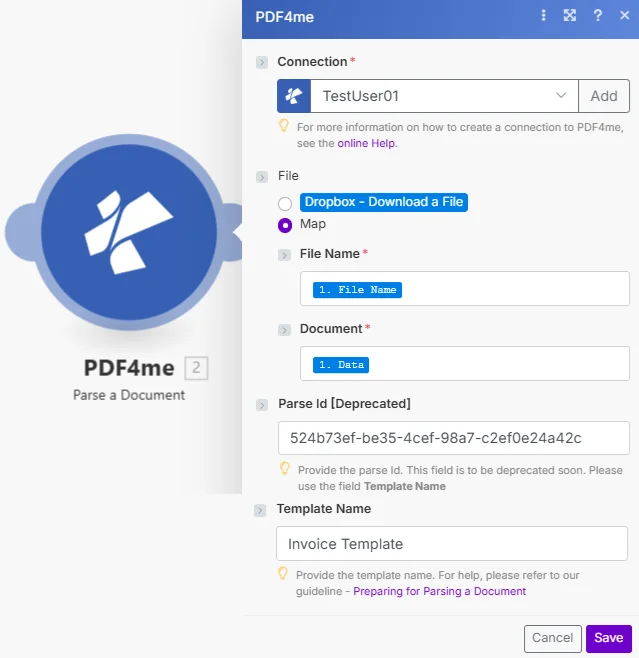
パラメータ
| パラメータ | 必須 | その機能 | 例 |
|---|---|---|---|
| Connection | Required | PDF4me connection that authenticates the module. Click Add to create one with your API key, or pick an existing connection from the dropdown. | PDF4me production |
| File | Required | How the source document reaches the module. The radio lists your connected storage actions (for example Dropbox - Download a File) and Map. Choose Map to wire the fields below from earlier modules: File Name and Document only appear once Map is selected. | Map |
| Document | Required | Binary PDF mapped from a previous module: Dropbox Download a File, Google Drive Get a File, OneDrive Download a File, HTTP Get a File, Gmail Get an Attachment, or any module that returns a file. | 1. Data |
| File Name | Required | Source filename including .pdf extension. Usually mapped from the same upstream module File Name output. | 1. File Name |
| Parse Id [Deprecated] | Optional | Superseded by Template Name. Make still shows the field, but new scenarios should use Template Name. | |
| Template Name | Optional | TemplateId GUID from the PDF4me dashboard. Identifies which parse template (capture keys + extraction rules) the module should apply. | 12345678-1234-1234-1234-123456789abc |
解析テンプレート内の式タイプ
正規表現安定したパターン請求書番号(
INV-\d{6,10})、日付(\d{2}/\d{2}/\d{4})、量($?\d{1,3}(?:,\d{3})*(?:.\d{2})?) 生産キャプチャキーの約80%。JavaScript式条件論理と分類器キャプチャ領域のテキストは次のように渡されます
文章; 文字列を返します。マルチマーカー分類、フォールバックルール、日付正規化。参照 ドキュメントの解析情報を準備する 2つの作業サンプルについて。出力
このモジュールは、解析テンプレートが抽出したデータを含むフィールドを1つ返します。
| 分野 | タイプ | 内容物 |
|---|---|---|
Parse Info | Any (structured data) | The data extracted using the parsing template, as structured data. It carries one value per capture key defined in the template, for example invoiceNumber, totalAmount or invoiceDate, pickable directly in the visual mapper of any downstream module. |
シナリオ例
一般的なMakeシナリオパターンTypical ways to chain Parse a Document into a Make flow.
請求書をAirtableにメールで送信する
- Gmailのメール監視機能は、新しい仕入先からの請求書を受信した際に作動します。
- イテレータは各 PDF 添付ファイル。
- 「ドキュメントを解析」機能は、バイナリ添付ファイルに対して請求書テンプレートを実行します。
- Airtableの「レコードの作成」機能は、invoiceNumber、totalAmount、invoiceDateをAPテーブルに書き込みます。
Dropboxの領収書をGoogleスプレッドシートに取り込む
- Dropbox Watch Files は、/receipts に新しいアップロードがあった場合に起動します。
- Dropbox ファイルのダウンロードは、 PDF バイナリ。
- ドキュメント解析機能は、領収書テンプレートを使用して、仕入先、日付、品目、合計金額を抽出します。
- Googleスプレッドシートの「行を追加」機能は、解析された値を経費トラッカーに追加します。
分類器+ルーターのシナリオ
- HTTP Webhook は受信します PDF。
- ドキュメントを解析すると、テンプレートが実行されます。 JavaScript 文書タイプを返す式キー。
- ルーターは、タイプフィールド(請求書/注文書/領収書)に基づいて、タイプ固有のダウンストリームブランチに分岐します。
- 各ブランチは、解析された値をそれぞれの宛先システムに送信する。
よくある質問
関連アクション
ドキュメントの解析情報を準備する
テンプレート設定の手順(正規表現の例と2つの動作例を含む) JavaScript 表現分類器のサンプル。
分類文書の設定
カテゴリのみの出力に関する補足ガイドです。ドキュメント解析の前にプリルーティングとして使用してください。
ドキュメントを解析する REST API
生データによる同じエンジン REST エンドポイント。外部のカスタムコードから呼び出す場合に使用します。 Make。
他のプラットフォームでも同じタスクを実行
ドキュメントを解析 n8n
同じテンプレート、同じ抽出フィールドを使用した、自己ホスト型の開発者向けノード。
ドキュメントを解析 Zapier
6,000以上のトリガーのいずれかから Zapier アプリは解析されたフィールドをスプレッドシートやデータベースにルーティングします。
ドキュメントを解析 Power Automate
Microsoft 365 流れ SharePoint、 Outlookチーム、そして Dynamics 統合。