ハイパーリンクの更新 - リンクマネージャー Make
PDF4me ハイパーリンクを更新する は Make 既存のモジュールを検索する PDF テキストによるハイパーリンクまたは URL そして、ドキュメントの残りの部分には手を加えずに、それらを一括で置き換えます。壊れたリンクを修正したり、移行したりするのに使用します。 URLs ウェブサイトの再構築後、または一連のブランディングの更新後 PDFs。
このモジュールの機能
PDF4me ハイパーリンクを更新する 検索 PDF既存のハイパーリンクを、その表示テキストまたは URL次に、一致するものを一括で置き換えます。各ハイパーリンク項目は、テキストまたは URL部分的な値または完全な値を置換し、オプションで検索値を正規表現として扱い、複数のリンクにわたってパターンベースのマッチングを一度に実行します。
関連ブログ記事
この機能に関するブログ記事はまだありません。近日公開予定です。
その間、PDF4me ブログを閲覧して、あらゆるプラットフォームのチュートリアルやワークフローをご覧ください。
ブログをご覧ください →
認証方法 Make シナリオ?
毎 PDF4me モジュール Make 有効な 繋がり. 作成または選択して、 PDF4me API シナリオがハイパーリンク更新要求を安全に認証できるようにするためのキー。
見逃してはならない重要な事実
検索対象としてテキストまたはURLを選択
各ハイパーリンク項目は、表示されているリンクテキストまたは基となるURL値のいずれかを検索し、両方を同時に検索することはありません。更新が必要なディメンションごとに、個別の項目を追加してください。
空白テキスト現在の値は一致全体を置き換えます
「現在のテキスト値」を空欄にすると、一致したテキストまたはURL全体が「新しいテキスト値」に置き換えられ、一部のみが置き換えられることはありません。
式は正規表現マッチングを有効にします
検索値を正規表現として扱うには、「式である」を「はい」に設定します。これは、URLのファミリー(例えば、パスが異なる古いドメイン)を、それぞれをリストアップする代わりに1つの項目で照合する場合に便利です。
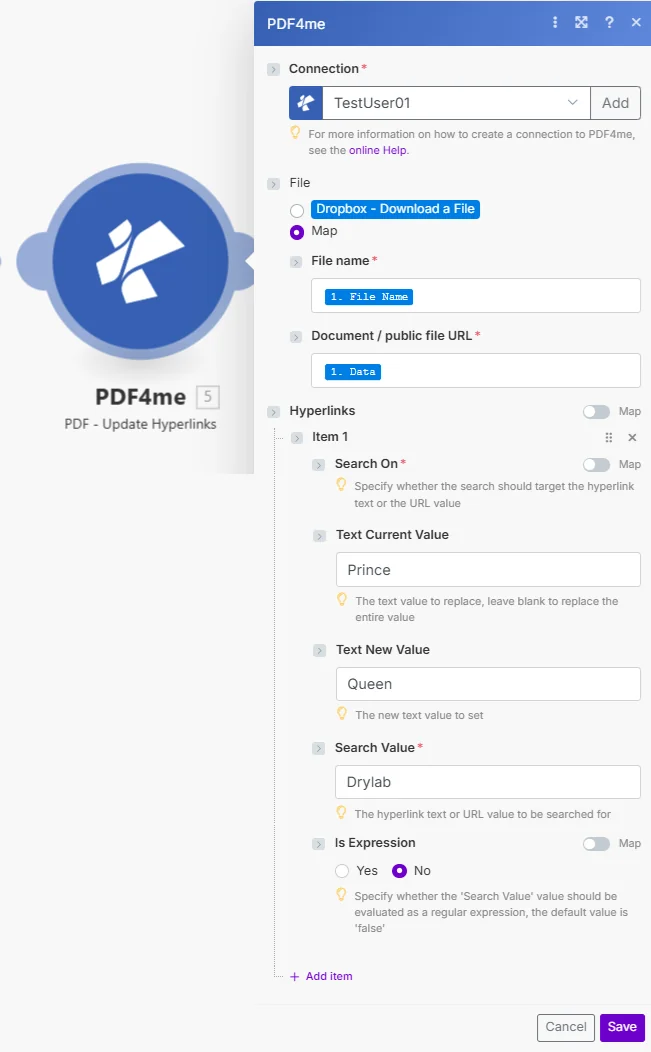
ファイルをマップに設定し、ファイル名とドキュメント/公開ファイルのURLを接続し、更新するリンクパターンごとにハイパーリンク項目を1つ追加します。
パラメータ
必須: 接続、ファイル名、ドキュメント/公開ファイルのURL、および検索対象と検索値が設定されたハイパーリンク項目が少なくとも1つ必要です。各項目につき、「現在のテキスト値」、「新しいテキスト値」、「式」はオプションです。
| パラメータ | 必須 | その機能 | 例 |
|---|---|---|---|
| Connection | Required | PDF4me API connection. Click Add and paste your API key if connecting for the first time. | My PDF4me connection |
| File | Required | How the source PDF reaches the module. The radio lists your connected storage actions (for example Dropbox - Download a File) and Map. Choose Map to wire the fields below from earlier modules: File Name and Document / public file URL only appear once Map is selected. | Map |
| File Name | Required | Filename of the source PDF including extension, used for output file identification. | brochure.pdf |
| Document / public file URL | Required | Binary PDF content mapped from a preceding module, or a public URL to the file. | [Buffer from Get File] |
| Hyperlinks | Optional | The link changes to apply. Add one item per link pattern you want to update. | |
| Hyperlinks > Search On | Conditional | Whether this item searches the hyperlink text or the URL value. Defaults to URL. | Text |
| Hyperlinks > URL Current Value | Conditional | Shown when Search On is URL. The URL substring to replace. Leave blank to replace the entire matched value. | http://old.example.com |
| Hyperlinks > URL New Value | Conditional | Shown when Search On is URL. The new URL to set in place of the match. | https://new.example.com |
| Hyperlinks > Text Current Value | Conditional | Shown when Search On is Text. The text substring to replace. Leave blank to replace the entire matched value. | Prince |
| Hyperlinks > Text New Value | Conditional | Shown when Search On is Text. The new text to set in place of the match. | Queen |
| Hyperlinks > Search Value | Conditional | The hyperlink text or URL value to search for in the document. | Drylab |
| Hyperlinks > Is Expression | Conditional | Yes evaluates Search Value as a regular expression instead of a literal match. Defaults to No. | No |
出力フィールド
| 分野 | タイプ | 内容物 |
|---|---|---|
Name | File name | Output PDF filename with updated hyperlinks. |
Document | File (binary data) | The PDF document with modified links, ready to upload or attach. |
Document Url | Text | Link to the resulting PDF. Returned when PDF4me processes the request as a background job. |
ハイパーリンクの更新を設定するにはどうすればいいですか Make?
- 追加 PDF4me → PDF - ハイパーリンクを更新 あなたの Make シナリオ。
- 選択 繋がり (またはクリック) 追加 あなたと一緒に作成する PDF4me API 鍵)。
- 下 ファイル、 選ぶ 地図 ワイヤー ファイル名 そして ドキュメント/公開ファイルのURL 前のモジュールから。
- クリック アイテムを追加 下 ハイパーリンク 更新したいリンクパターンごとに設定してください。
- セット 検索対象 に
TextまたはURL記入する 検索値 何を見つけるべきか。 - セット テキスト 現在の値 (または空欄のままにして試合全体を置き換える) テキスト 新しい価値 交換品と共に。
- セット 式 に
Yes検索値が正規表現の場合は、シナリオを実行します。更新された PDF バッファとして返します。
典型的な構成
ワークフローの例Common Make scenario patterns using Update Hyperlinks.
予定されているリンク切れのクリーンアップ
- 定期的にトリガーが作動し、公開されたコンテンツをレビューします PDFs。
- Get File は各ファイルを取得します PDF から Dropbox または Google Drive イテレータループ内で。
- ハイパーリンクの更新により、既知の破損またはリダイレクトされたリンクが置き換えられます。 URLs 既知の悪質なリンクごとに、ハイパーリンク項目を1つ使用します。
- 修正された PDF 以前のバージョンを上書きして、ストレージにアップロードされます。
ウェブサイトの再構築後のドメイン移行
- マーケティングチームが新しいサイト構造の稼働開始を確認した後、シナリオがトリガーされます。
- イテレータはすべての PDF それは古いドメインを参照しています。
- ハイパーリンクの更新で検索をオンに設定します URL、式を「はい」とし、古いドメインパターンを新しいドメインパターンに単一の項目で一致させます。
- 更新済み PDFs ドキュメントライブラリに保存され、検索インデックスが更新されます。
リブランディングに関するマーケティング資料
- リブランディングプロジェクトは、すべてのマーケティング活動に対する一括処理をトリガーします。 PDFs。
- ハイパーリンクの更新は、ドメイン変更用、ソーシャルメディアのハンドル名用、連絡先メールアドレスのリンクテキスト用など、複数の項目を実行します。
- それぞれ PDF イテレータ内の同じハイパーリンク構成を通して処理されます。
- ブランド名を変更 PDFs 更新された資料フォルダにアップロードされ、配布準備が整いました。
実践的なヒント
Search On decides text vs URL, not both
One Hyperlinks item cannot search text and URL simultaneously. Add a separate item for each dimension if you need to update both.
Blank Text Current Value replaces everything
If Text Current Value is left empty, the entire matched hyperlink text or URL is replaced with Text New Value, not just a substring.
Regex needs Is Expression set to Yes
Search Value is treated as a literal string unless Is Expression is Yes. Forgetting this toggle is the most common reason a regex-style Search Value fails to match.
One item per link pattern, not per link instance
A single Hyperlinks item updates every matching link in the document, you do not need one item per occurrence, only per distinct search pattern.
This module edits links, it does not add them
Update Hyperlinks only modifies hyperlinks that already exist in the PDF. To insert brand-new links, use the PDF4me Create Hyperlinks module.
Test with one item before batching many PDFs
Run the scenario against a single sample PDF first to confirm Search On and Search Value match as expected before applying it to a large batch.
チートシート
| 分野 | 価値 |
|---|---|
| Module | PDF - Update Hyperlinks |
| Connection | PDF4me API key |
| Search On options | Text or URL |
| Blank Text Current Value | Replaces the entire matched value |
| Is Expression | Yes = regex match, No = literal match (default) |
| Multiple updates | Add one Hyperlinks item per link pattern |
| Output | Name, Document, Document Url |
よくある質問
業界におけるユースケースとアプリケーション
- Web Publishing & Content
- Marketing & Communications
- Documentation & Technical
- Corporate & Business
- リンク切れの修正:壊れたハイパーリンクを更新します PDFs
- URL 移住: 変化 URLs ウェブサイトの再構築後
- ドメイン変更ドメイン移行後にリンクを更新
- リダイレクトの更新: リダイレクトされた URLs 期末試験付き
- ブランド変更ブランド関連のリンクをすべて更新する
- キャンペーン最新情報キャンペーン固有の変更 URLs
- ソーシャルメディアリンクソーシャルメディアのプロフィールを更新する URLs
- 連絡先メールとウェブサイトのリンクを変更する
- 文書管理技術文書へのリンクを最新の状態に保つ
- API 参考資料の更新: アップデート API ドキュメント URLs
- 外部参照外部リソースへのリンクを維持する
- バージョンアップデート新しいバージョンのドキュメントへのリンクを変更します
- ポリシーの更新: ポリシー参照リンクを更新します
- イントラネットリンク: 内部ポータルを変更する URLs
- リソースリンク従業員向けリソースリンクを更新します
- パートナーリンクパートナーとベンダーを変更する URLs
関連アクション
ハイパーリンクを作成する
新しいハイパーリンクを追加する PDFリンクがまだ存在しない場合は、「ハイパーリンクの更新」の代わりにこちらを使用してください。
ハイパーリンクを削除
ハイパーリンクを完全に削除する PDF完全なリンクライフサイクル管理を実現するには、Update Hyperlinksと組み合わせる。
ハイパーリンクを抽出する
すべてのハイパーリンクを一覧表示します PDF まず、リンク切れや古いリンクを監査してから更新してください。
他のプラットフォームでの同じタスク
n8n: ハイパーリンク注釈の更新
同じハイパーリンク更新ノード n8n ワークフローを自己ホスト型またはクラウドに接続します n8n インスタンスの代わりに Make。
Zapier: ハイパーリンク注釈の更新
同じハイパーリンク更新手順 Zapierそれを接続します Google Drive または Dropbox 既にZapに登録されているトリガー。
PDF4me API: ハイパーリンク注釈の更新
同じハイパーリンク更新エンドポイントを直接呼び出す REST カスタム統合の場合 Make。