SwissQRコードを読み取る Make
SwissQRコードを読み取る は Make スイスの文字を読み取るモジュール QR コードから PDF 請求書を自動的に作成し、 QR-請求書 (QR(請求書)ペイロード: IBAN、金額、通貨(CHF/EUR)、債権者、債務者、および参照番号。これを使用して、スイスの請求書の買掛金と支払照合を自動化します。 Make 手動でのデータ入力は不要です。
このモジュールの機能
PDF4meSwissQRコードを読み取る スイスの QR-請求書 (QR-Rechnung) ペイロードは、どのペイロードからでも PDF 請求書は Make シナリオ。すべての支払いフィールドを構造化してすぐに使用できる状態で返します。 IBAN金額、通貨、債権者名と住所、債務者の詳細、参照番号、およびその他の請求情報などが含まれるため、請求書データを手動で読み取ったり入力したりすることなく、買掛金、照合、または支払い開始のワークフローを実行できます。
認証 API リクエスト
毎 PDF4me モジュール Make 有効な 繋がり. 作成または選択して、 PDF4me API キーによりシナリオはスイスを認証できます QR リクエストを安全にデコードします。
見逃してはならない重要な事実
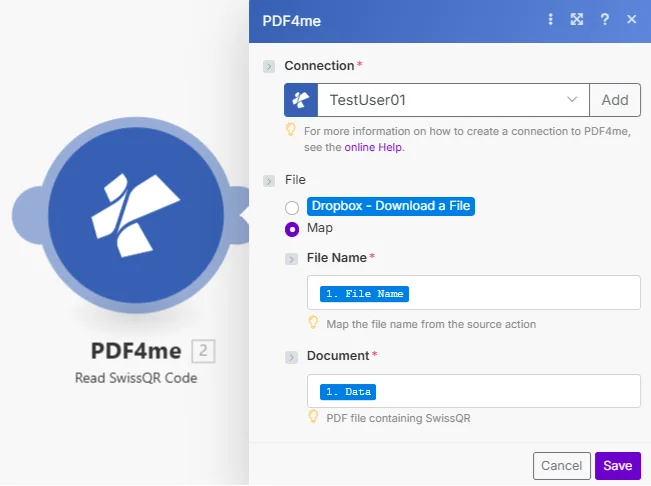
ファイルは次のように設定されています Map ファイル名を渡して PDF 以前のモジュールからのバッファ。モジュールはすべてのページをスキャンし、完全なスイスの QR-請求書支払いペイロード。
パラメータ
必須: 接続、ファイル名、およびドキュメントはすべて指定する必要があります。 PDF 有効なスイスの QR-モジュールが支払いデータを返すための請求書。
| パラメータ | 必須 | その機能 | 例 |
|---|---|---|---|
| Connection | Required | PDF4me API connection. Click Add and paste your API key if connecting for the first time. | Your PDF4me connection |
| File | Required | How the source PDF reaches the module. The radio lists your connected storage actions (for example Dropbox - Download a File) and Map. Choose Map to wire the fields below from earlier modules: File Name and Document only appear once Map is selected. | Map |
| File Name | Required | Source PDF filename including the .pdf extension. Map from the prior module's file name output. | swiss_invoice_2024.pdf |
| Document | Required | Binary PDF buffer from a prior module: cloud storage download (Dropbox, Google Drive, SharePoint), email attachment, or HTTP response. The PDF must contain a Swiss QR-bill on any page. | 1. Data |
出力
このモジュールは 3 つのフィールドを返し、それらはすべて後続のモジュールでマッピングに使用できます。請求データ自体はテキストとして届きます。 バーコードテキスト。
| 分野 | タイプ | 内容物 |
|---|---|---|
| Name | File name | File name of the processed document. |
| Document | File (binary data) | Content (binary data) of the processed document. |
| Barcode Text | Text | The billing data read from the Swiss QR code. |
請求データの内容
バーコードテキスト エンコードされた支払い値を保持します Swiss QR コード。そのテキストを下流で解析して、各値を個別に取得します。
| 価値 | タイプ | 内容物 |
|---|---|---|
| IBAN | String | International Bank Account Number of the payee. 21-character Swiss IBAN starting with CH or LI. |
| Amount | String | Payment amount as a string (e.g. "1250.00"). Convert to Number in Make if arithmetic is needed downstream. |
| Currency | String | CHF or EUR. The Swiss Payment Standard allows only these two values. |
| Creditor | Object | Creditor name, address type (K or S), street/PO box, building number, postcode, town, and country. |
| Debtor | Object | Debtor (payer) name and address fields, same structure as Creditor. May be empty if the invoice omits debtor data. |
| Reference | String | The reference number: 27-digit QRR, ISO 11649 SCOR, or empty string for NON reference type. |
| Reference Type | String | QRR, SCOR, or NON. Identifies the reference format so your downstream logic can branch accordingly. |
| Additional Info | String | Unstructured message text and Swico S1 structured billing data (VAT rates, payment conditions, accounting codes) when included by the invoice issuer. |
SwissQRコードを読み取る設定方法を教えてください Make?
- 追加 PDF4me → SwissQRコードを読み取る あなたの Make シナリオ。
- 選択 繋がり (またはクリック) 追加 あなたと一緒に作成する API 鍵)。
- 地図 ファイル名 そして 書類 前のモジュールから: メール添付ファイルの監視、クラウドストレージのファイル取得、または HTTP ダウンロード。
- クリック 保存 そしてシナリオを実行します。出力フィールドは次のとおりです。 IBAN、 額、 通貨、 債権者、 債務者、 参照、 参照タイプ、 そして 追加情報: これらはすべて、下流モジュールにマッピングするために利用可能です。
スイスQRコード読み取りはいつ使用すべきですか? Make?
ワークフローの例Common Make scenario patterns using Read SwissQR Code.
- メールウォッチは、スイスのサプライヤー請求書が届いたときに作動します。 QR請求書が届きます。
- SwissQRコードの抜粋を読む IBAN金額、参照番号、および債権者の詳細。
- 1 HTTP モジュールは支払いデータを会社の銀行または ERP API。
- Google スプレッドシートの行が作成され、請求書の参照番号、金額、債権者が記録されます。 AP 登録する。
- 銀行取引明細書のダウンロード処理は、スケジュールされたトリガーによって毎日実行されます。
- Read SwissQR Codeは、照合されていない支払いごとに、対応する送信済み請求書から参照番号を抽出します。 PDF。
- 参照番号はデータベース内の未払い請求書記録と照合され、一致した請求書は自動的に支払い済みとしてマークされます。
- 要約メールが送信されます AR チームは、その日のマッチング済みおよび未マッチングの支払いを一覧表示しました。
- Dropbox ウォッチ フォルダーは、新しいスイスの請求書が届いたときにトリガーされます PDF 受信トレイフォルダにドロップされます。
- SwissQRコードを読み取ると、債権者名と参照番号が抽出されます。 QR ペイロード。
- Googleドライブは、債権者用のフォルダを作成し(存在しない場合)、参照番号をファイル名として請求書をアップロードします。
- Slackの通知は、 AP 新しい請求書が提出され、承認準備が整ったことをチームに通知します。