生成する EPC QR コード SEPA で Make
このモジュールの機能
PDF4me 生成する EPC QR コード SEPA 支払い スキャン可能な欧州決済評議会を作成する QR 誰でもモバイルバンキングアプリを通じて即座に支払いができるコード。手動操作は不要です。 IBAN 入力ミスなく、受取人の詳細を入力してください。 IBAN、金額、および参照、そしてモジュールは を返します Base64 QR 請求書メールに挿入できる画像、または PDFどんなものでも動作します SEPA-ゾーン銀行口座 EU そして EEA顧客がドイツ、フランス、ベルギー、またはユーロ圏のその他の地域にいる場合は、このモジュールが最適です。
関連ブログ記事
この機能に関するブログ記事はまだありません。近日公開予定です。
その間、PDF4me ブログを閲覧して、あらゆるプラットフォームのチュートリアルやワークフローをご覧ください。
ブログをご覧ください →
認証 API リクエスト
毎 PDF4me モジュール Make 有効な 繋がり. 作成または選択して、 PDF4me API シナリオが認証できるようにするためのキー EPC QR 安全なコード生成。
見逃してはならない重要な事実
スイスとは全く異なる基準 QR 請求書
EPC QR 欧州決済評議会の仕様に準拠 SEPA クレジット転送とあらゆる IBAN 横断して EU そして EEAスイス QR Billはスイス専用の別の規格で、CHまたはLIでのみ機能します。 IBANスイスとリヒテンシュタイン国内では使用できません。請求書の受取人がドイツ、フランス、オランダ、またはユーロ圏内のその他の国にいる場合は、こちらを使用してください。
BIC バージョンV1を選択した場合のみ必要です
モジュールヒントにははっきりとこう書いてあります。BIC 必須は EPC バージョンV1。V2はデフォルトであり、新規実装に推奨されるバージョンです。V2では IBAN それだけで支払いをルーティングするのに十分です。 BIC 空にして、次に進む。
出力は画像ファイルであり、変更されたものではありません。 PDF
バーコード作成モジュールと同様に、このモジュールは画像を返します。 PDF ドキュメント。名前とドキュメントという 2 つのマッピング可能なフィールドとして届きます。 QR 請求書に変換するには、もう1つの手順が必要です。画像をマッピングして HTML またはWordテンプレートに変換して PDF。
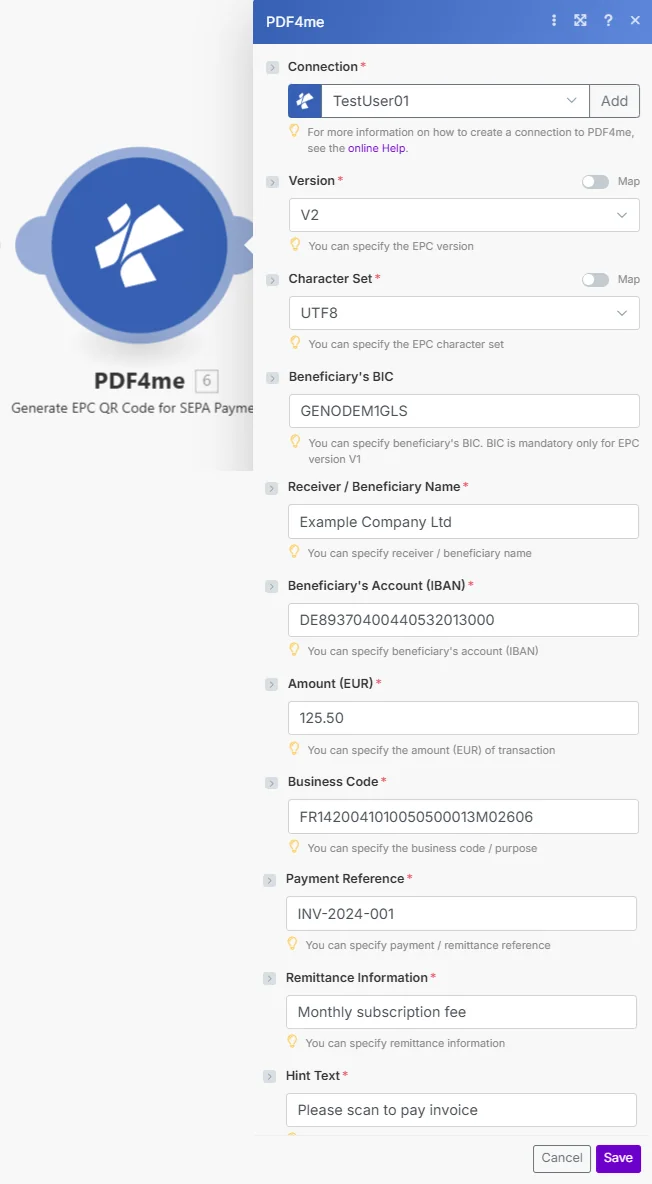
バージョンはデフォルトでV2になります。 BIC はオプションです。 IBANスキャン可能なデータを生成するには、金額、受取人名、および3つの参照フィールドが必要です。 EPC QR コード。
パラメータ
必須: 接続、バージョン、文字セット、受信者/受益者名、受益者のアカウント(IBAN)、 額 (EUR)、ビジネスコード、支払参照番号、送金情報、およびヒントテキスト。受取人の BIC バージョンV2を使用する場合はオプションです。
| パラメータ | 必須 | その機能 | 例 |
|---|---|---|---|
| Connection | Required | PDF4me API connection. Click Add and paste your API key if this is your first time connecting. | Your PDF4me connection |
| Version | Required | EPC QR code specification version. Options: V1, V2. BIC is optional at V2. Defaults to V2. Hint: "You can specify the EPC version." | V2 |
| Character Set | Required | Text encoding for the QR data. Options: UTF8, ISO8859_1, ISO8859_2, ISO8859_4, ISO8859_5, ISO8859_7, ISO8859_10, ISO8859_15. Defaults to ISO8859_1; pick UTF8 if your text needs characters it cannot represent. Hint: "You can specify the EPC character set." | UTF8 |
| Beneficiary's BIC | Optional | SWIFT/BIC code of the beneficiary's bank. Only mandatory when using Version V1. Can be left empty on V2. Hint: "BIC is mandatory only for EPC version V1." | GENODEM1GLS |
| Receiver / Beneficiary Name | Required | The legal name of the payment recipient and it must match the bank account holder. Hint: "You can specify receiver / beneficiary name." | Example Company Ltd |
| Beneficiary's Account (IBAN) | Required | The beneficiary's full IBAN. Any valid SEPA-zone IBAN is accepted and not limited to Swiss accounts. Hint: "You can specify beneficiary's account (IBAN)." | DE89370400440532013000 |
| Amount (EUR) | Required | Payment amount in euros. Use decimal point for cents. Hint: "You can specify the amount (EUR) of transaction." | 125.50 |
| Business Code | Required | SEPA purpose code that identifies the type of payment. Can be a structured code or reference. Hint: "You can specify the business code / purpose." | FR1420041010050500013M02606 |
| Payment Reference | Required | Structured remittance reference used for reconciliation, typically an invoice number. Max 35 characters. Hint: "You can specify payment / remittance reference." | INV-2024-001 |
| Remittance Information | Required | Free-text payment description shown to the payer and recipient. Max 140 characters. Hint: "You can specify remittance information." | Monthly subscription fee |
| Hint Text | Required | Instructional text shown to the payer when they scan the QR code. Hint visible in module below the field. | Please scan to pay invoice |
出力
このモジュールは2つのフィールドを返します。どちらのフィールドも、シナリオ内の後続のモジュールでマッピングに使用できます。 PDF4me リクエストをバックグラウンドジョブとして処理し、 Make 次のモジュールを実行する前に、結果を待ちます。
| 分野 | タイプ | 内容物 |
|---|---|---|
| Name | File name | File name of the resulting QR code image. Map it together with Document into the next module, for example to upload or email the file. |
| Document | File (binary data) | Content (binary data) of the resulting QR code image. Map it together with Name into the next module. |
クイックセットアップ
- 追加 PDF4me に 生成する EPC QR コード SEPA 支払い あなたの Make シナリオ。
- 選択 繋がり (またはクリック) 追加 あなたと一緒に作成する API 鍵)。
- 離れる バージョン V2として、 文字セット UTF8として設定されます。これらのデフォルト設定は、ほとんどのヨーロッパの請求書発行シナリオで機能します。
- 埋める 受取人/受益者名、 受益者の口座(IBAN)、 額 (EUR)、 ビジネスコード、 支払い参照番号、 送金情報、 そして ヒントテキスト。
- 保存して実行します。出力には以下が含まれます。
NameそしてDocument: その EPC QR 画像ファイル。メールに添付したり、アップロードしたり、ドキュメントテンプレートにマッピングしたりできます。
ワークフローの例
ワークフローの例Common Make scenario patterns using Generate EPC QR Code for SEPA Payment.
スキャン可能な支払いをドロップしてください QR すべての請求書メールに
- 会計システムで新しい請求書が作成され、Webhook が起動します Make。
- 生成する EPC QR コードは受益者をマッピングする IBAN請求書金額と請求書番号を支払い参照として、Webhookペイロードから直接取得します。
- の QR 画像はマッピングされます HTML 請求書とともに支払いコードが顧客に届くようにするためのメールテンプレート。
- Gmailが請求書メールを送信します。顧客はそれを開き、 QR 銀行アプリを使えば、数秒で支払いが完了し、入力も不要です。 IBAN。
請求書 EU 毎月、何の手間もかけずに購読者を獲得
- 毎月1日にスケジュールされたトリガーが実行されます。
- Airtable はすべてのアクティブなものを返します EU 加入者記録 IBAN、金額、およびアカウントごとに固有の請求書参照番号。
- イテレータは各サブスクライバーを処理します。 EPC QR コードはパーソナライズされたものを作成します QR それぞれに正しい金額と参照番号を記載してください。
- 各購読者には、スキャン可能な個別の請求書メールが送信されます。 QR コード。2つはありません。 QR コードは同じです。
支払いを追加する QR に PDF 請求書を送付する前に
- Google Drive は新しい請求書があるとトリガーされます PDF 「送信準備完了」フォルダに移動します。
- 生成する EPC QR コードが支払いを作成する QR その請求書に関連付けられたGoogleスプレッドシートの行に保存されている支払い情報を使用します。
- バーコードを追加する PDF 復号化されたスタンプ QR 請求書の1ページ目の右下隅に画像を挿入してください。
- スキャン可能な支払い情報が埋め込まれた完成済み請求書 QR Gmail経由で送信され、コピーはアーカイブされます。 SharePoint。
よくある質問
関連モジュール
SwissQR紙幣を作成する
スイス特有の同等品。支払い伝票を添付します。 PDF CHとLIの場合 IBANスイス決済基準に準拠。
バーコードを作成する
バーコードを生成するか、 QR 追跡コード、製品ラベル、汎用バーコードなどに使用できる、支払いフォーマットなしの画像ファイルとしてのコード。
バーコードを追加する PDF
スタンプを押す EPC QR 既存の請求書に画像を直接印刷する PDF 必要な位置に正確に配置できます。これは、このモジュールの次の自然なステップです。