SwissQR請求書を作成する Make
このモジュールの機能
PDF4me SwissQR紙幣を作成する スイスの準拠法を付加する QR 既存の請求書支払い伝票 PDF 文書。スイス決済基準で要求される完全な標準化セクションを追加します(ISO 20022スイスおよびリヒテンシュタイン国内での請求書発行には、請求書をご提供ください。 PDF債権者と債務者の詳細、 IBAN金額、参照番号を入力すると、モジュールは支払伝票を添付した同じ文書を返します。スイスのすべての銀行は、モバイルバンキングアプリ経由での支払い開始にこの出力を受け入れます。
認証 API リクエスト
毎 PDF4me モジュール Make 有効な 繋がり. 作成または選択して、 PDF4me API キーによりシナリオはスイスを認証できます QR 安全に請求書を作成する。
見逃してはならない重要な事実
パラメータ
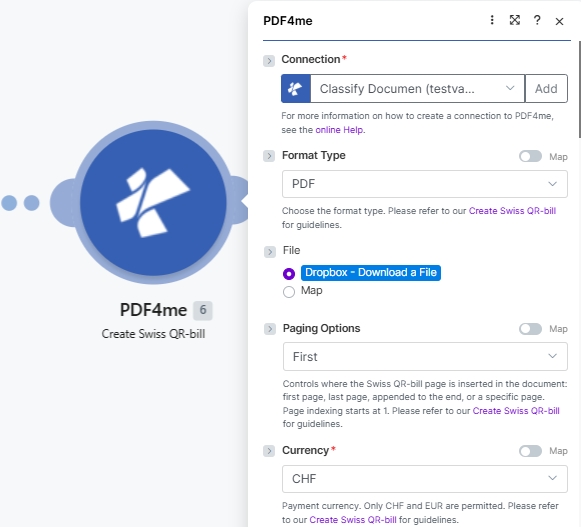
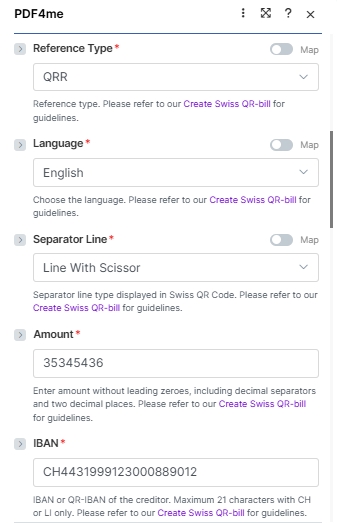
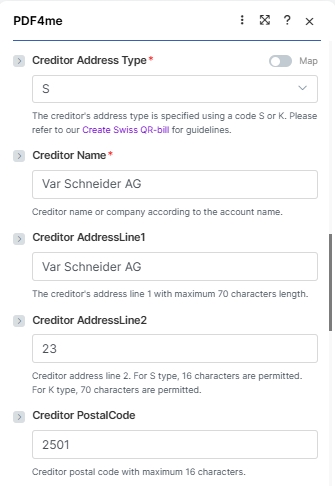
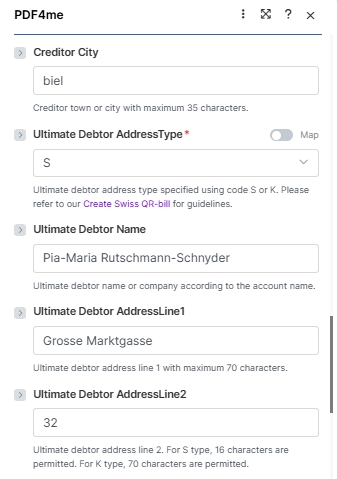
このモジュールは、4つの論理ブロックにグループ化された26個のフィールドを公開します。 接続 + ソースファイル、 支払いに関する基本事項、 債権者ブロック、 債務者ブロック、 そして 支払い参照以下のスクリーンショットは、フィールドの順序を正確に反映しています。 Make UI。
必須(赤いアスタリスク) UI): 接続、フォーマットタイプ、ページングオプション、通貨、参照タイプ、言語、区切り線、金額、 IBAN債権者住所タイプ、債権者名、最終債務者 AddressType。 条件付き: ファイル名 + ドキュメント (ファイルが設定されている場合) Map; ページ番号 ページングオプションが次の設定になっている場合のみ カスタム(ページ番号)。 オプション: 残りのすべての債権者/債務者住所フィールド、参照、非構造化メッセージ、請求情報、 AV1/AV2 パラメータ。
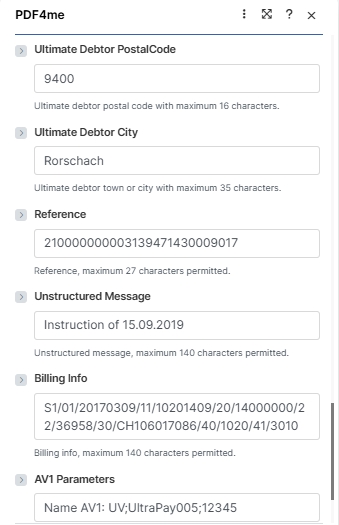
| パラメータ | 必須 | その機能 | 例 |
|---|---|---|---|
| Connection | Required | PDF4me connection. Click Add and paste your API key the first time, then reuse the connection across every PDF4me module. | test prod account |
| Format Type | Optional | Output container format. PDF for printable invoices and email attachments; PNG, JPEG, or TIFF for image output (no Paging Options applies in image modes). Defaults to PDF. See the dropdown reference card below. | PDF |
| File | Conditional | How the source PDF arrives. Radio: Dropbox - Download a File (or any other storage module), PDF4me Dev - Create Swiss QR Bill (chain from a prior PDF4me action), or Map (bind File Name and Document from a prior module manually). Skip the source file entirely for a standalone payment slip. | Map |
| File Name | Conditional | Filename of the source PDF including .pdf extension. Required when File is set to Map. Mapped from the prior module File Name output. | 1. File Name |
| Document | Conditional | Binary content of the source PDF. Required when File is set to Map. Mapped from the prior module Data / binary output. | 1. Data |
| Paging Options | Conditional | Where the Swiss QR-bill page is inserted. Appears only when Format Type is PDF. Options: First (new page 1), Last (appended), Add page at the end, Custom (page number) (insert at the page number you supply in the Page Number field). Defaults to First. See the dropdown reference card below. | Custom (page number) |
| Page Number | Conditional | The 1-based page number where the Swiss QR-bill is inserted. Required when Paging Options is Custom (page number); ignored for every other Paging Options value. Page indexing starts at 1. Defaults to 1. | 3 |
| Currency | Required | Payment currency. Only CHF and EUR are permitted by the Swiss Payment Standards. Defaults to CHF. | CHF |
| Reference Type | Required | Format of the payment reference. QRR (Swiss QR Reference, 27-digit numeric, used with QR-IBAN), SCOR (ISO 11649 creditor reference), NON (no reference). Defaults to QRR. | QRR |
| Language | Required | Language for the printed QR-bill text (Payment part labels: Account / Payable to, Reference, Currency, Amount). German, French, Italian, English. Defaults to English. | English |
| Separator Line | Required | Separator line style displayed in the QR-bill section. Options: Line With Scissor (line plus scissor pictogram, standard print), Only Line (line, no pictogram), or No Separation Line (eBill / e-invoice). Defaults to Line With Scissor. Note: the Make UI labels the field "Seperator Line"; the engine accepts either spelling. | Line With Scissor |
| Amount | Required | Payment amount in two decimal places without leading zeroes. Use the locale decimal separator your Culture & Language Settings expect. | 35345436 |
| IBAN | Required | IBAN or QR-IBAN of the creditor. Maximum 21 characters with CH or LI country codes only. QR-IBAN required when Reference Type is QRR. | CH4431999123000889012 |
| Creditor Address Type | Required | Address format for the creditor: S (Structured, separate PostalCode and City fields) or K (Combined, two free-text AddressLine fields). Defaults to S. | S |
| Creditor Name | Required | Creditor name or company according to the bank account. Maximum 70 characters. | Var Schneider AG |
| Creditor AddressLine1 | Optional | Creditor primary address line. Maximum 70 characters. | Var Schneider AG |
| Creditor AddressLine2 | Optional | Creditor secondary address line. 16 characters when address type is S; 70 characters when type is K. | 23 |
| Creditor PostalCode | Optional | Creditor postal code. Maximum 16 characters. | 2501 |
| Creditor City | Optional | Creditor town or city. Maximum 35 characters. | biel |
| Ultimate Debtor AddressType | Required | Address format for the debtor: S (Structured) or K (Combined). Same rules as Creditor Address Type. Defaults to S. | S |
| Ultimate Debtor Name | Optional | Debtor name or company according to the bank account. Maximum 70 characters. | Pia-Maria Rutschmann-Schnyder |
| Ultimate Debtor AddressLine1 | Optional | Debtor primary address line. Maximum 70 characters. | Grosse Marktgasse |
| Ultimate Debtor AddressLine2 | Optional | Debtor secondary address line. 16 characters (S) or 70 characters (K). | 32 |
| Ultimate Debtor PostalCode | Optional | Debtor postal code. Maximum 16 characters. | 9400 |
| Ultimate Debtor City | Optional | Debtor town or city. Maximum 35 characters. | Rorschach |
| Reference | Optional | Payment reference number. Maximum 27 characters. Format depends on Reference Type (QRR: 27-digit numeric with mod-10 check; SCOR: ISO 11649; NON: leave empty). | 210000000003139471430009017 |
| Unstructured Message | Optional | Free-text payment description shown in the Additional information block. Maximum 140 characters. | Instruction of 15.09.2019 |
| Billing Info | Optional | Structured billing information (Swico, etc) shown alongside the Unstructured Message. Maximum 140 characters. | S1/01/20170309/11/10201409/20/14000000/22/36958/30/CH106017086/40/1020/41/3010 |
| AV1 Parameters | Optional | Alternative scheme parameter 1 (e.g. eBill identifier). Maximum 100 characters. Convention: "Name AV1: UV;…". | Name AV1: UV;UltraPay005;12345 |
| AV2 Parameters | Optional | Alternative scheme parameter 2. Maximum 100 characters. Same convention as AV1 when a second alternative scheme is required. | Name AV2: XY;Service002;67890 |
フォーマットタイプのオプション
の Make UI 5つの値を表示します。選択してください。 PDF 印刷可能な請求書やメール添付ファイルの場合、画像形式は、 QR テンプレートに滑り込む PDF 後で表示するか、メール本文にインラインで表示します。
PDFPNGJPEGTIFFEmptyページングオプションのリファレンス
フォーマットタイプが PDF。 画像フォーマットタイプ(PNG、 JPEG、 TIFF) 挿入する複数ページの文書がないため、ページングオプションは無視します。
FirstLastAdd page at the endCustom (page number)Empty出力
このモジュールは2つのフィールドを返します。どちらのフィールドも、シナリオ内の後続のモジュールでマッピングに使用できます。 PDF4me リクエストをバックグラウンドジョブとして処理し、 Make 次のモジュールを実行する前に、結果を待ちます。
| 分野 | タイプ | 内容物 |
|---|---|---|
| Name | File name | File name of the resulting file. Map it together with Document into the next module, for example to upload or email the file. |
| Document | File (binary data) | Content (binary data) of the result: the source PDF with the Swiss QR-bill page inserted, or a standalone QR-bill image when Format Type is PNG, JPEG, or TIFF. |
クイックセットアップ
- 追加 PDF4me に SwissQR紙幣を作成する あなたの Make シナリオ。
- 選択 繋がり (またはクリック) 追加 あなたと一緒に作成する API 鍵)。
- セット フォーマットタイプ に
PDF(またはPNG/JPEG/TIFF画像出力用)。 ページングオプション にFirst、Last、Add page at the end、 またはCustom (page number). 選ぶ場合 カスタム(ページ番号)また、 ページ番号 スリップが着地する1ベースのインデックス(例:3) - セット ファイル ストレージモジュールに Dropbox - ファイルをダウンロードするまたは選択 Map そして縛る ファイル名 そして 書類 前の手順から。スタンドアロンの場合はファイルグループを完全にスキップします QR 滑る。
- 上記のスクリーンショットから、必要な支払い項目に値を入力してください。 通貨 (
CHFまたはEUR) 参照タイプ (QRR) 言語 (English) 分離ライン (Line With Scissor) 額、 IBAN (最大21文字、CHまたはLI) 債権者住所の種類 (SまたはK) 債権者名、 そして 最終債務者 AddressType。 - 債権者と債務者の住所フィールドを追加し、必要に応じて記入します。 参照、 非構造化メッセージ、 請求情報、 そして AV1 / AV2 パラメータ より豊富な決済データのために。
- 保存して実行します。モジュールの出力
Documentソースが含まれています PDF スイスと共に QRステップ3で選択した位置に挿入された請求書ページ(または独立したページ) QR ソースファイルが提供されなかった場合はスリップが発生します。
ワークフローの例
ワークフローの例Common Make scenario patterns using Create SwissQR Bill.
- Googleスプレッドシートの請求書登録簿に新しい行が追加されると、このシナリオがトリガーされます。
- Googleドライブが空白の請求書をダウンロードします PDF テンプレート。
- SwissQR請求書を作成すると、金額、支払いフィールドなど、すべての支払いフィールドがマッピングされます。 IBAN参照情報、債権者および債務者の詳細を、シートの列から直接取得します。
- Gmailは完成した請求書をスイスの QR 請求書は、シートから顧客のメールアドレスに添付されます。
- 毎月1日にスケジュールされたトリガーが実行されます。
- Airtableは、すべての有効なサブスクリプションレコードを返します。
- イテレータは各購読者を個別に処理します。SwissQR Billの作成機能は、購読金額、最終債務者としてマッピングされた顧客の詳細、およびレコードごとの一意の参照番号を含む、パーソナライズされた請求書を生成します。
- Gmailは各顧客に請求書を送信します。Airtableには送信日時を示すタイムスタンプが記録されます。
- 請求書が承認されると、Webhook が起動します。 ERP システム。
- HTTP 承認済みの請求書をダウンロードします PDF。
- SwissQR Bill を作成すると、支払い伝票が追加されます。 ERP供給された IBAN金額、および参照番号。
- 完成した請求書は SharePoint 売掛金フォルダと会計チームへの通知 Microsoft Teams。