メインコンテンツへスキップ

MakeでZUGFeRD 2.0+電子請求書を作成する:4つのモジュールからなるDropboxワークフロー

· 1分で読める
SEO and Content Writer

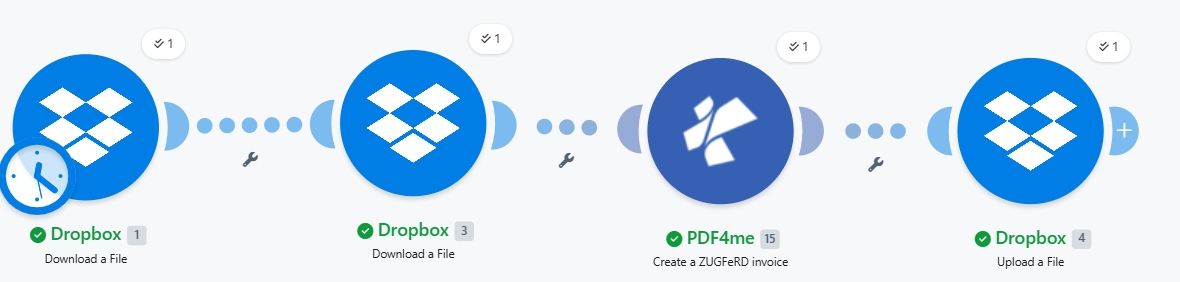
ZUGFeRD 2.0+(別名: ファクトゥールX フランスと XRechnung ドイツの公共部門では、 PDF/A3ハイブリッド請求書 PDF 内に機械可読 XML が埋め込まれています。人間と ERP システムの両方が利用できる 1 つのファイルです。このガイドでは、スクリーンショットに示されている正確な実行手順を説明します。Dropbox 内の基本請求書 PDF と ZUGFeRD 2.0+ XML が、EN16931 準拠のハイブリッド電子請求書になります。 /pdf4meoutput/、 で 4. モジュールを作成する、コード不要。

状況の概要
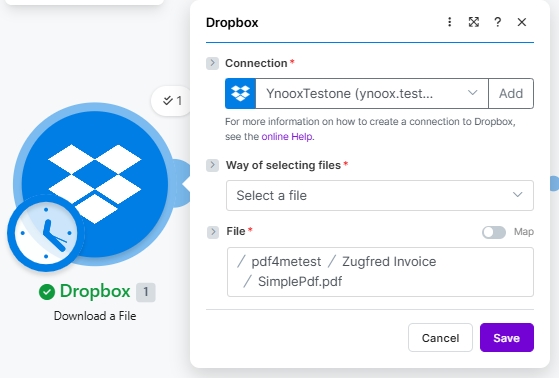
1. Dropbox Download (PDF)
Pulls the base invoice PDF (/pdf4metest/Zugfred Invoice/SimplePdf.pdf). Scheduled trigger shown.
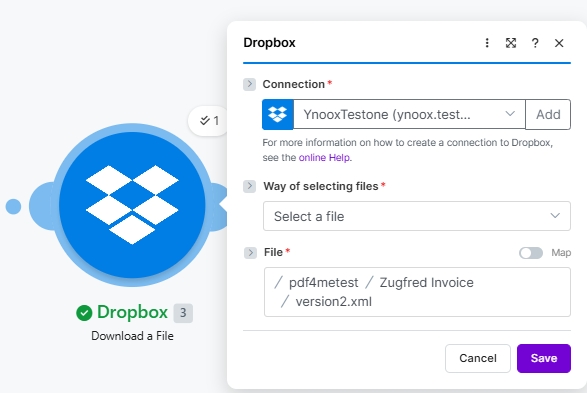
2. Dropbox Download (XML)
Pulls the ZUGFeRD 2.0+ XML invoice data (/pdf4metest/Zugfred Invoice/version2.xml).
3. PDF4me Create a ZUGFeRD invoice
Input Format XML, Output Mode XML With PDF, ZUGFeRD Version 2+, Conformance EN16931, Render Yes, Language de.
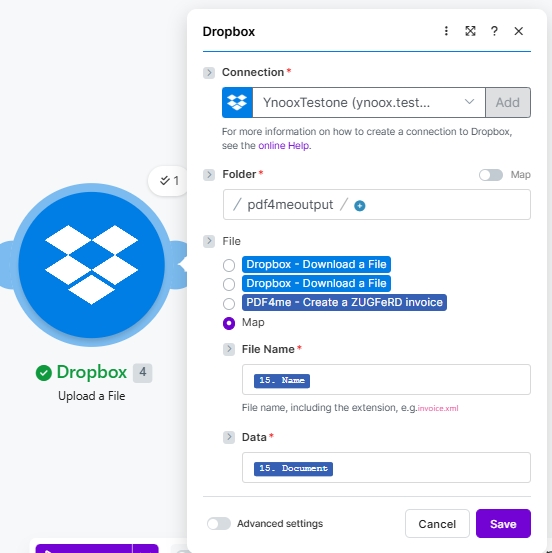
4. Dropbox Upload
Writes the hybrid PDF/A-3 e-invoice to /pdf4meoutput/ using File set to Map.
要約版

Makeモジュール4つをエンドツーエンドで実行。Dropbox 2つ ファイルをダウンロードする 手順では、ベースとなる PDF と ZUGFeRD 2.0+ XML を取得します (スクリーンショットには、 YnooxTestone 接続と経路 /pdf4metest/Zugfred Invoice/SimplePdf.pdf そして /pdf4metest/Zugfred Invoice/version2.xmlPDF4me ZUGFeRDの請求書を作成する XMLをPDFに埋め込む 出力モード XMLとPDF、 ZUGFeRD バージョン 2歳以上、 適合レベル EN16931、 請求書をPDF形式でレンダリングする はい、 言語 のDropbox ファイルをアップロードする 結果を書き込む ハイブリッドPDF/A-3 に /pdf4meoutput/ ファイル設定 地図、 ファイル名 15. 名前、 データ 15. 文書出力は任意のPDFリーダーで開き、ZUGFeRD / Factur-X / XRechnungをサポートする任意のERPで正しく解析されます。

ERPシステムが請求書を受け入れるかどうかを決定する2つの要素

まず、 適合レベル 購入者または受領者のERPシステムが期待する内容と一致している必要があります。 EN16931 (Comfort)はドイツの法的デフォルトであり、EUにおけるB2B取引において安全な選択肢です。 XRECHARGE ドイツにおけるB2G(公共部門)請求書の発行に必要です。 ベーシック 他のほとんどの購入者にも有効です。第二に、 ZUGFeRD バージョン でなければなりません 2歳以上 EN 16931に準拠したあらゆるものに対応。レガシー 1.0 BASIC / COMFORT / EXTENDED を使用し、EN 16931 受信機とは互換性がありません。 2歳以上 受信者が明示的に1.0を要求しない限り。

現実世界でよくある疑問を解決します​

人々は次のようなフレーズを使って、まさにこの問題を検索しています。

  • MakeでXMLを埋め込んだZUGFeRD請求書を作成するにはどうすればよいですか? この4つのモジュールからなるシナリオは、PDFテンプレートとXML形式の請求書を入力として、PDFとA3サイズのハイブリッド形式で出力するという、エンドツーエンドの処理を実現します。
  • 「ZUGFeRDはFactur-Xと同じですか?」 はい。技術的なフォーマットは同じですが、名称が異なります。ZUGFeRD 2.xファイルはFactur-Xを想定しているシステムで受け入れられ、その逆も同様です。
  • 「どの適合レベルを選択すればよいですか?」 B2B向けはEN16931(ドイツの法的デフォルトおよびEU EN 16931に準拠)、ドイツ公共部門向けはXRECHNUNG(B2G)、最も幅広い既存システムとの互換性を実現するにはBASIC。
  • 「XMLは自分で書く必要がありますか?」 いいえ、ただしこのシナリオでは、スクリーンショットは既存のXML請求書を使用しています。このモジュールはJSONまたはCSV形式の入力も受け付け、XMLを自動的に生成します。
  • 「購入者がXMLファイルだけを必要としていて、PDFファイルは不要な場合はどうすればいいですか?」 出力モードを XML Only そして、このモジュールはハイブリッドファイルではなく、XML形式の請求書ファイルのみを返します。

あなたが構築しているもの​

ベースとなるPDFファイルとXML請求書ファイルから、ZUGFeRD 2.0+に完全準拠したハイブリッド電子請求書を生成する、再利用可能なMakeシナリオです。トリガーは、手動、スケジュール設定(図示)、Dropboxファイル監視、またはHTTPウェブフックから選択できます。出力は、EUの電子請求書発行義務における人間が読めるPDF要件と機械が読めるXML要件の両方を満たす単一ファイルです。

シナリオキャンバスを作成します。Dropbox からファイルをダウンロード (PDF、スケジュールされた時計バッジ付き) を、2 つ目の Dropbox に接続し、さらに Dropbox からファイルをダウンロード (XML) を、PDF4me に接続し、ZUGFeRD 請求書を作成し、Dropbox からファイルをアップロードします。各モジュールには、1 回の実行回数カウンターと、実行が成功したことを示す緑色のチェックマークが表示されます。

4つのモジュールがエンドツーエンドで動作します。ダウンロードが2回、PDF4meの操作が1回、アップロードが1回です。モジュール1の時計バッジは、スケジュールされたトリガーを示しています。使用状況に合わせて、手動、ファイル監視、またはWebhookに切り替えてください。


必要なもの​

  • 作る シナリオが開いているアカウント。 Makeアカウントを作成する 必要であれば。
  • PDF4me APIキー。 APIキーを取得してください 最初のPDF4meモジュールに接続します。 PDF4me を接続して作成する。
  • Dropbox ソースフォルダ (例: /pdf4metest/Zugfred Invoice/) PDFテンプレートとXML請求書、および出力フォルダ(/pdf4meoutput/)
  • ベースとなるPDF (スクリーンショットは シンプルPDF.pdfレイアウトマークアップは不要です。このモジュールは、XMLをPDF/A-3添付ファイルとして埋め込みます。
  • ZUGFeRD 2.0+ XML請求書自分のものを使うか、 2.0 XMLサンプル 一緒に進めてください。

クイックリファレンス:各パラメータの機能​

Input Format
XML for existing ZUGFeRD XML, JSON for structured JSON, CSV for tabular invoice rows.
Output Mode
XML With PDF returns the hybrid PDF/A-3 (recommended). XML Only returns just the XML invoice file.
ZUGFeRD Version
2+ for EN 16931 alignment (use this). 1.0 is legacy with BASIC / COMFORT / EXTENDED only.
Conformance Level
2+ supports MINIMUM, BASICWL, BASIC, EN16931 (Comfort, default), EXTENDED, XRECHNUNG (German B2G).
Render Invoice on PDF
Yes draws the invoice line items visually on the PDF. Only takes effect when Output Mode is XML With PDF.
Language
Two-letter ISO code: de (default), en, fr, it, es, nl, pl, pt, cs. Controls label localisation on the rendered PDF.

シナリオを作成する​

モジュール1:Dropboxでファイルをダウンロードする(基本PDF)​

ZUGFeRD XMLがPDF/A-3添付ファイルとして埋め込まれる元のPDFファイルを取得してください。

分野この実行で使用された値
ConnectionYnooxTestone (ynoox.test...). your Dropbox connection
Way of selecting filesSelect a file
File/pdf4metest/Zugfred Invoice/SimplePdf.pdf
Dropbox で基本 PDF のファイル構成をダウンロードします。接続 YnooxTestone。ファイルの選択方法 ファイルを選択します。ファイルパス /pdf4metest/Zugfred Invoice/SimplePdf.pdf。

モジュール2:Dropboxからのファイルダウンロード(ZUGFeRD 2.0+ XML)​

ZUGFeRDのXML請求書ファイルを取得してください。XMLファイルには請求書の詳細情報がすべて含まれており、PDFファイルは単なる視覚的な表示形式です。

分野この実行で使用された値
ConnectionYnooxTestone (ynoox.test...). same Dropbox connection
Way of selecting filesSelect a file
File/pdf4metest/Zugfred Invoice/version2.xml
Dropbox で ZUGFeRD 2.0+ XML のファイル構成をダウンロードします。接続先 YnooxTestone。ファイルの選択方法 ファイルを選択します。ファイルパス /pdf4metest/Zugfred Invoice/version2.xml。

モジュール3:PDF4meでZUGFeRD請求書を作成する​

実際に埋め込み処理を行うアクションです。ダウンロードした2つのファイルを入力としてマッピングし、適合性設定を選択して実行します。

グループ分野価値
AuthConnectionClassify Documen (testva...). PDF4me connection
SourceFile (PDF template)Map → Module 1 File Name + Data
SourceInput FormatXML
SourceFile (XML invoice)Map → Module 2 File Name + Data (a second File picker appears when Input Format is XML)
OutputOutput ModeXML With PDF (hybrid PDF/A-3)
OutputZUGFeRD Version2+
OutputConformance LevelEN16931
OutputRender Invoice on PDFYes
OutputLanguagede

モジュール4:Dropboxでファイルをアップロードする​

PDF/A3形式のハイブリッド電子請求書を、出力フォルダに保存してください。

分野この実行で使用された値
ConnectionYnooxTestone (ynoox.test...)
Folder/pdf4meoutput/
FileMap (so File Name and Data come from the PDF4me step)
File Name15. Name (dynamic content from PDF4me Module 3)
Data15. Document (dynamic content from PDF4me Module 3)
Dropbox のファイルアップロード構成を作成します。接続 YnooxTestone。フォルダ /pdf4meoutput/。ファイルはマップに設定されています。ファイル名は 15 にバインドされています。名前 (PDF4me から ZUGFeRD 請求書を作成)。データは 15 にバインドされています。ドキュメント。

保存してクリック 1回実行ハイブリッドPDF/A-3が着陸 /pdf4meoutput/ 数秒以内に。


サンプルファイル(XML、JSON、CSV)​

これらの入力のいずれかをモジュール2(XML)に置き換えて変更できます。 入力形式 それに応じて。


トラブルシューティング​

Conformance Level dropdown shows different options than expected
You toggled between Versions. Version 1.0 has BASIC, COMFORT, EXTENDED. Version 2+ has Empty, MINIMUM, BASICWL, BASIC, EN16931, EXTENDED, XRECHNUNG. Pick the version first; conformance levels follow.
Second File picker did not appear when Input Format is XML
It only appears when File is set to Map. Click the File radio and choose Map; the second File picker (for the XML invoice) renders below.
Buyer ERP rejects the hybrid PDF as non-compliant
Mismatched Conformance Level. Check what the receiver expects (commonly EN16931 for B2B EU, XRECHNUNG for German B2G). Re-run with the right value.
Output is XML only when you wanted the hybrid PDF
Output Mode is set to XML Only. Switch to XML With PDF.
Rendered invoice on PDF is missing line items
Render Invoice on PDF is set to No or Empty, or Output Mode is XML Only. Set both: Output Mode = XML With PDF AND Render Invoice on PDF = Yes.
Want JSON or CSV instead of XML as the input
Change Input Format. The Invoice XML Data / second File picker is replaced by an Invoice JSON Data or Invoice CSV Data text field, which you map from a Google Sheets, HTTP, or file-download module.

このパターンはいつ使用するのか​

B2B invoicing in the EU
EN16931 (Comfort) covers the legal default for German and EU business-to-business e-invoicing.
B2G (public-sector) Germany
XRECHNUNG is required for invoicing public authorities. Same flow, different conformance level.
Cross-border Factur-X
France and other EU markets accept ZUGFeRD 2.x as Factur-X. No format conversion needed.
ERP integration without code
Buyer ERP extracts the embedded XML automatically; no manual data entry in accounts payable.

次に読むべきもの​


よくある質問​

What is ZUGFeRD 2.0+ and how does it differ from 1.0?+
ZUGFeRD 2.0+ aligns with the EU EN 16931 e-invoicing standard and supports the modern Conformance Level set (MINIMUM, BASICWL, BASIC, EN16931, EXTENDED, XRECHNUNG). ZUGFeRD 1.0 predates EN 16931 and uses BASIC / COMFORT / EXTENDED only. For any new integration in 2026 use 2+; 1.0 is kept for legacy buyer ERPs.
Is ZUGFeRD the same as Factur-X?+
Same technical format under different brand names. ZUGFeRD is the German designation; Factur-X is the French equivalent. Both align to EN 16931 and are cross-compatible: a ZUGFeRD 2.x invoice is accepted by Factur-X receivers and vice versa.
Which Conformance Level should I pick for a typical EU B2B invoice?+
EN16931 (also called Comfort). It is the German legal default and the safe choice for EU business-to-business invoicing. Use XRECHNUNG when invoicing German public authorities (B2G). Use BASIC only when a recipient ERP explicitly requires it.
Do I need to author the XML myself?+
No. The screenshots use an existing XML (Input Format = XML), but the module also accepts JSON or CSV. Choose Input Format = JSON or CSV and the XML is built for you. Sample JSON and CSV files are in the section above.
What if my buyer needs only the XML, no PDF?+
Set Output Mode to XML Only. The module returns just the XML invoice file without a PDF wrapper. Useful when the receiving ERP renders its own document and only consumes the structured data.
Can I render line items visually on the PDF page?+
Yes. Set Render Invoice on PDF = Yes (only effective when Output Mode is XML With PDF). The module draws the invoice items as a visual table on the PDF pages so human reviewers see the invoice content without opening the embedded XML.
Does this work in Power Automate, n8n, or Zapier?+
Yes. The PDF4me Create ZUGFeRD Invoice action is available on all four platforms with the same parameters. See the cross-platform comparison at the bottom of the Make action reference page.
Does the output PDF/A-3 work with every PDF viewer?+
Yes. PDF/A-3 is backward-compatible with all PDF readers. Human readers see the rendered invoice PDF; ZUGFeRD-aware ERPs extract the embedded XML automatically. Non-aware tools just see a normal PDF.
さあ始めましょう​