メインコンテンツへスキップ

Power Automateで任意の請求書PDFにスイスQRコード付き請求書を追加する:Dropboxワークフロー(4つのアクション)

· 1分で読める
SEO and Content Writer

すべてのスイスの請求書には スイスQR紙幣 そのため、銀行や会計ソフトウェアは支払いを自動的にスキャンして処理できます。Power AutomateとPDF4meでは、 4つのアクションの流れ: 手動でトリガー、Dropbox ファイルの内容を取得するPDF4me バーコード - SwissQRコード付き紙幣を作成Dropbox ファイルを作成する以下のスクリーンショットは、キャンバスにキャプチャされた実際の実行手順を示しています。10ページの請求書 /pdf4metest/sample スイスの法令に準拠した請求書となり、支払い伝票が添付され、アップロードされます。 /pdf4meoutput 固有のファイル名を使用。10分以内に本番環境で使用可能。

流れの概要
1. Manually trigger a flow
Manual trigger for testing. Swap for SharePoint When a file is created or any storage trigger in production.
2. Dropbox Get file content
Reads the 10-page invoice from /pdf4metest/sample/10 page.pdf with Infer Content Type Yes.
3. PDF4me Barcode - Create SwissQR Bill
Appends the QR payment slip with CHF, QRR reference, English labels, custom Paging Options to land on page 3.
4. Dropbox Create file
Writes the populated PDF to /pdf4meoutput with a unique guid()+headers/FileName so re-runs do not collide.
要約版

Power Automateのアクションが4つ。手動でトリガーするとフローが開始されます。Dropbox ファイルの内容を取得する 読む /pdf4metest/sample/10ページ.pdf 「コンテンツタイプを推測する」を「はい」に設定。PDF4me バーコード - SwissQRコード付き紙幣を作成 スイス決済規格に準拠したQR請求書ページを追加します(出力フォーマットタイプ PNG 今回の実行では、 PDF ハイブリッド出力の場合、IBAN CH4431999123000889012、 額 5253531、 通貨 CHF参照タイプ QRR、 言語 英語分離線 はさみで線を引く債権者: Var Schneider AG、最終債務者: Pia-Maria Rutschmann-Schnyder、参照者 210000000003139471430009017ページングオプション カスタムページ番号 3、 ファイル名 abc.pdfDropbox ファイルを作成する に手紙を書く /pdf4meoutput ファイル名は以下から構築されます guid() + ヘッダー/ファイル名 一意性を確保するため。出力は、アーカイブフォルダ内のスイス銀行でスキャン可能なファイルです。

出力が銀行でスキャン可能かどうかを決定する2つの要素

まず、 IBANはCHまたはLIで始まる必要があります 最大21文字です。QRR参照タイプの場合、IBANは QRコードIBAN標準IBANではありません。2番目に、 参照タイプはQRRです、 参照フィールドは、mod 10 チェックデジットを含む 27 桁の数値文字列です。. ない場合は、参照タイプを切り替えてください。 スコア (ISO 11649)または 非 参照欄は空欄のままにしてください。銀行は入力ミスのある参照値を拒否しますが、QRコード自体は拒否しません。

現実世界でよくある疑問を解決します​

人々は次のようなフレーズを使って、まさにこの問題を検索しています。

  • Power Automateで、スイスのQRコード付き領収書をPDF請求書に自動的に追加するにはどうすればよいですか? この4つのアクションからなるフローでそれが可能です。DropboxにPDFファイルをドロップし、フローをトリガーすると、QRコード付き請求書ファイルが出力フォルダに保存されます。
  • Power Automateは、既存の請求書からスイスのQRコード付き請求書を生成できますか? はい、PDF4meのバーコード機能「SwissQR請求書の作成」を使えば可能です。出力は、請求書が最初/最後/特定のページに追加された同じPDFファイルです。
  • 「QRコードライブラリやスイスのQRコード生成サービスのサブスクリプションは必要ですか?」 いいえ。PDF4meアクションは、QRコード生成、mod-10参照計算、およびスイス決済基準の完全なレイアウトを、単一のPower Automateステップの背後に隠しています。
  • 「ソースとなるPDFファイルがない場合、QRコードのみの伝票を生成することはできますか?」 はい。詳細設定の「ファイルコンテンツ」と「ファイル名」フィールドはスキップしてください。選択した出力フォーマット(PDF / PNG / JPEG / Tiff)で、独立したQRコード付き請求書が返されます。
  • 「スイスの銀行はこの出力を受け入れるだろうか?」 この処理により、ISO 20022スイス決済基準に準拠した伝票が生成されます。スイスのすべての銀行のモバイルバンキングアプリでこの伝票をスキャンして、決済を開始できます。

あなたが構築しているもの​

再利用可能な4つのアクションからなるPower Automateフローです。トリガーが作動すると、Dropbox(またはSharePoint/OneDrive/Outlook)からソース請求書が取得され、PDF4meアクションによってQRコード付き請求書が追加され、入力済みのファイルがGUIDプレフィックス付きの名前でアップロードされます。このパターンは、顧客への請求書送付、スケジュールされたバッチ実行、イベント駆動型の売掛金処理にも適用できます。

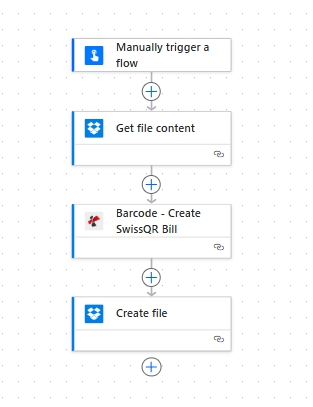
Power Automate フローキャンバスには、4 つのアクションがあります: フローを手動でトリガーする、Dropbox でファイルコンテンツを取得する、バーコード - SwissQR 請求書を作成する、Dropbox でファイルを作成する。

上から順に4つの動作。手動トリガーにより、フローのテストが容易になります。本番環境では、任意のストレージトリガーと交換可能です。


必要なもの​

  • パワーオートマタ フローが開いているアカウント。 Power Automateを開く。
  • PDF4me APIキー。 APIキーを取得してくださいアクションを初めてドロップする際に、PDF4me Connectコネクタにサインインしてください。
  • Dropbox ソースフォルダ (例: /pdf4metest/sample)と出力フォルダー(/pdf4meoutputどのストレージでも機能します。SharePoint、OneDrive、またはDataverseは同じようにマッピングされます。
  • 請求書のPDFファイル。 10ページのサンプルをダウンロードしてください スクリーンショットは、手順を正確に理解するために使用したものです。
  • スイスの決済データ: a CHまたはLI IBAN、金額、通貨(CHF または ユーロ)、および債権者 + 債務者の氏名/住所ブロック。完全なフィールド参照は アクションドキュメント。

クイックリファレンス:主要パラメータ​

Output Format Type
PDF (hybrid), PNG / JPEG / Tiff (standalone images).
IBAN
CH or LI prefix, max 21 chars. QR-IBAN required for QRR references.
Reference Type
QRR (27-digit + mod-10), SCOR (ISO 11649), or NON.
Address Type
S = structured (separate Postal Code + City). K = combined.
Paging Options
first, last, add at end, or custom (uses Page Number). PDF only.
Page Number
1-based page index. Required only when Paging Options is custom.

流れを作る​

アクション1:フローを手動でトリガーする​

手動トリガーはテストの最速の方法です。本番環境では、 Dropbox ファイルが作成されたとき、 SharePoint ファイルが作成されたとき、 OneDrive ファイルが作成されたとき、 Outlook 新しいメールが届いたとき、 再発、 または ウェブフック ARパイプラインによって異なります。

アクション2:Dropbox - ファイルコンテンツを取得する​

入力フォルダから元の請求書を取得してください。

分野この実行で使用された値
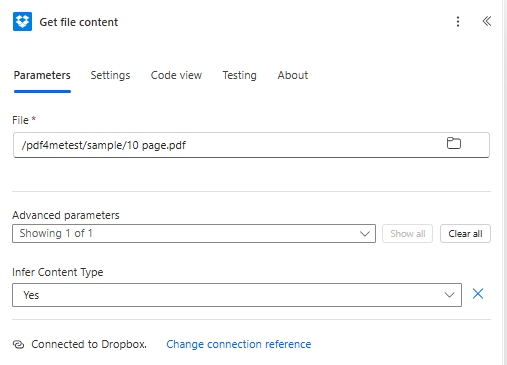
File/pdf4metest/sample/10 page.pdf
Infer Content TypeYes
Power Automate Dropbox のファイルコンテンツ取得アクションで、ファイル /pdf4metest/sample/10 page.pdf と詳細パラメーター Infer Content Type Yes を指定します。

アクション3:PDF4meバーコード - SwissQR請求書の作成​

検索する PDF4me そして選ぶ バーコード - SwissQRコード付き紙幣を作成このアクションにより、メインパネルに支払いフィールドが表示され、詳細設定パラメータの下に4つのフィールド(ページングオプション、ページ番号、ファイルコンテンツ、ファイル名)が表示されます。設定:

グループ分野価値
OutputOutput Format TypePNG
PaymentIBANCH4431999123000889012
PaymentAmount5253531
PaymentCurrencyCHF
PaymentReference TypeQRR
PaymentLanguage TypeEnglish
PaymentSeperator LineLineWithScissor
CreditorCreditor NameVar Schneider AG
CreditorCreditor Address TypeS
CreditorCreditor: Address Line 1Var Schneider AG
CreditorCreditor: Address Line 223
CreditorCreditor PostalCode2501
CreditorCreditor Citybiel
DebtorUltimate Debtor NamePia-Maria Rutschmann-Schnyder
DebtorUltimate Debtor AddressTypeS
DebtorUltimate Debtor: Address Line 1Grosse Marktgasse
DebtorUltimate Debtor: Address Line 233
DebtorUltimate Debtor PostalCode9400
DebtorUltimate Debtor Citybiel
Ref/MsgReference210000000003139471430009017
Ref/MsgUnstructured MessageInstruction of 15.09.2019
Ref/MsgBilling InfoS1/01/20170309/11/10201409/20/14000000/22/36958/30/CH106017086/40/1020/41/3010
Ref/MsgAV1 ParametersName AV1: UV;UltraPay005;12345
Ref/MsgAv2 ParametersName AV2: XY;XYService;54321
AdvancedPaging Optionscustom
AdvancedPage Number3
AdvancedFile ContentFile Content (from Action 2)
AdvancedFile Nameabc.pdf

アクション4:Dropbox - ファイルの作成​

入力済みのファイルを出力フォルダに保存します。一意のファイル名を作成します。 guid() 再放送が重ならないようにするためです。

分野この実行で使用された値
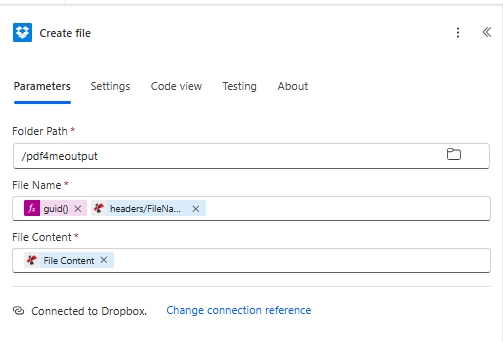
Folder Path/pdf4meoutput
File Nameguid() + headers/FileName (concat expression for a unique-per-run name)
File ContentFile Content (from Action 3, dynamic content)
Power Automate Dropbox の「ファイルの作成」アクションで、フォルダー パスを /pdf4meoutput、ファイル名を guid() + headers/FileName 式から構築し、ファイル コンテンツは PDF4me の「SwissQR 請求書の作成」アクションからの動的コンテンツを使用します。

の guid() ファイル名の式は、実行ごとに一意の名前を保証します。 ヘッダー/ファイル名 PDF4meの出力では、ファイル名に元の請求書名が保持されます。

保存してクリック テストスイス銀行がスキャン可能なファイルは /pdf4meoutput。


トラブルシューティング​

QR-bill page is blank or unreadable
IBAN is invalid (must start with CH or LI, max 21 chars) or Currency is something other than CHF / EUR. Both are hard requirements of the Swiss Payment Standards.
Bank rejects a QRR reference
QRR references must be 27 digits with a mod-10 check digit. If you do not have one, switch Reference Type to SCOR (ISO 11649) or NON and leave Reference empty.
QR-bill landed on the wrong page
Adjust Paging Options under Advanced. first puts the slip as the new page 1. last appends it after the last page. custom uses Page Number for a specific 1-based position.
Creditor or Debtor address looks wrong on the slip
Mismatched Address Type. With S, fill Postal Code + City and use Address Line 1/2 for street. With K, leave Postal Code + City empty and put the full address into Address Line 1 + Address Line 2.
Create file writes an empty file
File Content on Action 4 is not bound to the PDF4me File Content output. Click the field and re-pick the dynamic content from Action 3.
Want a standalone QR slip without a source invoice
Skip Action 2 (Get file content). On Action 3, leave File Content and File Name empty under Advanced parameters and the action returns a standalone Swiss QR-bill in the chosen Output Format Type.

このパターンはいつ使用するのか​

Outgoing customer invoices
Bills that need to be Swiss-payable directly from a banking app via QR scan.
Subscription billing
QR-IBAN + 27-digit QRR reference identifies the customer or contract on every recurring run.
Bulk invoice retrofitting
When an existing PDF invoice template does not yet carry the payment slip, append it.
e-Bill fallbacks
For customers who prefer paper or in-app QR-scan over electronic Bill.

次に読むべきもの​


よくある質問​

Do I need a special Swiss QR library or font?+
No. The PDF4me Create SwissQR Bill action bundles QR-code generation, the QR-bill fonts (Liberation Sans), mod-10 reference math, and the Swiss Payment Standards layout. Configure the fields, save the flow, and the output is a Swiss-compliant file.
What is the difference between QRR, SCOR, and NON references?+
QRR is the Swiss 27-digit numeric reference with a mod-10 check digit; it requires a QR-IBAN. SCOR is the international ISO 11649 creditor reference; it works with a standard IBAN. NON means no reference is shown on the slip, useful for ad-hoc one-off payments where the debtor adds their own reference at payment time.
Can I generate a Swiss QR-bill without an existing PDF invoice?+
Yes. Skip Action 2 (Get file content). On Action 3, leave File Content and File Name empty under Advanced parameters; the action returns a standalone Swiss QR-bill in the chosen Output Format Type (PDF, PNG, JPEG, or Tiff).
My IBAN starts with DE / FR / IT, can I still use this?+
No, Swiss QR-bills are scoped to CH and LI IBANs only. For European SEPA payments with non-Swiss IBANs, use the Generate EPC QR Code for SEPA action instead.
Address Type S vs K, which one should I pick?+
S (Structured) is the modern default: PostalCode and City go in separate fields; Address Line 1/2 carries the street. K (Combined) puts the full address in two free-text Address Line fields and ignores PostalCode/City. New integrations should use S unless you are importing legacy data.
Does the output work with mobile banking apps?+
Yes. Every Swiss bank app that supports payments via QR-bill (every major bank since 2022) can scan the output to pre-fill the payment form. Test by opening UBS, PostFinance, Raiffeisen, or any Swiss banking app and scanning the QR code.
How do I change where the QR-bill page lands?+
Click Show all on Advanced parameters. Set Paging Options to first / last / add at end / custom. For custom, also fill Page Number with the 1-based page index. Only applies when Output Format Type is PDF.
Same scenario in Make, Zapier, or n8n?+
Yes. The same PDF4me Create Swiss QR Bill action is available on all four platforms with identical parameters. See the cross-platform comparison at the bottom of the Create SwissQR Bill action page.

さあ始めましょう​